
AlphaTheta WAVE-EIGHT
AlphaTheta Wave-Eight 8-Inch Bluetooth DJ Speaker with SonicLink Instruction Manual
Model: WAVE-EIGHT
1. Introduction
The AlphaTheta Wave-Eight is an 8-inch Bluetooth DJ speaker designed for portable, high-quality audio. It features SonicLink, an ultra-low-latency wireless technology for seamless DJing without sound delays. This manual provides essential information for setting up, operating, and maintaining your Wave-Eight speaker.

Figure 1: Front view of the AlphaTheta Wave-Eight speaker.
2. What's in the Box
Verify that all the following items are included in your package:
- Main unit × 1
- Transmitter × 1
- Power cable × 1
- Transmitter charging/transmission cable × 1
- RCA cable × 1
- Quick Start Guide × 1
3. Setup
Follow these steps to set up your AlphaTheta Wave-Eight speaker:
- Charging the Speaker: Connect the power cable to the speaker's AC IN port and a power outlet. The battery indicator will show charging status.
- Charging the Transmitter: Use the provided transmitter charging/transmission cable to charge the transmitter.
- Connecting the Transmitter: Connect the included transmitter to your DJ gear using the appropriate cables (e.g., RCA cable).
- Power On: Press and hold the power button on the speaker and the transmitter to turn them on.
- SonicLink Connection: The speaker and transmitter should automatically establish a SonicLink connection for ultra-low-latency wireless audio. Ensure both devices are within range.
- Bluetooth Pairing (Optional): For standard Bluetooth audio, activate Bluetooth on your source device and select "WAVE-EIGHT" from the list of available devices.

Figure 2: Rear panel of the speaker showing power and input connections.

Figure 3: Close-up of the SonicLink transmitter.
4. Operating Instructions
The AlphaTheta Wave-Eight is designed for versatile use in various environments.
4.1 Wireless Audio with SonicLink
The primary feature of the Wave-Eight is its SonicLink technology, providing ultra-low-latency wireless audio transmission. This allows for cable-free DJing with minimal delay between your decks and the speaker, ensuring precise mixing.
4.2 Sound Quality
The speaker features an efficient amplifier, an 8-inch driver, and a Vortex Bass Accelerator to deliver professional sound quality with deep, clear bass.
4.3 Expanding Your Setup
For larger events or spaces, you can easily expand your audio setup by connecting additional Wave-Eight units using the SonicLink connection. This creates a synchronized, powerful sound system.

Figure 4: Multiple Wave-Eight speakers configured for a larger sound setup.
4.4 Portability and Durability
The Wave-Eight is battery-powered, offering extended operation without the need for a constant power source. Its waterproof design makes it suitable for outdoor events and environments where exposure to moisture is possible.
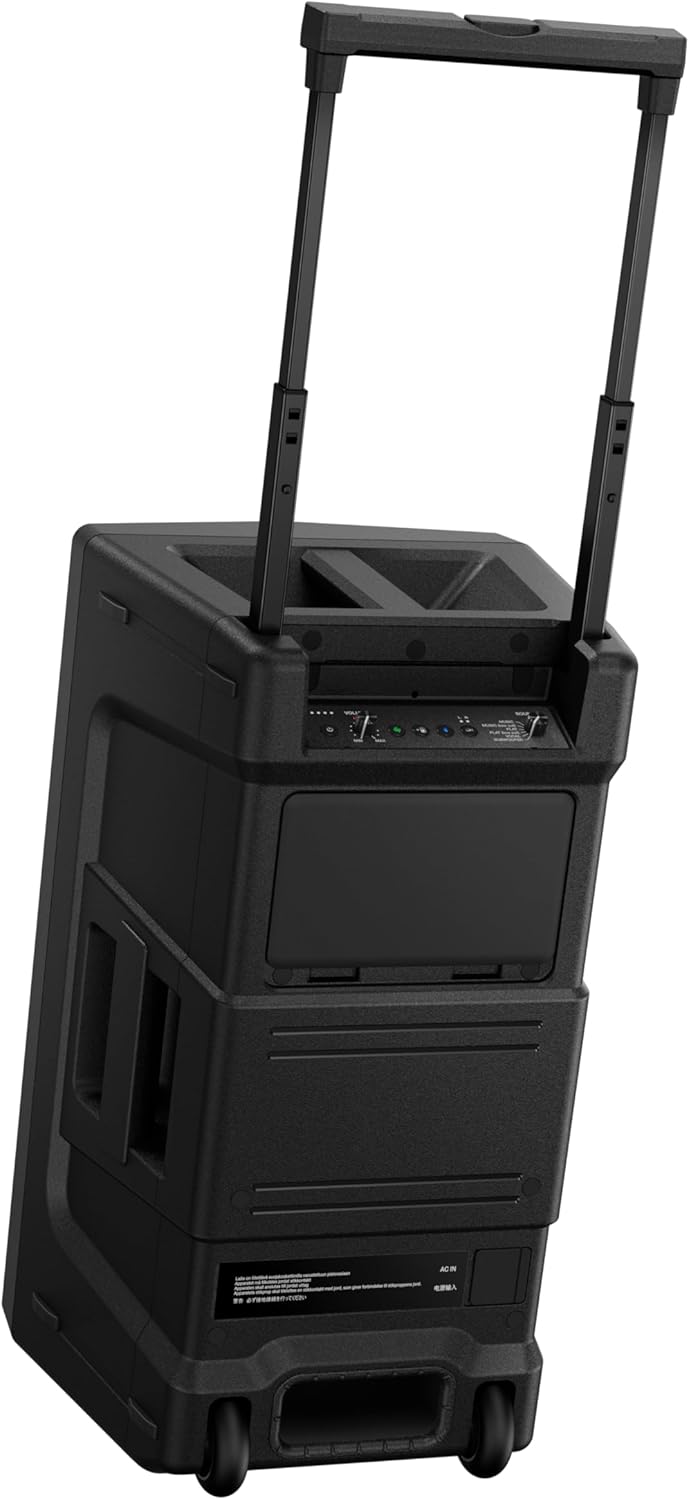
Figure 5: The Wave-Eight speaker demonstrating its waterproof capabilities.

Figure 6: The Wave-Eight speaker featuring a retractable handle for easy transport.
4.5 Controls and Inputs
The speaker features intuitive controls for volume, input selection, and sound adjustments. The rear panel includes various input options for connecting different audio sources.
Video 1: Official product video showcasing the AlphaTheta Wave-Eight 8-Inch Bluetooth DJ Speaker.
5. Maintenance
- Cleaning: Use a soft, dry cloth to clean the speaker's exterior. Avoid abrasive cleaners or solvents.
- Storage: Store the speaker in a cool, dry place away from direct sunlight and extreme temperatures.
- Battery Care: For optimal battery life, avoid fully discharging the battery frequently. Charge the speaker regularly, even when not in use for extended periods.
- Waterproof Features: While waterproof, ensure all port covers are securely closed before exposing the speaker to water.
6. Troubleshooting
- No Power: Ensure the power cable is securely connected and the power outlet is functional. Check the battery level.
- No Sound: Verify that the volume is turned up on both the speaker and the audio source. Check all cable connections and ensure the SonicLink or Bluetooth connection is active.
- SonicLink Disconnection: Ensure the speaker and transmitter are within range and there are no significant obstructions. Try re-pairing the devices if necessary.
- Bluetooth Pairing Issues: Ensure the speaker is in pairing mode and your device's Bluetooth is enabled. Forget previous pairings on your device and try again.
7. Specifications
| Feature | Specification |
|---|---|
| Model Name | WAVE-EIGHT |
| Mounting Type | Floor Standing |
| Material | Metal |
| Speaker Type | Outdoor |
| Special Feature | Waterproof |
| Recommended Uses For Product | For Music Players |
| Compatible Devices | Smartphone |
| Unit Count | 1.0 Count |
| Surround Sound Channel Configuration | 2.0 (or 2.1 with additional subwoofer) |
| Color | Black |
| Product Dimensions | 13.3"D x 11.8"W x 21.8"H |
| Is Waterproof | true |
| Warranty Type | Limited |
| Number of Items | 1 |
| Control Method | Touch |
| Wireless Communication Technology | Bluetooth |
| Speaker Size | 8 Inches |
| Power Source | Battery Powered |
| Woofer Diameter | 8 Inches |
| Audio Driver Type | Dynamic Driver |
| Audio Driver Size | 8 Inches |
| Specific Uses For Product | Party, Outdoor Events |
| UPC | 841300102410 |
| Manufacturer | AlphaTheta |
| Shape | rectangular prism |
| Set Name | WAVE-EIGHT Set |
| Item Weight | 36 pounds |
| ASIN | B0CX3VWRYJ |
| Item model number | WAVE-EIGHT |
| Speaker Maximum Output Power | 100 Watts |
| Frequency Response | 55 Hz |
| Connectivity Technology | Bluetooth |
| Audio Output Mode | Stereo |
8. Warranty and Support
The AlphaTheta Wave-Eight comes with a Limited Warranty. Please refer to the warranty card included in your package for detailed terms and conditions. For technical support or service inquiries, please visit the official AlphaTheta website or contact their customer service.
Related documentsWAVE-EIGHT


Ask a question about this manual
Ask about setup, troubleshooting, compatibility, parts, safety, or missing instructions. Manuals+ will review the question and use this page’s manual context to help answer it.