
1. Introduction
This manual provides essential instructions for setting up, operating, maintaining, and troubleshooting your realme 12+ 5G smartphone. Please read this guide thoroughly to ensure optimal performance and longevity of your device.
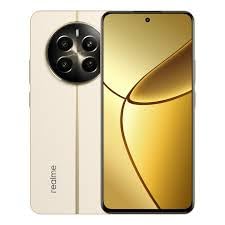
This image displays the realme 12+ 5G smartphone. The front features an expansive AMOLED display, while the rear showcases a circular camera module with multiple lenses and the realme branding, all in a Navigator Beige finish.
2. Setup
2.1 Unboxing and Initial Inspection
Upon opening the package, verify that all components are present and undamaged. The standard package includes:
- realme 12+ 5G Smartphone
- Charger
- User Manual (this document)
- SIM Ejector Tool (typically included)
2.2 Inserting the SIM Card
- Locate the SIM card tray on the side of your device.
- Insert the SIM ejector tool into the small hole next to the tray and press gently until the tray pops out.
- Place your Nano-SIM card(s) into the designated slots on the tray. Ensure the gold contacts face downwards.
- Carefully reinsert the tray into the phone.
2.3 Powering On and Initial Configuration
- Press and hold the Power button (usually on the right side) until the realme logo appears.
- Follow the on-screen instructions to complete the initial setup, which includes selecting your language, connecting to a Wi-Fi network, and setting up your Google account.
2.4 Charging the Device
Before first use, it is recommended to fully charge your realme 12+ 5G. Use the provided 67W SUPERVOOC charger for optimal charging speed.
- Connect the charger to the USB port on your phone.
- Plug the charger into a power outlet.
- The charging indicator will appear on the screen.
3. Operating Instructions
3.1 Basic Navigation
Your realme 12+ 5G runs on realme UI 5.0, offering intuitive navigation through gestures or traditional on-screen buttons. Customize your preference in the Settings menu.
- Home Screen: Swipe left or right to access different pages.
- App Drawer: Swipe up from the bottom of the screen to view all installed applications.
- Notifications & Quick Settings: Swipe down from the top of the screen.
3.2 Calls and Messaging
To make a call, open the Phone app and dial the number or select a contact. For messaging, use the Messages app.
3.3 Connectivity
- Wi-Fi: Go to Settings > Wi-Fi to connect to available networks.
- Bluetooth: Go to Settings > Bluetooth to pair with other Bluetooth devices.
- USB: Connect your phone to a computer using a USB cable for data transfer or charging.
3.4 Camera Usage
The realme 12+ 5G features a 50MP Sony LYT-600 OIS Portrait Camera. Open the Camera app to access various modes:
- Photo: Standard photo mode.
- Portrait: Utilizes OIS for enhanced depth and clarity in portraits.
- Video: Record videos.
- Explore other modes like Night, Pro, and Panorama for diverse photography experiences.
3.5 Display Features
Experience smooth visuals on the 120 Hz Ultra-Smooth AMOLED Display. The display also incorporates Rainwater Smart Touch technology, which intelligently distinguishes between water and finger touches, enhancing usability in wet conditions.
3.6 Security Features
Secure your device using various methods available in Settings > Security & Privacy:
- Fingerprint Unlock: Register your fingerprints for quick and secure access.
- Face Unlock: Set up facial recognition for convenient unlocking.
- PIN/Pattern/Password: Standard security options.
4. Maintenance
4.1 Cleaning Your Device
To clean your realme 12+ 5G, use a soft, lint-free cloth. Avoid abrasive materials or harsh chemicals. For stubborn smudges, slightly dampen the cloth with water or a screen cleaner designed for electronics.
4.2 Battery Care
The device is equipped with a 5000 mAh battery. To prolong battery life:
- Avoid extreme temperatures.
- Use the original charger.
- Do not let the battery drain completely frequently.
- Avoid overcharging for extended periods.
4.3 Software Updates
Regularly check for software updates to ensure your device has the latest features, security patches, and performance improvements. Go to Settings > About device > realme UI version to check for updates.
4.4 Storage Management
Your device comes with 128 GB of internal storage. You can expand storage further using a microSD card (up to 2TB, if supported by the SIM tray design, typically a hybrid slot). Regularly manage your storage by deleting unnecessary files and uninstalling unused applications.
4.5 Cooling System
The integrated Vapour Chamber Cooling System helps dissipate heat during intensive tasks, maintaining optimal device performance. Ensure proper airflow around the device and avoid covering it during heavy usage.
5. Troubleshooting
This section addresses common issues you might encounter with your realme 12+ 5G.
5.1 Device Not Powering On
- Ensure the battery is charged. Connect the charger and wait a few minutes before attempting to power on.
- Press and hold the Power button for at least 10-15 seconds to force a restart.
5.2 Charging Problems
- Verify the charger and USB cable are securely connected.
- Try using a different power outlet.
- Inspect the charging port for any debris.
- Use only the original realme charger.
5.3 Network Connectivity Issues
- No Signal/Poor Signal: Check if your SIM card is properly inserted. Ensure you are in an area with network coverage.
- Wi-Fi Connection: Restart your router and phone. Forget the network in Wi-Fi settings and reconnect.
- Bluetooth Pairing: Ensure both devices are in pairing mode and within range.
5.4 App Crashes or Freezing
- Close and reopen the app.
- Clear the app's cache and data (Settings > Apps > [App Name] > Storage > Clear cache/Clear data).
- Ensure the app is updated to its latest version.
- Restart your phone.
5.5 Factory Reset
If persistent issues occur, a factory reset may resolve them. Warning: This will erase all data on your phone. Back up important data before proceeding.
- Go to Settings > System > Reset options.
- Select "Erase all data (factory reset)".
- Confirm your decision and enter your PIN/pattern/password if prompted.
6. Specifications
| Feature | Detail |
|---|---|
| Model | realme 12+ 5G |
| Operating System | realme UI 5.0 |
| Processor | MediaTek Dimensity 7050 |
| RAM | 8 GB |
| Internal Storage | 128 GB |
| Expandable Storage | Up to 2 TB (via microSD card) |
| Display | 120 Hz Ultra-Smooth AMOLED Display |
| Display Resolution | 720p (as per provided data) |
| Rear Camera | 50MP Sony LYT-600 OIS Portrait Camera |
| Battery Capacity | 5000 Milliamp Hours |
| Charging | 67 W SUPERVOOC Charge |
| Dimensions (LxWxH) | 16.29 x 7.54 x 0.79 cm |
| Weight | 190 g |
| Wireless Technologies | Bluetooth, Wi-Fi |
| Connectivity | USB |
| GPS | True |
| Color | Navigator Beige |
7. Warranty Information
Your realme 12+ 5G smartphone is covered by a limited warranty. The specific terms and conditions of the warranty may vary by region and purchase date. For detailed warranty information, including coverage period and service procedures, please refer to the warranty card included with your product or visit the official realme support website.
Important: Keep your proof of purchase (receipt or invoice) as it will be required for any warranty claims.
8. Support
For further assistance, technical support, or service inquiries regarding your realme 12+ 5G, please contact realme customer service through one of the following channels:
- Official realme Website: Visit the support section on realme's official website for FAQs, software downloads, and contact information.
- Customer Service Hotline: Refer to your regional realme website or product packaging for the relevant customer service telephone number.
- Authorized Service Centers: Locate the nearest authorized realme service center for in-person support.
When contacting support, please have your device model number and serial number ready.