
1. Product Overview
The HATUSOKU Digital Thermometer is designed for accurate temperature measurements in various environments, including underwater, inside refrigerators, freezers, and other remote locations. It features a large, easy-to-read LCD screen and an external sensor with a 59-inch cord for versatile placement.
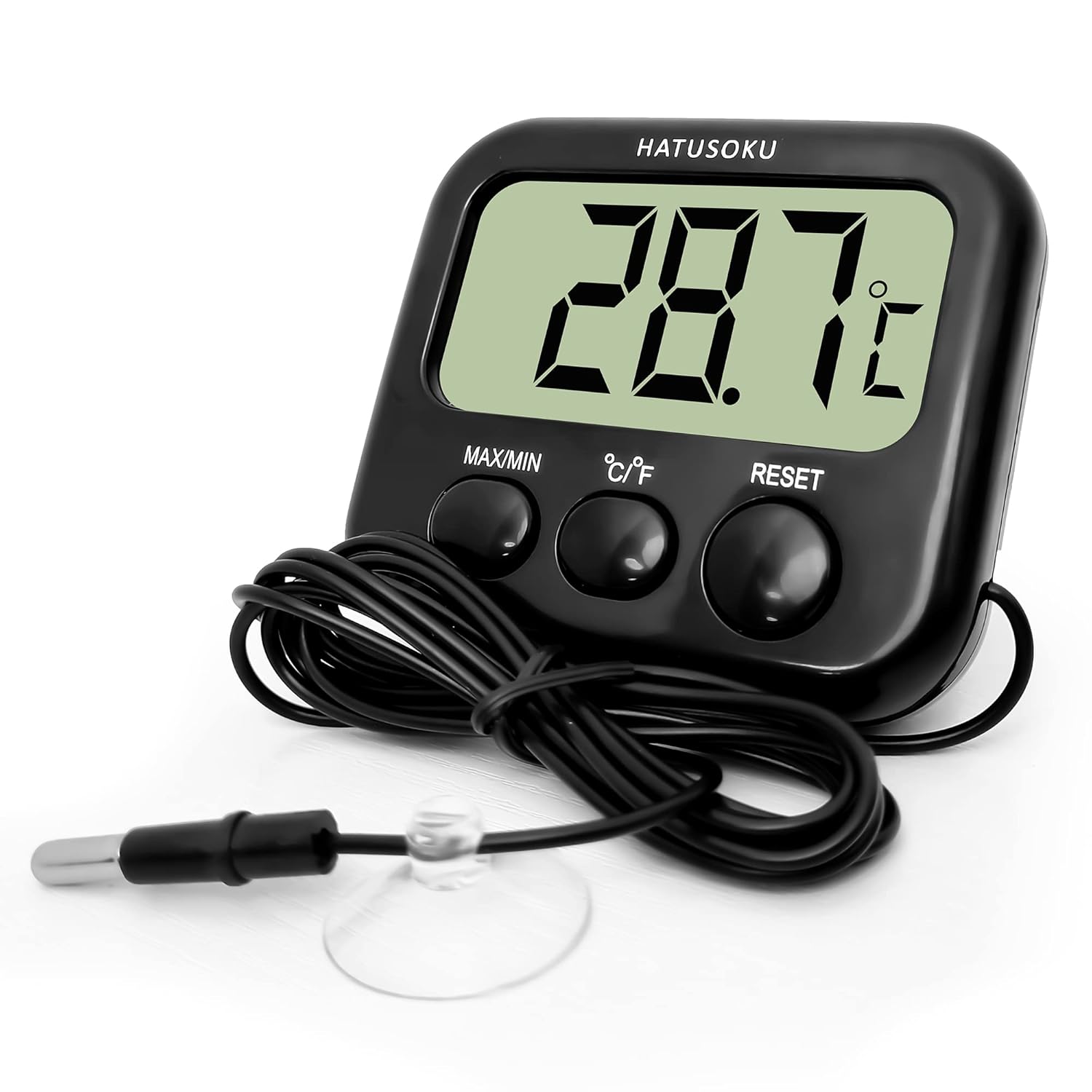
Key Features:
- External Sensor: Equipped with a 59-inch (150cm) cord, the temperature sensor can measure remote locations, making it ideal for aquariums, refrigerators, and freezers.
- Waterproof Sensor: The temperature sensor probe is waterproof, suitable for water temperature management. Note: The main thermometer body is not water resistant.
- Magnetic Backing: A magnet on the back of the main unit allows for convenient attachment to metallic surfaces like refrigerators.
- Large LCD Screen: Despite its compact size, the thermometer features a large LCD screen for easy readability of temperature values.
- Max/Min Value Display: Includes a function to display maximum and minimum temperature records.
2. Safety Information
- Ensure the main thermometer unit does not come into contact with water, as it is not waterproof. Only the external sensor probe is waterproof.
- Do not expose the main unit to extreme temperatures or direct sunlight for prolonged periods.
- Keep out of reach of children.
- Dispose of used batteries responsibly according to local regulations.
3. Setup and Installation
3.1. Battery Installation
The thermometer requires one AAA battery (included). To install:
- Locate the battery compartment on the back of the main unit.
- Slide open the battery cover.
- Insert one AAA battery, ensuring the correct polarity (+/-) as indicated inside the compartment.
- Close the battery cover securely.

3.2. Sensor Placement
The external sensor probe can be placed in the desired measurement area. The 59-inch cord provides flexibility for placement. The probe includes a suction cup for secure attachment to smooth surfaces, and the main unit has a magnet for attaching to metal surfaces.

4. Operation
Once the battery is installed, the thermometer will automatically power on and display the current temperature measured by the external sensor.

4.1. Button Functions
- MAX/MIN Button: Press this button to view the maximum and minimum temperature records since the last reset. Press again to cycle between MAX, MIN, and current temperature.
- °C/°F Button: Press this button to toggle the temperature display between Celsius (°C) and Fahrenheit (°F).
- RESET Button: Press this button to clear the stored maximum and minimum temperature records and reset the system.
4.2. Typical Applications
The HATUSOKU Digital Thermometer is versatile for various temperature monitoring needs:
- Aquarium Temperature Management: The waterproof sensor is ideal for monitoring water temperature in aquariums for tropical fish, goldfish, killifish, and reptiles. Ensure the main unit remains dry. Not suitable for seawater.
- Refrigerator and Freezer Temperature Control: Use the magnet on the back of the main unit to attach it to your refrigerator or freezer door, with the sensor placed inside to monitor internal temperatures.


5. Maintenance
To ensure the longevity and accuracy of your HATUSOKU Digital Thermometer:
- Cleaning: Wipe the main unit clean with a soft, dry cloth. Do not use abrasive cleaners or immerse the main unit in water. The sensor probe can be wiped clean with a damp cloth.
- Storage: Store the thermometer in a dry place away from direct sunlight and extreme temperatures when not in use.
- Battery Replacement: Replace the AAA battery when the display becomes dim or the unit stops functioning.
6. Troubleshooting
If you encounter issues with your HATUSOKU Digital Thermometer, consider the following:
- No Display/Dim Display: Check if the AAA battery is installed correctly. Replace with a new battery if necessary.
- Inaccurate Readings: Ensure the sensor probe is properly positioned in the area you wish to measure. Verify that the probe cable is not damaged.
- Buttons Not Responding: Try removing and reinserting the battery to perform a soft reset. If the issue persists, press the RESET button.
If problems persist after attempting these steps, please refer to the manufacturer's support information.
7. Specifications
| Feature | Specification |
|---|---|
| Model Number | HSK-2207-27 |
| Body Dimensions (L x W x H) | 3.1 x 2.8 x 1.1 inches (7.8 x 7.0 x 2.8 cm) |
| Weight | 2.47 ounces (70 grams) |
| Sensor Cord Length | 59 inches (150 cm) |
| Measurement Temperature Range | -40°F to 158°F (-40°C to 70°C) |
| Measurement Accuracy | ±1°C (±1.8°F) |
| Display Type | Digital LCD |
| Power Source | 1 x AAA Battery (included) |
| Connectivity Technology | Wired (sensor) |
| Outer Material | Plastic |
| Special Features | Large Display, Max/Min Record, °C/°F Toggle, Magnet, Suction Cup |

8. Warranty and Support
For warranty information or technical support, please refer to the product packaging or contact HATUSOKU customer service directly. Contact details can typically be found on the manufacturer's official website or the product's retail page.
Manufacturer: HATUSOKU


