1. Introduction
Thank you for choosing the GAOMON 3-Drawer Dresser. This manual provides essential information for the safe assembly, proper use, and maintenance of your new furniture. Please read these instructions carefully before beginning assembly and retain them for future reference.
2. Safety Information
- Adult Assembly Required: This product requires adult assembly. Keep small parts and packaging materials away from children during assembly.
- Weight Limits: Do not exceed the maximum weight capacity. The top surface can hold up to 120 lbs (54.4 kg). Each drawer can hold up to 20 lbs (9.1 kg).
- Anti-Tip Device: For safety, it is highly recommended to secure the dresser to a wall using an anti-tip device (not specified if included, but general safety advice). This prevents accidental tipping, which can cause serious injury.
- Stable Placement: Place the dresser on a flat, level surface to ensure stability.
- Proper Use: Do not allow children to climb on the dresser or hang from the drawers. Open only one drawer at a time to maintain stability.
3. Package Contents
Before assembly, verify that all parts and hardware are present. All hardware and parts are numbered or lettered for easy identification. If any parts are missing or damaged, please contact GAOMON customer support.

Figure 1: Dresser Dimensions Overview. This image illustrates the overall dimensions of the dresser (30.5"H x 32"W x 16"D) and the internal dimensions of a single drawer (26"W x 14.5"D x 7.5"H).
4. Assembly Instructions
Assembly of this dresser is designed to be straightforward. Follow the step-by-step, illustrated instructions provided in the packaging. Ensure all parts are correctly oriented before tightening fasteners. An additional person may be helpful for certain steps.
Key Assembly Steps:
- Unpack all components and lay them out on a clean, soft surface to prevent scratches.
- Identify all numbered or lettered parts and hardware according to the instruction manual.
- Assemble the main frame of the dresser, ensuring all connections are secure.
- Install the high-quality metal slide rails for each drawer into the dresser frame.
- Assemble the individual drawers, attaching the front panels and handles.
- Insert the completed drawers into the dresser frame, ensuring smooth operation.
- Attach the anti-tip device to the back of the dresser and secure it to a wall stud (if applicable).
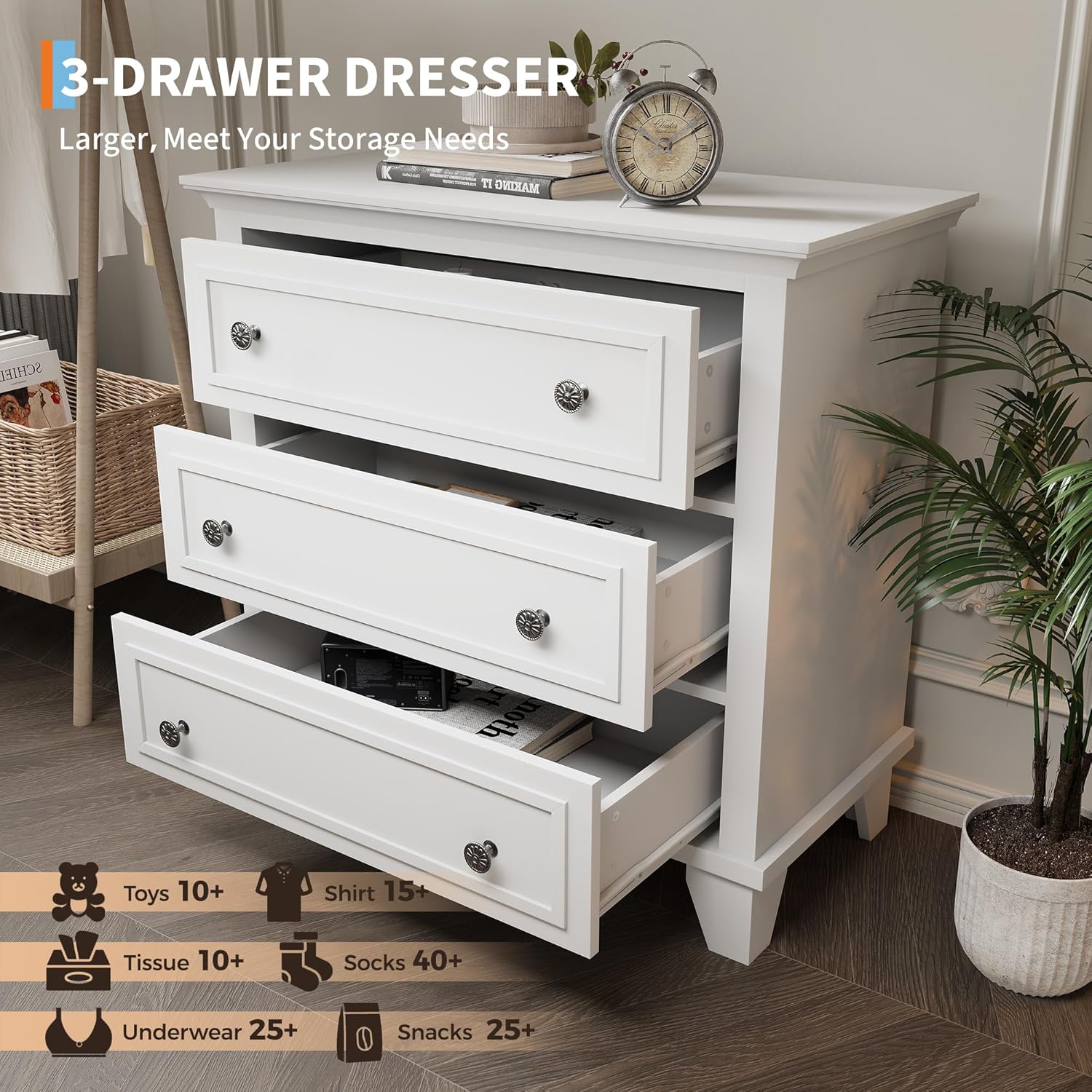
Figure 2: Open Drawers View. This image demonstrates the spacious interior of the three drawers, suitable for organizing various items.
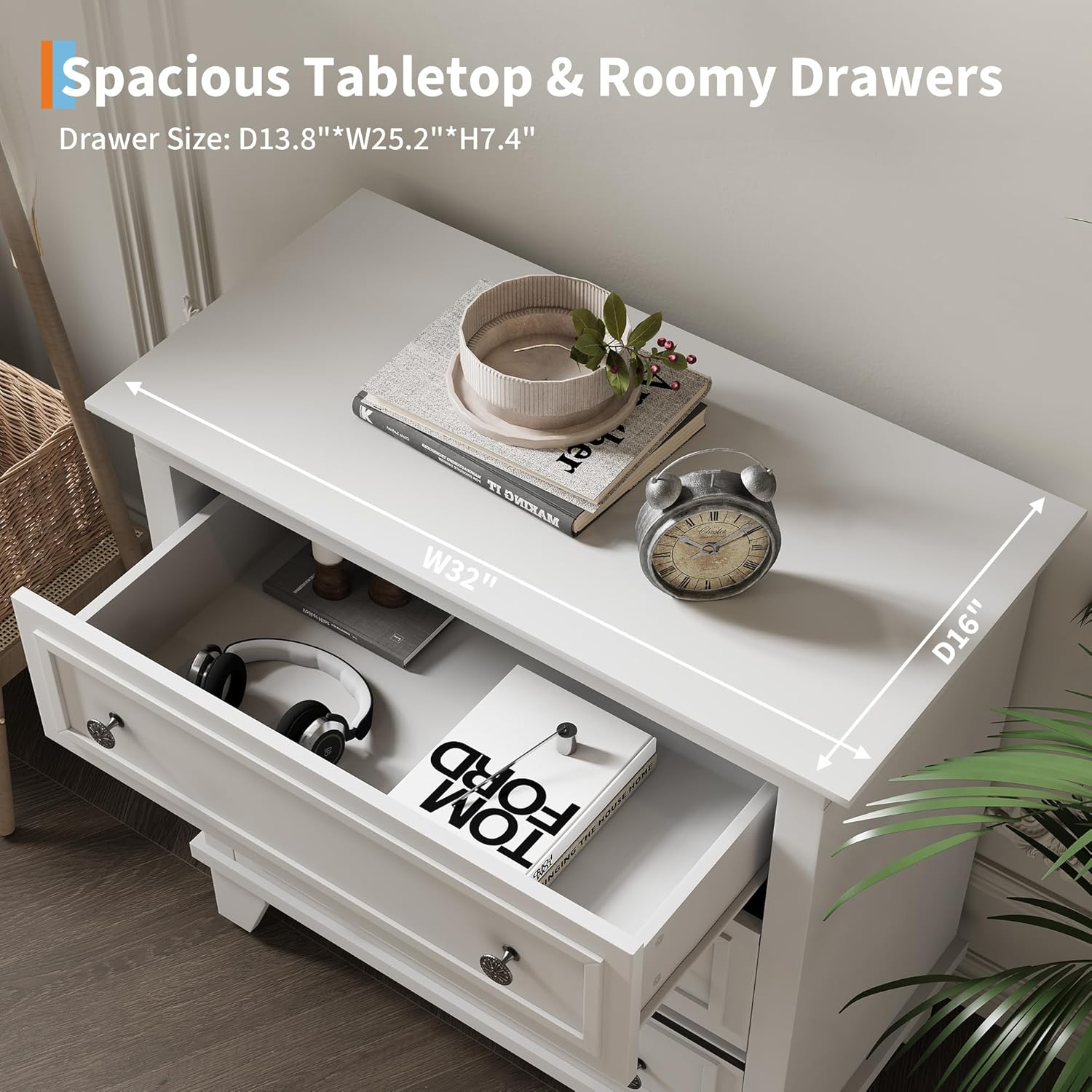
Figure 3: Top Surface and Drawer Detail. This image shows the 32"W x 16"D top surface and a partially open drawer, illustrating the drawer's depth and the smooth slide mechanism.
5. Operating Instructions
The GAOMON 3-Drawer Dresser is designed for convenient storage. To operate the drawers, simply pull the handles to open and push to close. The drawers are equipped with high-quality metal slide rails for smooth movement.
- Drawer Capacity: Each drawer is designed to hold up to 20 lbs (9.1 kg). Avoid overloading to ensure smooth operation and prevent damage.
- Top Surface Use: The top surface can support items up to 120 lbs (54.4 kg). It is suitable for lamps, decorative items, or other personal belongings.
- Smooth Operation: If a drawer feels stiff, ensure it is properly aligned on its rails and not overloaded.

Figure 4: GAOMON 3-Drawer Dresser in a Room Setting. This image displays the fully assembled dresser, showcasing its design and functionality within a home environment.
6. Maintenance and Care
To ensure the longevity and appearance of your GAOMON dresser, follow these care guidelines:
- Cleaning: Wipe surfaces with a soft, damp cloth. Avoid using harsh chemicals, abrasive cleaners, or polishes that may damage the finish.
- Spills: Clean up spills immediately to prevent staining or damage to the wood finish.
- Sunlight Exposure: Avoid prolonged exposure to direct sunlight, which can cause fading or discoloration.
- Humidity: Maintain a stable humidity level in the room to prevent wood from warping or cracking.
- Hardware Check: Periodically check and tighten all screws and fasteners to ensure the dresser remains stable and secure.
7. Troubleshooting
If you encounter any issues with your dresser, refer to the following common solutions:
| Problem | Possible Cause | Solution |
|---|---|---|
| Drawer does not slide smoothly. | Overloaded drawer, misaligned rails, or debris in rails. | Reduce drawer contents. Check if rails are properly installed and aligned. Clean rails of any obstructions. |
| Dresser feels wobbly. | Loose fasteners or uneven floor. | Tighten all assembly screws. Ensure the dresser is on a level surface; use shims if necessary. |
| Parts are missing or damaged. | Shipping damage or packaging error. | Contact GAOMON customer support with your model number and details of the issue. |
8. Specifications
- Brand: GAOMON
- Model Name: eZfjHjtWX4DvxGR3dJLMxwWsmB6z (Internal Model Number: 55bQcx7CxK_iqoKY7FTP2wd0)
- Product Dimensions: 16"D x 32"W x 30.5"H (40.6 cm D x 81.3 cm W x 77.5 cm H)
- Drawer Dimensions (Internal): Approximately 14.5"D x 26"W x 7.5"H (36.8 cm D x 66 cm W x 19 cm H)
- Color: White
- Material: High-quality MDF with vacuum-formed craftsmanship
- Item Weight: 70.5 pounds (32 kg)
- Top Surface Weight Capacity: 120 lbs (54.4 kg)
- Drawer Weight Capacity: 20 lbs (9.1 kg) per drawer
- Assembly Required: Yes
- UPC: 199809414290
9. Warranty and Support
For warranty information or customer support, please contact GAOMON directly through their official channels. If you have any issues with your package, including missing or damaged parts, please reach out to us for assistance. We are committed to helping you resolve any problems.


