
1. Introduction
Thank you for choosing the TRANSFORMERS TF-T23 TWS Bluetooth 5.4 Gaming Earbuds. These earbuds are designed to provide a high-quality audio experience for gaming, music, and calls, featuring a unique design inspired by TRANSFORMERS.
This manual provides essential information on how to set up, operate, and maintain your TF-T23 earbuds to ensure optimal performance and longevity.
2. Package Contents
Please check the package for the following items:
- TRANSFORMERS TF-T23 TWS Earbuds (Left and Right)
- Charging Case
- USB Type-C Charging Cable
- User Manual
3. Product Overview
Familiarize yourself with the components of your TRANSFORMERS TF-T23 earbuds and charging case.

The image displays the yellow TRANSFORMERS TF-T23 TWS earbuds nestled within their distinctive circular charging case, featuring the Bumblebee theme. The case has a mechanical, gear-like design.
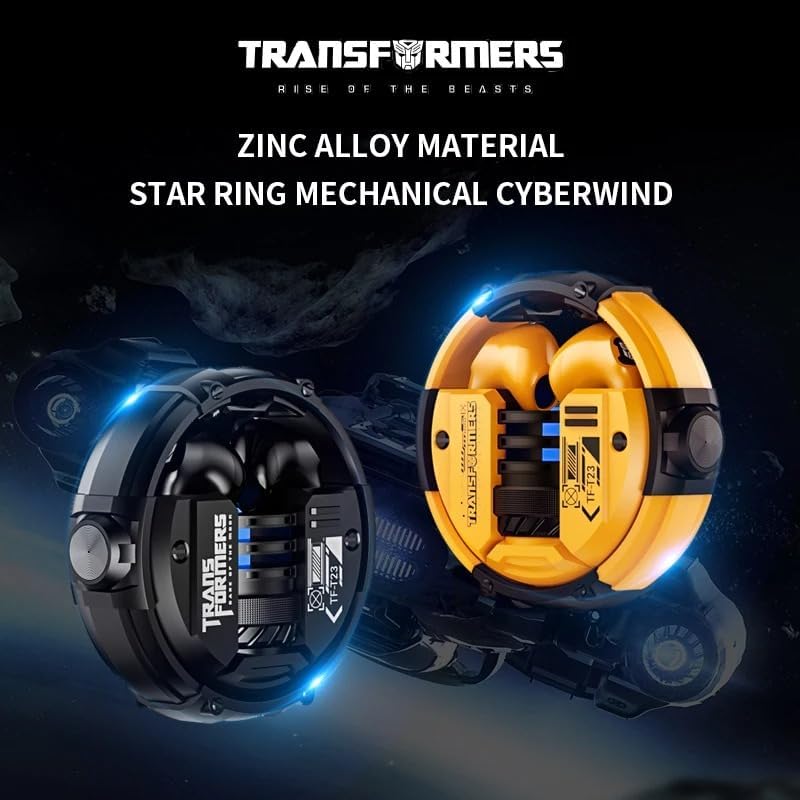
This image presents both the black and yellow versions of the TF-T23 earbuds and their charging cases, emphasizing the durable zinc alloy construction and the 'Star Ring Mechanical Cyberwind' design of the case.
Key Features:
- Bluetooth 5.4: For stable and efficient wireless connectivity.
- 13mm Dynamic Drivers: Delivering stereo surround sound quality.
- Gaming Mode: Optimized for low latency audio during gameplay.
- Intelligent Audio Decoding: For clear and detailed sound reproduction.
- Clear Voice Pickup: Enhanced microphone for clear calls.
- Durable Design: Zinc alloy material for the charging case.
4. Specifications
| Feature | Detail |
|---|---|
| Model Number | TF-T23 |
| Bluetooth Version | V5.4 |
| Transmission Distance | Approximately 10 meters |
| Driver Diameter | 13 mm |
| Impedance | 32 ohms |
| Frequency Range | 20 Hz - 20,000 Hz (Estimated) |
| Earbud Battery Capacity | 30 mAh |
| Charging Case Battery Capacity | 300 mAh |
| Music Playtime (50% volume) | Approximately 4 hours |
| Charging Time | Approximately 1.5 hours |
| Charging Interface | Type-C |
| Material | Plastic (earbuds), Zinc Alloy (case) |
| Compatible Devices | Mobile phones, tablets, consoles |
| Special Features | Surround Sound, Gaming Mode, Clear Call Quality |
5. Setup
5.1. Charging the Earbuds and Case
- Place the earbuds into the charging case. Ensure they are correctly seated.
- Connect the USB Type-C charging cable to the charging port on the case and the other end to a USB power source (e.g., computer, wall adapter).
- The indicator light on the charging case will illuminate to show charging status. It takes approximately 1.5 hours for a full charge.
- Once fully charged, disconnect the charging cable.
5.2. Bluetooth Pairing
- Ensure the earbuds are charged.
- Open the charging case. The earbuds will automatically power on and enter pairing mode. The indicator lights on the earbuds will flash, indicating they are ready to pair.
- On your device (smartphone, tablet, console), enable Bluetooth.
- Search for available Bluetooth devices and select "TF-T23" from the list.
- Once connected, a voice prompt will confirm successful pairing, and the earbud indicator lights will turn off or show a steady light.
- If pairing fails, place the earbuds back into the case, close it, and then repeat the steps.
Note: The earbuds will automatically reconnect to the last paired device when taken out of the case, if Bluetooth is enabled on the device.
6. Operating Instructions
The TF-T23 earbuds feature touch controls for various functions.
6.1. Power On/Off
- Power On: Open the charging case, or long-press the touch area on both earbuds for 3 seconds.
- Power Off: Place the earbuds back into the charging case and close the lid, or long-press the touch area on both earbuds for 5 seconds.
6.2. Music Playback
- Play/Pause: Single tap on either earbud.
- Next Track: Double tap on the right earbud.
- Previous Track: Double tap on the left earbud.
- Volume Up: Triple tap on the right earbud.
- Volume Down: Triple tap on the left earbud.
6.3. Phone Calls

An individual is shown wearing one of the black TF-T23 earbuds, illustrating its capability to accurately capture human voices for clear communication during calls.
- Answer/End Call: Single tap on either earbud.
- Reject Call: Long-press on either earbud for 2 seconds.
6.4. Voice Assistant
- Activate Voice Assistant: Long-press on either earbud for 2 seconds (when not on a call).
6.5. Gaming Mode
- Toggle Gaming Mode: Quadruple tap on either earbud to switch between standard mode and gaming mode. A voice prompt will confirm the mode change.
- Gaming mode reduces audio latency, which is beneficial for gaming, but may slightly increase power consumption.
7. Maintenance
- Cleaning: Use a soft, dry, lint-free cloth to clean the earbuds and charging case. Do not use harsh chemicals or abrasive materials.
- Storage: When not in use, store the earbuds in their charging case to protect them and keep them charged.
- Avoid Water: The earbuds are not waterproof. Avoid exposure to water, moisture, or extreme temperatures.
- Charging: Charge the earbuds regularly, even if not used for extended periods, to maintain battery health.
8. Troubleshooting
- Earbuds not pairing:
- Ensure both earbuds are charged.
- Place them back in the case, close the lid, then open it again to re-enter pairing mode.
- Turn off and on Bluetooth on your device.
- Forget/delete "TF-T23" from your device's Bluetooth list and try pairing again.
- Only one earbud working:
- Ensure both earbuds are charged.
- Place both earbuds back into the charging case, close the lid, and then open it again. This should resynchronize them.
- If the issue persists, try resetting the earbuds (refer to manufacturer's specific reset instructions if available, otherwise, try forgetting the device and re-pairing).
- Low volume or poor sound quality:
- Adjust the volume on both your device and the earbuds.
- Ensure the earbuds are clean and free from debris.
- Check for interference; move closer to your paired device.
- Charging case not charging:
- Ensure the charging cable is securely connected to both the case and the power source.
- Try a different USB Type-C cable and power adapter.
9. Warranty and Support
Specific warranty information for the TRANSFORMERS TF-T23 TWS Bluetooth 5.4 Gaming Earbuds is not provided in the product details. Please refer to the retailer or your purchase documentation for warranty terms and conditions.
For further assistance or technical support, please contact the seller or manufacturer directly through your purchase platform.


