1. Product Overview
The Panasonic ES-EY30 Epilator is designed for efficient and gentle hair removal at home. It features a dual-disc epilation head with 60 hypoallergenic tweezers, a flexible 90-degree pivoting head, and three speed settings for customized use. This device supports both wet and dry operation and includes various attachments for comprehensive body care.
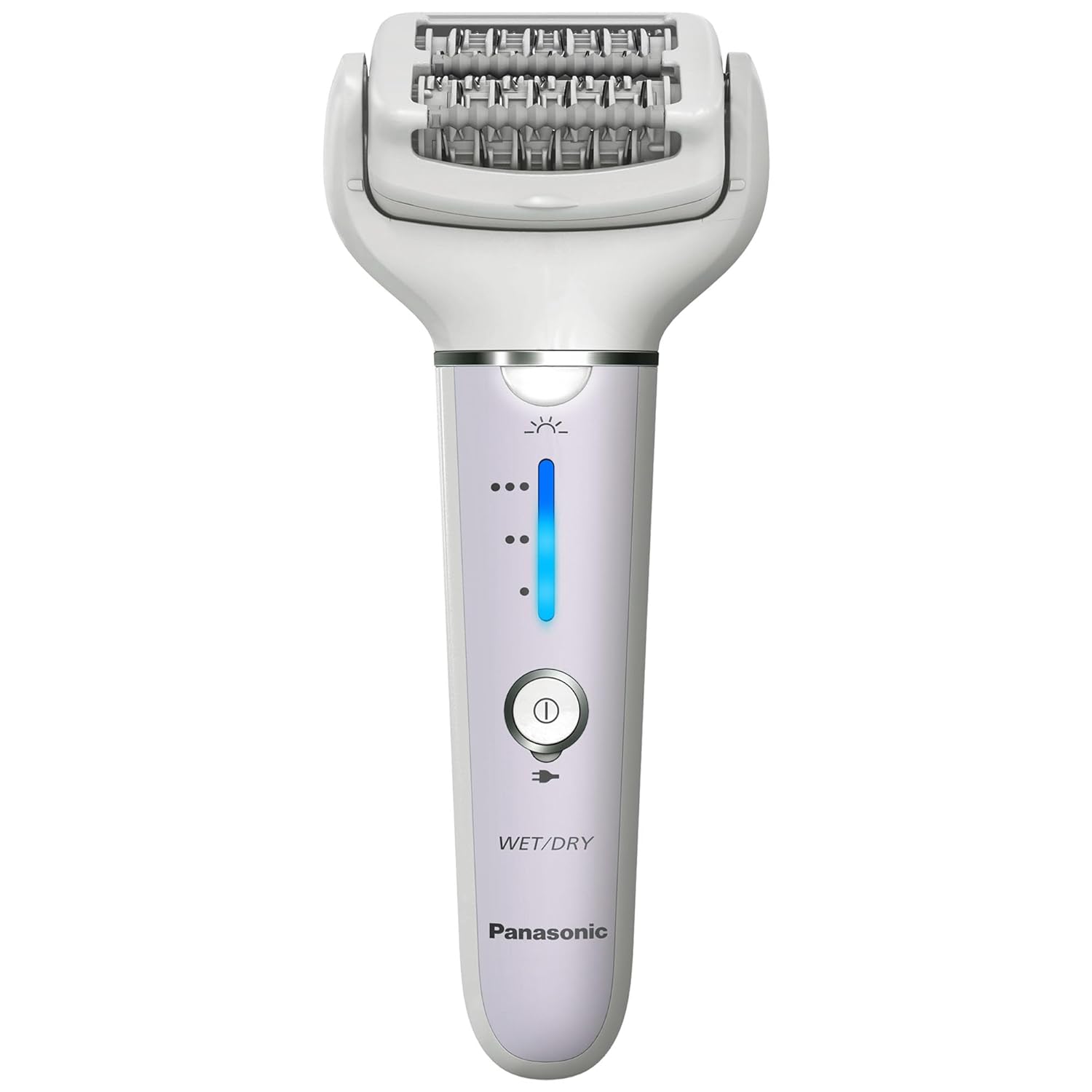
Front view of the Panasonic ES-EY30 Epilator.
2. Package Contents
Verify that all items are present in the package:
- Panasonic ES-EY30 Epilator Unit
- Epilator Head with Gentle Cap
- Shaver Head
- Exfoliation Brush Attachment
- AC Charger
- Cleaning Brush
- Travel/Storage Pouch
3. Setup
3.1 Charging the Device
Before first use, fully charge the epilator. Connect the AC charger to the charging port at the bottom of the device and plug it into a power outlet. A full charge takes approximately one hour and provides up to 30 minutes of cordless operation.

The epilator charging port for convenient recharging.
3.2 Attaching/Detaching Heads
To change an attachment head, press the release button located on the back of the epilator unit and gently pull the current head off. Align the desired head with the unit and push until it clicks securely into place.

Side view of the epilator, illustrating the head attachment and release mechanism.
4. Operating Instructions
4.1 Preparing Your Skin
For optimal results, prepare your skin by exfoliating and cleansing the area to be epilated. This helps prevent ingrown hairs and ensures a smoother process.
4.2 Wet or Dry Use
The ES-EY30 is designed for both wet and dry use. For a more comfortable experience, especially for sensitive areas, use the epilator in the shower or bath with bath gel to create a rich foam. For quick touch-ups, it can be used dry.

The epilator is waterproof and can be used for wet shaving or epilation in the shower or bath.
4.3 Power Settings and Pressure Sensor
The epilator features three speed settings (Gentle, Normal, Powerful) and a pressure sensor. Adjust the speed based on your skin sensitivity and hair type. The pressure sensor helps ensure you apply the correct amount of pressure for effective hair removal without irritation.

Illustration of the three speed settings and the helpful LED pressure sensor on the epilator.
4.4 Epilation Technique
Hold the skin taut with one hand. With the other hand, hold the epilator at a 90-degree angle to the skin and move it slowly against the direction of hair growth. The flexible 90-degree pivoting head will adjust to your body's contours, making it easier to reach difficult areas like underarms and knees.

The 90-degree pivoting head smoothly adjusts to natural body contours for efficient hair removal.
4.5 Using the Gentle Epilation Cap
For sensitive areas or if you are new to epilation, attach the gentle epilation cap. This cap limits the number of exposed tweezers, providing a milder hair removal experience.
4.6 Post-Epilation Care
After epilation, moisturize your skin to soothe and hydrate it.
5. Maintenance
5.1 Cleaning the Epilator
Maintenance is quick and easy. Simply rinse the epilator body and all attachments under warm running water to clean. Ensure the device is turned off before cleaning. Use the included cleaning brush to remove any trapped hairs from the epilation head.
5.2 Storage
Store the epilator and its attachments in the provided travel/storage pouch in a dry place when not in use.
6. Troubleshooting
If you encounter any issues with your Panasonic ES-EY30 Epilator, please refer to the following common solutions:
- Device not turning on: Ensure the device is fully charged. If the issue persists, try connecting it to the charger to confirm power supply.
- Reduced performance: Clean the epilation head thoroughly to remove any hair or debris that might be obstructing the tweezers. Ensure the attachment head is securely fastened.
- Skin irritation: Ensure you are using the correct technique (holding skin taut, moving against hair growth). Consider using the gentle epilation cap or using the device wet with foam.
- Battery not holding charge: Ensure the charger is properly connected and the power outlet is functional. If the battery life has significantly decreased over time, it may be reaching the end of its lifespan.
For further assistance, please contact Panasonic customer support.
7. Specifications
| Feature | Detail |
|---|---|
| Model Number | ES-EY30 |
| Brand | Panasonic |
| Power Source | Battery Powered (1 Lithium Ion battery included) |
| Operating Time | Approx. 30 minutes (after 1 hour charge) |
| Water Resistance Level | Waterproof (Wet/Dry Use) |
| Epilation Head | Dual-disc with 60 hypoallergenic tweezers |
| Pivoting Head | 90-degree flexible |
| Speed Settings | 3 levels (up to 2,900 rotations per minute) |
| Special Features | LED light, Pressure Sensor, Gentle Epilation Cap |
| Product Dimensions | 6.5 x 1.9 x 0.1 inches |
| Item Weight | 0.4 Pounds (6.4 ounces) |
| UPC | 885170430440 |
8. Warranty and Support
For warranty information and customer support, please refer to the documentation included with your product or visit the official Panasonic website. You can also visit the Panasonic Store on Amazon for more details.


