
1. Introduction
This manual provides comprehensive instructions for the installation, operation, and maintenance of your Hisense AX5125H 5.1.2 Channel Dolby Atmos Soundbar System. Please read this manual thoroughly before using the product to ensure proper and safe operation. Keep this manual for future reference.
The Hisense AX5125H is designed to deliver an immersive audio experience with its 5.1.2 channel configuration, including a wireless subwoofer and true wireless rear speakers. It supports Dolby Atmos and DTS Virtual:X technologies for a dynamic, three-dimensional soundstage.
2. Important Safety Information
Always follow basic safety precautions when using this product to reduce the risk of fire, electric shock, and injury to persons.
- Do not expose this appliance to dripping or splashing.
- Do not place objects filled with liquids, such as vases, on the apparatus.
- Ensure proper ventilation. Do not block any ventilation openings.
- Only use attachments/accessories specified by the manufacturer.
- Unplug this apparatus during lightning storms or when unused for long periods of time.
- Refer all servicing to qualified service personnel.
- Keep batteries away from children.
3. Package Contents
Verify that all components are present and in good condition upon opening the package.
- Hisense AX5125H Soundbar
- Wireless Subwoofer
- Two (2) True Wireless Rear Speakers
- Remote Control (with 2 AAA batteries included)
- Power Cords (for Soundbar, Subwoofer, and Rear Speakers)
- HDMI Cable
- Optical Cable
- Wall Mount Brackets and Screws
- User Manual (this document)

Figure 3.1: Overview of the Hisense AX5125H Soundbar system, including the soundbar, wireless subwoofer, and two wireless rear speakers.
4. Setup and Installation
4.1 Placement
Optimal placement of the soundbar and speakers is crucial for the best audio experience.
- Soundbar: Place the soundbar centrally below your television. Ensure no objects obstruct the front or top-firing speakers.
- Wireless Subwoofer: Position the subwoofer on the floor, preferably in a corner or near a wall for enhanced bass. Experiment with placement to find the best sound.
- True Wireless Rear Speakers: Place the rear speakers behind your listening position, to the left and right. Ensure they are within range of the soundbar for wireless connection. They can be placed on stands or wall-mounted.
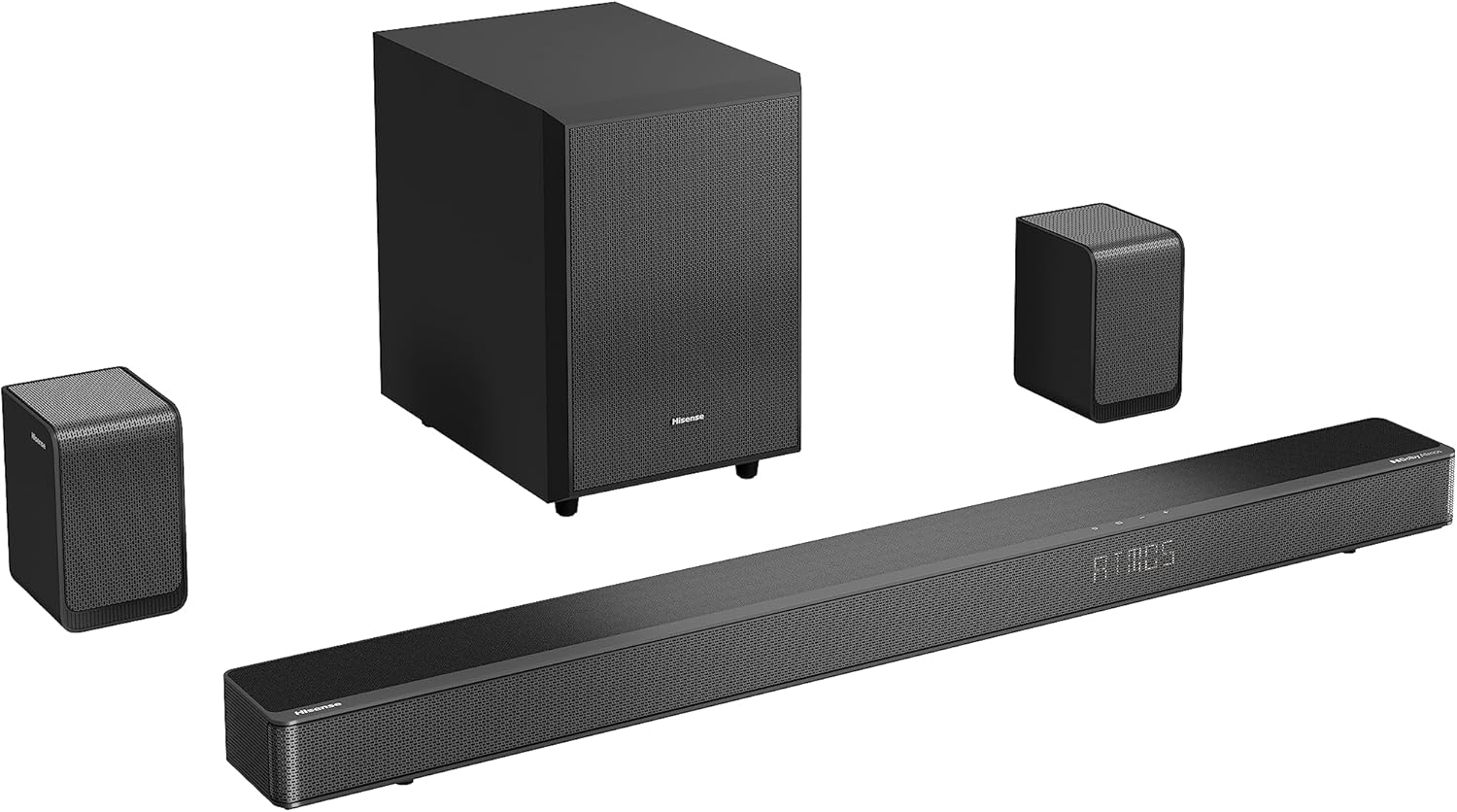
Figure 4.1: The Hisense AX5125H soundbar and its wireless subwoofer, ready for placement.
4.2 Connections
Connect the soundbar to your television or other audio sources.
- Power Connection: Connect the power cords to the soundbar, subwoofer, and each rear speaker, then plug them into a power outlet. The units will automatically power on or enter standby mode.
- HDMI ARC/eARC (Recommended):
- Connect one end of the HDMI cable to the HDMI OUT (ARC/eARC) port on the soundbar.
- Connect the other end to the HDMI ARC/eARC port on your television.
- Ensure HDMI ARC/eARC is enabled in your TV's audio settings.
- Optical Connection:
- Connect one end of the optical cable to the OPTICAL IN port on the soundbar.
- Connect the other end to the optical digital output port on your television or audio source.
- Bluetooth Connection:
- Press the Bluetooth button on the soundbar or remote control to enter pairing mode.
- On your mobile device, search for "Hisense AX5125H" in the Bluetooth settings and connect.

Figure 4.2: Rear view of the Hisense AX5125H soundbar, showing the various input ports for connectivity.
4.3 Wireless Speaker Pairing
The subwoofer and rear speakers should automatically pair with the soundbar upon power-up. If not, follow these steps:
- Ensure all units are powered on.
- If pairing fails, press and hold the "Pairing" button on the back of the subwoofer and each rear speaker until the indicator light flashes.
- Then, press and hold the "Pairing" button on the soundbar (refer to the soundbar's specific button location in the quick start guide).
- The indicator lights will turn solid when pairing is successful.
5. Operating Instructions
5.1 Basic Operations
- Power On/Off: Press the Power button on the remote or soundbar.
- Volume Control: Use the Volume Up (+) and Volume Down (-) buttons.
- Input Selection: Press the Input button to cycle through HDMI, Optical, Bluetooth, and other available inputs.
- Mute: Press the Mute button to silence the audio. Press again to unmute.

Figure 5.1: Top view of the Hisense AX5125H soundbar, showing the integrated control buttons.
5.2 Sound Modes and Settings
The Hisense AX5125H offers various sound modes and adjustments to optimize your listening experience.
- EQ Modes: Use the EQ button on the remote to cycle through preset equalization modes (e.g., Movie, Music, News, Sport, Night, AI Surround, Bass Boost).
- Bass/Treble Adjustment: Use dedicated Bass +/- and Treble +/- buttons on the remote to fine-tune audio frequencies.
- Surround Sound: The system automatically detects Dolby Atmos or DTS Virtual:X content. Ensure your source material supports these formats for the best immersive experience.
- EzPlay Functionality: For seamless integration with compatible Hisense TVs, EzPlay allows for unified control of the soundbar and TV.
6. Maintenance and Care
Proper care ensures the longevity and optimal performance of your soundbar system.
- Cleaning: Use a soft, dry cloth to clean the surfaces of the soundbar, subwoofer, and speakers. Do not use liquid cleaners or aerosols.
- Ventilation: Ensure ventilation openings are not blocked.
- Storage: If storing the unit for an extended period, disconnect it from power and store it in a cool, dry place.
- Battery Replacement: Replace remote control batteries (2 AAA) when the remote's range decreases or it stops responding.
7. Troubleshooting
This section addresses common issues you might encounter. If the problem persists, contact Hisense customer support.
| Problem | Possible Cause | Solution |
|---|---|---|
| No power | Power cord not connected; Power outlet not active. | Ensure power cords are securely connected. Test the outlet with another device. |
| No sound | Incorrect input selected; Volume too low; Mute activated; Cables loose. | Select the correct input source. Increase volume. Deactivate mute. Check all cable connections. |
| Subwoofer/Rear speakers not pairing | Out of range; Interference; Pairing failed. | Move units closer. Reduce wireless interference. Re-initiate pairing process as described in Section 4.3. |
| Remote control not working | Batteries depleted; Obstruction; Incorrect aiming. | Replace batteries. Remove any obstructions between remote and soundbar. Aim remote directly at the soundbar's sensor. |
| Distorted sound | Source audio quality; Volume too high; Incorrect EQ settings. | Check source audio. Reduce volume. Adjust EQ settings. |
8. Product Specifications
| Feature | Detail |
|---|---|
| Model Number | AX5125H |
| Channels | 5.1.2 Channel |
| Total Output Power | 500 Watts |
| Audio Technologies | Dolby Atmos, DTS Virtual:X |
| Connectivity | HDMI ARC/eARC, Optical, Bluetooth 5.3 |
| Wireless Components | Wireless Subwoofer, True Wireless Rear Speakers |
| Soundbar Length | 92 Centimeters |
| Item Weight | 12.6 Kilograms (Total system weight) |
| Color | Black |
| Power Source | Corded Electric |
| Included Batteries | 2 AAA (for remote) |
9. Warranty and Support
9.1 Warranty Information
Hisense products are covered by a limited warranty. Please refer to the warranty card included in your package or visit the official Hisense website for detailed warranty terms and conditions specific to your region. Keep your purchase receipt as proof of purchase for warranty claims.
9.2 Customer Support
For technical assistance, troubleshooting, or service inquiries, please contact Hisense customer support. You can find contact information on the official Hisense website or on the product packaging.
Online Support: Visit the official Hisense support page for FAQs, software updates, and additional resources.
Phone Support: Refer to your regional Hisense website for local contact numbers.