
1. Introduction
Welcome to the user manual for your GERRIT YATEGOOD G5000 4G/5G Network Walkie Talkie. This device is designed for reliable, long-distance communication using 4G and 5G cellular networks, offering a wide range of features for various applications. This manual provides essential information on setting up, operating, and maintaining your device to ensure optimal performance and longevity.
Important Note: To utilize the Push-to-Talk Over Cellular (POC) function, it is necessary to have two or more GERRIT YATEGOOD G5000 devices.
2. Package Contents
Please verify that all items listed below are included in your product package:
- GERRIT YATEGOOD G5000 Host Unit
- Rechargeable Lithium Polymer Battery
- Back Clip
- Charging Cable / Charger
- SIM Card (pre-installed or included separately)
- Earphone
- Mobile Phone Invisible Holder
3. Product Overview
The GERRIT YATEGOOD G5000 is a robust network walkie talkie featuring advanced communication capabilities and integrated utility functions. Below are visual representations and descriptions of the device and its key components.
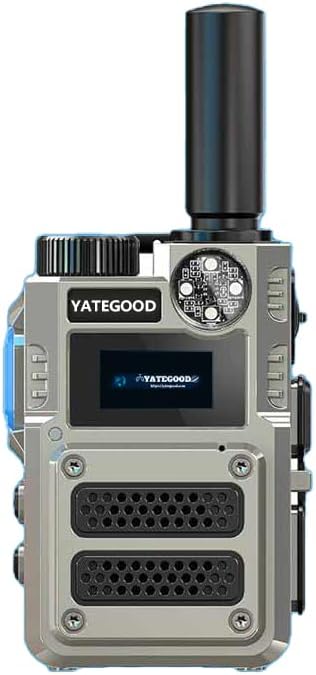
Figure 3.1: Front view of the GERRIT YATEGOOD G5000 Walkie Talkie, showcasing its display, speaker grilles, and antenna.

Figure 3.2: The G5000 device comfortably held in a user's hand, illustrating its portable size and the '5G LTE' network indicator on its display.

Figure 3.3: A close-up view highlighting the integrated red laser feature of the G5000, useful for pointing or signaling.

Figure 3.4: The G5000 demonstrating its purple light function, which can be used for verifying banknotes or other UV-sensitive materials.

Figure 3.5: Two G5000 devices illustrating the powerful integrated flashlight, suitable for outdoor use or in low-light conditions.

Figure 3.6: A user hiking with the G5000 attached, highlighting the device's integrated compass feature for navigation.
4. Setup
4.1 SIM Card Installation and Activation
The G5000 operates on 4G/5G cellular networks. Your device includes a SIM card with 1 year of data usage for 72 countries. This SIM card automatically switches between telecom service providers for optimal connectivity. Data usage can be renewed after the initial year.
- Locate the SIM card slot on your device. Refer to the device diagram for exact placement.
- Carefully insert the provided SIM card into the slot, ensuring correct orientation.
- Close the SIM card slot cover securely to protect it from dust and moisture.
4.2 Battery Installation
The G5000 uses a Lithium Polymer battery.
- Ensure the device is powered off.
- Open the battery compartment cover on the back of the device.
- Insert the battery, aligning the contacts correctly.
- Close the battery compartment cover until it clicks into place.
4.3 Charging the Device
Before first use, fully charge the device battery.
- Connect the charging cable to the Type-C charging connector on the device.
- Plug the other end of the charging cable into a compatible USB power adapter or port.
- The charging indicator on the device will illuminate. Once charging is complete, the indicator may change color or turn off.
- Disconnect the charger once the battery is fully charged.
5. Operating Instructions
5.1 Power On/Off
- To Power On: Press and hold the Power button (refer to device diagram for location) until the screen illuminates and the device starts up.
- To Power Off: Press and hold the Power button until a power-off prompt appears on the screen. Confirm to shut down the device.
5.2 Basic Communication (POC Function)
The G5000 utilizes Push-to-Talk Over Cellular (POC) technology, allowing communication over long distances via cellular networks.
- Ensure your device is powered on and connected to a 4G/5G network.
- Select the desired contact or group for communication.
- Press and hold the PTT (Push-to-Talk) button to transmit your voice. Speak clearly into the microphone.
- Release the PTT button to listen for a response.
5.3 Special Features
- Call Alert: The device supports a call alert feature to notify you of incoming communications. Refer to the device settings for customization.
- Flashlight: Activate the strong integrated flashlight for illumination in dark environments. Consult the device interface for the flashlight activation method.
- Red Laser: The device includes a red laser for pointing or signaling. Use with caution and avoid directing the laser beam into eyes.
- UV Light (for Banknotes): A purple UV light is integrated for verifying the authenticity of banknotes or other documents with UV security features.
- Compass: An integrated compass provides directional guidance, useful for navigation in outdoor settings.
6. Maintenance
Proper maintenance ensures the longevity and optimal performance of your GERRIT YATEGOOD G5000.
- Cleaning: Use a soft, dry cloth to clean the device. Avoid using harsh chemicals or abrasive materials.
- Battery Care: To prolong battery life, avoid fully discharging the battery frequently. Store the device in a cool, dry place when not in use for extended periods.
- Water Resistance: Please note that this device is not water resistant. Avoid exposure to water, rain, or high humidity to prevent damage.
- Storage: Store the device in a safe place, away from extreme temperatures, direct sunlight, and corrosive materials.
7. Troubleshooting
If you encounter issues with your GERRIT YATEGOOD G5000, refer to the following common troubleshooting steps:
- Device not powering on: Ensure the battery is correctly installed and fully charged.
- No network signal: Check SIM card installation. Ensure you are in an area with 4G/5G cellular coverage. Restart the device.
- Cannot communicate: Verify that you have selected the correct contact or group. Ensure the PTT button is pressed firmly during transmission. Confirm that you have at least two devices for POC functionality.
- Poor audio quality: Check the microphone and speaker for obstructions. Ensure the volume is adjusted appropriately.
For persistent issues, please contact customer support.
8. Specifications

Figure 8.1: Overview of GERRIT YATEGOOD G5000 product parameters.
| Feature | Specification |
|---|---|
| Model Number | G5000 |
| Brand | GERRIT |
| Network Support | 4G, 5G (Automatic switching between 4G/5G) |
| Communication Type | Push-to-Talk Over Cellular (POC) |
| Special Feature | Call Alert, Flashlight, Red Laser, UV Light, Compass |
| Battery Type | Lithium Polymer |
| Battery Capacity | 6800mAh (Large battery) |
| Voltage | 7.4 Volts |
| Charging Connector | Type-C (USB charging and data transfer) |
| Water Resistance Level | Not Water Resistant |
| Item Weight | 1.1 pounds (approx. 0.5 Kilograms) |
| Product Dimensions | 0.2 x 2.1 x 3.3 inches (approx. 0.5cm D x 5.3cm W x 8.4cm H) |
| Included Components | Host, battery, back clip, charger, SIM, earphone, Mobile phone invisible holder |
9. Warranty and Support
9.1 Warranty Information
The GERRIT YATEGOOD G5000 Walkie Talkie comes with a one-year warranty from the date of purchase. This warranty covers manufacturing defects and malfunctions under normal use. Please retain your proof of purchase for warranty claims.
9.2 Customer Support
For technical assistance, troubleshooting, or warranty inquiries, please contact your retailer or the manufacturer's customer support. Refer to the product packaging or the official GERRIT website for contact details.