
ULTIMEA Nova S80
Contents
ULTIMEA Nova S80 5.1.2Ch Sound Bar with Dolby Atmos - Instruction Manual
Model: Nova S80
Brand: ULTIMEA
Introduction
The ULTIMEA Nova S80 is a high-performance 5.1.2 channel soundbar system designed to elevate your home audio experience. It features Dolby Atmos for immersive, multi-dimensional sound, an 8-inch wireless subwoofer for powerful bass, and 360° ASL-Aural Spatial Localization Technology for precise sound placement. With 4K HDR Pass-Through and multiple connectivity options, the Nova S80 delivers a truly cinematic audiovisual feast.

Figure 1: The ULTIMEA Nova S80 soundbar system components.
What's in the Box
Carefully unpack all components and ensure all items are present:
- 1x Soundbar with Wireless Subwoofer
- 2x Surround Speakers
- 1x Power Adaptor
- Subwoofer Power Cable
- Stereo RCA to RCA Cable
- 1x HDMI eARC Cable
- Digital Optical Cable
- Stereo 3.5mm to RCA Audio Cable
- 1x 6-pin Cable for Soundbar Connection
- Remote Control
- User Manual
- 12x Wall Mounted Kits
- 6x Wall Bracket
- 2x HDMI Adaptor

Figure 2: Overview of all included accessories and components.
Setup
Follow these steps to set up your ULTIMEA Nova S80 soundbar system.
1. Soundbar Assembly
The soundbar comes in two parts. Align the connection joints and push them parallel to combine into one piece. Then, connect the two parts using the provided 6-pin cable.
2. Power Connection
Plug the power cord into the soundbar and the subwoofer. Ensure both units are connected to a power source.
3. Connecting to Your TV
There are several ways to connect the soundbar to your TV. For optimal audio quality, especially for Dolby Atmos, HDMI eARC is preferred.
- HDMI eARC (Preferred): Connect the included HDMI eARC cable from the soundbar's HDMI OUT (eARC) port to your TV's HDMI ARC/eARC port. This connection supports Dolby Atmos audio format.
- Optical: Connect the Digital Optical Cable from your TV's Optical OUT port to the soundbar's OPTICAL port. Remember to remove the protective caps from the cable ends.
- AUX: Connect the Stereo 3.5mm to RCA Audio Cable from your TV's RCA AUDIO OUT to the soundbar's AUX port.
- Bluetooth (Wireless): Switch the soundbar to Bluetooth mode via the remote control. Enable Bluetooth on your TV and select "ULTIMEA Nova S80" from the device list to pair.
Video 1: ULTIMEA Nova S80 Unboxing and Assemble Video. This video demonstrates the unboxing, assembly, and various connection methods for the soundbar system.
4. Connecting Other Devices
For connecting other devices like a game console or Blu-ray player directly to the soundbar, use the HDMI IN port on the soundbar. Connect an HDMI cable from your device's HDMI OUT to the soundbar's HDMI IN.
Operating the Soundbar
The ULTIMEA Nova S80 offers various features to enhance your audio experience.
1. Basic Controls
Use the included remote control to manage power, volume, input selection, and sound modes. The TV's remote control can also control the soundbar and TV simultaneously when connected via HDMI eARC (CEC function supported).
2. Sound Modes
The soundbar features pre-set EQ programs to optimize audio for different content:
- Movie Mode: Enhances cinematic sound effects and dialogue.
- Music Mode: Optimizes audio for music playback.
- Dialogue Mode: Improves vocal clarity for TV shows and news.
You can also adjust bass and surround levels independently for a customized listening experience.
3. Dolby Atmos and Spatial Sound
Experience immersive 5.1.2 Dolby Atmos surround sound with 2 up-firing drivers and 360° ASL-Aural Spatial Localization Technology. This technology precisely positions sound sources, including overhead effects, for a truly enveloping audio experience.
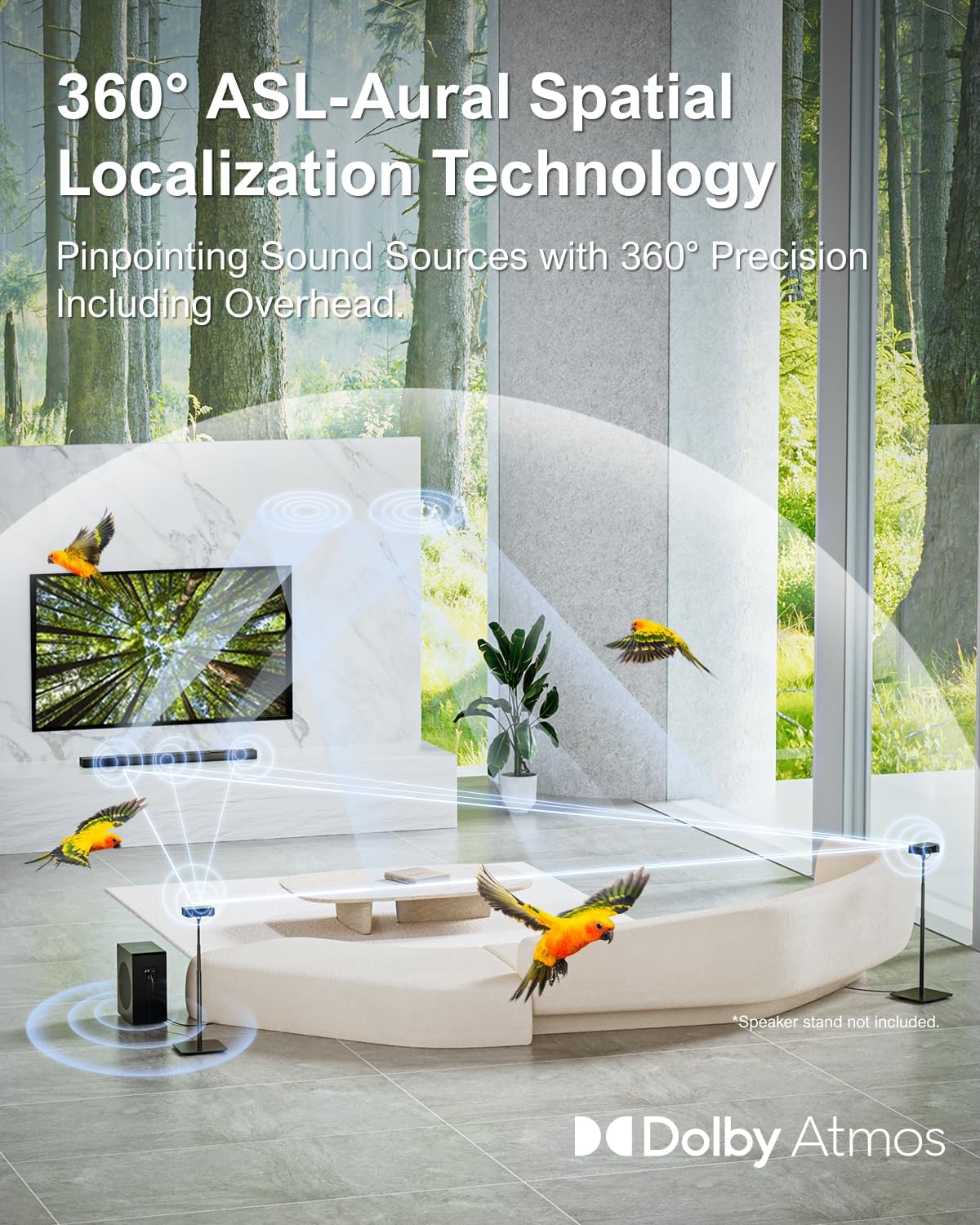
Figure 3: Visual representation of 360° ASL-Aural Spatial Localization Technology.
Video 2: ULTIMEA Nova S80 5.1.2Ch Sound Bar with Dolby Atmos. This video highlights the immersive sound capabilities of the soundbar.
4. BassMAX Technology
The 8-inch wireless subwoofer, enhanced by BassMAX technology, delivers powerful and thunderous bass effects, providing a deep and impactful audio foundation.

Figure 4: The 8-inch wireless subwoofer with BassMAX technology.
Maintenance
To ensure the longevity and optimal performance of your ULTIMEA Nova S80 soundbar, follow these maintenance guidelines:
- Cleaning: Use a soft, dry cloth to clean the surfaces of the soundbar, subwoofer, and surround speakers. Avoid using liquid cleaners or abrasive materials.
- Placement: Place the soundbar on a stable, flat surface or mount it securely on a wall. Ensure adequate ventilation around all components to prevent overheating.
- Power: Disconnect the power cable from the wall outlet during lightning storms or when the unit is left unattended for long periods.
- Environment: Avoid exposing the system to extreme temperatures, humidity, dust, or direct sunlight.
Troubleshooting
If you encounter issues with your soundbar, refer to the following common troubleshooting steps:
1. No Sound
- Check Connections: Ensure all cables (HDMI, Optical, AUX) are securely connected to both the soundbar and your TV/device.
- Correct Input: Verify that the soundbar's input mode matches the connection type (e.g., eARC for HDMI eARC, OPT for Optical).
- TV Audio Output: Confirm your TV's audio output settings are configured to send audio to the soundbar (e.g., HDMI ARC/eARC, Optical).
- Volume Levels: Increase the volume on both the soundbar and your TV/device.
2. Subwoofer Not Pairing / No Bass
If there is no sound coming from the wireless subwoofer, you may need to re-pair it with the soundbar:
- Ensure the subwoofer is powered on.
- Press and hold the "BassMX" button on the remote control for 3 seconds. The soundbar's display will show "SUB" flashing.
- On the back of the subwoofer, press and hold the "PAIR" button for 3 seconds. The white LED on the subwoofer will flash rapidly.
- Once successfully paired, the subwoofer's LED will stay on.
3. TV Audio Format Settings
For optimal sound, especially Dolby Atmos, ensure your TV's digital audio output format is correctly set. Different TVs may have different menu paths, but generally, navigate to:
Settings → Sound → Digital Audio Format
Select one of the following options:
- Auto: For general audio (preferred for most content).
- Pass-through: For Atmos Audio (only works with HDMI eARC).
- PCM: For DTS audio (Note: Nova S80 does not support decoding DTS).
Specifications
| Model Name | Nova S80 |
| Speaker Type | 5.1.2Ch Soundbar with Dolby Atmos |
| Speaker Maximum Output Power | 520 Watts |
| Surround Sound Channel Configuration | 5.1.2 |
| Subwoofer Connectivity Technology | Wireless |
| Speaker Size | 8 Inches (Subwoofer) |
| Connectivity Technology | HDMI IN/eARC, Auxiliary, Bluetooth 5.3, Optical |
| Product Dimensions | 3.54"D x 31.5"W x 1.5"H |
| Item Weight | 24.5 pounds |
| Mounting Type | Tabletop Mount / Wall Mount |
Warranty and Support
ULTIMEA products come with a limited warranty. For detailed warranty information, technical support, or customer service inquiries, please refer to the contact information provided in the included User Manual or visit the official ULTIMEA website. ULTIMEA is committed to providing pre-sale consultation, 7/24 service, and a worry-free warranty experience.
Ask a question about this manual
Ask about setup, troubleshooting, compatibility, parts, safety, or missing instructions. Manuals+ will review the question and use this page’s manual context to help answer it.