
Introduction
The Wurkkos HD11 is a versatile right-angle flashlight designed for various activities, featuring both spotlight and floodlight capabilities, a red light mode, and a magnetic tail cap. This manual provides essential information for the safe and effective use of your device.

Figure 1: Wurkkos HD11 Right Angle Flashlight
Setup
1. Battery Installation & Charging
The Wurkkos HD11 comes with a rechargeable Lithium Ion battery (18650). Before first use, ensure the battery is fully charged.
- Unscrew the tail cap of the flashlight.
- Insert the included 18650 Lithium Ion battery with the positive (+) end facing towards the head of the flashlight.
- Screw the tail cap back on securely.
- Locate the USB-C charging port on the side of the flashlight, usually covered by a rubber flap.
- Connect the provided USB-C cable to the flashlight and to a compatible USB power source (e.g., computer, wall adapter).
- The side switch will illuminate to indicate charging status:
- Green Light: 70%-100% battery remaining.
- Red Light: 30%-70% battery remaining.
- Red Light Flashing: 1%-30% battery remaining.

Figure 2: Battery Indicator Status
2. Attaching the Clip and Lanyard
The HD11 includes a two-way clip and a lanyard for convenient carrying options.
- To attach the clip, slide it onto the flashlight body into the designated groove. The clip can be oriented for either head-up or head-down carry.
- Thread the lanyard through the small hole located on the tail cap for added security.
Operating Instructions
1. Power On/Off & Mode Cycling
The flashlight is operated via a single side switch.
- Turn On/Off: Single click the side switch to turn the flashlight on or off. The flashlight has mode memory and will turn on in the last used brightness setting for white light.
- Brightness Adjustment (White Light): When the white light is on, press and hold the side switch to cycle through Low, Medium, and High brightness levels. Release the switch at your desired brightness.
- Direct Access to Moonlight: From OFF, press and hold the side switch for approximately 1 second to activate the Moonlight mode (1 lumen).
- Direct Access to Turbo: From ON, double-click the side switch to activate Turbo mode (1800 lumens). Double-click again to return to the previous brightness level.
2. Light Modes
The HD11 features multiple light sources and modes:
- Switching Light Sources: From ON, triple-click the side switch to cycle between Spotlight, Floodlight, and Spot+Flood combined modes.
- Red Light Mode: From ON, quadruple-click the side switch to activate the Red Light mode. In Red Light mode, single-click to cycle between constant Red and Red Strobe.
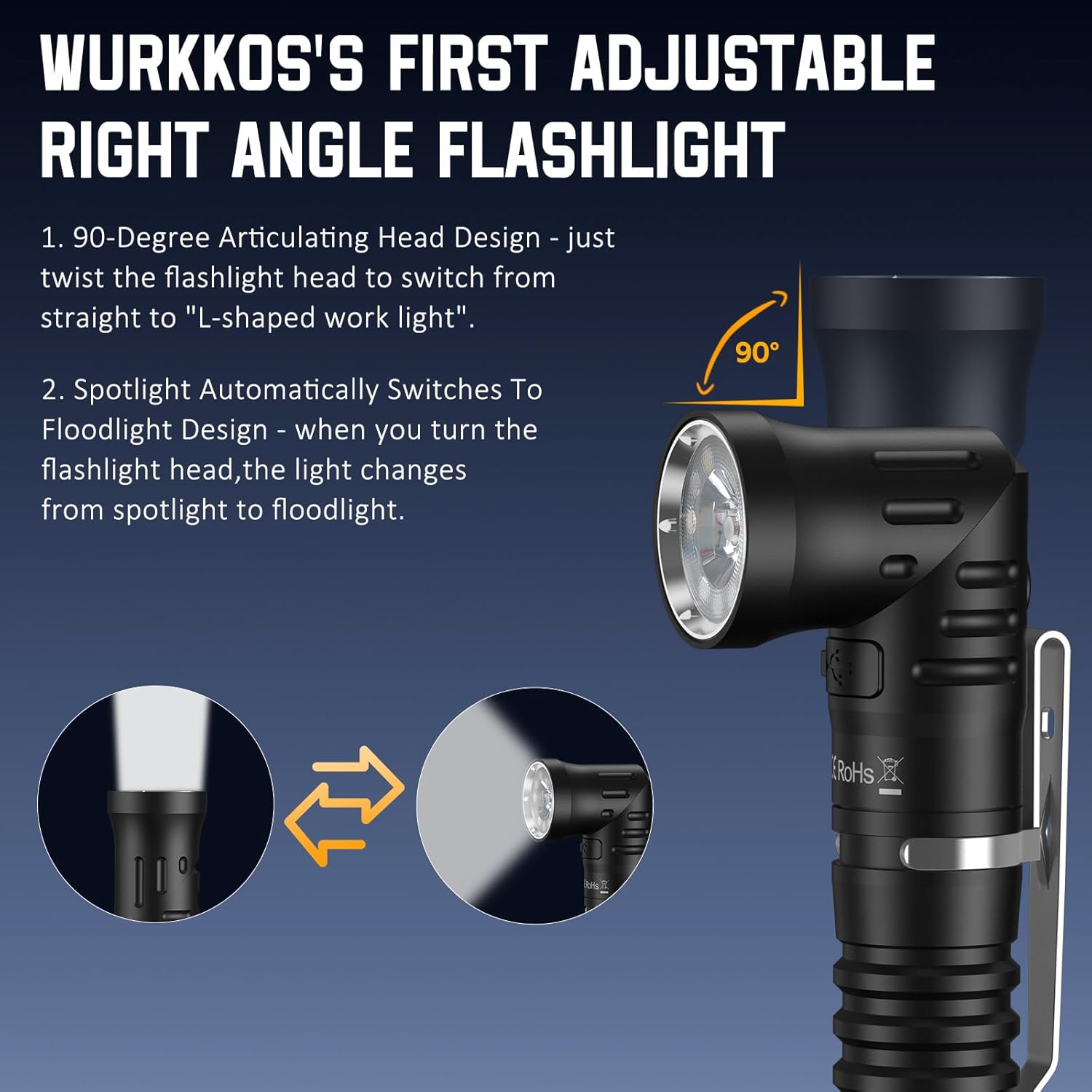
Figure 3: Light Modes and Gears
3. Adjustable Right Angle Head
The unique 90-degree articulating head allows for flexible lighting angles.
- Twist the flashlight head to switch between a straight flashlight and an L-shaped work light.
- The light automatically transitions between spotlight and floodlight profiles as the head is twisted, allowing for precise illumination.

Figure 4: Adjustable Right Angle Head Functionality
4. Magnetic Tail Cap
The strong magnetic base allows the flashlight to attach to any metal surface, providing hands-free operation for various tasks.

Figure 5: Magnetic Tail Cap in Use
5. Official Product Video
Video 1: Official product video showcasing the Wurkkos HD11 Right Angle Flashlight with Red Light features.
Maintenance
Proper maintenance ensures the longevity and optimal performance of your Wurkkos HD11 flashlight.
- Cleaning: Clean the flashlight body with a soft, damp cloth. Do not use abrasive cleaners or solvents.
- O-Ring Maintenance: Regularly inspect the O-rings for wear and tear. Apply silicone grease to the O-rings periodically to maintain the IP68 waterproof rating. Replace damaged O-rings promptly.
- Water Resistance: The HD11 is IP68 waterproof, meaning it can be submerged in 2 meters of water for 30 minutes without damage. Ensure the USB-C port cover is securely closed before exposing the flashlight to water.
- Storage: If storing the flashlight for an extended period, remove the battery to prevent self-discharge and potential damage.
Troubleshooting
If you encounter issues with your Wurkkos HD11, try the following solutions:
- Light Not Turning On:
- Ensure the battery is fully charged.
- Check if the battery is inserted correctly with the positive (+) end towards the head.
- Tighten the tail cap securely. A loose tail cap can prevent electrical contact.
- Dim Light or Intermittent Operation:
- Recharge the battery. Low battery levels can cause dimming.
- Clean the battery contacts and flashlight threads with a clean cloth.
- The flashlight has a temperature control protection function. If the temperature exceeds 60 degrees Celsius, the output will automatically reduce to prevent damage. Allow the flashlight to cool down.
- Head Rotation Issues:
- Ensure no debris is lodged in the rotating mechanism.
- Apply a small amount of silicone grease to the rotating parts if movement feels stiff.
Specifications
| Feature | Specification |
|---|---|
| Brand | Wurkkos |
| Model | HD11 |
| Special Feature | 90 Degree Rotary Head, L-shaped Work Light, Rechargeable, Spotlight/Floodlight/Red light Triple Light Source, Magnetic Tail Cap |
| White Brightness | 1800 Lumens |
| Light Path Distance | 253 Meters |
| Power Source | Battery Powered |
| Battery Type | 1 Lithium Ion (18650) (included) |
| Material | Aluminum |
| Water Resistance Level | IP68 Waterproof (2 meters for 30 minutes) |
| Product Dimensions | 5.12"D x 1.18"W x 1.18"H |
Warranty and Support
Wurkkos offers a Worry-Free 24-Month warranty for the HD11 flashlight. For any inquiries or support needs, please do not hesitate to contact our customer service team. We are committed to providing world-class service and will address your concerns within 24 hours.
For further assistance, please refer to the official Wurkkos website or your purchase platform for contact details.