Introduction
Thank you for choosing the De'Longhi Dedica Maestro Plus EC950.M Espresso and Cappuccino Machine. This manual provides essential information for the safe and efficient use of your appliance. Please read all instructions carefully before operating the machine and retain this manual for future reference.
Important Safety Information
Always follow basic safety precautions when using electrical appliances to reduce the risk of fire, electric shock, and/or injury to persons. This includes:
- Read all instructions before use.
- Do not touch hot surfaces. Use handles or knobs.
- To protect against fire, electric shock, and personal injury, do not immerse cord, plugs, or the appliance in water or other liquid.
- Close supervision is necessary when any appliance is used by or near children.
- Unplug from outlet when not in use and before cleaning. Allow to cool before putting on or taking off parts, and before cleaning the appliance.
- Do not operate any appliance with a damaged cord or plug, or after the appliance malfunctions or has been damaged in any manner.
- The use of accessory attachments not recommended by the appliance manufacturer may result in fire, electric shock, or personal injury.
- Do not use outdoors.
- Do not let cord hang over edge of table or counter, or touch hot surfaces.
- Do not place on or near a hot gas or electric burner, or in a heated oven.
- Always attach plug to appliance first, then plug cord into the wall outlet. To disconnect, turn any control to 'off', then remove plug from wall outlet.
- Do not use appliance for other than intended use.
Setup and First Use
1. Unpacking
Carefully remove all packaging materials from the machine and its accessories. Ensure all components are present: the espresso machine, portafilter, filter baskets, measuring scoop, and descaling solution (if included).
2. Initial Rinse
- Fill the water tank with fresh, cold water up to the MAX level.
- Place a container under the coffee spout and the steam wand.
- Turn on the machine. Allow it to heat up.
- Run hot water through the coffee spout and steam wand to rinse the internal circuits. Repeat this process 2-3 times.
3. Water Hardness Setting
The machine features an Active Temperature Control system. For optimal performance and to prevent limescale buildup, it is recommended to set the water hardness according to your local water supply. Refer to the detailed instructions in the full manual for specific steps on how to test and set water hardness.
Operating Instructions
1. Making Espresso
- Ensure the water tank is filled with fresh water.
- Select the appropriate filter basket (single or double shot) and place it in the portafilter.
- Add ground coffee to the filter basket. For a single shot, use approximately 7g; for a double shot, use up to 20g. Tamp the coffee evenly.
- Attach the portafilter to the brewing head and lock it into place.
- Place one or two cups under the portafilter spouts. The machine's design allows for adjustable cup height.
- Select your desired coffee infusion temperature (92°C, 94°C, or 96°C) using the control panel.
- Press the espresso button to start brewing. The machine will deliver espresso at 15 bar pressure for optimal extraction.

Image: The De'Longhi Dedica Maestro Plus EC950.M brewing two shots of espresso into double-walled glasses, showcasing the rich crema.
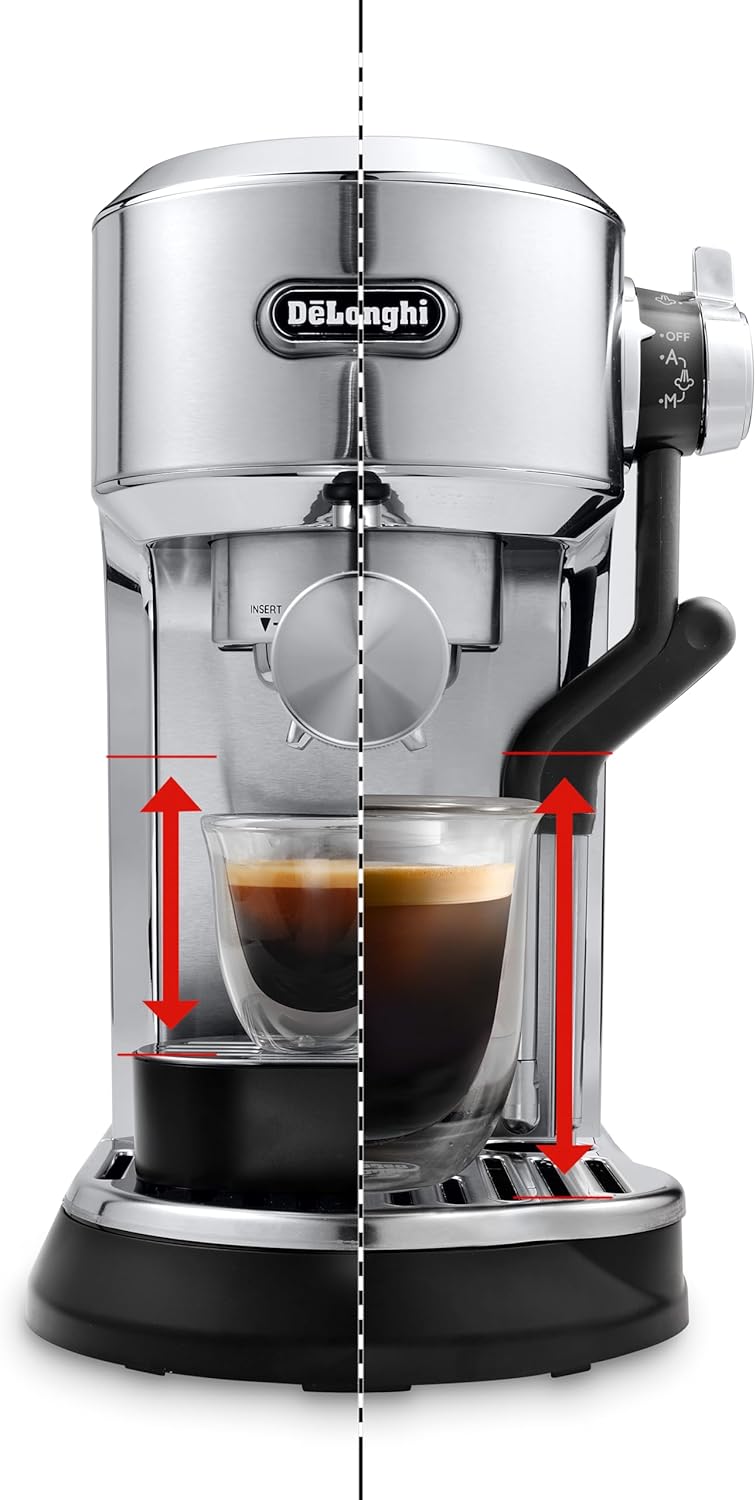
Image: A visual representation of the De'Longhi Dedica Maestro Plus EC950.M's adjustable cup height feature, accommodating various cup sizes for espresso preparation.
2. Using the Automatic LatteArt System
The Auto LatteArt system allows for effortless milk frothing with customizable temperature and texture.
- Fill a milk pitcher with cold milk.
- Position the automatic steam wand into the milk pitcher.
- Select your desired milk temperature profile (60°C, 65°C, or 70°C) and milk texture profile (Latte Art/Microfoam, Fine, or Dense Texture) using the control panel.
- Activate the steam function. The machine will automatically froth the milk to your selected settings.
- Once frothing is complete, clean the steam wand immediately.

Image: The De'Longhi Dedica Maestro Plus EC950.M actively frothing milk in a metal pitcher using its automatic steam wand.
Maintenance and Cleaning
Regular cleaning and maintenance are crucial for the longevity and optimal performance of your espresso machine.
1. Daily Cleaning
- Portafilter and Filter Baskets: After each use, remove spent coffee grounds and rinse the portafilter and filter baskets under hot water.
- Drip Tray: Empty and clean the drip tray daily to prevent overflow and bacterial growth.
- Water Tank: Rinse the water tank daily and refill with fresh water.
- Steam Wand: Immediately after frothing milk, wipe the steam wand with a damp cloth to remove any milk residue. Purge a small amount of steam to clear the internal nozzle.
2. Descaling
Limescale buildup can affect machine performance and coffee taste. The machine will indicate when descaling is required. Use a suitable descaling solution as recommended by De'Longhi and follow the instructions provided with the descaler. Typically, descaling involves:
- Emptying the water tank and filling it with the descaling solution mixed with water according to the descaler's instructions.
- Running the descaling cycle as per the machine's specific instructions (refer to the full user manual).
- Rinsing the machine thoroughly with fresh water after the descaling cycle.
Troubleshooting
This section addresses common issues you might encounter with your De'Longhi Dedica Maestro Plus EC950.M.
| Problem | Possible Cause | Solution |
|---|---|---|
| No coffee dispenses | Water tank empty; coffee too finely ground or tamped too hard; machine clogged. | Fill water tank; use coarser grind or less pressure when tamping; descale machine. |
| Coffee is cold | Cups not pre-warmed; machine not fully heated. | Pre-warm cups with hot water; allow machine to fully heat up before brewing. |
| Milk not frothing properly | Steam wand clogged; milk type unsuitable; insufficient milk. | Clean steam wand; use fresh, cold, high-protein milk; ensure adequate milk volume. |
| Machine is noisy or vibrates excessively | Normal operation; cup placement. | Some noise and vibration are normal during brewing. Ensure cups are stable on the drip tray. |
If the problem persists after attempting these solutions, please contact customer support.
Specifications
- Brand: De'Longhi
- Model Number: EC950.M
- Color: Metal (Grey)
- Product Dimensions: 45 x 19 x 32.5 cm
- Item Weight: 5.5 Kilograms
- Capacity: 1.6 Liters
- Power / Wattage: 1450 Watts
- Voltage: 240 Volts
- Material: Stainless Steel
- Coffee Maker Type: Espresso Machine
- Style: Modern
- Specific Uses For Product: Espresso, Cappuccino, Latte
- Special Features: Auto LatteArt, Active Temperature Control, Greater Control, Compact Iconic Design
- Included Components: Portafilter
Warranty and Support
Your De'Longhi Dedica Maestro Plus EC950.M machine comes with a manufacturer's warranty. Please refer to the warranty card included in your product packaging for detailed terms and conditions, including the warranty period and coverage.
For technical support, service, or to order spare parts, please visit the official De'Longhi website or contact their customer service department. Contact information can typically be found in the warranty documentation or on the De'Longhi website.


