
GODOX V1Pro
Godox V1 Pro Round Head TTL Camera Flash
Model: V1Pro
Introduction
The Godox V1 Pro is an advanced round head TTL camera flash designed for Sony cameras, offering exceptional performance and versatility for professional photographers. It features a unique detachable SU-1 external flash component, high-speed sync capabilities, and a rapid recycle time, ensuring you capture every critical moment with precision and consistent lighting.
What's in the Box

Image: The Godox V1 Pro flash unit shown with its complete set of accessories, including the main flash, detachable SU-1 sub-flash, battery, charger, USB-C cable, mini stand, and protective pouch.
- Godox V1 Pro Round Head TTL Camera Flash
- Detachable SU-1 External Flash Component
- Lithium-Ion Battery (VB30)
- Battery Charger
- USB-C Cable
- Mini Stand
- Protective Pouch
Setup and Charging
Battery Installation
- Locate the battery compartment on the V1 Pro flash unit.
- Insert the provided Lithium-Ion battery (VB30) into the compartment, ensuring correct polarity.
- Close the battery compartment securely.
Charging the Battery

Image: The Godox V1 Pro battery being charged using both the USB-C port directly on the flash and the external VC26 charger for the VB30 battery.
The V1 Pro offers flexible charging options:
- USB-C Charging: Connect the provided USB-C cable to the flash unit and a compatible USB power adapter (not included).
- Dedicated Charger (VC26): Use the included VC26 charger to charge the VB30 battery independently.
A full charge typically takes approximately 1.5 hours. The charging indicator light will change color to indicate charging status (e.g., red for charging, green for fully charged).
Operating Instructions
Mounting the Flash
Slide the V1 Pro's hot shoe onto your camera's hot shoe mount. Secure it by tightening the locking mechanism. The new quick-release hot shoe design allows for fast and secure attachment.
Powering On/Off
Press and hold the power button located on the side of the flash unit to turn it on or off.
TTL/Manual Mode Switching

Image: A detailed view of the dedicated TTL/M switch button on the Godox V1 Pro, allowing for quick mode changes.
The V1 Pro features a dedicated one-click TTL/M switch. Press this button to effortlessly toggle between TTL (Through-The-Lens) automatic flash mode and Manual flash mode, adapting to various shooting scenarios quickly.
Detachable SU-1 External Flash

Image: The Godox V1 Pro demonstrating the detachable SU-1 sub-flash, which can be used as a fill light while the main flash acts as a bounce flash.
The innovative SU-1 component can be attached or detached from the main flash unit. When attached, it functions as a supplementary fill light, allowing the main round head to be used for bounce flash while still providing direct fill. This enhances lighting control and versatility.
Adjusting Flash Head Angle

Image: Illustrations depicting the extensive horizontal (0-330 degrees) and vertical (-7 to 120 degrees) rotation capabilities of the Godox V1 Pro flash head.
The V1 Pro flash head offers extensive rotation for flexible lighting:
- Horizontal Rotation: 0 to 330 degrees.
- Vertical Rotation: -7 to 120 degrees.
This allows for direct flash, bounce flash off ceilings or walls, and various other creative lighting techniques.
Modeling Lamp

Image: A photographer using the Godox V1 Pro, highlighting the adjustable LED modeling lamp that aids in pre-visualizing lighting effects.
The V1 Pro includes a 10-level adjustable LED modeling lamp. This feature allows you to preview the light effect before taking the shot, ensuring precise exposure and composition.
External Power Port
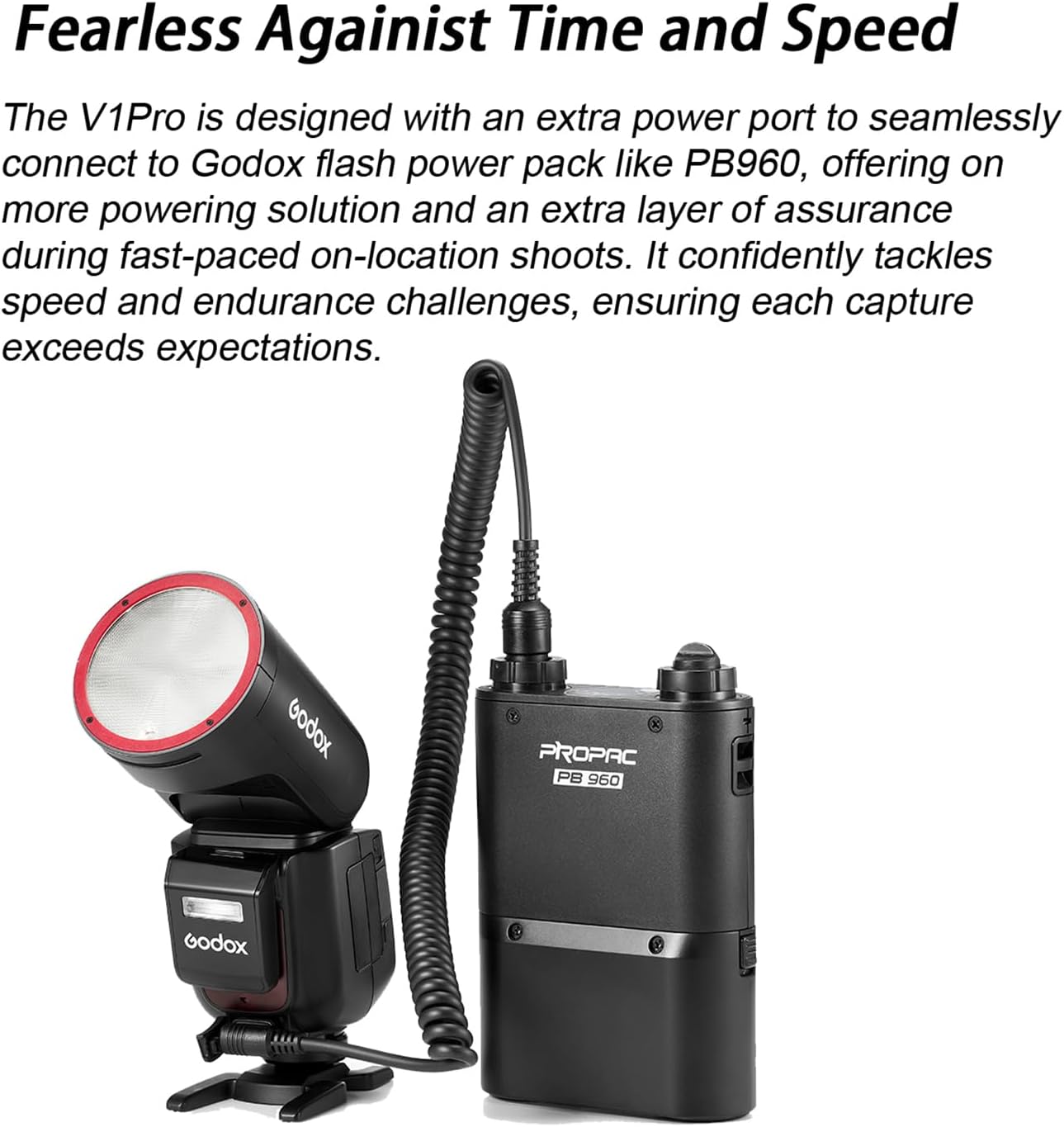
Image: The Godox V1 Pro flash unit connected via its external power port to a Godox PB960 power pack, illustrating extended power capabilities.
For extended shooting sessions and faster recycle times, the V1 Pro is equipped with an external power port. This port allows seamless connection to compatible Godox power packs, such as the PB960, providing additional power and endurance.
Maintenance and Care
- Keep the flash unit clean by wiping it with a soft, dry cloth. Avoid using solvents or abrasive cleaners.
- Store the flash in a cool, dry place, away from direct sunlight and extreme temperatures.
- Ensure the battery contacts are clean to maintain optimal performance.
- Avoid dropping or subjecting the flash to strong impacts.
- When not in use for extended periods, remove the battery.
Troubleshooting
| Problem | Possible Cause | Solution |
|---|---|---|
| Flash does not fire. | Low battery; Incorrect mode; Flash not securely mounted. | Charge battery; Switch to appropriate mode (TTL/M); Re-mount flash securely. |
| Flash recycle time is slow. | Low battery; High power output settings. | Recharge battery; Reduce flash power output; Consider using an external power pack. |
| Flash output is inconsistent. | Dirty contacts; Environmental interference. | Clean hot shoe contacts; Ensure no strong electromagnetic interference. |
| SU-1 sub-flash not working. | Not properly attached; Feature disabled. | Ensure SU-1 is securely attached; Check flash settings for sub-flash activation. |
Specifications
| Feature | Detail |
|---|---|
| Model | V1Pro |
| Compatible Mountings | Sony Alpha |
| Flash Sync Speed | 1/250s or faster (up to 1/8000s High Speed Sync) |
| Recycle Time | Approx. 1.3 seconds (at full power) |
| Full Power Flashes | Up to 500 times (with VB30 battery) |
| Continuous Shots | Up to 100 at full power |
| Flash Coverage | 28-105mm (Auto/Manual Zoom) |
| Swivel Angle (Horizontal) | 0 to 330 degrees |
| Tilt Angle (Vertical) | -7 to 120 degrees |
| Power Source | VB30 Lithium-Ion Battery (included) |
| Charging | USB-C or VC26 Charger |
| Dimensions (Package) | 9 x 7 x 3.5 inches |
| Weight (Item) | 2 pounds |
Warranty and Support
For warranty information and technical support, please refer to the official Godox website or contact your local distributor. Keep your purchase receipt as proof of purchase for warranty claims.
Manufacturer: Godox
Website: www.godox.com
Ask a question about this manual
Ask about setup, troubleshooting, compatibility, parts, safety, or missing instructions. Manuals+ will review the question and use this page’s manual context to help answer it.