
Casio Illuminator AE1500WH Digital Watch User Manual
Model: AE1500WH
1. Overview
The Casio Illuminator AE1500WH is a digital watch designed for durability and functionality. It features an extra-large, high-visibility LCD display for easy reading of time, date, and various functions. Key features include a 10-year battery life, 100-meter water resistance, multiple alarms, a stopwatch, and a countdown timer.
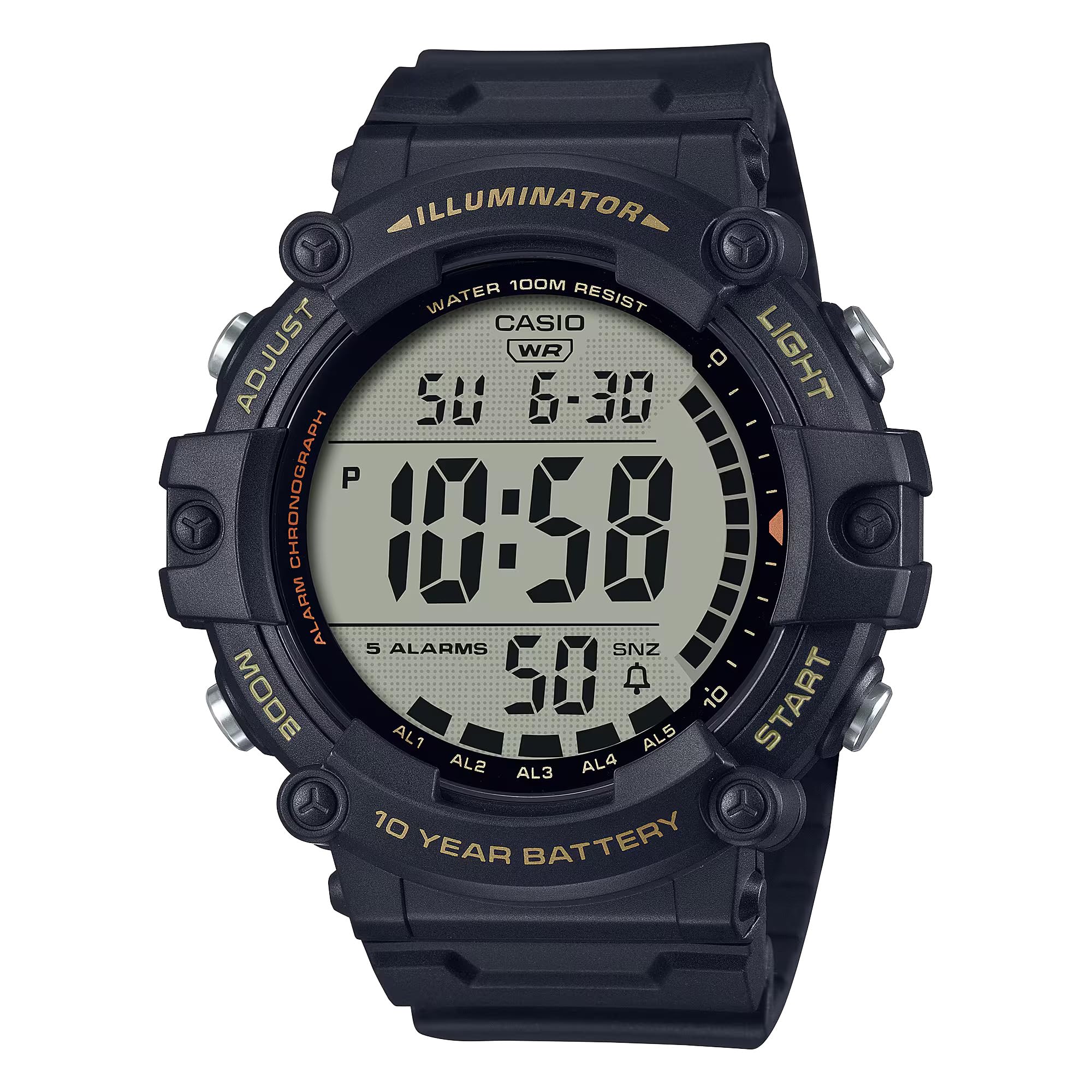
Image: Front view of the Casio Illuminator AE1500WH digital watch, displaying the time and date.
2. Setup
Initial Time and Date Setting
To set the time and date on your Casio AE1500WH watch, follow these steps:
- In the Timekeeping Mode, press and hold the ADJUST button (top left) until the seconds begin to flash, indicating the setting screen.
- Press the MODE button (bottom left) to cycle through the settings: Seconds → Hour → Minute → Year → Month → Day.
- Use the START/STOP button (top right) to increase the flashing value. Use the RESET button (bottom right) to decrease the value (if applicable, for some settings).
- Once all settings are adjusted, press the ADJUST button to exit the setting screen and return to Timekeeping Mode.
The watch supports both 12-hour and 24-hour formats. To switch between formats, press the START/STOP button while the hour/minute setting is flashing.
Video: A demonstration of setting the time and date on the Casio AE1500WH digital watch, including how to use the adjustment buttons.
3. Operating Instructions
Mode Navigation
Press the MODE button (bottom left) to cycle through the different modes: Timekeeping → World Time → Alarm → Stopwatch → Countdown Timer.
Video: A visual guide demonstrating how to navigate through the different operational modes of the watch using the mode button.
Alarms
The watch features 5 multi-function alarms, including one snooze alarm, and an hourly time signal.
- In Alarm Mode, use the START/STOP button (top right) to select the desired alarm (AL1 to AL5 or SNZ for snooze).
- Press and hold the ADJUST button until the alarm time begins to flash.
- Use the MODE button to select between hour and minute settings.
- Use the START/STOP button to change the flashing value.
- Press ADJUST to save the alarm setting.
- To turn an alarm on or off, select the alarm in Alarm Mode and press the RESET button (bottom right).
Stopwatch
The 1/100-second stopwatch measures elapsed time, split times, and 1st-2nd place times.

Image: Icon representing the stopwatch function.
- Navigate to Stopwatch Mode.
- Press the START/STOP button to start the stopwatch.
- Press START/STOP again to stop it.
- Press the RESET button to reset the stopwatch to zero.
- For split times, press RESET while the stopwatch is running to display the split time. Press RESET again to return to elapsed time measurement.
Countdown Timer
The 24-hour countdown timer features an auto-repeat function.

Image: Icon representing the countdown timer function.
- Navigate to Countdown Timer Mode.
- Press and hold the ADJUST button until the timer setting begins to flash.
- Use the MODE button to select between hour and minute settings.
- Use the START/STOP button to change the flashing value.
- Press ADJUST to save the timer setting.
- Press START/STOP to start or stop the countdown.
- Press RESET to reset the timer to its set value.
Dual Time
The Dual Time mode allows you to keep track of a second time zone.
- Navigate to World Time Mode.
- Press and hold the ADJUST button until the city code begins to flash.
- Use the START/STOP button to scroll through city codes (time zones).
- Press ADJUST to set the desired city code. The time for that city will be displayed.
LED Backlight
The watch features an amber LED backlight with afterglow for visibility in low-light conditions.
- Press the LIGHT button (top right) to activate the backlight.
- The backlight will illuminate for a few seconds.
Video: A demonstration of the watch's LED backlight function, showing how it illuminates the display in dark conditions.
4. Maintenance
Battery Life
The Casio AE1500WH is powered by a CR2032 battery, providing approximately 10 years of operation. Battery replacement should be performed by a qualified technician to ensure water resistance is maintained.

Image: Graphic indicating a 10-year battery life.
Water Resistance
The watch is rated for 100-meter water resistance, making it suitable for swimming and general water activities. Avoid operating buttons while the watch is submerged to prevent water intrusion.

Image: Icon representing 100-meter water resistance.
Cleaning and Care
Clean the watch with a soft, dry cloth. For stubborn dirt, use a mild soap solution and rinse thoroughly. Avoid harsh chemicals or abrasive cleaners. Store the watch away from extreme temperatures and strong magnetic fields.
5. Troubleshooting
Display is blank or dim
- Check if the battery is low. Although designed for 10 years, environmental factors can affect battery life.
- Ensure the watch is not exposed to extreme cold, which can temporarily dim the LCD.
Buttons are unresponsive
- Ensure the watch is not in a locked mode (if applicable, refer to specific module instructions for lock functions).
- If the watch has been submerged, ensure it is dry, as water can sometimes affect button responsiveness.
Time is inaccurate
- Re-set the time and date following the instructions in Section 2.
- If inaccuracy persists, the battery may be nearing the end of its life.
6. Specifications
| Feature | Specification |
|---|---|
| Model Number | AE-1500WHX-1AVCF |
| Display Type | Digital |
| Movement Type | Quartz |
| Case Material | Resin |
| Band Material | Resin |
| Water Resistance | 100 meters (330 feet) |
| Battery Life | Approx. 10 years (CR2032) |
| Alarms | 5 multi-function alarms (1 snooze) |
| Stopwatch | 1/100-second, measuring capacity: 23:59'59.99'' |
| Countdown Timer | Measuring unit: 1 second, countdown range: 24 hours, auto-repeat |
| Backlight | Amber LED with afterglow |
| Calendar | Full auto-calendar (to year 2099) |
| Accuracy | ±30 seconds per month |
| Case Diameter | 5.1 centimeters |
| Case Thickness | 16 millimeters |
| Band Length | 23.5 centimeters |
7. Warranty and Support
Warranty Information
This Casio watch comes with a limited manufacturer's warranty. Please refer to the warranty card included with your purchase for specific terms and conditions, including coverage duration and what is covered.
Customer Support
For further assistance, technical support, or service inquiries, please visit the official Casio website or contact their customer service department. Contact information can typically be found on the Casio website or in the documentation provided with your watch.
You can also refer to the official Casio store on Amazon for additional product information: Casio Store


