
1. Overview
The ALGO 8180 IP Audio Alerter is a network-connected speaker designed for voice paging, emergency alerting, and loud ringing applications. This device integrates with SIP-compatible phone systems and supports multicast for wide-area notifications, making it suitable for various environments requiring clear and effective audio communication.
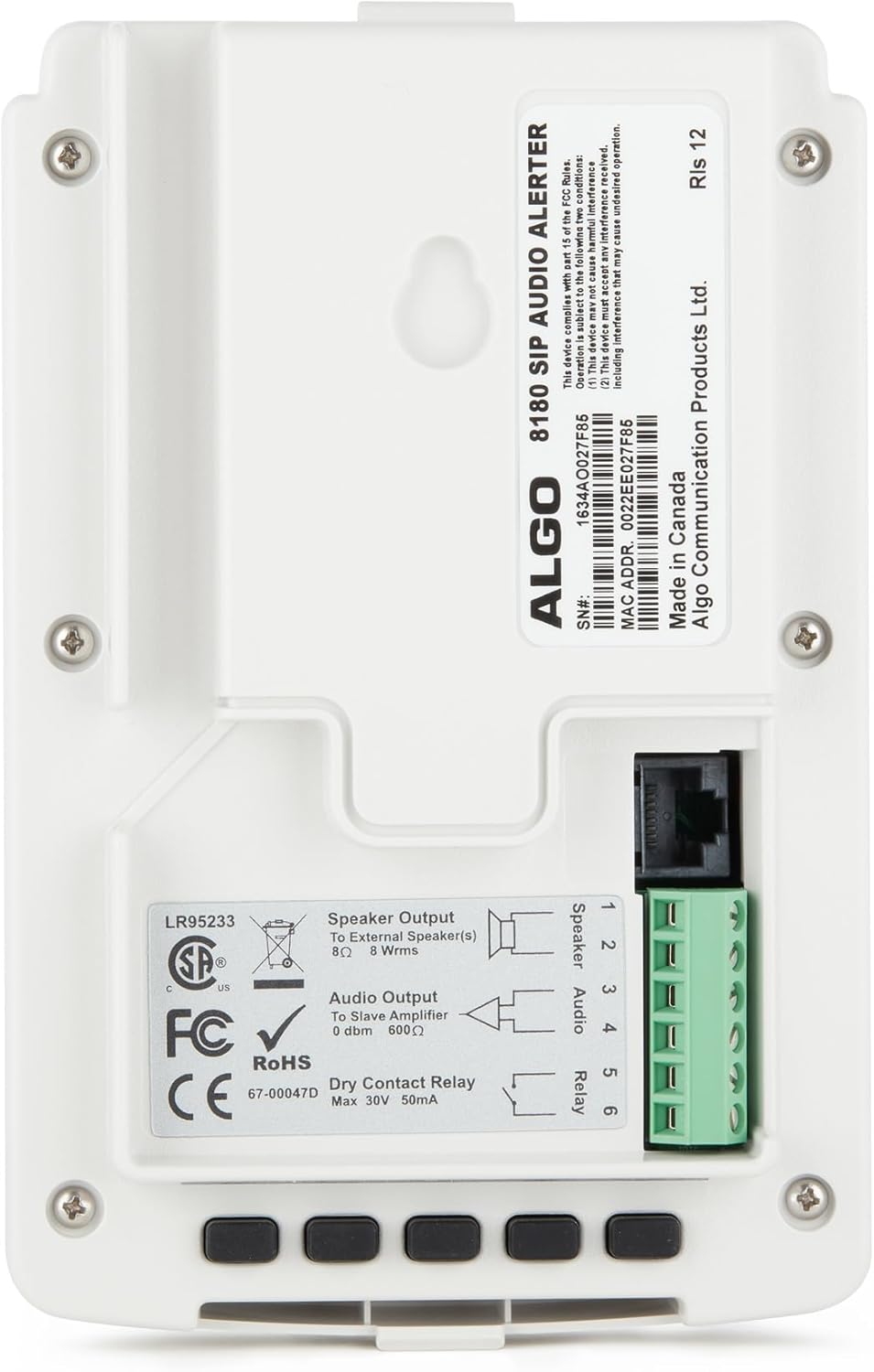
Figure 1: Front view of the ALGO 8180 IP Audio Alerter.
2. Product Features
- Wideband Audio (G.722 codec): Provides clear and intelligible speech for effective communication in various settings.
- Dynamic Volume Control: Automatically adjusts speaker volume based on ambient noise levels, ensuring messages are heard clearly without being overly loud or too quiet.
- Talkback Capability: Features an embedded microphone for two-way communication, allowing for interactive responses.
- Multicast Support: Enables simultaneous broadcasting of live voice pages or ringtones over the network to other Algo IP speakers and visual alerters, either individually or in zone groups.
- Customizable WAV Files: Supports custom audio files for emergency notifications and telephone loud ringing, allowing for tailored alerts.
- Easy Installation: Designed for wall mounting with an included bracket, simplifying the setup process.

Intelligible Audio

Multicast Capable

Embedded Microphone

Wide UC Compatibility
3. Package Contents
Verify that all items are present in the package:
- 1 x ALGO 8180 IP Audio Alerter
- 1 x Mounting Bracket
- Instruction Manual (this document)
4. Installation
4.1 Mounting the Device
The ALGO 8180 is designed for easy wall mounting. Use the provided mounting bracket to secure the device in a desired location. Ensure the mounting surface is stable and can support the device's weight. Allow sufficient space around the device for cable connections and ventilation.
4.2 Network and Power Connection
The 8180 IP Audio Alerter is powered via Power over Ethernet (PoE). Connect a standard Ethernet cable from your network switch (which must support PoE) to the RJ45 port on the device. This single connection provides both power and network connectivity.

Figure 2: Side view showing the Ethernet port and terminal block connections.
4.3 External Connections (Optional)
The device includes a terminal block for optional external connections:
- Speaker Output: Connect an optional external 8 Ohm speaker to terminals 1 and 2 for extended audio coverage.
- Audio Output: Provides a 0 dBm, 600 Ohm audio output for connection to a slave amplifier.
- Dry Contact Relay: Terminals 5 and 6 provide a dry contact relay output (Max 30V, 50mA) for integration with external systems, such as strobe lights or door locks.

Figure 3: Back view displaying connection labels and serial information.
5. Configuration
The ALGO 8180 is configured via a web-based interface. Once connected to the network and powered on, the device will obtain an IP address (either via DHCP or a static IP if pre-configured).
- Access Web Interface: Open a web browser and enter the device's IP address into the address bar.
- Login: Enter the default username and password (refer to the ALGO documentation for default credentials).
- SIP Registration: Configure the SIP registration details (SIP server address, user ID, password) to integrate the 8180 with your IP PBX system.
- Multicast Settings: Set up multicast addresses and zones for group paging and alerting.
- Audio Settings: Adjust volume levels, enable/disable dynamic volume control, and configure talkback sensitivity.
- Upload WAV Files: Upload custom audio files for specific alerts, ringtones, or announcements.
- Firmware Update: Check for and apply any available firmware updates to ensure optimal performance and security.
6. Operation
The ALGO 8180 supports various operational modes for effective communication:
- Voice Paging: Initiate a live voice page by dialing the 8180's extension from a SIP phone. Your voice will be broadcast through the speaker.
- Emergency Alerting: Trigger pre-configured emergency alerts or announcements via SIP or multicast. These can be custom WAV files for specific situations.
- Loud Ringing: Configure the device to play a loud ringtone for incoming calls to a specific extension, useful in noisy environments.
- Talkback Functionality: When enabled, the embedded microphone allows for two-way communication. After a page, users near the speaker can respond, and their voice will be transmitted back to the paging source.
- Dynamic Volume Control: The device continuously monitors ambient noise and adjusts its output volume to ensure messages are audible without manual intervention.
7. Maintenance
7.1 Cleaning
To clean the ALGO 8180, gently wipe the exterior with a soft, dry cloth. Do not use liquid cleaners, aerosols, or abrasive materials, as these can damage the device.
7.2 Firmware Updates
Periodically check the official ALGO website for available firmware updates. Firmware updates can provide new features, performance improvements, and security enhancements. Follow the instructions provided with the firmware package for a safe and successful update process.
8. Troubleshooting
If you encounter issues with your ALGO 8180, refer to the following common troubleshooting steps:
- No Power/Indicator Light Off: Ensure the Ethernet cable is securely connected and that your network switch is providing Power over Ethernet (PoE). Test with a known working PoE port or injector.
- No Audio Output: Verify that the volume settings in the web interface are not set to zero. Confirm that the SIP registration is active and that the device is receiving audio streams. If using multicast, check multicast group settings.
- Network Connectivity Issues: Check the device's IP address, subnet mask, and gateway settings in the web interface. Ensure there are no firewall rules blocking communication to or from the device. Ping the device's IP address from a computer on the same network.
- Poor Audio Quality: Ensure sufficient network bandwidth is available. Check the audio codec settings (G.722 is recommended for wideband audio). Verify that the microphone is not obstructed if talkback quality is poor.
- Device Not Registering with SIP Server: Double-check the SIP server address, user ID, and password. Ensure the SIP server is reachable from the device's network location.
9. Specifications
| Feature | Specification |
|---|---|
| Brand | ALGO |
| Model Number | 8180 |
| Connectivity Technology | Ethernet |
| Connectivity Protocol | SIP |
| Power Source | Ethernet Powered (PoE) |
| Speaker Maximum Output Power | 24 Watts |
| Audio Output Mode | Wideband |
| Speaker Type | Multimedia, Wideband |
| Additional Features | Wideband Speaker, Two-Way Talk, Ambient Noise Detection, Embedded Microphone |
| Mounting Type | Wall Mount |
| Enclosure Material | Plastic |
| Color | Black |
| Item Weight | 1.5 Pounds |
| Number of Microphones | 1 |
| Specific Uses For Product | Classroom, factory, warehouse, utility plant, machine shop, garage, lunch room, kitchen, emergency/safety/security notification and alerting, Voice over IP (VoIP) paging, IP loud ringing |
9.1 Application Examples

Classroom

Hospital

Warehouse
10. Warranty Information
The ALGO 8180 IP Audio Alerter comes with a limited warranty. The warranty period is 12 months from the date of purchase, not to exceed 18 months from the date of manufacture. Please retain your proof of purchase for warranty claims.
11. Support
For additional support, technical assistance, or to access the latest documentation and firmware, please visit the official ALGO website or contact your authorized ALGO reseller. You can find more information at ALGO Communication Products Store.


