
Introduction
The M-VAVE Tank-B is a portable and multifunctional bass multi-effects processor designed for bass guitarists. It integrates a wide range of effects, amplifier models, and cabinet simulations into a compact, rechargeable unit. This manual provides essential information for setting up, operating, maintaining, and troubleshooting your Tank-B processor.
Key Features
- Integrated rechargeable battery for portable use.
- 36 editable presets allowing for customized effects chains.
- Comprehensive effects suite including Noise Gate, Compressor, 9 Preamp selection slots, 3-band EQ, 3 Modulations, 1 Delay, 1 Reverb, and 8 IR CAB slots.
- Built-in Tuner for accurate instrument tuning.
- Computer software and mobile application support for preset editing, exchange, sharing, import/export, IR file import, factory reset, and customizable footswitch light colors.
- Supports mobile phone recording, wireless connection, earphone monitoring, and XLR balanced output.
- Functions as a computer sound card.
Product Overview
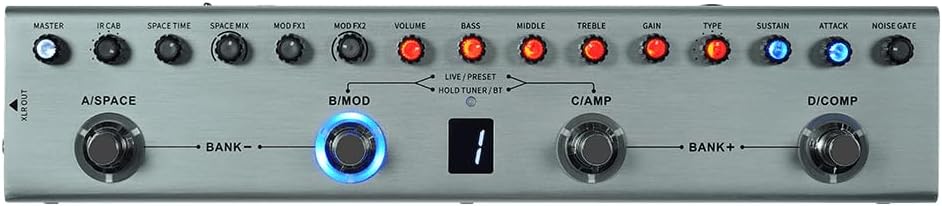
Figure 1: Top view of the Tank-B, highlighting the control layout including Master, IR Cab, Space Time, Space Mix, Mod FX1, Mod FX2, Volume, Bass, Middle, Treble, Gain, Type, Sustain, Attack, and Noise Gate knobs, along with four footswitches (A/Space, B/Mod, C/Amp, D/Comp) and a digital display.

Figure 2: Angled view of the Tank-B, providing a perspective of the unit's compact size and the arrangement of its controls and footswitches.

Figure 3: Top and rear view of the Tank-B, illustrating the input (IN), output (OUT), headphone jack, and USB port for connectivity.

Figure 4: Bottom view of the Tank-B, displaying the product label with model name "TANK-B Combined Effects Pedal" and power requirements (USB 5V > 300mA).
Setup
Charging the Battery
The Tank-B features a built-in rechargeable battery. Before first use, ensure the unit is fully charged. Connect the Tank-B to a standard USB power adapter (not included) or a computer's USB port using the provided USB cable. The charging indicator will show the charging status.
Connecting Your Instrument
- Connect your bass guitar to the IN jack on the Tank-B using a standard 1/4-inch instrument cable.
- Connect the OUT jack of the Tank-B to your amplifier, mixer, or audio interface using a 1/4-inch instrument cable. For balanced output, use the XLR OUT.
- For silent practice or monitoring, connect headphones to the dedicated headphone jack.
Powering On/Off
Press and hold the power button (if available, or a specific footswitch combination) to turn the unit on or off. Refer to the quick start guide included with your product for exact power-on procedures.
Operating Instructions
Preset Selection
The Tank-B features 36 editable presets. Use the BANK+ and BANK- footswitches to navigate through different banks of presets. Each footswitch (A, B, C, D) within a bank corresponds to a specific preset.
Editing Presets
To edit a preset, select it and then adjust the various knobs (e.g., Volume, Bass, Middle, Treble, Gain, Type, Sustain, Attack, Noise Gate, IR Cab, Space Time, Space Mix, Mod FX1, Mod FX2) to achieve your desired sound. Changes can be saved to the current preset slot. Refer to the official software/app manual for detailed instructions on saving and managing presets.
Using the Tuner
The built-in tuner can be activated by holding down a specific footswitch (often indicated as "HOLD TUNER/BT"). The display will show tuning information.
Software/App Connectivity
Download the official M-VAVE software or mobile application from the manufacturer's website. Connect the Tank-B to your computer via USB or wirelessly to your mobile device (if supported) to access advanced editing features, import IR files, and perform firmware updates.
For more detailed operational procedures, including specific footswitch functions and advanced parameter adjustments, please consult the comprehensive user guide available on the M-VAVE official website: www.m-vave.com
Maintenance
- Keep the unit clean by wiping it with a soft, dry cloth. Avoid using abrasive cleaners or solvents.
- Do not expose the unit to extreme temperatures, humidity, or direct sunlight.
- Avoid dropping the unit or subjecting it to strong impacts.
- When not in use for extended periods, store the unit in a cool, dry place and ensure the battery is partially charged (not fully depleted or fully charged) to prolong its lifespan.
Troubleshooting
Unit Does Not Power On
- Ensure the battery is sufficiently charged. Connect the unit to a USB power source and allow it to charge for at least 30 minutes before attempting to power on again.
- Verify that the USB cable is securely connected to both the Tank-B and the power source.
- Try a different USB cable or power adapter to rule out faulty accessories.
No Sound Output
- Check all cable connections (instrument to IN, OUT to amplifier/mixer).
- Ensure the volume knob on the Tank-B is turned up.
- Verify that your amplifier or mixer is powered on and its volume is set appropriately.
- Check if the active preset has any effects that might mute the sound or significantly reduce volume.
Unexpected Behavior / Freezing
- Try performing a soft reset by powering the unit off and then on again.
- If issues persist, consider performing a factory reset via the computer software/app (this will erase all user presets).
- Ensure your unit's firmware is up to date by checking the M-VAVE official website.
Specifications
| Attribute | Detail |
|---|---|
| Model Number | Tank-B |
| Item Weight | 14.1 ounces |
| Package Dimensions | 9.84 x 3.15 x 1.97 inches |
| Power Source | Battery Powered (Rechargeable) |
| Signal Format | Analog |
| Audio Output Effects | Multi-Effect |
| Controls Type | Footswitch, Knobs |
| Color | Silver |
| Date First Available | February 28, 2024 |
Warranty and Support
For warranty information, technical support, or service inquiries, please contact M-VAVE directly through their official website or the retailer from whom you purchased the product. Keep your proof of purchase for warranty claims.
Official Website: www.m-vave.com


