
1. Introduction
Thank you for purchasing the PopBloom Hertz 54 LED Aquarium Light. This manual provides detailed instructions for the installation, operation, and maintenance of your new aquarium lighting system. This system is designed to provide optimal lighting for freshwater planted aquariums, featuring full spectrum output and smart-APP control for a natural simulation of light cycles.
Important Notice: This light system is controlled by a smart-APP and requires a 2.4GHz Wi-Fi network for full functionality.
2. Package Contents
Please verify that all items listed below are included in your package:
- 1 x PopBloom Hertz 54 LED Light (54cm)
- 1 x Arm Kit for mounting
- 1 x Power Supply
- 1 x Power Plug
- 1 x User Manual (this document)

Image: The PopBloom Hertz 54 LED Aquarium Light unit, showcasing its sleek design and LED array.
3. Specifications
| Feature | Detail |
|---|---|
| Model Number | FK4BP1-A |
| Panel Dimension | 54 x 12 x 3.6 cm (21.5 x 4.7 x 1.4 inches) |
| Suitable Tank Size | 60-80 cm (24-30 inches) length, 60 cm (24 inches) width |
| AC Adaptor Input | 100-265V (worldwide compatible) |
| Electrical Power | 60 Watts |
| LED Quantity | 112 pcs |
| Channels & Wattage |
|
| Base Material | Aluminum |
| Control Method | Smart-APP (Wi-Fi + Bluetooth) |
| Water Resistance Level | Not Water Resistant |
| Indoor/Outdoor Usage | Indoor |
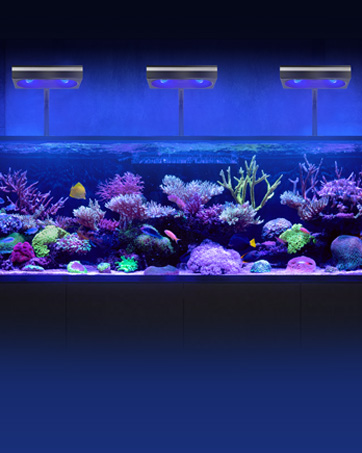
Image: Professional detail setup showing the panel dimensions of 54cm (21.3 inches) in length and 3.6cm (1.4 inches) in thickness.

Image: Visual representation of the light's parameters, including 60W LED array, 3676 lm, 150 PAR at water surface, and spectral distribution across its four channels with CIE 1931 color graph, photometric spectrum, and PPF spectrums.

Image: Breakdown of the four LED channels, their colors (red, blue, white, green), wattage, and intended functions for plant growth, moonlight, day white adjustment, and vivid coloration.
Image: An aquarium showcasing aquatic plants and fish under the PopBloom light, illustrating its close-to-sunlight spectrum and high CRI (Color Rendering Index) of 90 for optimal aquatic plant health.
4. Setup Instructions
4.1 Arm Kit Installation
The included arm kit allows for flexible mounting on various tank types. Follow these steps to install the light:
- Assemble the arm kit components as shown in the diagram.
- Attach the mounting clamp to the rim of your aquarium. Ensure it is securely fastened. The arm kit is adjustable for rimless, horizontal, and rimmed tanks.
- Mount the light fixture onto the arm. The light can be installed along the length side or width side of the arm.
- Adjust the scalable length (2-16cm) and adjustable height (19-34cm) to position the light optimally over your aquarium.

Image: Illustration of the adjustable arm kit, demonstrating how to mount the light along the length or width, and showing compatibility with different tank rim types (rimless, horizontal, rimmed).
4.2 Power Connection
- Connect the power supply to the light fixture.
- Plug the power adapter into a suitable electrical outlet (100-265V).
- Ensure all connections are secure before proceeding.
4.3 Smart-APP Installation and Connection
The PopBloom Hertz 54 LED light is controlled via a smart application. Please follow these steps to set up the app:
- Download the "SmartLife" or "Tuya Smart" app from the App Store (iOS) or Google Play Store (Android). You can scan the QR codes provided in the product images for direct links.
- Open the app and register for an account or log in if you already have one.
- Ensure your mobile device is connected to a 2.4GHz Wi-Fi network. The light system only supports 2.4GHz Wi-Fi.
- Add a new device in the app. Follow the on-screen instructions to connect your PopBloom Hertz 54 LED light. This typically involves putting the light into pairing mode (refer to the app's specific instructions for pairing).
- Once connected, you can control the light through the app.

Image: The "All in one APP" interface, illustrating easy setup, online monitoring, notifications, and group control capabilities for up to 10 lights, with QR codes for App Store and Google Play downloads.

Image: A child observing an aquarium illuminated by the PopBloom light, with a smartphone displaying the Wi-Fi Smart Control app interface, showing multiple light grouping and remote control features.
Download the SmartLife App: SmartLife App
Download the Tuya Smart App: Tuya Smart App
5. Operating Instructions
The PopBloom Hertz 54 LED light offers advanced control through the SmartLife/Tuya Smart app.
5.1 App Control Features
- WiFi + Bluetooth Connectivity: Connects wirelessly for convenient control.
- Group Control: One system can control up to 10 light panels simultaneously.
- Remote Functionality: Control your light from anywhere at any time via the app.
- Programmable Modes: Set custom lighting schedules.
- Natural Simulation: Simulate sunrise, sunset, moonlight, and lightning effects.
- 24-Hour Day-Night Cycle: Create a realistic lighting environment for your aquatic inhabitants.
- Lunar Cycle: Activate a 29-day lunar cycle to mimic natural moon phases.
- DIY Mode: Customize up to 8 time points to adjust the time and brightness of each channel according to your specific needs.
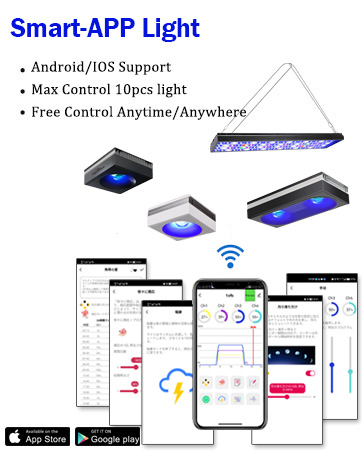
Image: A comparison chart highlighting the advanced features available with Smart-APP control (WiFi + Bluetooth, group control, remote operation, screen display, programmable, WiFi support, iOS/Android, full simulation including lightning and lunar cycle) versus basic remote control functionality (only sunrise/sunset, moonlight).
5.2 Channel Adjustment
The light features four independent channels, allowing for precise control over the spectrum:
- Channel 1 (Plant Growth Red): Promotes healthy plant growth.
- Channel 2 (Moonlight): Provides a gentle blue light for nighttime viewing.
- Channel 3 (Day White Adjust): Main white light for general illumination and brightness adjustment.
- Channel 4 (Vivid Color): Enhances the colors of fish and plants.
Use the app to adjust the intensity of each channel independently to achieve your desired lighting conditions and spectrum for optimal plant growth and fish coloration.
6. Maintenance
Proper maintenance ensures the longevity and optimal performance of your PopBloom Hertz 54 LED Aquarium Light.
- Cleaning: Regularly wipe the light fixture with a soft, dry cloth to remove dust and water spots. Ensure the light is unplugged before cleaning. Do not use abrasive cleaners or immerse the unit in water.
- Heat Dissipation: The aluminum chassis is designed for efficient heat dissipation. Ensure there is adequate airflow around the fixture and that the vents are not obstructed.
- Water Exposure: This product is not water resistant. Avoid direct contact with water to prevent damage and electrical hazards.
7. Troubleshooting
If you encounter issues with your PopBloom Hertz 54 LED Aquarium Light, please refer to the following common solutions:
- Light Not Turning On:
- Check if the power plug is securely connected to both the light fixture and the electrical outlet.
- Verify that the electrical outlet is functioning correctly by plugging in another device.
- App Connection Issues:
- Ensure your Wi-Fi network is 2.4GHz. The light does not support 5GHz networks.
- Restart your Wi-Fi router and try connecting again.
- Make sure your mobile device is close to the light fixture during the pairing process.
- Reset the light to factory settings (refer to app instructions for specific steps) and attempt to re-pair.
- Light Output Irregularities:
- Check the app settings to ensure the channels are set to the desired intensity and that no schedules are interfering.
- If individual LEDs are not functioning, contact customer support.
8. Warranty & Support
Warranty: The PopBloom Hertz 54 LED Aquarium Light comes with a one-year manufacturer warranty from the date of purchase. This warranty covers defects in materials and workmanship under normal use. It does not cover damage caused by misuse, accidents, unauthorized modifications, or improper installation.
Customer Support: For technical assistance, warranty claims, or any questions regarding your product, please contact PopBloom customer support through the retailer where you purchased the product or visit the official PopBloom website for contact information.
For more information, visit the PopBloom Store on Amazon.


