
1. Introduction
This manual provides essential instructions for the safe and effective use of your PKPOWER AC DC Adapter Charger. This adapter is designed to provide reliable power for compatible devices, specifically the Texas Instruments AC9940 6VDC/4A power supply. Please read this manual thoroughly before use and retain it for future reference.
2. Safety Information
Your PKPOWER AC DC Adapter Charger is equipped with multiple safety features to protect your devices and ensure safe operation. Adhere to the following guidelines:
- Over Voltage Output Protection (OVP): Prevents damage from excessive voltage output.
- Over Current Output Protection (OCP): Safeguards against damage from excessive current.
- Short Circuit Output Protection (SCP): Protects against short-circuit conditions.
PK-Power products are CE, FCC, and RoHS certified, indicating compliance with health, safety, and environmental protection standards.

Image 1: Internal components illustrating the built-in safety protections including over charge, over voltage, short-circuit, over current, and over temperature protection.
3. Package Contents
Verify that all items are present in the package:
- 1 x PKPOWER AC DC Adapter Charger
4. Setup
Follow these steps to set up your AC DC Adapter Charger:
- Verify Compatibility: Ensure your device requires a 6VDC/4A power supply and is compatible with the adapter's connector type. This adapter is specifically designed for the Texas Instruments AC9940.
- Connect to Device: Insert the DC output connector of the adapter firmly into the power input port of your device.
- Connect to Power Outlet: Plug the AC input cord into a standard 100-240V AC wall outlet.
- Power On: Once connected, your device should receive power.

Image 2: Detailed view of the product, highlighting the 2-pin plug for safer and more durable connection, and the copper interface for stable output and firm connection.
5. Operating Instructions
The PKPOWER AC DC Adapter Charger operates automatically once connected. It provides a stable 6VDC output at 4A to your compatible device. No user intervention is required during operation.
- Ensure the adapter is placed in a well-ventilated area to prevent overheating.
- Do not cover the adapter during use.
- Disconnect the adapter from the power outlet when not in use for extended periods.
6. Maintenance
To ensure the longevity and optimal performance of your adapter, follow these maintenance tips:
- Cleaning: Use a dry, soft cloth to clean the adapter. Do not use liquid cleaners or aerosols.
- Storage: Store the adapter in a cool, dry place away from direct sunlight and moisture when not in use.
- Cable Care: Avoid bending or crimping the power cord excessively. Do not place heavy objects on the cord.
7. Troubleshooting
If you encounter issues with your adapter, refer to the following troubleshooting steps:
- No Power to Device:
- Ensure the adapter is securely plugged into both the wall outlet and your device.
- Check if the wall outlet is functional by plugging in another device.
- Verify that your device's power input port is not damaged.
- Adapter Overheating:
- Ensure the adapter is in a well-ventilated area and not covered.
- Disconnect the adapter and allow it to cool down before resuming use.
- Device Not Charging/Functioning Correctly:
- Confirm that your device's power requirements (voltage and amperage) match the adapter's specifications.
- Ensure the adapter is compatible with your specific device model (Texas Instruments AC9940).
If the problem persists after following these steps, please contact customer support.
8. Specifications
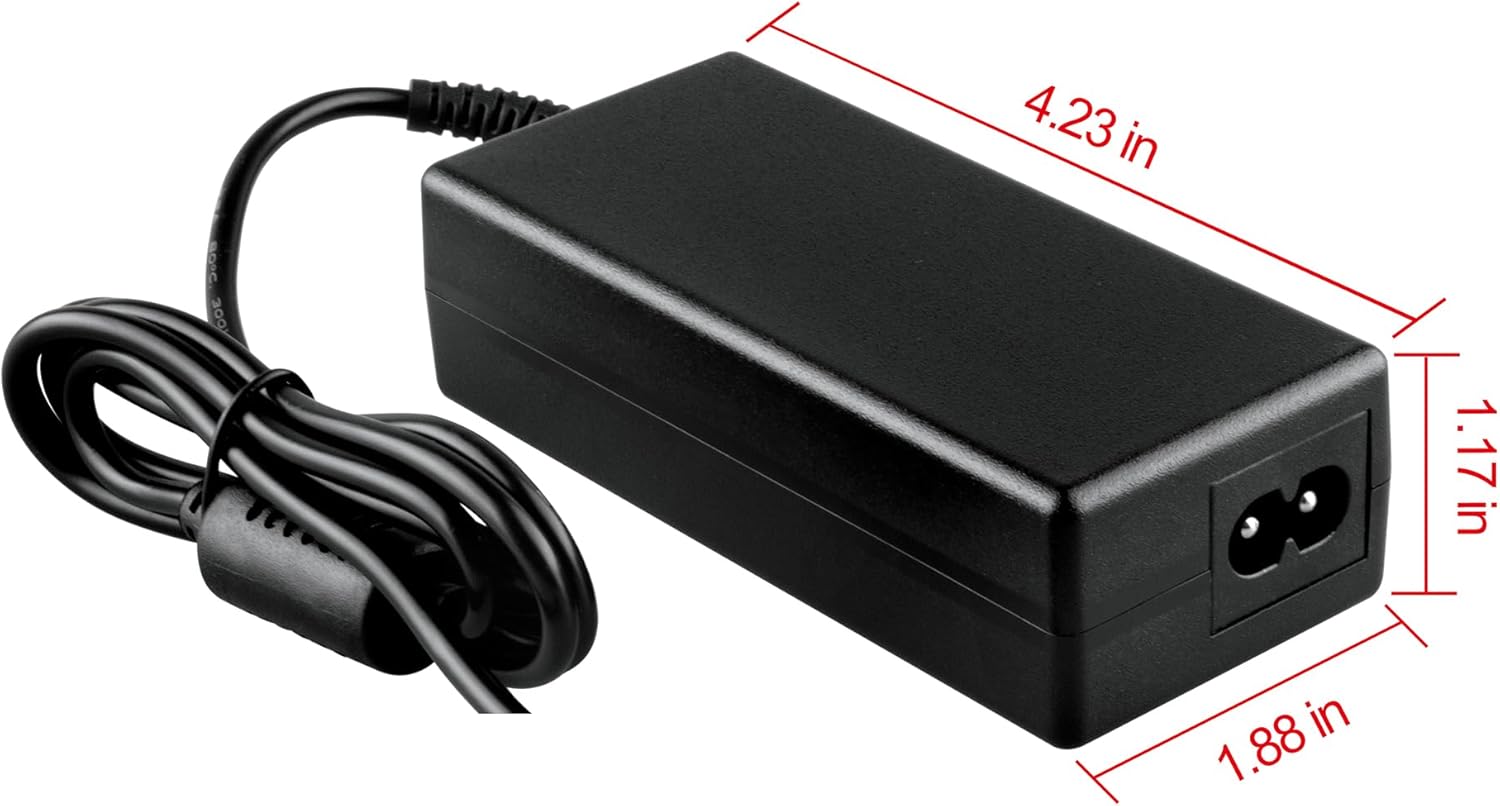
Image 3: The PKPOWER AC DC Adapter Charger showing its dimensions: approximately 4.23 inches (length), 1.88 inches (width), and 1.17 inches (height).
| Feature | Specification |
|---|---|
| Model | B0CWP44H4W |
| Input Voltage Range | 100-240V AC (Worldwide Compliant) |
| Output Voltage | 6V DC |
| Output Amperage | 4 Amps |
| Output Wattage | 18 Watts |
| Compatible Devices | Texas Instruments AC9940 6VDC/4A Power Supply |
| Connector Type | Auxiliary |
| Product Dimensions | 6 x 4 x 2 inches (approx. 15.24 x 10.16 x 5.08 cm) |
| Item Weight | 1.56 pounds (approx. 0.71 kg) |
| Color | Black |
| Manufacturer | Shenzhen Sunshine Technological Co., Ltd |
9. Warranty and Support
PKPOWER is committed to providing quality products and customer satisfaction. For any inquiries or support needs, our friendly and reliable customer service team is available to assist you.
- Customer Service Response: Our team aims to respond to all inquiries within 24 hours.
- For support, please refer to the contact information provided with your purchase or visit the official PKPOWER store online.