1. Introduction
The Hantek HDG6000B series, including the HDG6132B, is a versatile instrument integrating multiple functions: arbitrary waveform generator, pulse generator, 16-bit word generator, 7-digit cymometer, and function generator. It is designed to generate and output stable, accurate, and low-distortion signals for various applications. This manual provides essential information for the safe and effective operation of your HDG6132B unit.
2. Safety Information
Please read the following safety precautions carefully before operating the instrument to avoid personal injury or damage to the product or any connected products. This product is designed for use by trained personnel only.
- Power Source: Connect the instrument to a power source that complies with the specified voltage and frequency requirements.
- Grounding: Ensure the instrument is properly grounded to prevent electric shock.
- Ventilation: Do not block ventilation openings. Ensure adequate airflow around the instrument to prevent overheating.
- Environment: Operate the instrument in a dry, well-ventilated area, away from direct sunlight, high temperatures, humidity, and corrosive gases.
- Cleaning: Disconnect power before cleaning. Use a soft, dry cloth. Do not use liquid or spray cleaners.
- Servicing: Refer all servicing to qualified service personnel. Do not attempt to repair the instrument yourself.
3. Product Overview
The Hantek HDG6132B features a large 7.0-inch LCD color display with 800x640 resolution for clear and intuitive user interaction. It offers a wide output frequency range and high sampling rate for precise waveform generation.
3.1 Key Features
- Output frequency range: 1uHz ~ 130MHz (for HDG6132B model).
- Up to 1.25GSa/s sampling rate.
- 16-bit vertical resolution for accurate waveform output.
- Up to 64M memory depth for detailed waveform creation.
- Rich modulation functions: AM, FM, PM, 2ASK, 2FSK, 2PSK, PWM.
- Built-in 7-digit high-resolution 200MHz cymometer.
- Standard communication interfaces: USB Host, USB Device.
- Over 150 built-in arbitrary waveforms (e.g., exponential rise, ECG, Gaussian).
3.2 Front Panel
The front panel provides access to the display, control buttons, and output connectors. The intuitive layout allows for easy navigation and parameter adjustment.

Figure 1: Front view of the HDG6132B Arbitrary Waveform Generator. The left side features the large color display showing waveform parameters for two channels (CH1 and CH2). The right side contains a numeric keypad, function buttons (e.g., Mod, Sweep, Burst, Utility), and a rotary knob for fine adjustments. Below the display are USB ports and data generator output. On the far right, there are two BNC output connectors for CH1 and CH2, along with a 10MHz In/Out and Counter In port.
3.3 Included Accessories
The following items are typically included with your HDG6132B unit:

Figure 2: Contents of the HDG6132B package. This image displays the main unit, a power cable, two BNC coaxial cables for signal output, and a printed user manual.
- Hantek HDG6132B Arbitrary Waveform Generator unit
- Power Cord
- USB Cable
- BNC Coaxial Cables (x2)
- User Manual (printed)
4. Setup
4.1 Unpacking and Inspection
- Carefully remove the instrument and all accessories from the packaging.
- Inspect the instrument for any signs of damage during transit. If damage is found, contact your supplier immediately.
- Verify that all accessories listed in Section 3.3 are present.
4.2 Power Connection
- Ensure the power switch on the rear panel is in the OFF position.
- Connect the provided power cord to the AC input on the rear panel of the instrument.
- Plug the other end of the power cord into a grounded AC power outlet.
4.3 Initial Power On
- Press the power switch on the rear panel to the ON position.
- The instrument will perform a self-test and display the boot-up screen.
- Once the main interface appears, the instrument is ready for operation.
5. Operating Instructions
This section provides general guidance on operating the HDG6132B. For detailed instructions on specific functions, refer to the comprehensive user manual provided with the product.
5.1 Basic Waveform Generation
- Select Channel: Press the CH1 or CH2 button on the front panel to select the desired output channel.
- Select Waveform Type: Press the Wave button to cycle through standard waveforms (Sine, Square, Triangle, Pulse, etc.) or select an arbitrary waveform.
- Adjust Frequency: Use the Freq button and the rotary knob or numeric keypad to set the desired frequency.
- Adjust Amplitude: Use the Ampl button and the rotary knob or numeric keypad to set the peak-to-peak amplitude.
- Adjust Offset: Use the Offset button to set the DC offset voltage.
- Enable Output: Press the Output button for the selected channel (CH1 or CH2) to enable the signal output. The button will illuminate when active.
5.2 Modulation Functions
The HDG6132B supports various modulation types. To access these functions:
- Press the Mod button on the front panel.
- Select the desired modulation type (AM, FM, PM, etc.) from the on-screen menu.
- Adjust the modulation parameters (e.g., modulation depth, frequency) using the corresponding soft keys and the rotary knob.
5.3 Using the Cymometer
The built-in 7-digit 200MHz cymometer allows for external frequency measurement.
- Connect the external signal to the Counter In input on the front panel.
- Press the Counter button to activate the cymometer function.
- The measured frequency will be displayed on the screen.
6. Maintenance
6.1 Cleaning
- Always disconnect the power cord before cleaning the instrument.
- Use a soft, dry cloth to wipe the exterior surfaces.
- For stubborn dirt, a cloth lightly dampened with mild detergent and water may be used, followed by a dry cloth.
- Do not use abrasive cleaners, solvents, or chemical agents that may damage the instrument's finish or components.
6.2 Storage
- When not in use for extended periods, store the instrument in a clean, dry environment.
- Avoid extreme temperatures and humidity.
- Protect the instrument from dust and direct sunlight.
7. Troubleshooting
This section lists common problems and their possible solutions. If the problem persists, contact Hantek customer support.
| Problem | Possible Cause | Solution |
|---|---|---|
| No power when turned on. | Power cord not connected; Power outlet faulty; Power switch off. | Check power cord connection; Test power outlet; Ensure power switch is ON. |
| No signal output. | Output channel not enabled; Amplitude set to 0; Incorrect waveform parameters. | Press the Output button; Adjust amplitude; Verify frequency and offset settings. |
| Display is blank or frozen. | System error; Temporary software glitch. | Restart the instrument. If the problem persists, contact support. |
8. Specifications
The following table provides detailed technical specifications for the Hantek HDG6132B Arbitrary Waveform Generator. Note that specifications are subject to change without notice.
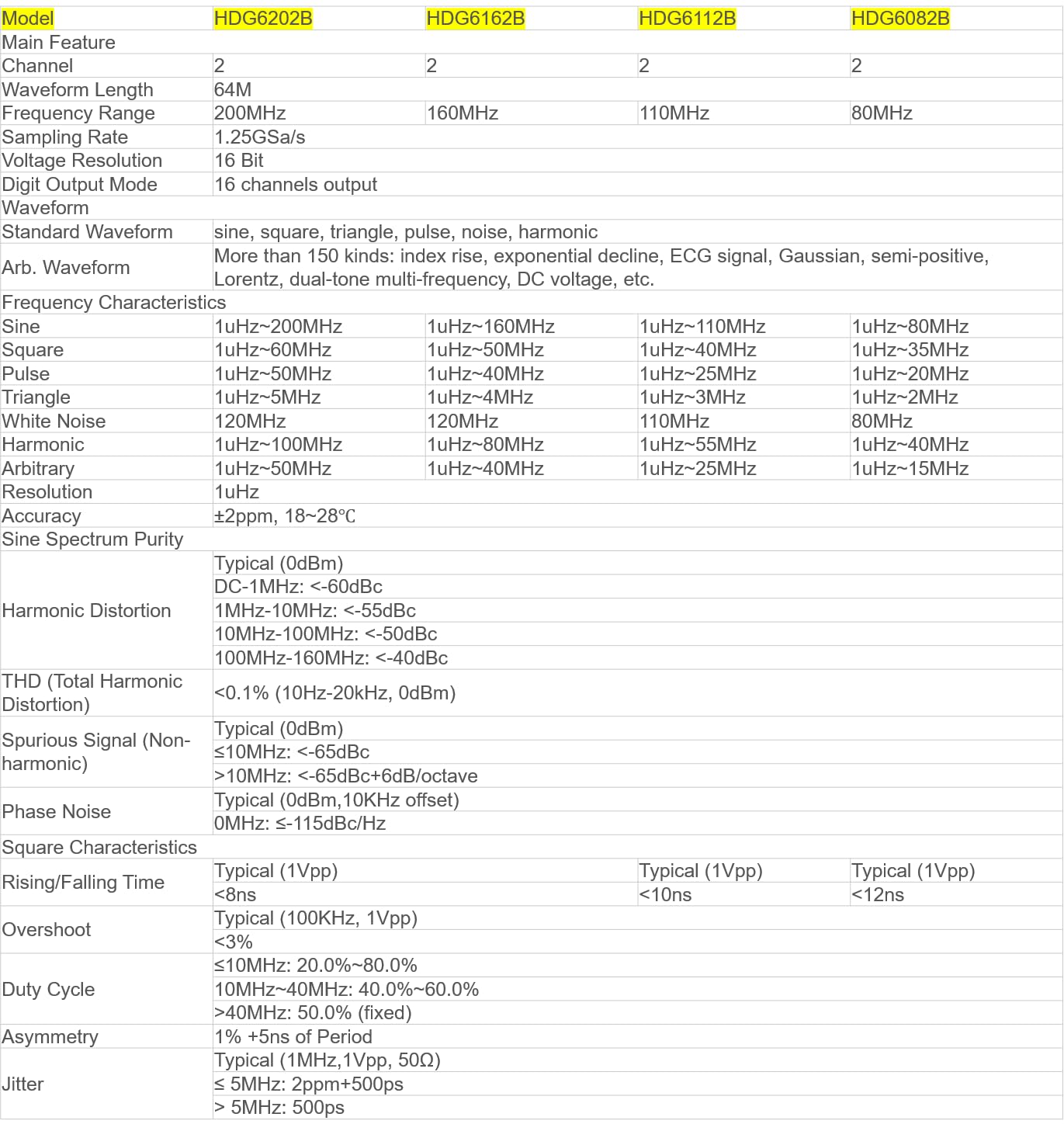
Figure 3: Technical specifications for the HDG6000B series. This table details parameters such as frequency range, sampling rate, vertical resolution, memory depth, and various waveform characteristics for different models, including the HDG6132B.
| Feature | Specification (HDG6132B) |
|---|---|
| Model | HDG6132B |
| Main Feature | 2 Channels |
| Waveform Length | 64M |
| Frequency Range | 130MHz |
| Sampling Rate | 1.25GSa/s |
| Voltage Resolution | 16 Bit |
| Digit Output Mode | 16 channels output |
| Standard Waveform | Sine, square, triangle, pulse, noise, harmonic |
| Arbitrary Waveform | More than 150 kinds: index rise, exponential decline, ECG signal, Gaussian, semi-positive, Lorentz, dual-tone multi-frequency, DC voltage, etc. |
| Frequency Resolution | 1uHz |
| Accuracy | ±2ppm, 18-28°C |
| Sine Spectrum Purity | Typical (0dBm) DC-1MHz: <-60dBc, 1MHz-10MHz: <-55dBc, 10MHz-100MHz: <-50dBc, 100MHz-160MHz: <-40dBc |
| THD (Total Harmonic Distortion) | <0.1% (10Hz-20kHz, 0dBm) |
| Spurious Signal (Non-harmonic) | Typical (0dBm) <-65dBc, >10MHz: <-65dBc+6dB/octave |
| Phase Noise | Typical (0dBm, 10kHz offset) 0MHz: ≤-115dBc/Hz |
| Square Characteristics Rising/Falling Time | Typical (1Vpp) <10ns |
| Overshoot | Typical (1Vpp) <5% |
| Duty Cycle | 10MHz: 20.0%-80.0%, 10MHz-40MHz: 40.0%-60.0%, >40MHz: 50.0% (fixed) |
| Asymmetry | 1% +5ns of Period |
| Jitter | Typical (1MHz, 1Vpp, 50Ω) ≤ 5MHz: 2ppm+500ps, > 5MHz: 500ps |
| Manufacturer | Hantek Qingdao |
| Item Weight | 1.5 kg |
| Product Dimensions | 21 x 11 x 16 cm |
| Batteries | 1 Lithium Metal battery required (included) |
| Wattage | 10 watts |
| Measurement Accuracy | 0.5% |
| Specification Met | CE, ISO 9001, RoHS |
| Upper Temperature Rating | 60 Degrees Celsius |
9. Warranty and Support
Hantek products are designed for reliability and performance. For warranty information and technical support, please refer to the official Hantek website or contact your local distributor.
- Official Website: www.hantek.com (Note: This is a placeholder URL, please verify the actual official website.)
- Customer Service: Refer to the contact information provided in your product packaging or on the official website for support.
- EU Spare Part Availability Duration: 1 Year (as per product specifications).


