
1. Introduction
Thank you for choosing the Mecer 1200VA, 720W, 12V DC-AC Inverter. This device is designed to convert 12V DC power from a battery into 230V AC power, suitable for powering various electronic appliances. It features an LCD display for real-time monitoring of input voltage, output voltage, battery level, and potential overload warnings. This manual provides essential information for the safe and efficient operation of your inverter.
Please read this manual thoroughly before installation and operation, and retain it for future reference.
2. Safety Information
Always observe the following safety precautions to prevent injury and damage to the inverter or connected equipment:
- Electrical Shock Hazard: Do not open the inverter casing. There are no user-serviceable parts inside. Refer all servicing to qualified service personnel.
- Proper Ventilation: Ensure the inverter is installed in a well-ventilated area. Do not block ventilation openings.
- Avoid Moisture: Do not expose the inverter to rain, water, or excessive humidity.
- Flammable Materials: Do not operate the inverter near flammable liquids or gases.
- Battery Safety: Connect the inverter to a 12V DC battery system only. Ensure correct polarity (+ to + and - to -) when connecting battery cables. Incorrect polarity can cause severe damage.
- Overload Protection: Do not exceed the inverter's rated output power of 720W. Overloading can damage the inverter and connected devices.
- Children and Pets: Keep the inverter out of reach of children and pets.
3. Package Contents
Verify that all items are present in the package:
- Mecer 1200VA, 720W, 12V DC-AC Inverter (Model IVR-1200LBKS)
- User Manual (this document)
- DC Battery Cables (typically included, verify upon unboxing)
4. Product Overview
4.1 Key Features
- Simulated Sinewave Output
- Wide Input Voltage Range
- Comprehensive LCD Display for real-time information
- Automatic Frequency Sensing (50 Hz/60 Hz)
- Fast Transfer Time (20 ms typical)
- Overload and Short Circuit Protection
- Compatible with external 12V batteries
4.2 Inverter Components
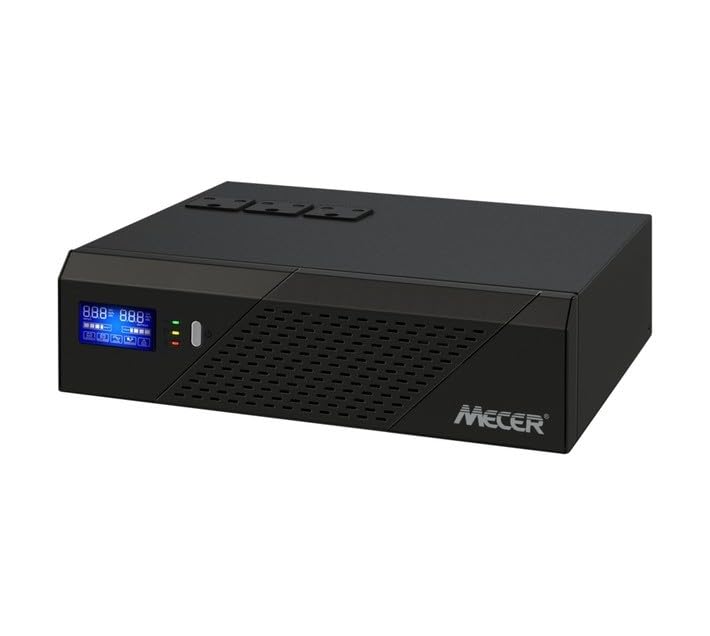
Image of the Mecer 1200VA 720W 12V DC-AC Inverter, showing its front panel with an LCD display and power outlets.
While specific labels are not visible in the provided image, a typical inverter of this type includes:
- Front Panel: LCD Display, Power On/Off Button, AC Output Sockets.
- Rear Panel: DC Input Terminals (for battery connection), AC Input (for utility power if applicable), Cooling Fan, Circuit Breaker/Fuse.
5. Setup
5.1 Choosing an Installation Location
- Install the inverter in a cool, dry, and well-ventilated area.
- Avoid direct sunlight, heat sources, and moisture.
- Ensure sufficient clearance around the inverter for proper airflow.
- Mount the inverter on a stable, non-flammable surface.
5.2 Battery Connection
- Ensure the inverter is switched OFF before making any connections.
- Connect the positive (+) terminal of the 12V battery to the positive (+) terminal on the inverter using the red battery cable.
- Connect the negative (-) terminal of the 12V battery to the negative (-) terminal on the inverter using the black battery cable.
- Ensure all connections are tight and secure to prevent arcing and overheating.
Warning: Incorrect battery polarity will damage the inverter and void the warranty.
5.3 Connecting AC Loads
- Once the battery is connected, you can plug your AC appliances into the output sockets on the inverter.
- Ensure the total wattage of all connected appliances does not exceed the inverter's rated output of 720W.
6. Operating Instructions
6.1 Powering On the Inverter
- After all connections are secure, press and hold the Power On/Off button on the front panel for a few seconds until the LCD display illuminates.
- The inverter will perform a self-test, and the LCD will show operational status, including input voltage, output voltage, and battery level.
6.2 Monitoring the LCD Display
The LCD display provides critical information:
- Input Voltage: Displays the DC voltage from the connected battery.
- Output Voltage: Shows the AC output voltage provided by the inverter.
- Battery Level: Indicates the remaining charge in the connected battery.
- Load Indicator: May show the current load percentage or wattage.
- Warning/Error Codes: Alerts for conditions like overload, low battery, or high temperature.
6.3 Powering Off the Inverter
To turn off the inverter, press and hold the Power On/Off button until the LCD display turns off. Disconnect AC loads before prolonged shutdown.
7. Maintenance
- Cleaning: Periodically clean the exterior of the inverter with a soft, dry cloth. Do not use liquid cleaners or solvents.
- Ventilation: Ensure the ventilation openings are free from dust and debris. Use compressed air to clear vents if necessary.
- Battery Check: Regularly inspect battery terminals for corrosion and ensure connections are tight.
- Storage: If storing the inverter for an extended period, disconnect it from the battery and store it in a cool, dry place. Ensure the battery is fully charged before storage and recharged periodically to prevent deep discharge.
8. Troubleshooting
| Problem | Possible Cause | Solution |
|---|---|---|
| Inverter does not power on. | Battery not connected or low voltage. Incorrect polarity. Power button not pressed correctly. | Check battery connections and ensure battery is charged. Verify polarity. Press and hold power button firmly. |
| No AC output. | Overload. Low battery voltage. Inverter fault. | Reduce connected load. Recharge or replace battery. If fault persists, contact support. |
| Overload warning on LCD. | Connected load exceeds 720W. | Disconnect some appliances to reduce the load below 720W. |
| Inverter shuts down unexpectedly. | Low battery voltage. Overload. Overheating. | Recharge battery. Reduce load. Ensure proper ventilation and clear any obstructions. |
9. Specifications
| Feature | Specification |
|---|---|
| Model Number | IVR-1200LBKS |
| Brand | Mecer |
| Apparent Power (VA) | 1200VA |
| Rated Power (Watts) | 720W |
| DC Input Voltage | 12V |
| AC Output Voltage | 230V (typical, region dependent) |
| Frequency | 50 Hz/60 Hz (Auto sensing) |
| Waveform | Simulated Sinewave |
| Transfer Time | 20 ms typical |
| Battery Cell Composition (Compatibility) | Lithium Ion (compatible with external Lithium Ion batteries) |
| Material | Metal |
| Colour | Black |
| Item Weight | 5 Kilograms |
10. Warranty and Support
10.1 Manufacturer's Warranty
This Mecer Inverter comes with a 1 Year Manufacturer's Warranty from the date of purchase. This warranty covers defects in materials and workmanship under normal use. It does not cover damage caused by misuse, accident, unauthorized modification, or improper installation.
Please retain your proof of purchase for warranty claims.
10.2 Customer Support
For technical assistance, troubleshooting beyond this manual, or warranty inquiries, please contact your Mecer product retailer or authorized service center. Refer to your purchase documentation for specific contact details.
