1. Introduction
Thank you for choosing the ZEEGII PM1508 Handheld Insulation Resistance Tester. This device is designed for high-precision measurement of insulation resistance, voltage, and frequency. It features a backlit HD LCD screen, data hold function, and safety features like high voltage and short circuit buzzer alarms. Please read this manual thoroughly before operation to ensure safe and correct use.
2. Safety Information
Warning: Improper use of this meter can cause damage, shock, or serious injury. Always follow basic safety precautions when using any electrical testing equipment.
- Do not use the meter if it appears damaged or if the insulation on the test leads is compromised.
- Ensure the battery compartment is securely closed before operation.
- Do not apply voltage exceeding the maximum rated input to any terminal.
- Exercise extreme caution when working with voltages above 60V DC or 30V AC RMS.
- Always disconnect power to the circuit under test before making insulation resistance measurements.
- The device is designed with anti-high voltage circuit features and a high voltage/short circuit buzzer alarm for user safety.
- Refer to the specifications section for maximum input ratings.
3. Product Overview
3.1 Components and Display
The ZEEGII PM1508 features a clear LCD display and intuitive controls for various measurement functions.

Figure 1: Front view of the ZEEGII PM1508 Insulation Resistance Tester with key components labeled.
- 1. LCD Display (with Backlight): Shows measurement readings, units, and function indicators.
- 2. ZERO Button: Used for zeroing certain measurements.
- 3. HOLD Button: Freezes the current display reading.
- 4. LOCK Button: Locks the test function for continuous measurement.
- 5. COMP (Compare) Button: Activates the comparison function for insulation resistance.
- 6. PI/DAR Button: Initiates Polarization Index (PI) and Dielectric Absorption Ratio (DAR) tests.
- 7. TEST Button: Initiates the insulation resistance test.
- 8. Backlight Button: Toggles the display backlight.
- 9. Function Rotary Knob: Selects measurement modes (Insulation Resistance, Voltage, Frequency, OFF).
- 10. Test Sockets: Input terminals for test leads (VΩHz, COM).
3.2 What's in the Box
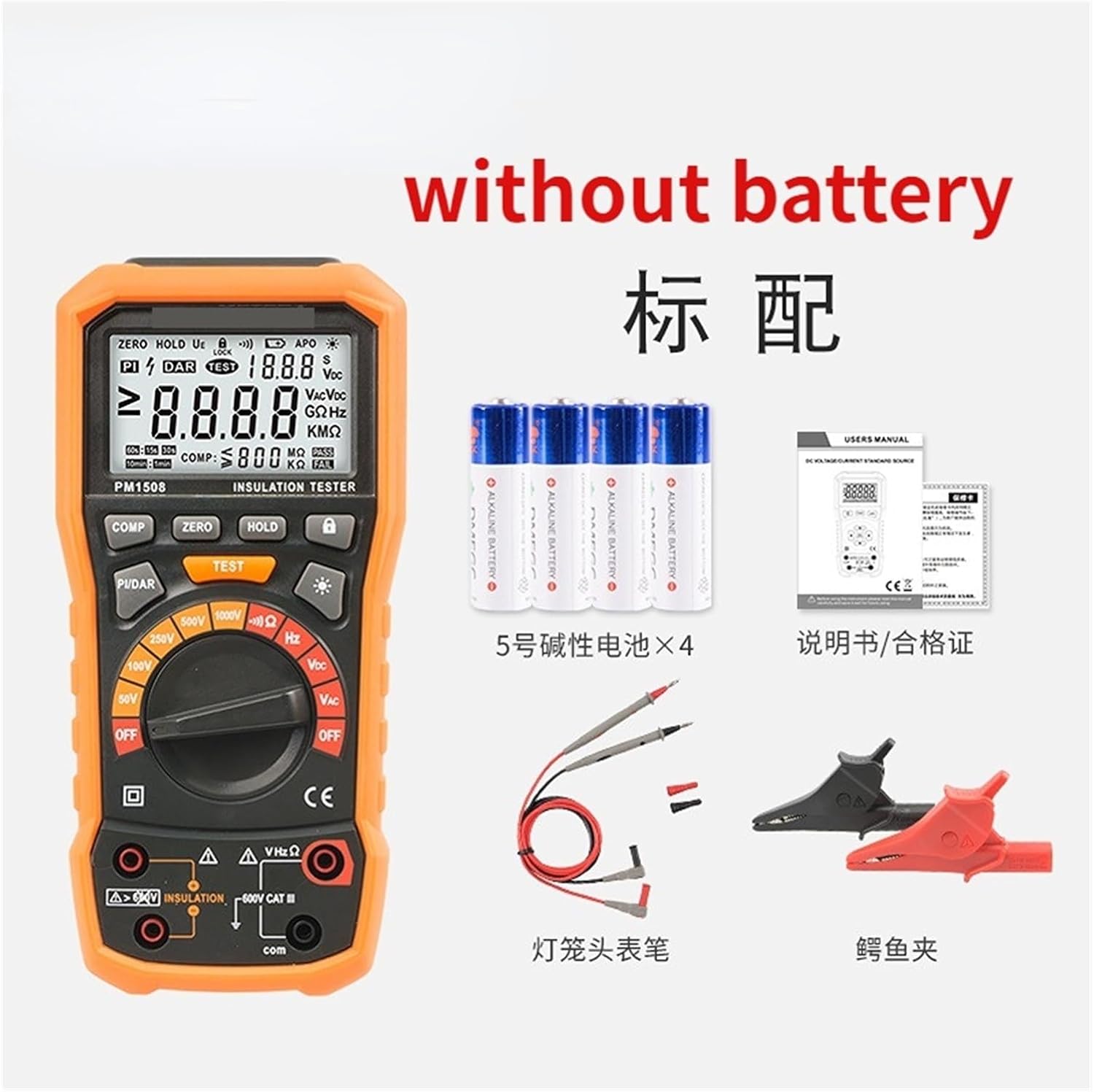
Figure 2: Package contents of the ZEEGII PM1508. Note: Batteries are not included.
- ZEEGII PM1508 Insulation Resistance Tester
- Test Leads (probe type)
- Alligator Clips (pair)
- User Manual
- Note: 4x AA batteries are required but not included.
4. Setup
4.1 Battery Installation
- Ensure the device is powered OFF.
- Locate the battery compartment cover on the back of the meter.
- Unscrew or slide open the cover.
- Insert 4x AA batteries, observing correct polarity (+ and -).
- Replace the battery compartment cover and secure it.
Note: If the low battery indicator appears on the display, replace the batteries promptly to ensure accurate measurements.
4.2 Connecting Test Leads
- Connect the red test lead to the "VΩHz" input terminal.
- Connect the black test lead to the "COM" input terminal.
- Ensure connections are firm before proceeding with any measurements.
5. Operating Instructions
5.1 Power On/Off and Mode Selection
- To power on the meter, rotate the Function Rotary Knob from "OFF" to the desired measurement mode.
- To power off the meter, rotate the Function Rotary Knob to "OFF".
- The meter features an Auto Power Off (APO) function to conserve battery life.
5.2 Insulation Resistance Measurement
- Ensure the circuit under test is de-energized and safely discharged.
- Rotate the Function Rotary Knob to one of the insulation resistance test voltage settings (e.g., 50V, 100V, 250V, 500V, 1000V).
- Connect the test leads to the circuit or component to be measured.
- Press and hold the TEST button to initiate the measurement. The high voltage indicator will illuminate.
- The insulation resistance value will be displayed on the LCD.
- Release the TEST button to stop the measurement. The circuit will automatically discharge.
- For continuous testing, press the TEST button and then the LOCK button. Press LOCK again to unlock.
Note: The meter displays the specific insulation resistance value, not just a range.
5.3 PI (Polarization Index) and DAR (Dielectric Absorption Ratio) Tests
- Select an insulation resistance test voltage.
- Press the PI/DAR button. The display will show "PI" or "DAR" and the corresponding time intervals (e.g., 60s, 15s, 10min, 1min).
- Press and hold the TEST button to start the test. The meter will automatically calculate and display the PI or DAR value after the specified time.
5.4 Comparison Function (COMP)
- In insulation resistance mode, press the COMP button to set a comparison threshold.
- Use the arrow buttons (if available, or refer to specific model instructions for setting threshold) to adjust the comparison value.
- During a test, the meter will indicate "PASS" or "FAIL" based on the measured value against the set threshold.
5.5 Voltage (VAC/VDC) and Frequency (Hz) Measurement
- Rotate the Function Rotary Knob to "VAC" or "Hz" for AC voltage and frequency, or "VDC" for DC voltage.
- Connect the test leads in parallel to the circuit where voltage or frequency is to be measured.
- The reading will be displayed on the LCD.
5.6 Data Hold and Backlight
- Data Hold: Press the HOLD button to freeze the current reading on the display. Press again to release.
- Backlight: Press the Backlight button (sun icon) to turn the display backlight on or off, improving visibility in low-light conditions.
6. Maintenance
6.1 Cleaning
- Wipe the meter casing with a damp cloth and mild detergent. Do not use abrasives or solvents.
- Ensure the meter is completely dry before use.
6.2 Battery Replacement
When the low battery indicator appears, replace all 4x AA batteries as described in Section 4.1. Remove batteries if the meter is not used for an extended period to prevent leakage.
6.3 Storage
Store the meter in a cool, dry place, away from direct sunlight and extreme temperatures. Keep it out of reach of children.
7. Troubleshooting
| Problem | Possible Cause | Solution |
|---|---|---|
| Meter does not power on. | Dead or incorrectly installed batteries. | Check battery polarity; replace batteries. |
| No reading or "OL" (Overload) displayed. | Open circuit; range exceeded; incorrect mode. | Check test lead connections; select appropriate range; ensure correct measurement mode. |
| Inaccurate readings. | Low battery; dirty test leads; external interference. | Replace batteries; clean test leads; move away from strong electromagnetic fields. |
| High voltage alarm sounds unexpectedly. | Incorrect connection; residual charge in circuit. | Ensure proper connection; discharge circuit before testing. |
8. Specifications
- Model: PM1508
- Brand: ZEEGII
- Item Weight: 2.2 pounds (approximately 1000 Grams)
- Package Dimensions: 1.18 x 0.79 x 0.39 inches
- Power Source: 4x AA Batteries (not included)
- Safety Rating: 600V CAT III
- Features: Display insulation resistance value specifically, high voltage and short circuit buzzer alarm, anti-high voltage circuit, backlight HD LCD screen, data hold, range selection, comparison function, PI/DAR tests.
9. Warranty and Support
For warranty information or technical support, please refer to the contact details provided with your purchase or visit the official ZEEGII website. Keep your purchase receipt as proof of purchase.
