Product Overview
The ANNTLENT N70-PL Cell Phone Signal Booster is designed to enhance cellular signal strength for all major US carriers, supporting 5G and LTE on bands 2, 4, 5, 12, 13, 17, and 25. This system provides improved voice quality, fewer dropped calls, and faster data speeds within its coverage area, which can extend up to 5,000 sq ft under optimal conditions. It features a smart app and an integrated screen for simplified installation and monitoring.

Figure 1: The ANNTLENT N70-PL Cell Phone Signal Booster unit, accompanied by the outdoor directional antenna and the indoor panel antenna.
Package Contents
Before beginning installation, please verify that all components are present in your package:
- N70 Booster Unit
- Outside Directional Antenna
- Inside Panel Antenna
- Window Entry Cable
- 3 Coaxial Cables (2 x 16 ft, 1 x 33 ft)
- Power Supply
- Waterproof Tape
- Cable Management Tape

Figure 2: All components included in the ANNTLENT N70-PL signal booster kit, laid out for inspection.
Setup and Installation
Proper installation is crucial for optimal performance. Follow these steps carefully:
1. Check Your Current Signal Band
Before installation, confirm that your phone's frequency band is compatible with the booster (Bands 2, 4, 5, 12, 13, 17, and 25). The booster will only work if your phone operates on one of these bands.

Figure 3: How to check your phone's signal band on iOS devices using a specific dial code.

Figure 4: How to check your phone's signal band on Android devices using the "Network Cell Info Lite" app.
2. Outdoor Antenna Placement
The outdoor directional antenna should be mounted in a location where it can receive the strongest possible signal from the nearest cell tower. Use the ANNTLENT Signal Advisor APP to find the best location and direction for the outdoor antenna. This app provides real-time signal strength and direction information.

Figure 5: Utilizing the Signal Advisor APP to accurately position the outdoor antenna for optimal signal capture.

Figure 6: The Signal Advisor APP interface, displaying real-time signal strength and direction to assist with antenna alignment.
Ensure the outdoor antenna is pointed directly towards the cell tower. Secure the antenna firmly to prevent movement due to wind or other environmental factors. Use the provided waterproof tape for outdoor cable connections to protect them from moisture.

Figure 7: Applying waterproof tape to cable connections for outdoor durability and protection.
3. Indoor Antenna Placement
Mount the indoor panel antenna on a wall within the area where you need improved signal. The indoor antenna should be placed as far as possible from the outdoor antenna to prevent oscillation (feedback loop) and ensure maximum coverage. A minimum separation of 20 feet vertically or 50 feet horizontally is recommended.

Figure 8: The indoor panel antenna mounted on a wall, designed to spread strong signal throughout the home.
4. Connecting the Components
- Connect the outdoor antenna to the "OUTDOOR" port on the booster unit using one of the provided coaxial cables.
- If drilling through walls is not desired, use the flat window entry cable to pass the outdoor antenna cable into your home without drilling.
- Connect the indoor antenna to the "INDOOR" port on the booster unit using another coaxial cable.
- Connect the power supply to the booster unit and then plug it into a power outlet.

Figure 9: The window entry cable allows for drill-free installation, passing the antenna cable through a window frame.
Use the cable management tape to neatly secure cables and prevent tripping hazards.

Figure 10: Cable management tape used to organize and secure the coaxial cables.
Operating the Booster
Once all components are connected and powered on, the booster will automatically begin to amplify the cellular signal. The integrated screen on the booster unit provides real-time information about its operation, including signal gain and output power.
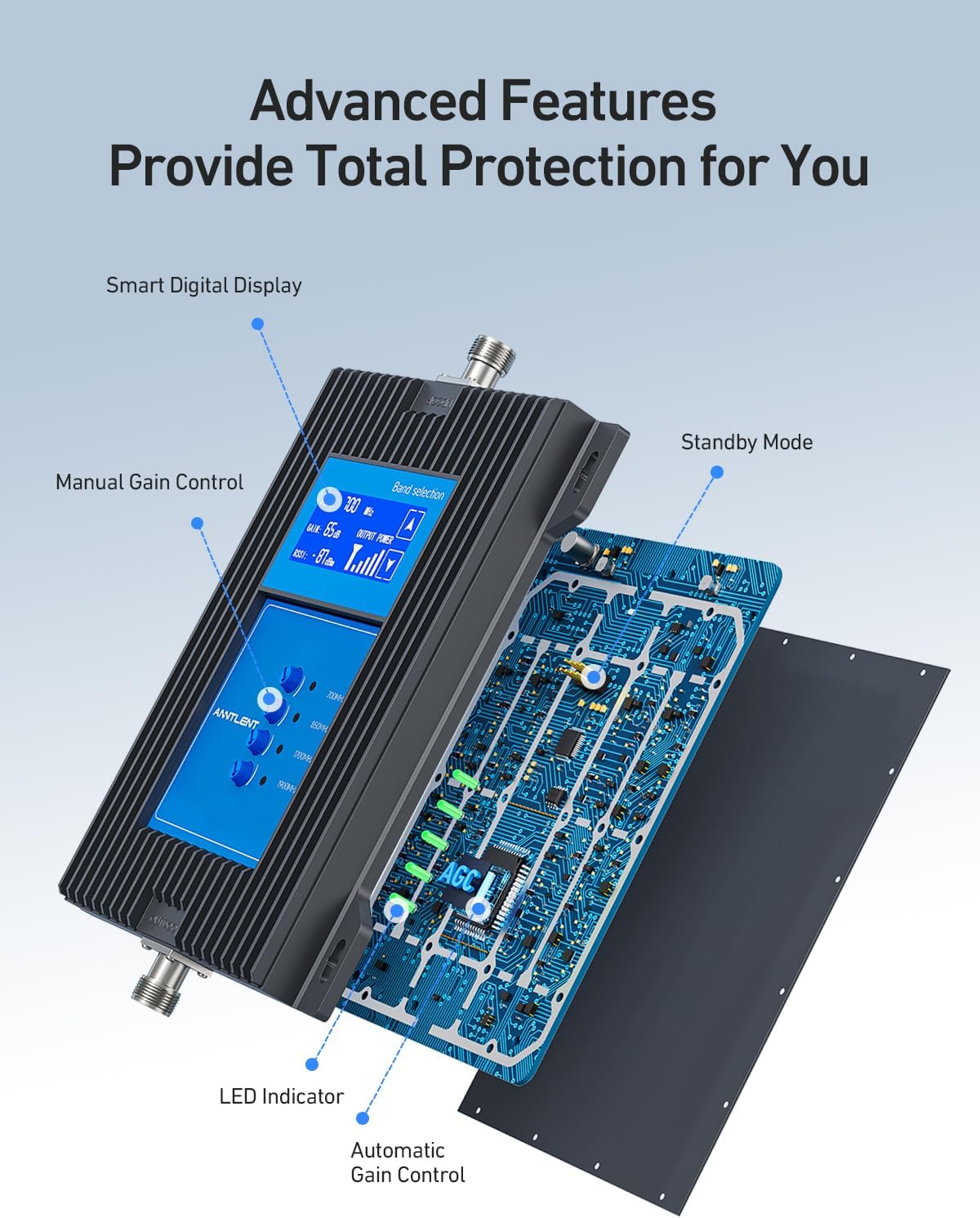
Figure 11: The booster's internal components, highlighting the smart digital display and automatic gain control features.

Figure 12: The smart digital display provides clear information on the booster's performance, eliminating guesswork.
Automatic Gain Control (AGC)
The booster features Automatic Gain Control (AGC) which optimizes the signal gain automatically to prevent overload and ensure stable performance. This means the booster adjusts itself to provide the best possible signal without manual intervention.

Figure 13: Automatic Gain Control (AGC) optimizes signal for hassle-free and optimal performance.
Manual Gain Control
For specific signal environments, the booster also offers manual gain control, allowing you to customize the booster's settings to meet individual signal needs. Refer to the on-screen display for guidance when making manual adjustments.

Figure 14: Manual Gain Control allows customization of the booster to individual signal requirements.
Standby Mode
The booster is designed with a standby mode to reduce power consumption when not actively boosting a signal, contributing to energy efficiency.

Figure 15: The booster's standby mode reduces power consumption, saving energy.
Maintenance
The ANNTLENT N70-PL signal booster requires minimal maintenance. Keep the unit and antennas clean and free from dust or debris. Periodically check all cable connections to ensure they are secure and free from damage, especially outdoor connections which should remain waterproofed.
No user-serviceable parts are inside the booster unit. Do not attempt to open or repair the device, as this will void the warranty.
Troubleshooting
If you experience issues with your signal booster, consider the following common solutions:
- No Signal Improvement:
- Ensure the outdoor antenna is pointed directly at the nearest cell tower. Use the Signal Advisor APP to verify direction and signal strength.
- Check all cable connections to ensure they are tight and properly connected to the correct ports (OUTDOOR to outdoor antenna, INDOOR to indoor antenna).
- Verify that there is at least 1 bar of existing signal outside your home. The booster amplifies existing signal; it does not create signal where none exists.
- Increase the separation distance between the indoor and outdoor antennas to prevent oscillation.
- Confirm your phone's frequency band is supported by the booster (Bands 2, 4, 5, 12, 13, 17, 25).
- Reduced Coverage Area:
- The actual coverage area depends on the strength of the outside signal. More bars outside generally lead to larger coverage inside.
- Building materials (concrete, metal) can significantly reduce indoor coverage. Try repositioning the indoor antenna.
- Booster Displaying an Error:
- Refer to the booster's screen for specific error codes or messages. Consult the Signal Advisor APP for further diagnostic information or online support.

Figure 16: Relationship between outdoor signal strength and expected indoor coverage area.
Specifications
| Feature | Detail |
|---|---|
| Model Number | N70-PL |
| Supported Bands | 2, 4, 5, 12, 13, 17, 25 (5G & LTE) |
| Coverage Area | Up to 5,000 sq ft (varies with outdoor signal) |
| Gain | 65 dB |
| Control Features | Smart APP, Screen Control, Automatic Gain Control (AGC), Manual Gain Control |
| Power Supply | DC 5V/2A |
| FCC Certified | Yes |
| Dimensions | 15.83 x 11.06 x 6.22 inches (Package Dimensions) |
| Item Weight | 6.25 pounds |
Warranty and Support
ANNTLENT provides comprehensive support for the N70-PL Cell Phone Signal Booster:
- 30-Day Money-Back Guarantee: If you are not satisfied with the product, you may return it within 30 days for a full refund.
- 3-Month Free Replacement: In case of defects or malfunctions within the first three months, a free replacement will be provided.
- 3-Year Manufacturer Warranty: A 3-year warranty covers manufacturing defects and ensures product reliability.
- FCC Certified: This device is FCC certified, ensuring compliance with regulatory standards.
For technical assistance or warranty claims, please contact ANNTLENT customer support. You can also find online support through the Signal Advisor APP.


