1. Product Overview
The BAYCKRC Dolphin Flight Controller is designed for drone pilots requiring high performance and precise control. It features an AT32F435 MCU and ICM42688P gyroscope, delivering stable flight performance. This controller integrates comprehensive power filtering, dual BEC outputs, and a 16MB Black Box for flight data recording.
Key features include a high-performance AT32F435 MCU, ICM42688P gyroscope, AT7456E OSD, BMP280 barometer, and 16MB Black Box. It supports 3-6S input voltage and provides 5V/3A and 9V/3A BEC outputs. The board measures 38mm x 38mm x 6.5mm and weighs 8g, with 30.5mm x 30.5mm mounting holes.
2. Specifications
| Component | Specification |
|---|---|
| Brand | BAYCKRC |
| Model Number | Dolphin FC |
| MCU | AT32F435 |
| IMU (Gyro) | ICM42688P (Reserved Bonding pad for MPU 6000) |
| OSD | AT7456E |
| Barometer | BMP280 |
| Black Box | 16MB |
| Input Voltage | 3~6s |
| 5V-BEC | 5V/3A |
| 9V-BEC | 9V/3A |
| Firmware | Betaflight 4.5 |
| Size | 38mm*38mm*6.5mm |
| Mounting hole | 30.5mmx30.5mm |
| Weight | 8g |

Image: BAYCKRC Dolphin Flight Controller with detailed dimensions (38mm x 38mm x 6.5mm) and component layout.
3. What's in the Box
The package includes the following items:
- 1x BAYCKRC Dolphin FC
- 4x M3 Silicone Grommets
- 1x Service Card
- 1x 35mm cable for ESC
- 1x 65mm cable for Camera
- 1x 65mm cable for Video transmitter
- 1x 65mm cable for Receiver
- 1x 70mm cable for ESC
- 1x 100mm cable for LED and Buzzer
- 1x 170mm cable for GPS
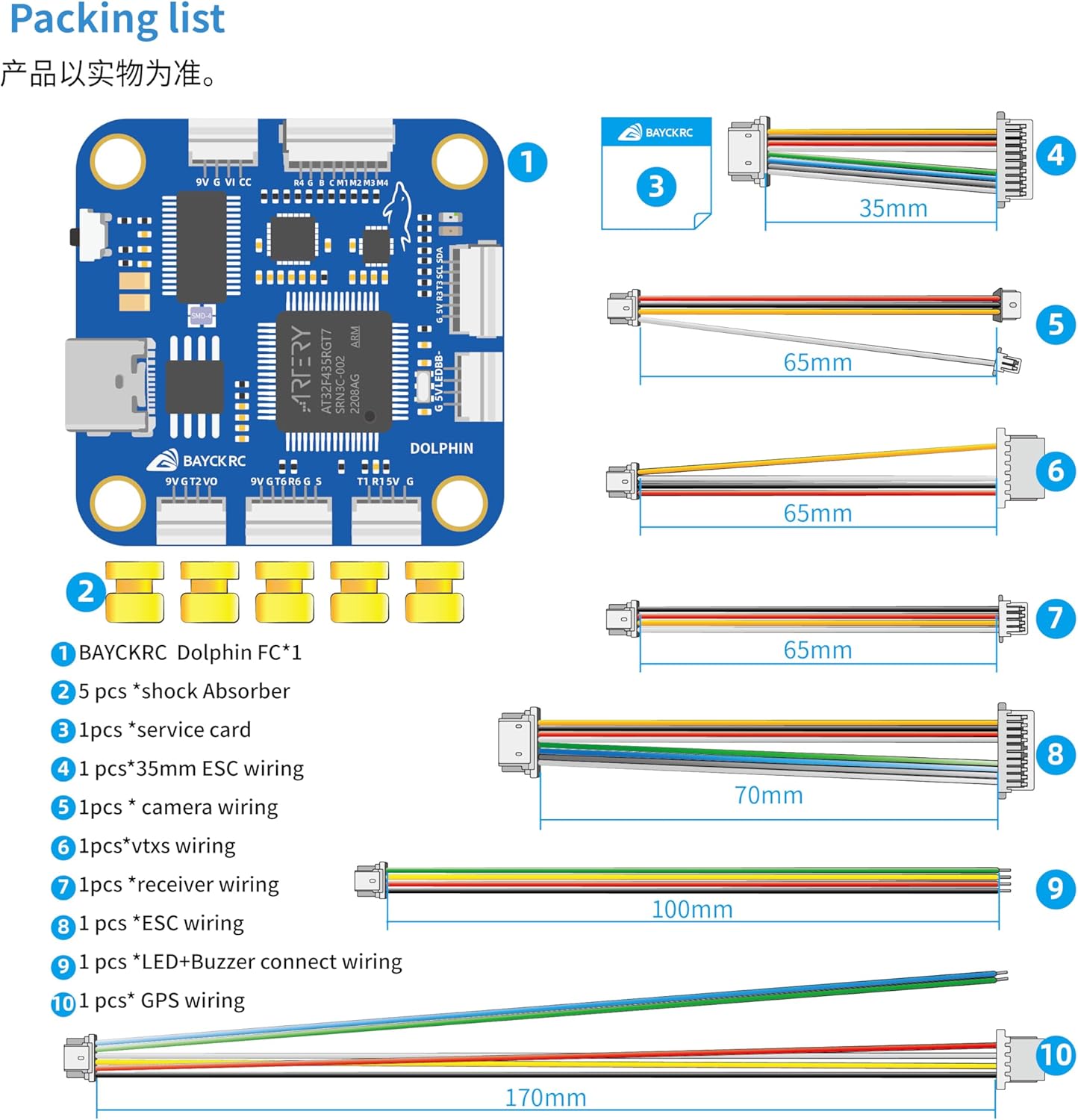
Image: Visual representation of the BAYCKRC Dolphin Flight Controller and its included accessories and cables.
4. Setup and Wiring
The Dolphin FC features SH1.0 locking sockets for secure connections and oversized 1.5mm x 2mm solder pads for ease of installation. Refer to the wiring diagram below for proper connection of components.
4.1. Connection Points:
- ESC Interface: Connect Electronic Speed Controllers.
- Analog Camera Interface: For analog FPV cameras.
- Compass Interface: For external compass modules.
- GPS Module Interface: For GPS functionality.
- LED Strip and BB Interface: For LED lighting and buzzer.
- Receiver Interface: Connect your radio receiver.
- Digital Video Transmitter Interface: For digital FPV systems.
- Analog Video Transmitter Interface: For analog FPV systems.
4.2. Power Supply System:
The flight controller is equipped with a dual-channel BEC system providing 9V/3A and 5V/3A outputs. The 9V channel includes LC filtering for clean video transmission. Ensure proper polarity when connecting power. The board includes SS56L anti-reverse connection diode and HD07B surge protection TVS diode for safety.

Image: Detailed diagram illustrating the various connection points and power supply system on the BAYCKRC Dolphin Flight Controller.
5. Operating Instructions
5.1. Firmware Flashing:
The Dolphin FC comes pre-installed with Betaflight 4.5 firmware. For updates or re-flashing, connect the flight controller to your computer via the USB-C port. Use the Betaflight Configurator software to flash the appropriate firmware target for the AT32F435 MCU.
5.2. Configuration:
After flashing, configure the flight controller settings using Betaflight Configurator. This includes setting up your receiver, ESC protocol, OSD elements, and PID tuning. Refer to the Betaflight documentation for detailed configuration guides.
5.3. Flight Data Logging:
The integrated 16MB Black Box (W25Q128JVS1Q) records flight data. This data can be downloaded via Betaflight Configurator for analysis, which is useful for troubleshooting and tuning your drone's performance.
6. Maintenance
- Regularly inspect all connections for looseness or damage.
- Keep the flight controller clean and free from dust, dirt, and moisture.
- Avoid exposing the board to extreme temperatures or direct sunlight for prolonged periods.
- Ensure proper ventilation when the drone is in operation to prevent overheating.
7. Troubleshooting
- No Power: Check battery connection, input voltage, and ensure no short circuits. Verify the anti-reverse connection diode is intact.
- No Signal from Receiver: Ensure the receiver is correctly wired to the FC and bound to your radio transmitter. Check receiver protocol settings in Betaflight.
- Unstable Flight: Review PID settings in Betaflight. Check for loose components or vibrations affecting the gyroscope. Analyze Black Box logs for insights.
- Video Interference: Verify the 9V BEC output has LC filtering enabled. Check for proper grounding and shielded video cables.
- OSD Not Displaying: Ensure OSD is enabled in Betaflight Configurator and the video signal is correctly routed through the FC.
8. Safety Information
Keep away from fire. Always handle electronic components with care. Ensure proper insulation and avoid short circuits during installation. Disconnect power before making any wiring changes or maintenance. Operating drones requires skill and responsibility; always fly in a safe environment and adhere to local regulations.
9. Warranty and Support
For warranty claims or technical support, please contact your retailer or the manufacturer directly. Keep your proof of purchase for warranty validation. This product is intended for users aged 14-18 years and above, as recommended by the manufacturer.


