
Hantek DSO8202E
Hantek DSO8202E 6-in-1 Handheld Oscilloscope User Manual
Model: DSO8202E
1. Introduction
The Hantek DSO8202E is a versatile 6-in-1 handheld instrument designed for various electronic testing and measurement applications. It integrates the functions of an oscilloscope, recorder, digital multimeter (DMM), spectrum analyzer, frequency counter, and arbitrary waveform generator (AWG). This manual provides detailed instructions for the safe and effective operation, setup, and maintenance of your DSO8202E.

Figure 1: Hantek DSO8202E 6-in-1 Handheld Oscilloscope. This image shows the front and side view of the blue and grey handheld device with its screen displaying a waveform and various control buttons.
2. Safety Information
WARNING:
- DO NOT EXCEED THE MAXIMUM VOLTAGE SPECIFIED ON INPUT TERMINALS.
- TO AVOID ELECTRICAL SHOCK, REMOVE TEST LEADS BEFORE OPENING CASE OR BATTERY COVER.
- DO NOT OPERATE WITH BATTERY COVER OPEN.
- ONLY USE SPECIFIED ACCESSORIES AND INSPECT BEFORE AND AFTER USE.
- USE ONLY BATTERY CHARGER AS SPECIFIED.

Figure 2: Close-up of the warning label located on the back of the Hantek DSO8202E, detailing important safety precautions.
3. Package Contents
Verify that all items listed below are included in your package. If any items are missing or damaged, please contact your vendor.
- Hantek DSO8202E Handheld Oscilloscope
- Test Probes (Quantity: 2)
- Power Adapter/Charger
- USB Cable
- Carrying Bag
- Software CD
- Adjustable Stand
- BNC Safety Joints (Replaceable, additional set included)
- Lithium Metal Battery (18650 type, included)
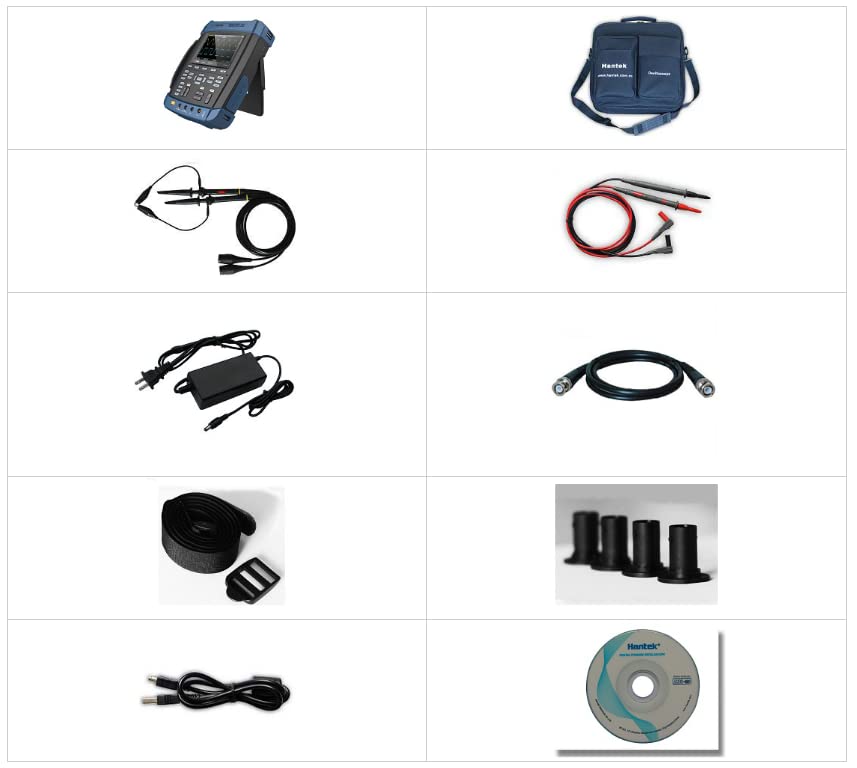
Figure 3: Various accessories included with the Hantek DSO8202E, such as test probes, power adapter, and cables.

Figure 4: The Hantek branded carrying bag and the product box for the DSO8202E.
4. Product Features
The Hantek DSO8202E offers a comprehensive set of features for advanced measurement and analysis:
- Six-in-One Functionality: Integrates Oscilloscope, Recorder, DMM, Spectrum Analyzer, Frequency Counter, and Arbitrary Waveform Generator.
- Robust Design: IP-51 rated for dust, drip, and shake proofing, suitable for harsh environments.
- Enhanced Safety: Large fuse conforms to European Safety Standard.
- Flexible Power: Battery indicator with easy-changed connect points. Supports selectable 18650 battery box.
- Convenience Features: Anti-theft lock hole, tripod fixed hole, hang rope, and a built-in flashlight for use in dark conditions.
- High-Performance Oscilloscope: 200MHz bandwidth, 1GSa/s sample rate, 2M Memory depth.
- Arbitrary Waveform Generator: 25MHz Arb. Waveform Generator, 200MSa/s DDS, 12-bit vertical resolution, ideal for transducer simulation.
- Digital Multimeter: 6000 counts DMM for AC/DC voltage, AC/DC current, resistance, continuity, capacitance, and diode functions.
- Advanced Analysis: FFT spectral analysis, waveform math (add, subtract, multiply, divide), X-Y mode, and over 20 automatic measurements.
- Versatile Triggering: Abundant trigger functions and double timebase sampling for observing two waveforms at different frequencies.
- Data Recording: Record and replay of over 1000 waveforms.
- Clear Display: Large 5.6-inch TFT Color LCD Display with High Resolution (640*480).
- Connectivity: USB Host/Device 2.0 full-speed interface, support for removable disk, and optional WIFI/LAN for PC control.
- Data Export: Waveform data can be output in WORD, EXCEL, BMP, JPG formats.
5. Setup
5.1 Initial Power-Up
- Ensure the device is fully charged or connected to the power adapter.
- Press and hold the power button until the display illuminates.
5.2 Battery Installation/Replacement
The DSO8202E uses a selectable 18650 battery. Refer to the battery compartment for correct polarity when installing or replacing batteries. Ensure the battery cover is securely closed before operation.
5.3 Connecting Probes and Cables
Connect the oscilloscope probes to the BNC input terminals (CH1, CH2) for waveform acquisition. For DMM functions, use the dedicated DMM input terminals. The arbitrary waveform generator output is typically a separate BNC connector.

Figure 5: Front view of the Hantek DSO8202E, showing the display, control panel, and input ports for probes and DMM functions.
6. Operating Instructions
The DSO8202E features a user-friendly interface with dedicated buttons and a clear LCD for easy navigation and operation across its multiple functions.
6.1 Oscilloscope Function
To use the oscilloscope, connect your signal to the CH1 or CH2 BNC input. Use the dedicated channel buttons (CH1, CH2) to enable/disable channels and access their settings. Adjust vertical scale (Volts/Div) and horizontal scale (Time/Div) using the corresponding knobs or buttons. The trigger system allows for stable waveform display; use the TRIG button to access trigger settings.
6.2 Digital Multimeter (DMM) Function
Press the DMM button to switch to multimeter mode. Connect test leads to the appropriate DMM input terminals. Select the desired measurement function (AC/DC voltage, current, resistance, capacitance, diode, continuity) using the mode buttons. The display will show the measurement value.
6.3 Arbitrary Waveform Generator (AWG) Function
Access the AWG function to generate various waveforms. Select the waveform type (sine, square, ramp, pulse, arbitrary), frequency, amplitude, and offset. Connect the AWG output to your circuit for testing.
6.4 Spectrum Analyzer Function
The spectrum analyzer mode allows for frequency domain analysis of signals. This function is useful for identifying signal components and analyzing harmonic content. Refer to the on-screen menu for specific settings like center frequency, span, and reference level.
6.5 Recorder Function
The recorder function enables long-term data logging of waveforms. Configure the recording parameters such as sample rate and duration. Recorded waveforms can be replayed and analyzed later.
6.6 Frequency Counter Function
The built-in frequency counter provides precise frequency measurements of input signals. This function is often integrated within the DMM or oscilloscope modes, or accessible via a dedicated utility menu.

Figure 6: A collage of various waveform types and measurement displays, demonstrating the capabilities of the Hantek DSO8202E.
7. Maintenance
7.1 Cleaning
Clean the instrument regularly with a soft, damp cloth. Do not use abrasive cleaners or solvents. Ensure the device is powered off and disconnected from all power sources before cleaning.
7.2 Battery Care
To prolong battery life, avoid fully discharging the battery frequently. Store the device in a cool, dry place when not in use for extended periods. Use only the specified charger.
7.3 Self-Calibration
The device may feature a self-calibration function to maintain measurement accuracy. Refer to the utility menu on the device for instructions on performing a self-calibration.
8. Troubleshooting
- No Power: Ensure the battery is charged or the power adapter is correctly connected. Check the power button.
- No Waveform Display: Verify probes are correctly connected to the input channels and the signal source. Check channel enable/disable settings and trigger levels.
- Incorrect Measurements: Perform a self-calibration. Ensure correct probe attenuation settings (1X/10X) are selected on both the probe and the oscilloscope.
- Device Not Responding: Try restarting the device. If the issue persists, contact customer support.
9. Specifications
| Feature | Description |
|---|---|
| Model | DSO8202E |
| Bandwidth | 200MHz |
| Sample Rate | 1GSa/s |
| Memory Depth | 2M |
| Channels | 2 |
| Vertical Resolution | 8-bit |
| DMM Counts | 6000 |
| AWG Frequency | 25MHz |
| AWG Sample Rate | 200MSa/s |
| AWG Vertical Resolution | 12-bit |
| Display | 5.6 inch TFT Color LCD (640*480) |
| Connectivity | USB Host/Device 2.0, WIFI/LAN (Option) |
| Battery Type | 18650 Lithium Metal (included) |
| Dimensions | 8.27 x 4.33 x 6.3 inches |
| Weight | 3.31 Pounds |
| IP Rating | IP-51 |

Figure 7: A detailed table outlining the technical specifications for the Hantek DSO8000E series, including the DSO8202E model.
10. Warranty and Support
For warranty information, technical support, or service inquiries, please visit the official Hantek website or contact your local distributor.
Official Hantek Website: http://hantek.com/en/index.html
Manufacturer: Hantek Qingdao
Ask a question about this manual
Ask about setup, troubleshooting, compatibility, parts, safety, or missing instructions. Manuals+ will review the question and use this page’s manual context to help answer it.