
Introduction
This manual provides comprehensive instructions for the setup, operation, and maintenance of your OPPO A79 5G smartphone, model CPH2557-GR. Please read this guide thoroughly to ensure proper use and to maximize the device's capabilities. Keep this manual for future reference.
Setup
1. Unboxing and Package Contents
Upon opening the package, verify that all included accessories are present:
- OPPO A79 5G Smartphone (with pre-applied protective film)
- SIM Eject Tool (sample)
- Quick Guide
- Safety Guide
Note: The charger is sold separately.
2. SIM Card Installation
The OPPO A79 5G supports dual SIM functionality (nanoSIM + nanoSIM) or nanoSIM + eSIM. To install a physical SIM card:
- Locate the SIM card tray on the side of the device.
- Insert the SIM eject tool into the small hole next to the tray and press gently until the tray pops out.
- Place your nanoSIM card(s) into the designated slots on the tray, ensuring the gold contacts face downwards.
- Carefully reinsert the SIM tray into the device until it clicks into place.
For eSIM activation, please refer to your mobile carrier's instructions.
3. Initial Power On and Charging
Press and hold the Power button (located on the side) until the OPPO logo appears. Follow the on-screen prompts to complete the initial setup, including language selection, Wi-Fi connection, and Google account setup.
Before first use, it is recommended to fully charge the device. The OPPO A79 5G supports 33W SUPERVOOC Flash Charge. Connect a compatible charger (sold separately) to the USB Type-C port at the bottom of the device. A full charge takes approximately 74 minutes.

Image: Bottom view of the OPPO A79 5G, highlighting the USB Type-C port for charging and data transfer, the 3.5mm headphone jack, and the speaker grille.
Operating Instructions
1. Display and Navigation
The device features an approximate 6.7-inch Full HD+ (2400x1080) LCD display with a 90Hz refresh rate for smooth visuals. Navigate the ColorOS 13 interface (based on Android 13) using touch gestures.
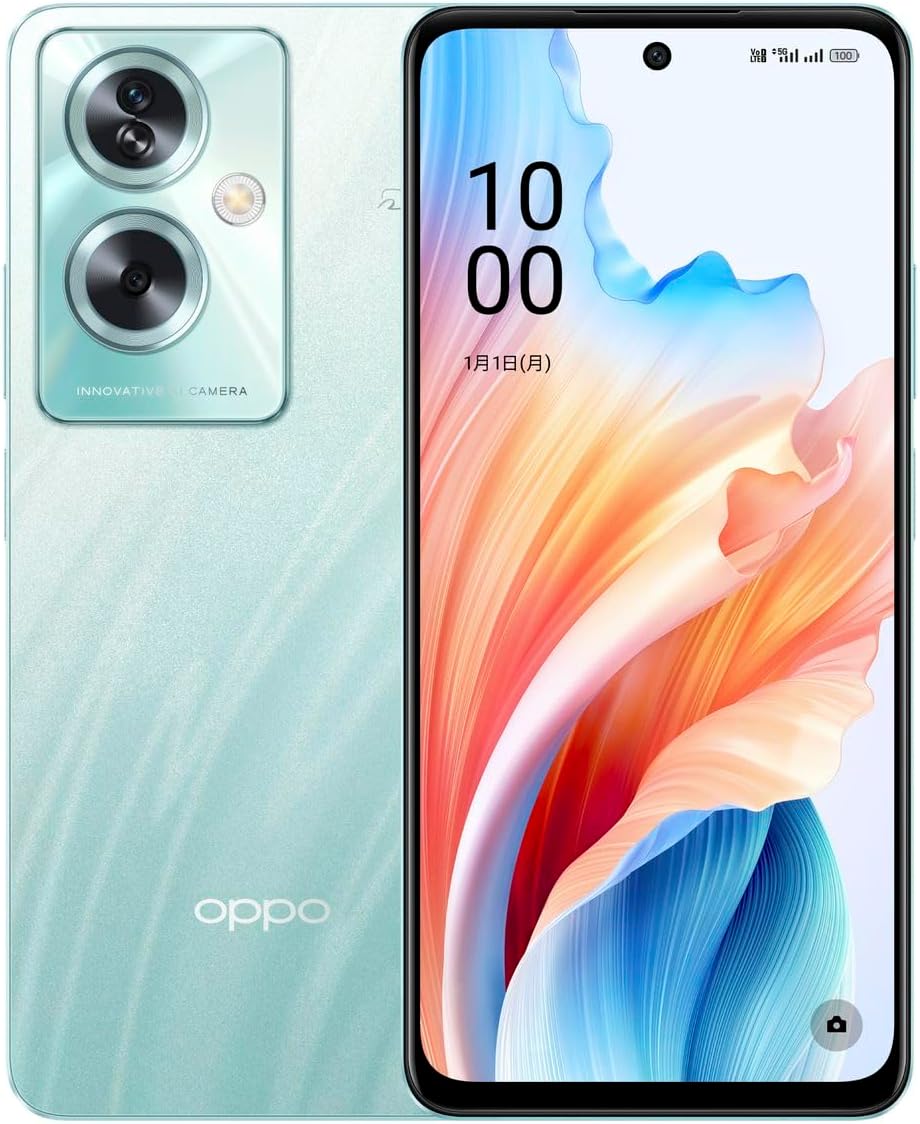
Image: Front and back view of the OPPO A79 5G smartphone, showcasing its Glow Green color and display.

Image: Angled front view of the OPPO A79 5G, emphasizing the large display and slim bezels.
2. Biometric Authentication
For enhanced security, the device supports side fingerprint authentication and face authentication. Set up these features in the device settings for quick and secure unlocking.
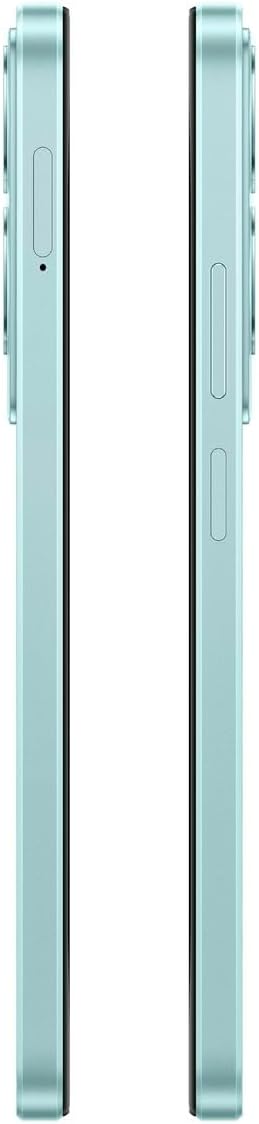
Image: Side view of the OPPO A79 5G, illustrating the power button which also functions as the side fingerprint sensor.
3. Camera Functions
The OPPO A79 5G is equipped with a versatile camera system:
- Rear Camera: Approx. 50 million pixels (Wide, F1.8) and Approx. 2 million pixels (Depth, F2.4).
- Front Camera: Approx. 8 million pixels (F2.0).
Open the Camera app to access various modes, settings, and filters. Ensure proper lighting for optimal photo and video quality.

Image: Back view of the OPPO A79 5G, highlighting the dual camera module and the OPPO branding.
4. Connectivity
The device supports a wide range of connectivity options:
- Network: 5G, 4G FDD LTE, 4G TD LTE, 3G WCDMA, 2G GSM. Supports Carrier Aggregation.
- Wi-Fi: IEEE802.11 a/b/g/n/ac, with tethering support.
- Bluetooth: Version 5.3 for connecting wireless accessories.
- Location: GPS, Beidou, GLONASS, GALILEO, QZSS for accurate positioning.
- USB: USB Type-C port, USB2.0 compatible, supports OTG (On-The-Go) for connecting external devices.
- FM Radio: Available when wired earphones (sold separately) are connected.
- Osaifu-Keitai (NFC): Supported for mobile payments and other NFC functions.
Maintenance
1. Battery Care
The OPPO A79 5G is equipped with a 5000mAh battery. To prolong battery life:
- Avoid extreme temperatures.
- Use only compatible chargers.
- Avoid completely draining the battery frequently.
2. Water and Dust Resistance
The device has an IPX4 rating for splash resistance and an IP5X rating for dust resistance. This means it is protected against splashing water from any direction and is dust protected. It is not designed for submersion in water or exposure to high-pressure water jets. Avoid exposing the device to sand, dust, or liquids beyond these ratings to prevent damage.
3. Cleaning
To clean your device, gently wipe it with a soft, lint-free cloth. Avoid using harsh chemicals or abrasive materials.
Troubleshooting
If you encounter issues with your OPPO A79 5G, consider the following general troubleshooting steps:
- Restart the device: A simple restart can often resolve minor software glitches.
- Check connections: Ensure SIM cards are properly inserted and cables are securely connected.
- Update software: Ensure your device's operating system (ColorOS) is up to date. Go to Settings > About device > Up to date.
- Clear cache: If an app is misbehaving, try clearing its cache in App info settings.
- Factory reset: As a last resort, you may perform a factory reset. Warning: This will erase all data on your device. Back up important data before proceeding.
For more detailed troubleshooting or persistent issues, please refer to the included Safety Guide or visit the official OPPO support website.
Specifications
| Feature | Specification |
|---|---|
| Model Number | CPH2557-GR |
| Color | Glow Green |
| Dimensions (W×H×D) | Approx. 76mm × 166mm × 8.0mm |
| Weight | Approx. 193g |
| Operating System | ColorOS 13 (based on Android™ 13) |
| CPU | MediaTek Dimensity 6020 / Octa-core CPU (2.2GHz×2 + 2.0GHz×6) |
| Internal Memory (RAM) | 4GB (expandable up to 8GB equivalent) |
| Internal Storage (ROM) | 128GB |
| External Memory | microSDXC™ (up to 1TB) |
| SIM Type | nanoSIM / eSIM (Exclusive Dual SIM Slot: SIM1 (nanoSIM) + SIM2 (nanoSIM) or SIM1 (nanoSIM) + eSIM) |
| Display | Approx. 6.7 inches Full HD+ (2400×1080) LCD, 90Hz Refresh Rate |
| Rear Camera | Wide: Approx. 50MP (F1.8), Depth: Approx. 2MP (F2.4) |
| Front Camera | Approx. 8MP (F2.0) |
| Battery Capacity | 5000mAh |
| Charging | 33W SUPERVOOC™ Flash Charge / 33W PPS (Approx. 74 minutes for full charge) |
| Continuous Talk Time | Approx. 1500 minutes |
| Continuous Standby Time | Approx. 548 hours |
| Wireless Communication | Wi-Fi (IEEE802.11 a/b/g/n/ac), Bluetooth® Ver. 5.3, Tethering |
| Location Services | GPS/Beidou/GLONASS/GALILEO/QZSS |
| USB Port | USB Type-C / USB2.0 compatible / OTG compatible |
| Audio | Stereo Speakers, 3.5mm Earphone Jack, Hi-Res Audio (with compatible earphones) |
| Biometric Authentication | Side Fingerprint Authentication, Face Authentication |
| Water/Dust Resistance | IPX4 (Splash-proof) / IP5X (Dust protected) |
| Other Features | Osaifu-Keitai® (NFC), FM Radio (requires wired earphones) |
| Sensors | Geomagnetic, Proximity, Light, Accelerometer, Gyroscope, Gravity, Step Count |
*1: Average available time in Japan in standby mode. Actual usage may be shorter depending on location and usage conditions.
*2: Please refer to the safety guide for precautions regarding charger use. Charger sold separately.
*3: The maximum supported capacity of external memory cards may vary depending on the manufacturer, and there may be restrictions depending on the device/content.
*4: SIM combinations are SIM1 (nanoSIM) + SIM2 (nanoSIM) or SIM1 (nanoSIM) + eSIM.
*5: DSDV compatible, VoLTE compatible with au/SoftBank/docomo/UQ mobile/Rakuten/Y!mobile.
*6: Not available for some apps and content.
Warranty and Support
For information regarding product warranty, please refer to the warranty card or the Safety Guide included in your product package. For further assistance, technical support, or service inquiries, please visit the official OPPO support website or contact their customer service. Keep your purchase receipt as proof of purchase for warranty claims.
You can find additional information and support resources on the OPPO Brand Store on Amazon.co.jp.


