
1. Introduction
This manual provides essential information for the installation, operation, and maintenance of your FSP Hydro PTM PRO 1350W Power Supply. Please read this manual thoroughly before installation and retain it for future reference.
The FSP Hydro PTM PRO 1350W is an 80 PLUS Platinum certified power supply designed for high-performance computing systems. It complies with ATX 3.1 and PCIe 5.1 standards, featuring native 12V-2x6 connectors and a fully modular design.

Image 1.1: Angled view of the FSP Hydro PTM PRO 1350W Power Supply.
2. Safety Information
- Do not open the power supply unit. High voltages are present inside, which can cause electric shock.
- Ensure the power supply is disconnected from the AC power outlet before installation or handling.
- Install the power supply in a well-ventilated area. Do not block any ventilation openings.
- Use only the modular cables provided with this power supply. Using incompatible cables may damage the unit or connected components.
- This product is designed for use in computer systems. Do not use it for any other purpose.
- Ensure proper grounding of your computer system.
3. Package Contents
Verify that all items are present in the package:
- FSP Hydro PTM PRO 1350W Power Supply Unit
- Modular Cable Set (including 12V-2x6, ATX 24-pin, CPU 8-pin, PCIe 6+2-pin, SATA, Peripheral)
- AC Power Cord (C19 to NEMA 5-15P)
- Mounting Screws
- Cable Ties
- User Manual
4. Setup and Installation
4.1 Physical Installation
- Ensure your computer case has adequate space for a 160mm ATX power supply.
- Mount the power supply into the designated PSU bay in your computer case using the provided mounting screws. Ensure the fan is oriented correctly for optimal airflow (typically facing downwards or upwards depending on case design).
4.2 Cable Connections
The Hydro PTM PRO 1350W features a fully modular design, allowing you to connect only the necessary cables. Refer to the cable diagram below for connector types and lengths.

Image 4.1: Modular cable connection ports on the FSP Hydro PTM PRO 1350W Power Supply.
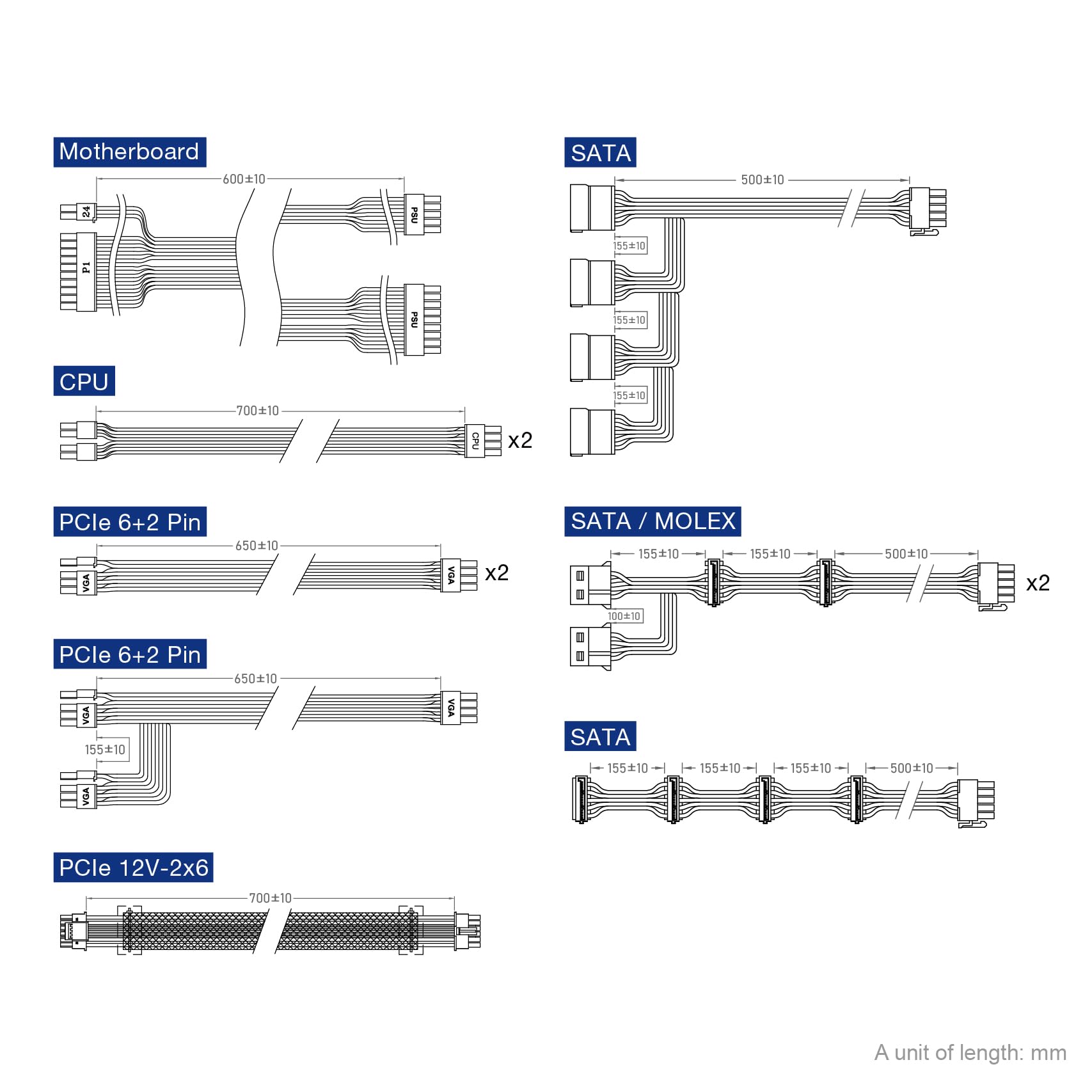
Image 4.2: Cable diagram illustrating the types and lengths of modular cables included.
- Motherboard Power: Connect the 24-pin ATX cable to the corresponding port on the power supply and your motherboard.
- CPU Power: Connect the 8-pin (4+4-pin) CPU cable(s) to the CPU ports on the power supply and your motherboard.
- PCIe Power: For graphics cards, use the appropriate PCIe 6+2-pin cables. This PSU also features native 12V-2x6 connectors for compatible GPUs. Ensure secure connections for high-power graphics cards.
- SATA Power: Connect SATA power cables to your storage drives (SSDs, HDDs) and optical drives.
- Peripheral Power: Use peripheral (Molex) cables for other components requiring this connection type.
After connecting all necessary internal components, connect the AC power cord to the power supply's inlet and then to a wall outlet.
5. Operating Instructions
5.1 Powering On/Off
Once all connections are secure, flip the main power switch on the back of the power supply to the 'ON' position. You can then power on your computer system via the case's power button.
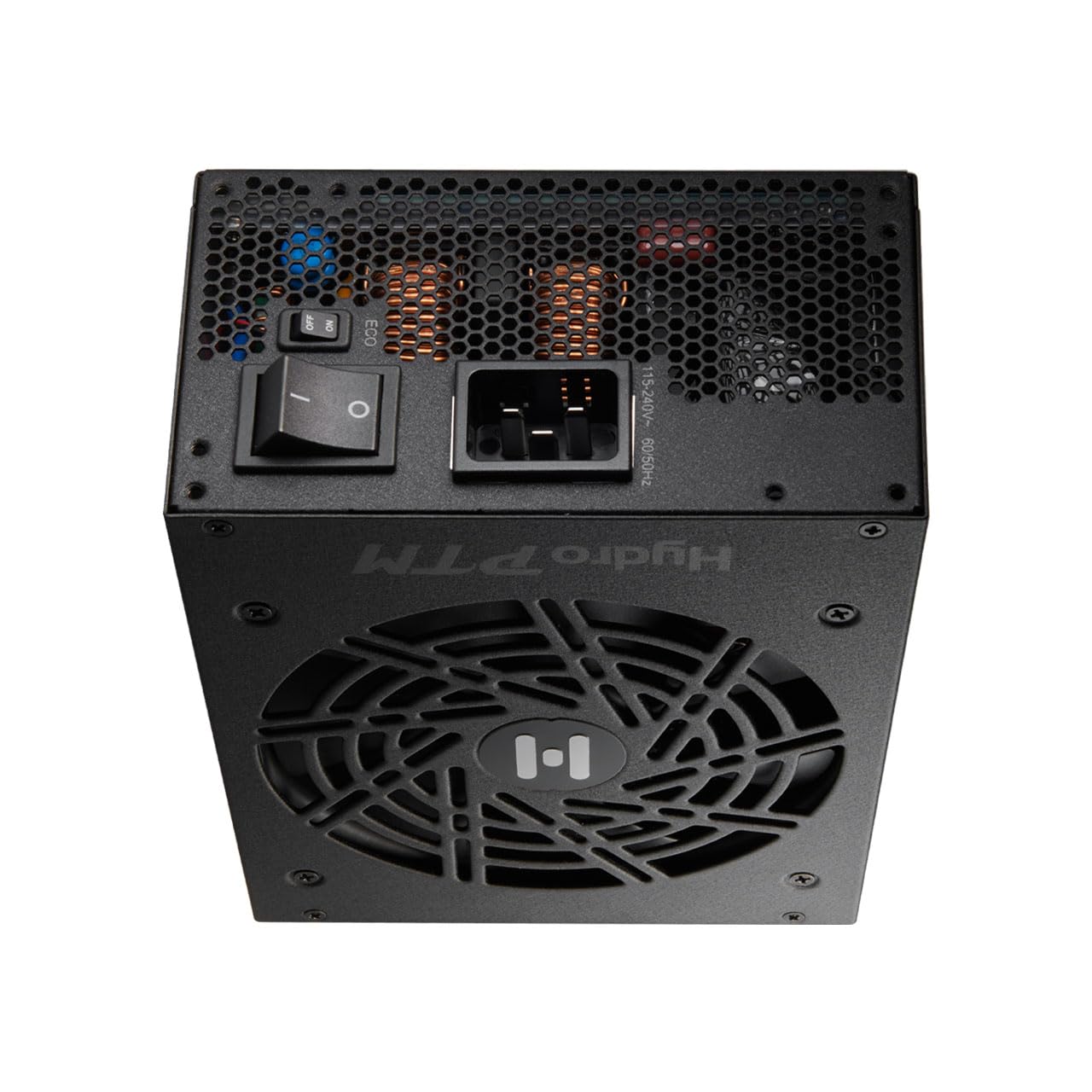
Image 5.1: Rear view of the power supply, highlighting the main power switch and Eco switch.
5.2 Eco Switch Functionality
The Eco Switch, located on the rear of the power supply, controls the fan's operation. When the Eco Switch is in the 'ON' position, the power supply fan will remain off under low load conditions (typically below 30% load) for silent operation. The fan will activate automatically when the load increases. When the Eco Switch is in the 'OFF' position, the fan operates continuously.

Image 5.2: Visual representation of the Eco Mode feature.
5.3 80 PLUS Platinum Efficiency
This power supply is 80 PLUS Platinum certified, meaning it achieves over 92% efficiency at typical loads. This reduces wasted energy, heat generation, and operating costs.

Image 5.3: Explanation of 80 PLUS Platinum Certification.
6. Maintenance
To ensure optimal performance and longevity of your power supply, follow these maintenance guidelines:
- Dust Cleaning: Periodically clean dust from the power supply's fan and ventilation grilles using compressed air. Ensure the power supply is turned off and unplugged before cleaning.
- Airflow: Ensure that your computer case has good airflow and that the power supply's intake and exhaust vents are not obstructed.
- Conformal Coating: The Hydro PTM PRO series features a conformal coating that protects internal components from dust, humidity, and stains, enhancing reliability in various environments.

Image 6.1: Visual representation of the conformal coating protection.
7. Troubleshooting
If you encounter issues with your power supply, perform the following basic checks:
- No Power:
- Ensure the AC power cord is securely connected to both the power supply and the wall outlet.
- Verify the main power switch on the PSU is in the 'ON' position.
- Check all modular cable connections to the motherboard, CPU, and graphics card.
- Test the wall outlet with another device to confirm it has power.
- System Instability/Crashes:
- Ensure all power connectors are fully seated. Loose connections can cause instability.
- Verify that your system's power requirements do not exceed the PSU's capacity.
- Check for proper ventilation within your case to prevent overheating.
- Fan Noise:
- If the Eco Switch is 'ON', the fan may cycle on and off as load changes. This is normal operation.
- If unusual noises persist, ensure no cables are obstructing the fan.
If problems persist after performing these checks, contact FSP customer support.
Video 7.1: An overview video of the FSP Hydro PTM PRO power supply, demonstrating its features and design.
8. Specifications
| Feature | Description |
|---|---|
| Model Name | HPT2-1350M, GEN5 |
| Brand | FSP |
| Output Wattage | 1350 watts |
| Form Factor | ATX |
| Efficiency Certification | 80 PLUS Platinum |
| Cooling Method | Air (with FDB fan) |
| Item Dimensions (L x W x H) | 7.09 x 5.91 x 3.39 inches |
| Power Supply Design | Fully Modular |
| Number of Fans | 1 |
| Maximum Input Voltage | 240 volts AC |
| Minimum Input Voltage | 110 volts AC |
| Connector Types | ATX, PCI Express (including 2x Native 12V-2x6) |
| Protection Features | UVP, OCP, OVP, OTP, SCP, OPP (Under Voltage, Over Current, Over Voltage, Over Temperature, Short Circuit, Over Power Protection) |
9. Warranty
The FSP Hydro PTM PRO 1350W Power Supply is backed by a 10-year manufacturer's warranty. This warranty covers defects in materials and workmanship under normal use. For detailed warranty terms and conditions, please refer to the official FSP website or contact customer support.
10. Support
For technical assistance, troubleshooting beyond this manual, or warranty claims, please visit the official FSP website or contact FSP customer support directly.
FSP Official Website: FSP Group USA Store