
1. Introduction
Thank you for purchasing the Mr. Dj PBX6500LED and PBX6500S Dual 15-inch PA Loudspeaker System. This system includes one PBX6500LED active speaker and one PBX6500S passive speaker, designed for professional audio applications. This manual provides essential information for safe operation, setup, and maintenance of your loudspeaker system. Please read this manual thoroughly before use and retain it for future reference.
2. Safety Information
To ensure safe operation, please observe the following precautions:
- Power Source: Connect the active speaker only to the specified power supply (AC 110/220V 60Hz-50Hz). Ensure the voltage selector is set correctly for your region.
- Ventilation: Do not block ventilation openings. Ensure adequate airflow around the speakers to prevent overheating.
- Water and Moisture: Do not expose the speakers to rain or moisture. Do not place objects filled with liquids on or near the speakers.
- Placement: Place speakers on a stable, level surface. Avoid placing them in direct sunlight or near heat sources.
- Servicing: Do not attempt to service this product yourself. Refer all servicing to qualified service personnel.
- Hearing Protection: Prolonged exposure to high sound pressure levels can cause permanent hearing damage. Use appropriate hearing protection when operating the system at high volumes.
- Cables: Ensure all cables are securely connected and routed to prevent tripping hazards.
- California Proposition 65 Warning: This product can expose you to chemicals, including lead, which is known to the State of California to cause cancer and birth defects or other reproductive harm. For more information, go to P65Warnings.ca.gov.
3. Package Contents
Verify that all items are present in the package:
- 1 x Mr. Dj PBX6500LED Active Loudspeaker
- 1 x Mr. Dj PBX6500S Passive Loudspeaker
- 1 x Wireless Remote Control
- 1 x Wired Microphone
- 1 x Power Cable
- 1 x Speakon Cable (for connecting active to passive speaker)
- User Manual (this document)
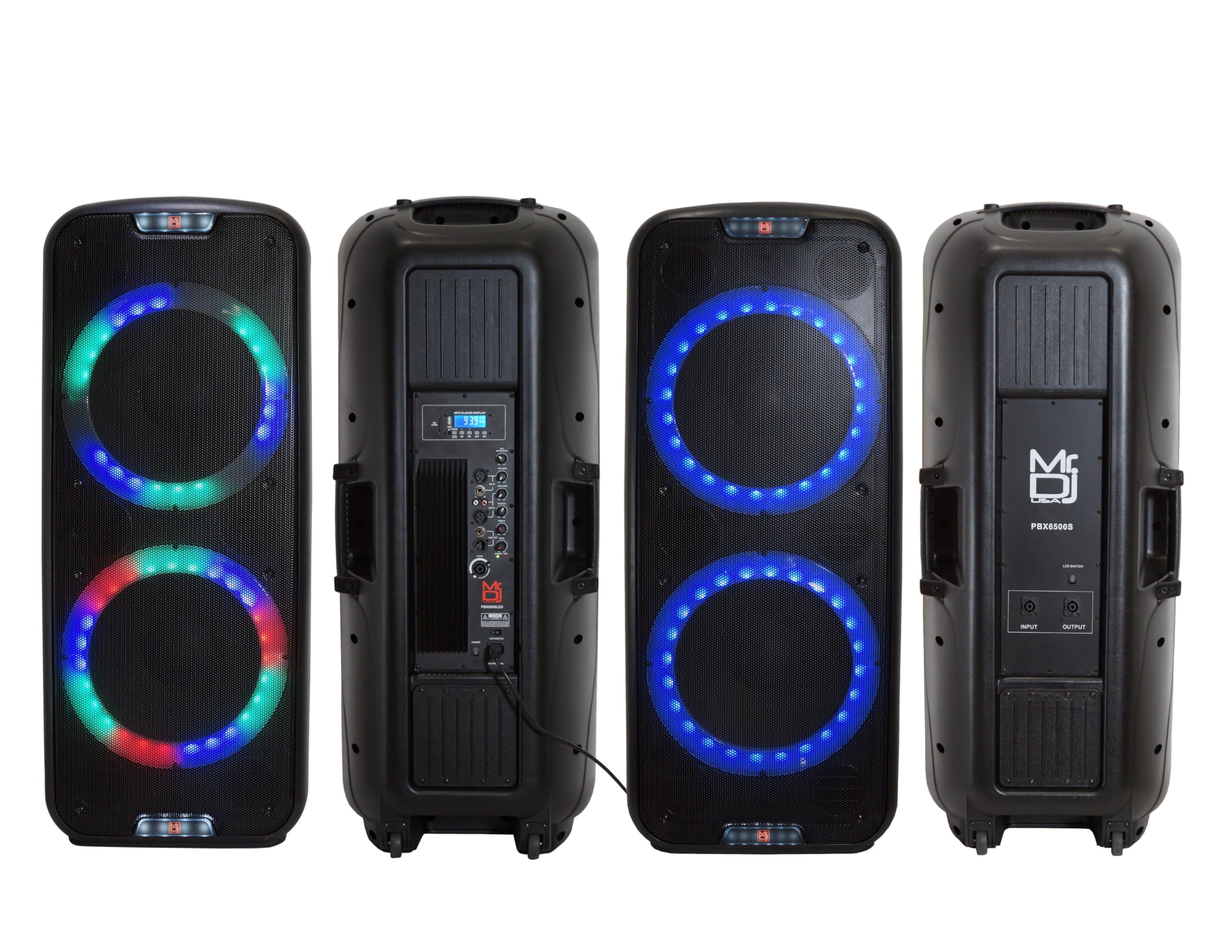
Image: Contents of the Mr. Dj PBX6500LED and PBX6500S loudspeaker system package, including both speakers, microphone, remote control, and packaging box.
4. Product Overview
4.1 PBX6500LED Active Loudspeaker
The PBX6500LED is the active component of your loudspeaker system, featuring a built-in amplifier, media player, and various input/output options. It powers itself and can also power the passive PBX6500S speaker.

Image: The Mr. Dj PBX6500LED active loudspeaker shown with its included microphone, remote control, and product packaging.
Rear Panel Controls and Connections (PBX6500LED)
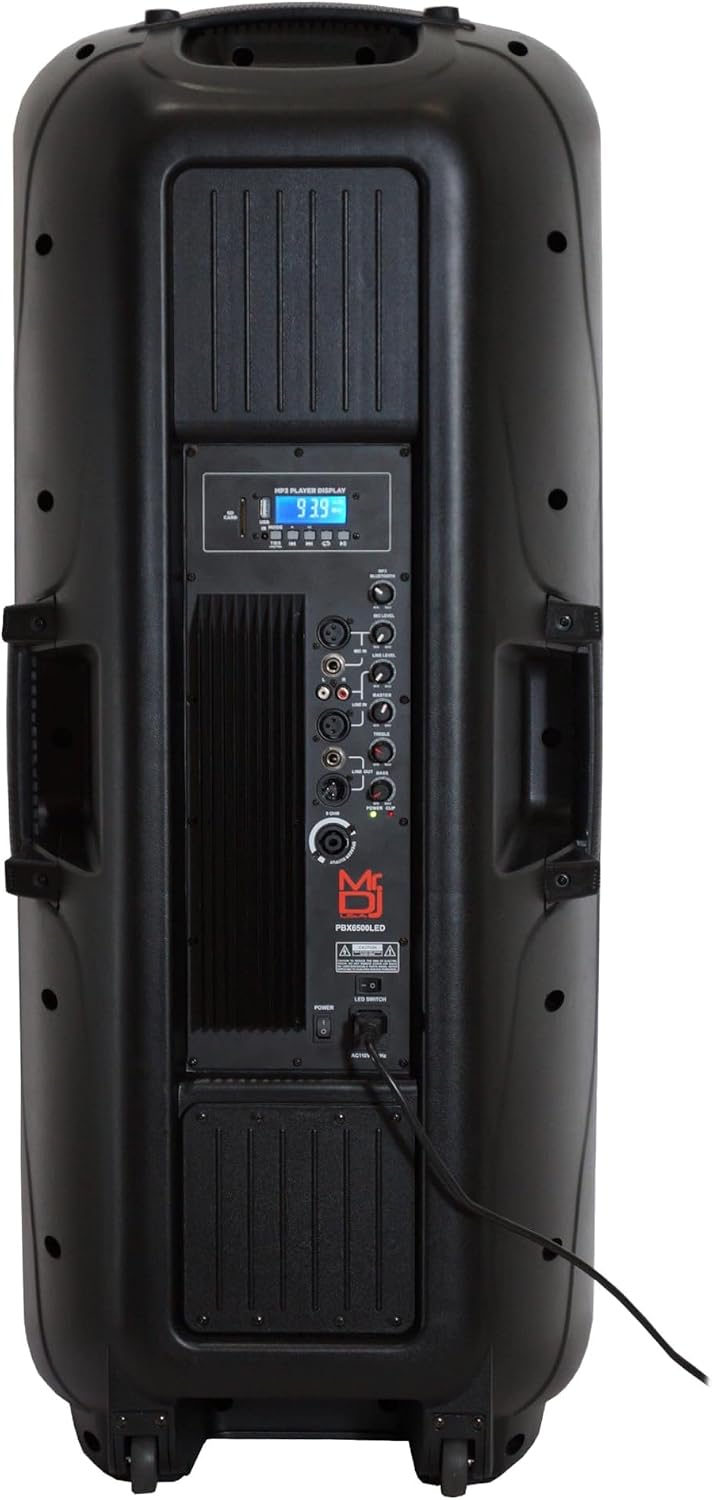
Image: Detailed view of the rear control panel of the PBX6500LED active speaker, highlighting various input/output jacks, volume knobs, equalizer, and media player controls.
- Media Player: LCD display, USB port, SD card slot, control buttons for playback and mode selection.
- Bluetooth: Integrated for wireless audio streaming.
- Inputs: 2 x XLR Microphone Inputs, 2 x 1/4" Jack Line Inputs, RCA Input (L/R), Guitar Input.
- Outputs: RCA Line Output (L/R), XLR Line Output, Speakon Output (for passive speaker).
- Controls: Master Volume, MP3 Volume, Mic Volume, Master Bass, Master Treble, 5-Band Graphic Equalizer, Microphone Echo, Delay, Treble, Bass, X-Bass.
- Power: AC input, Power switch, Voltage selector (115V/230V).
4.2 PBX6500S Passive Loudspeaker
The PBX6500S is the passive component, requiring an external amplifier (typically the PBX6500LED active speaker) for operation. It features dual 15-inch woofers and LED accent lighting.

Image: Front and rear views of the Mr. Dj PBX6500S passive loudspeaker, accompanied by a microphone and remote control.
Rear Panel Connections (PBX6500S)
- Speakon Input: For connecting to the PBX6500LED active speaker or another external amplifier.
- Speakon Output: For daisy-chaining to another passive speaker (if supported by amplifier).
- LED Light Switch: On/Off switch for the multi-color LED woofer and tweeter lights.
5. Setup
5.1 Unpacking and Placement
- Carefully remove both speakers and accessories from their packaging.
- Place the speakers on a stable, level surface or use appropriate speaker stands (not included).
- Ensure there is sufficient space around the speakers for ventilation.
5.2 Power Connection (PBX6500LED Active Speaker)
- Before connecting the power cable, ensure the voltage selector switch on the rear panel of the PBX6500LED is set to the correct voltage for your region (115V or 230V).
- Connect the included power cable to the AC input on the PBX6500LED and then to a grounded power outlet.
- Do not power on the speaker until all audio connections are made.
5.3 Connecting the PBX6500S Passive Speaker
- Use the provided Speakon cable to connect the Speakon Output on the PBX6500LED active speaker to the Speakon Input on the PBX6500S passive speaker.
- Ensure the connections are secure. The active speaker will now power the passive speaker.
6. Operating Instructions
6.1 Power On/Off
- Ensure all volume controls are set to minimum before powering on.
- Flip the Power switch on the rear panel of the PBX6500LED to the 'ON' position. The power LED will illuminate.
- To power off, set the Power switch to 'OFF'.
6.2 Bluetooth Pairing
- On the PBX6500LED, press the 'MODE' button on the media player panel until 'Bluetooth' is selected. The LCD display will show 'BT'.
- On your Bluetooth-enabled device (smartphone, tablet, etc.), enable Bluetooth and search for available devices.
- Select 'MR DJ SPEAKER' (or similar) from the list. Once paired, the speaker will emit a confirmation tone, and the LCD will indicate a successful connection.
- Adjust the MP3 Volume knob on the speaker and the volume on your device.
6.3 USB/SD Card Playback
- Insert a USB flash drive or SD card (pre-loaded with MP3 audio files) into the respective slot on the PBX6500LED media player.
- The speaker will automatically switch to USB/SD mode and begin playback. If not, press the 'MODE' button to select USB or SD.
- Use the media player controls (Play/Pause, Next, Previous) or the remote control to manage playback.
- Adjust the MP3 Volume knob.
6.4 FM Radio Operation
- Press the 'MODE' button on the PBX6500LED until 'FM' is selected.
- Use the 'Play/Pause' button to initiate an automatic scan for FM stations. The speaker will save found stations.
- Use the 'Next' and 'Previous' buttons to navigate through saved stations.
- Adjust the MP3 Volume knob.
6.5 Microphone and Line Inputs
- Connect microphones to the XLR or 1/4" Mic Inputs. Adjust the 'Mic Volume' knob.
- Connect external audio sources (mixers, instruments, etc.) to the 1/4" Line Inputs or RCA Input. Adjust the 'Input Volume' knob.
- Use the 'Microphone Echo', 'Delay', 'Treble', and 'Bass' controls to fine-tune microphone sound.
6.6 TWS (True Wireless Stereo) Pairing (Requires two PBX6500LED speakers)
If you have two PBX6500LED active speakers, you can link them wirelessly for stereo sound.
- Ensure both PBX6500LED speakers are powered on and in Bluetooth mode.
- On one speaker, press the 'TWS' button. The speaker will search for another TWS-compatible speaker.
- Once connected, the LCD display on both speakers will indicate TWS pairing. One speaker will act as the left channel, and the other as the right channel.
- Connect your Bluetooth device to the primary TWS speaker.
6.7 Equalizer and Master Volume Controls
- Use the 5-Band Graphic Equalizer on the PBX6500LED to adjust specific frequency ranges for overall sound shaping.
- The 'Master Volume' knob controls the overall output level of the entire system.
- 'Master Bass' and 'Master Treble' knobs provide general tone adjustments.
6.8 LED Lighting Control
- Both PBX6500LED and PBX6500S speakers feature built-in multi-color LED woofer and tweeter lights.
- On the PBX6500S, there is a dedicated switch on the rear panel to turn the LED lights On or Off.
- The PBX6500LED's LED lights are typically controlled via the remote or a dedicated button on the unit (refer to remote control instructions for specific functions).

Image: Front view of the PBX6500LED active speaker with its multi-color LED lights around the woofers illuminated, showcasing the visual effect.

Image: Front view of the PBX6500S passive speaker with its blue LED lights around the woofers illuminated.
7. Maintenance
- Cleaning: Use a soft, dry cloth to clean the speaker cabinets. Do not use abrasive cleaners, waxes, or solvents.
- Storage: When not in use for extended periods, store the speakers in a cool, dry place, away from direct sunlight and extreme temperatures.
- Transportation: Utilize the built-in trolley handles and wheels for easy transportation.
8. Troubleshooting
| Problem | Possible Cause | Solution |
|---|---|---|
| No power to active speaker | Power cable not connected; Power switch off; Incorrect voltage selector; Blown fuse. | Check power cable connection; Ensure power switch is ON; Verify voltage selector setting; Replace fuse if necessary (consult service personnel). |
| No sound from passive speaker | Speakon cable not connected; Active speaker not powered on; Volume too low. | Ensure Speakon cable is securely connected between active and passive speakers; Power on active speaker; Increase Master Volume. |
| Bluetooth not connecting | Speaker not in Bluetooth mode; Device too far; Previously paired device connected. | Press MODE button to select Bluetooth; Move device closer to speaker; Disconnect from other devices or forget 'MR DJ SPEAKER' on your device and re-pair. |
| Distorted sound | Volume too high (clipping); Incorrect EQ settings; Faulty cable. | Reduce Master Volume and input levels; Adjust EQ settings; Try a different audio cable. |
| Microphone feedback | Microphone too close to speaker; Volume too high. | Reposition microphone away from speakers; Reduce Mic Volume; Adjust Mic Treble/Bass. |
9. Specifications
9.1 Common Specifications (PBX6500LED & PBX6500S)
- Speaker Type: Dual 15-inch, 3-Way Full-Range Loudspeaker
- Woofer: Dual 15" with 60 Oz Magnet, 3" Voice Coil, 2" KSV Voice Coils, Non-Pressed Paper Cones
- Tweeter: 44mm Ti Diaphragm Compressor Driver, 2" Compression Neodymium Magnet HF Horn Drivers
- Frequency Response: 45Hz - 20kHz
- Maximum SPL @ 1w/1m: 128dB
- Enclosure Material: High Impact ABS
- Features: Trolley Handle and Wheels, Metal Grill Covered Speakers, Built-in Multi-color LED Woofer and Tweeter Lights
- Color: Black
- Dimensions (Each Speaker): 21.5" (W) x 19.4" (D) x 52.7" (H)
9.2 PBX6500LED Active Speaker Specifics
- Power Output: 5000 Watts P.M.P.O, 400 Watts RMS
- Amplifier: Built-in
- Connectivity: Bluetooth, USB/SD Card Reader, FM Radio
- Inputs: 2 x XLR Mic, 2 x 1/4" Line, RCA (L/R), Guitar
- Outputs: RCA Line (L/R), XLR Line, Speakon (for passive speaker)
- Controls: 5-Band Graphic EQ, Master Volume, Input Volume, MP3 Volume, Mic Volume, Master Bass, Master Treble, Mic Echo, Mic Delay, Mic Treble, Mic Bass, X-Bass
- Special Features: TWS Wireless Speaker Linking, LCD MP3 Display, Remote Control, 115/230 Volt Switchable
- Speaker Weight: 72.6 Lbs.
9.3 PBX6500S Passive Speaker Specifics
- Power Handling: 4000 Watts P.M.P.O, 400 Watts RMS
- Inputs/Outputs: Speakon Input, Speakon Output
- Special Features: LED Light On/Off Switch
- Speaker Weight: 40 Lbs.
10. Warranty and Support
This Mr. Dj loudspeaker system is covered by a 1-year manufacturer's warranty from the date of purchase. This warranty covers defects in materials and workmanship under normal use.
The warranty does not cover damage caused by misuse, abuse, accident, unauthorized modifications, or improper installation. For warranty service or technical support, please contact your authorized Mr. Dj dealer or visit the official Mr. Dj website for contact information.
