
1. Introduction
Thank you for purchasing the Mr. Dj PRO-SUB18BT-18-6000W Powered Subwoofer. This manual provides essential information for the safe and efficient operation of your new audio equipment. Please read it thoroughly before use and retain it for future reference.
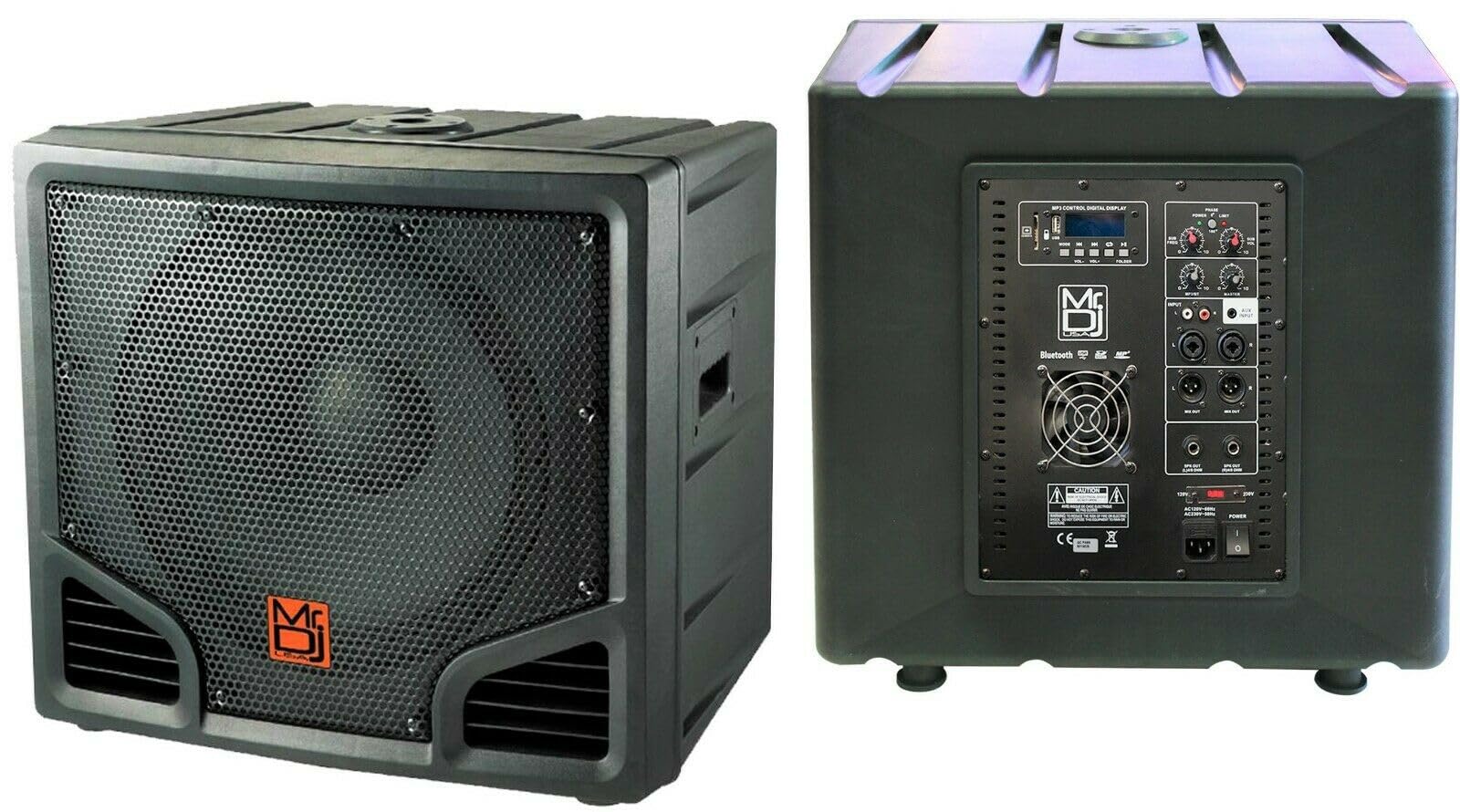
Image 1.1: Front view of the Mr. Dj PRO-SUB18BT-18-6000W Powered Subwoofer, showcasing its robust design and 18-inch speaker cone.
2. Safety Instructions
To prevent electric shock, fire, or damage to the unit, please observe the following safety precautions:
- Power Source: Connect the unit only to an AC power outlet of the specified voltage.
- Ventilation: Ensure adequate ventilation. Do not block ventilation openings.
- Water and Moisture: Do not expose the unit to rain or moisture. Do not place objects filled with liquids on the unit.
- Heat: Keep the unit away from heat sources such as radiators, heat registers, stoves, or other apparatus that produce heat.
- Servicing: Do not attempt to service this product yourself. Refer all servicing to qualified service personnel.
- Cleaning: Unplug the unit from the power outlet before cleaning. Use a dry cloth only.
- Overloading: Do not overload wall outlets or extension cords as this can result in a risk of fire or electric shock.
3. Package Contents
Please check that all items are present in the package:
- Mr. Dj PRO-SUB18BT-18-6000W Powered Subwoofer Unit
- Power Cable
- User Manual (this document)
4. Features
The Mr. Dj PRO-SUB18BT-18-6000W Powered Subwoofer offers a range of features for versatile audio applications:
- High Power Output: Up to 6000 Watts (Peak) for robust sound.
- Large Woofer: Equipped with an 18-inch dynamic driver for deep bass.
- Bluetooth Connectivity: Wireless audio streaming from compatible devices.
- USB Playback: Direct audio playback from USB storage devices.
- Line Input: Connect external audio sources via standard audio cables.
- Speaker Outputs: Two speaker outputs for connecting additional passive speakers.
- Control Method: Intuitive push-button controls.
5. Setup
5.1 Placement
Place the subwoofer on a stable, flat surface. Ensure there is sufficient space around the unit for proper ventilation. Avoid placing it in direct sunlight or near heat sources.
5.2 Power Connection
- Ensure the subwoofer's power switch is in the OFF position.
- Connect the provided power cable to the AC IN port on the subwoofer.
- Plug the other end of the power cable into a suitable AC power outlet (120V/60Hz or 240V/50Hz, depending on your region and unit specifications).
5.3 Audio Connections
The subwoofer offers multiple input and output options:
- Line Input: Use an RCA or XLR cable (not included) to connect your mixer, DJ controller, or other audio source to the LINE IN ports.
- Speaker Outputs: Use speakON or 1/4" TS cables (not included) to connect passive full-range speakers to the SPEAKER OUT ports. Ensure the impedance of connected speakers matches the subwoofer's output requirements.
6. Operating Instructions
6.1 Power On/Off
Flip the main power switch located on the rear panel to the 'ON' position to power on the subwoofer. The power indicator light will illuminate. Flip it to 'OFF' to power down.
6.2 Volume Control
Use the MASTER VOLUME knob on the control panel to adjust the overall output level of the subwoofer. Start with a low volume and gradually increase it to a comfortable listening level.
6.3 Bluetooth Pairing
- Ensure the subwoofer is powered on and in Bluetooth mode (select via the MODE button if available, or it may default to Bluetooth).
- On your Bluetooth-enabled device (smartphone, tablet, laptop), enable Bluetooth and search for available devices.
- Select "Mr. Dj Subwoofer" (or similar name) from the list of devices.
- Once paired, you can stream audio wirelessly from your device to the subwoofer.
6.4 USB Playback
- Insert a USB flash drive containing MP3 or WAV audio files into the USB port.
- Press the MODE button to select USB input.
- Use the playback controls (Play/Pause, Next/Previous Track) on the subwoofer to manage your music.
6.5 Line Input Usage
When an audio source is connected to the LINE IN ports, select the LINE input mode using the MODE button. The subwoofer will then play audio from the connected external device.
6.6 Speaker Output Usage
If passive speakers are connected to the SPEAKER OUT ports, the subwoofer will pass through a full-range or high-pass signal to these speakers, depending on the internal crossover settings. Adjust the volume for these speakers via the subwoofer's master volume or individual gain controls if available.
7. Maintenance
7.1 Cleaning
Regularly clean the exterior of the subwoofer with a soft, dry cloth. Do not use liquid cleaners or solvents, as they may damage the finish. Ensure the unit is unplugged before cleaning.
7.2 Storage
When not in use for extended periods, store the subwoofer in a cool, dry place, away from direct sunlight and extreme temperatures. Cover the unit to protect it from dust.
8. Troubleshooting
If you encounter issues with your subwoofer, refer to the following common problems and solutions:
| Problem | Possible Cause | Solution |
|---|---|---|
| No power | Power cable not connected; Power outlet faulty; Power switch off | Check power cable connection; Try a different outlet; Ensure power switch is ON |
| No sound output | Volume too low; Incorrect input selected; Audio source issue; Cables loose | Increase volume; Select correct input mode; Check audio source; Secure all audio cables |
| Bluetooth not pairing | Subwoofer not in pairing mode; Device too far; Interference | Ensure subwoofer is in Bluetooth mode; Move device closer; Restart both devices |
| Distorted sound | Volume too high; Input signal too strong; Damaged speaker | Reduce volume; Lower input signal level; Contact support if speaker is damaged |
9. Specifications
| Feature | Specification |
|---|---|
| Brand | Mr. Dj |
| Model Number | PRO-SUB18BT-18-6000W |
| Speaker Type | Powered Subwoofer |
| Speaker Size | 18 Inches |
| Woofer Diameter | 18 Inches |
| Maximum Output Power | 6000 Watts |
| Connectivity Technology | Bluetooth, USB, Line (Audio) |
| Wireless Technology | Bluetooth |
| Audio Output Mode | Surround |
| Number of Audio Channels | 2.1 |
| Control Method | Push Button |
| Power Source | Corded Electric |
| Item Weight | 1 Pounds (Note: This value may be a placeholder and actual weight may vary) |
| Compatible Devices | Laptop, MP3 Player, Projector, Smartphone, Tablet |
10. Warranty and Support
10.1 Warranty Information
This Mr. Dj PRO-SUB18BT-18-6000W Powered Subwoofer is covered by a 1-year manufacturer's limited warranty from the date of purchase. This warranty covers defects in materials and workmanship under normal use. It does not cover damage caused by misuse, accident, unauthorized modification, or improper installation.
10.2 Customer Support
For technical assistance, warranty claims, or service inquiries, please contact Mr. Dj customer support. Refer to the contact information provided on the official Mr. Dj website or your purchase documentation.
Please have your model number (PRO-SUB18BT-18-6000W) and proof of purchase ready when contacting support.