
Billboard BB-S78879
Contents
Billboard Carbono Pocket Wireless Speaker User Manual
Model: BB-S78879
1. Introduction
Thank you for purchasing the Billboard Carbono Pocket Wireless Speaker. This manual provides essential information for setting up, operating, and maintaining your speaker. Please read it thoroughly before use to ensure optimal performance and safety.
2. Safety Information
- Do not expose the speaker to extreme temperatures, direct sunlight, or high humidity.
- While the speaker is IPX5 water-resistant, do not submerge it in water.
- Keep the speaker away from strong magnetic fields.
- Do not attempt to disassemble or modify the speaker. This will void the warranty.
- Use only the provided charging cable or a certified Type-C cable with appropriate voltage (5Vcc 1A).
- Keep out of reach of children.
3. Package Contents
Please check the box for the following items:
- Billboard Carbono Pocket Wireless Speaker
- USB Type-C Charging Cable
- User Manual (this document)

Image: The retail packaging of the Billboard Carbono Pocket speaker, highlighting its portable design, IPX5 water resistance, and 6-hour battery life.
4. Product Overview
Front View
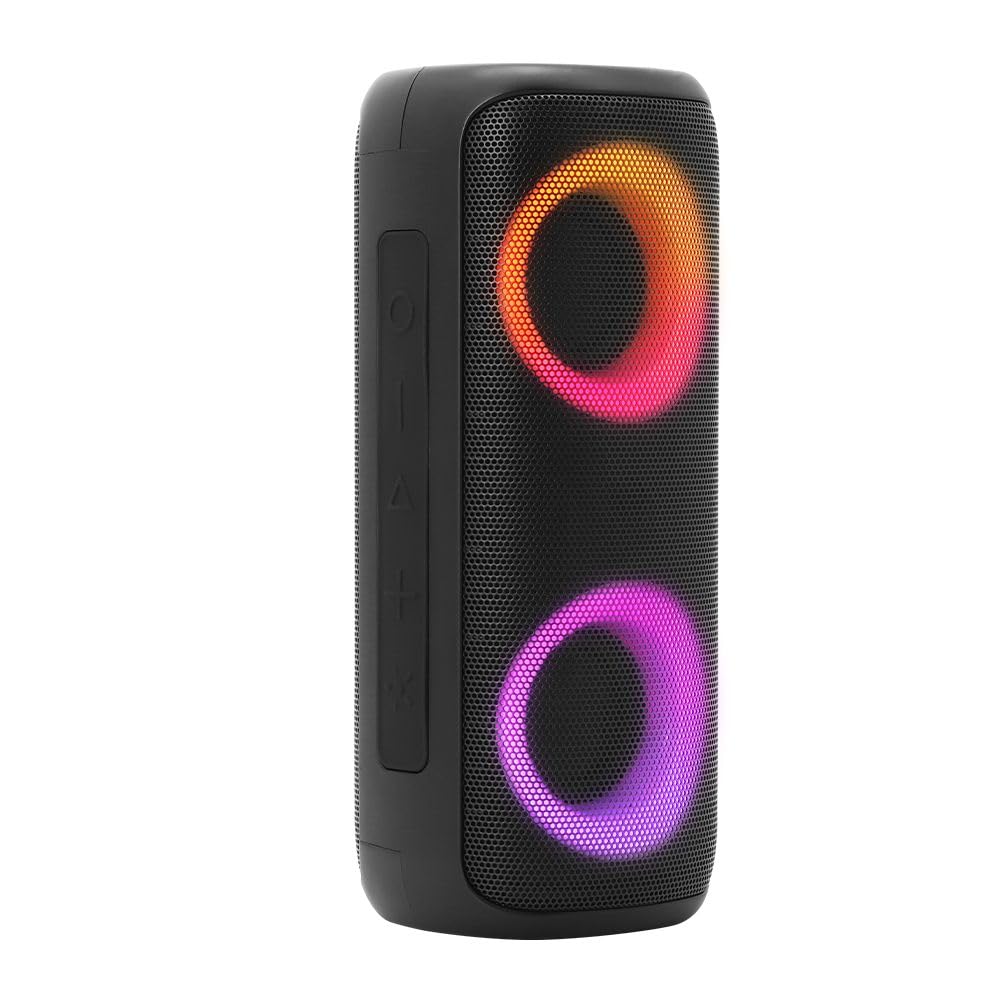
This image shows the front of the speaker, featuring two large speaker grilles with vibrant, illuminated RGB LED rings. The control buttons are visible on the left side panel.
Side View (Controls)

A closer look at the side panel, detailing the tactile control buttons for power, volume, track control, and mode selection.
Rear View (Ports)

The back of the speaker reveals the input panel, protected by a rubber flap, which includes ports for USB, Micro SD, 3.5mm AUX, and USB Type-C charging.
Angled View (Lights On)

This image provides an angled perspective of the speaker, showcasing the dynamic multi-color LED lighting effects around the speaker drivers.
5. Setup
5.1 Charging the Speaker
Before first use, fully charge the speaker. Locate the Type-C charging port on the rear panel (under the protective flap). Connect the provided USB Type-C cable to the speaker and the other end to a 5Vcc 1A USB power adapter (not included). The LED indicator will show charging status and turn off when fully charged. A full charge provides approximately 6 hours of playback time.
5.2 Power On/Off
Press and hold the Power button (usually marked with a power symbol) on the side panel for a few seconds to turn the speaker ON or OFF. A sound prompt will indicate the power status.
6. Operating Instructions
6.1 Bluetooth Pairing
- Ensure the speaker is powered ON and in Bluetooth pairing mode (indicated by a flashing LED).
- On your device (smartphone, tablet, etc.), enable Bluetooth and search for available devices.
- Select "Billboard Carbono Pocket" from the list.
- Once paired, the LED indicator will stop flashing, and a confirmation sound will play.
- The speaker has a wireless range of up to 10 meters (33 feet).
6.2 True Wireless Stereo (TWS) Function
The TWS function allows you to connect two Billboard Carbono Pocket speakers for a stereo sound experience.
- Ensure both speakers are powered ON and not connected to any Bluetooth device.
- On one speaker, press and hold the TWS button (refer to button layout if available, otherwise assume a dedicated button or combination). The speakers will search for each other.
- Once connected, a confirmation sound will play. The LED indicator on one speaker will flash (master), and the other will be solid (slave).
- Now, connect your device to the master speaker via Bluetooth as described in section 6.1.
6.3 USB / Micro SD Playback
Insert a USB flash drive or a Micro SD card (up to 32GB, formatted to FAT32) into the respective port on the rear panel. The speaker will automatically switch to USB/Micro SD mode and begin playing supported audio files.
6.4 FM Radio
Press the Mode button to switch to FM Radio mode. Press the Play/Pause button to auto-scan and save available stations. Use the Volume +/- buttons to navigate between saved stations or adjust volume.
6.5 AUX Input
Connect an external audio device (e.g., MP3 player, laptop) to the speaker's 3.5mm AUX input port using a 3.5mm audio cable (not included). The speaker will automatically switch to AUX mode.
6.6 LED Light Control
The speaker features RGB LED lighting. Press the Light button (if available, otherwise assume a combination or mode button press) to cycle through different light modes or turn the lights off.
7. Maintenance
- Clean the speaker with a soft, dry cloth. Do not use abrasive cleaners or solvents.
- Ensure the protective rubber flap over the ports is securely closed when not in use, especially in wet environments.
- Store the speaker in a cool, dry place when not in use for extended periods.
8. Troubleshooting
| Problem | Possible Cause | Solution |
|---|---|---|
| Speaker does not turn on. | Low battery; Power button not pressed long enough. | Charge the speaker; Press and hold the Power button for 3-5 seconds. |
| No sound. | Volume too low; Incorrect mode selected; Device not connected. | Increase volume on speaker and device; Press Mode button to select correct input; Re-pair Bluetooth or check cable connection. |
| Bluetooth pairing fails. | Speaker not in pairing mode; Device too far; Interference. | Ensure speaker LED is flashing; Move device closer (within 10m); Turn off other Bluetooth devices. |
| TWS connection fails. | Speakers too far apart; One speaker already paired to a device. | Ensure speakers are close to each other; Disconnect any Bluetooth devices from both speakers before initiating TWS. |
9. Specifications
| Model Number | BB-S78879 |
| Wireless Connection | Bluetooth 5.3 |
| Wireless Range | Up to 10 meters (33 feet) |
| Output Power | 10 W RMS |
| Speaker Diameter | 2 x 2 inches (5.2 cm) |
| Impedance | 4 Ohm |
| Battery Capacity | 4000 mAh |
| Power Input | 5 Vcc 1 A (Type-C) |
| Playback Time | Up to 6 hours |
| Memory Card Support | Micro SD, USB |
| Auxiliary Input | 3.5 mm |
| FM Radio | Yes |
| TWS Function | Yes |
| Water Resistance | IPX5 (Resistant to water jets) |
| LED Lighting | RGB |
| Material | Plastic |
| Dimensions (L x W x H) | 35 x 24 x 25 cm (approximate) |
10. Warranty and Support
This Billboard Carbono Pocket Wireless Speaker comes with a one-year warranty from the date of purchase. This warranty covers manufacturing defects and workmanship under normal use.
The warranty does not cover damage caused by:
- Accidents, misuse, abuse, or neglect.
- Unauthorized repair or modification.
- Improper connection or use with incompatible accessories.
- Exposure to extreme temperatures or conditions beyond IPX5 rating.
For warranty claims or technical support, please contact your retailer or the manufacturer's customer service. Please retain your proof of purchase for warranty validation.
Documents and downloads
Ask a question about this manual
Ask about setup, troubleshooting, compatibility, parts, safety, or missing instructions. Manuals+ will review the question and use this page’s manual context to help answer it.