
1. Introduction
Thank you for choosing the VBESTLIFE AT350 Live Sound Card. This device is designed to enhance your audio experience for streaming, podcasting, gaming, and other live audio productions. It features Bluetooth 5.2 connectivity, 48V microphone support, and a range of sound effects to customize your output. Please read this manual carefully to ensure proper setup and operation.
Package Contents:
- 1 x AT350 Live Sound Card
- 2 x Audio Cables
- 1 x USB to Type-C Cable
- 1 x Type-C to Type-C Cable
2. Product Features
- High-Quality Audio: Offers exceptional sound quality with a frequency response of 20 Hz to 20 kHz and low total harmonic distortion (<0.05% at 1 kHz).
- Versatile Compatibility: Compatible with PCs and mobile devices for professional-grade recording and streaming.
- Enhanced Performance: Headphone output power of 20 mW (320 Ω, 1 kHz, +N = 1%) for optimal sound monitoring with reduced background noise.
- Wireless Connectivity: Bluetooth 5.2 technology for stable and fast wireless connection to your devices.
- 48V Microphone Support: Directly supports 48V condenser microphones.
- Extensive Sound Effects: Includes 12 types of electric sound effects and 20 types of special ambient sound effects.
- Long Battery Life: Equipped with a 2400 mAh lithium battery, providing up to 6 hours of continuous use.
- Intuitive Controls: Features mixing switch support, simple input control, reverb mute control, and reverb melody adjustment.
3. Product Overview
Familiarize yourself with the layout and controls of your AT350 Live Sound Card.
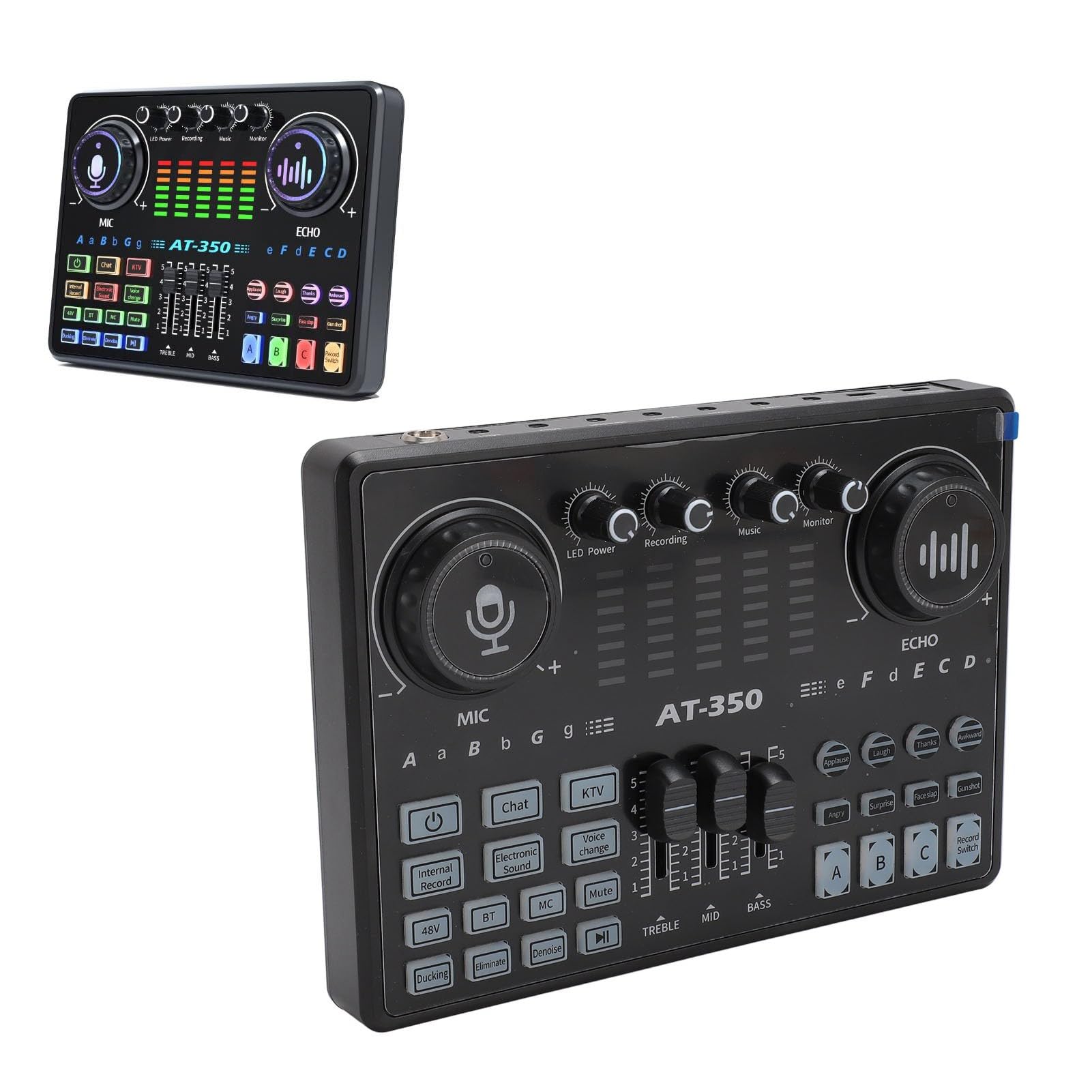
Figure 3.1: Front view of the AT350 Live Sound Card, showing main control knobs for MIC and ECHO, LED indicators for power, recording, music, and monitor, along with key specifications.

Figure 3.2: Detailed view of the AT350 Live Sound Card's front panel, highlighting features such as 12 electric sound effects, 20 ambient sound effects, 48V microphone support, and mixing switch functionality.

Figure 3.3: The AT350 Live Sound Card packaged with its essential cables: USB to Type-C, Type-C to Type-C, and two audio cables.

Figure 3.4: Close-up view of the AT350 Live Sound Card's side panel, showing the 48V microphone input, Mic1, Mic2, and Headset ports.
4. Setup and Connections
This section details various connection methods for your AT350 Live Sound Card with different devices.
4.1. Connecting to a Phone (3.5mm / 5V MIC)

Figure 4.1: Connect your phone (3.5mm jack) and a 5V microphone to the sound card. Use the appropriate audio cables for connection. Music can be played from the phone.
4.2. Connecting to a Phone (3.5mm / 48V MIC)

Figure 4.2: Connect your phone (3.5mm jack) and a 48V condenser microphone to the sound card. Ensure the 48V microphone is connected to the dedicated 48V input. Music can be played from the phone.
4.3. Computer Recording with Phone Music
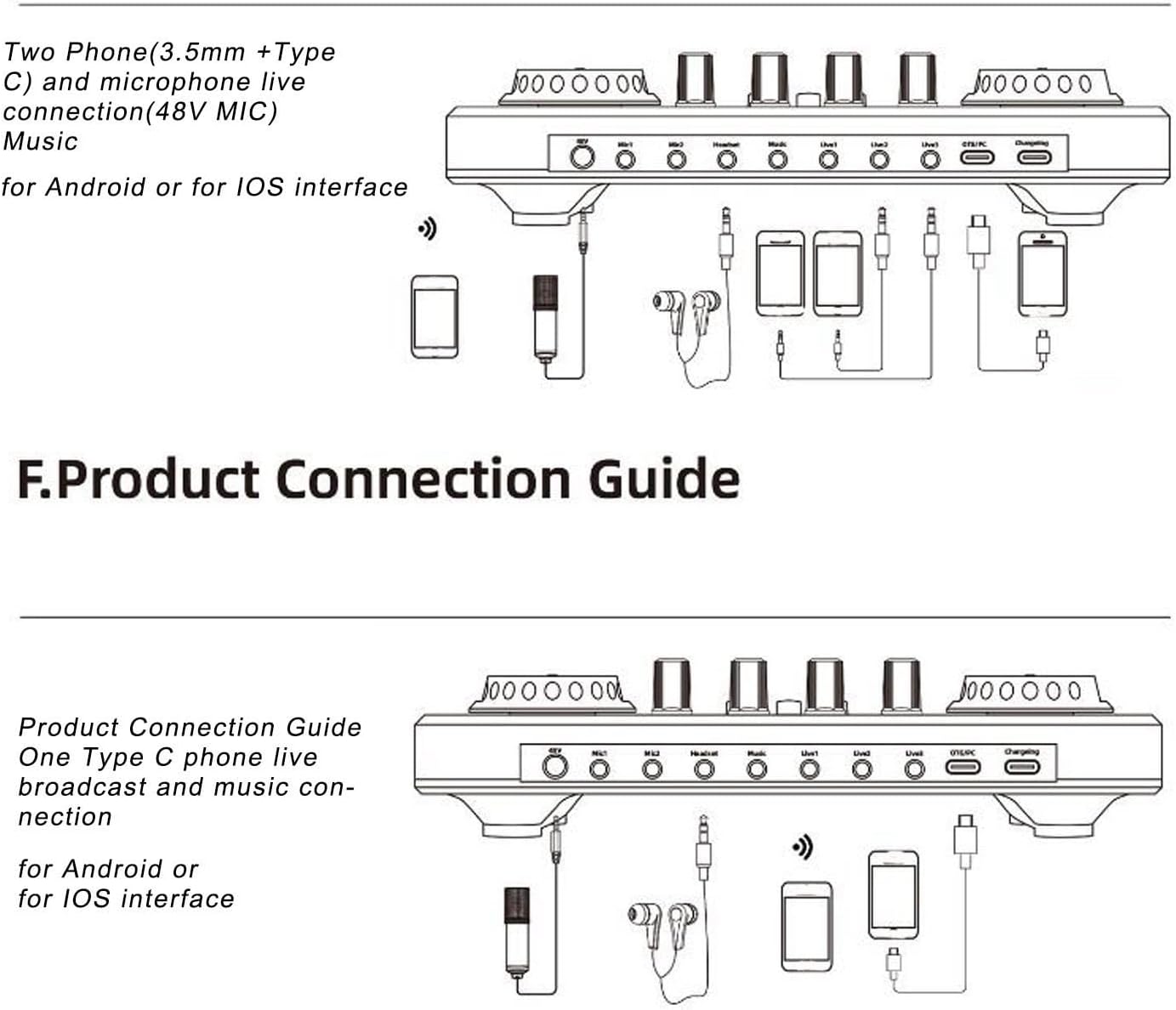
Figure 4.3: Connect the sound card to your computer via the USB-C port for recording. Connect your phone (3.5mm jack) to the sound card for music input. This setup allows for computer online recording while playing music from your phone.
4.4. Computer Recording, Mobile Phone Live Broadcast, and Phone Music

Figure 4.4: This advanced setup allows simultaneous computer recording, live broadcasting from a mobile phone, and music input from another phone. Connect the sound card to your computer (USB-C), one phone for live broadcast, and another phone for music input (3.5mm jacks).
4.5. Two Phones (3.5mm + Type-C) and 48V Microphone Live Connection

Figure 4.5: Connect two phones for live broadcast or music input (one via 3.5mm, one via Type-C) and a 48V microphone. This setup is compatible with both Android and iOS interfaces.
5. Operating Instructions
The AT350 Live Sound Card is designed for ease of use. Once connected, you can begin adjusting your audio settings.
5.1. Power On/Off and Charging
- To power on, press and hold the power button (usually indicated by a power symbol).
- To power off, press and hold the power button again.
- Connect the sound card to a power source using the provided USB to Type-C cable for charging. The LED power indicator will show charging status.
5.2. Microphone and Echo Control
- Use the MIC knob to adjust the microphone input volume.
- Use the ECHO knob to control the reverb effect level.
- The sound card supports 48V condenser microphones; ensure it is connected to the dedicated 48V input.
5.3. Sound Effects
- The sound card features 12 types of electric sound effects and 20 types of special ambient sound effects. Press the corresponding buttons on the panel to activate them.
- Experiment with different effects to find the best sound for your content.
5.4. Bluetooth Connectivity
- Activate Bluetooth on your mobile device.
- On the sound card, press the BT button to enable Bluetooth pairing mode.
- Search for "AT350" or similar on your device's Bluetooth list and connect.
- Once connected, you can stream music or audio wirelessly to the sound card.
5.5. Monitoring
- Connect your headphones to the Headset port to monitor your audio in real-time.
- Adjust the monitor volume using the dedicated knob.
6. Specifications
| Feature | Specification |
|---|---|
| Item Type | Live Sound Card Mixer |
| Material | ABS |
| Frequency Response | 20 Hz - 20 kHz |
| Total Harmonic Distortion | <0.05% at 1 kHz |
| Headphone Output Power | 20 mW, 320 Ω (1 kHz, +N = 1%) |
| Sampling Rate | 48 kHz/16 bit |
| Wireless Connection | Bluetooth 5.2 |
| Battery Type | Lithium Battery |
| Battery Capacity | 2400 mAh |
| Charging Time | Approximately 3 hours |
| Usage Time | Approximately 6 hours |
| Model Number | AT350 (VBESTLIFEw3nf71hb2p) |
| Package Dimensions | 28 x 18 x 6 cm |
| Weight | 735 grams |
| Origin | China |
7. Maintenance
- Cleaning: Use a soft, dry cloth to clean the surface of the sound card. Avoid using liquid cleaners or abrasive materials.
- Storage: Store the device in a cool, dry place away from direct sunlight and extreme temperatures.
- Battery Care: To prolong battery life, avoid fully discharging the battery frequently. Charge the device regularly, even if not in use for extended periods.
- Handling: Handle the sound card with care to prevent damage from drops or impacts.
8. Troubleshooting
| Problem | Possible Cause | Solution |
|---|---|---|
| No sound output | Incorrect cable connection; Volume too low; Device not powered on. | Check all audio cable connections. Ensure the sound card is powered on and volume knobs are adjusted correctly. Check headphone connection. |
| Microphone not working | Microphone not connected properly; MIC volume too low; Incorrect microphone type for port. | Ensure microphone is securely connected to the correct input (e.g., 48V mic to 48V port). Increase MIC volume. Test with another microphone if possible. |
| Bluetooth connection issues | Device not in pairing mode; Out of range; Interference. | Ensure the sound card's BT button is pressed for pairing. Move devices closer. Restart both devices. |
| Short battery life | Battery not fully charged; High volume usage. | Ensure the device is fully charged (approx. 3 hours). Reduce output volume if possible. |
| Sound distortion | Input volume too high; Faulty cable. | Reduce input volume levels. Try different audio cables. |
9. Warranty and Support
The VBESTLIFE AT350 Live Sound Card comes with a standard manufacturer's warranty. Please refer to the warranty card included in your package or contact your retailer for specific warranty terms and conditions.
For technical support, troubleshooting assistance, or any inquiries regarding your product, please contact VBESTLIFE customer service through the retailer's platform or the official VBESTLIFE support channels.
Please retain your proof of purchase for warranty claims.