
1. Product Overview
The Roland GO:KEYS 5 is a 61-note music creation keyboard designed for ease of use and creative exploration. It features a 61-note keyboard with expressive touch sensitivity, a ZEN-Core engine with over 1000 Roland sounds, auto-accompaniment styles, a microphone input with vocal effects, and comprehensive connectivity options.
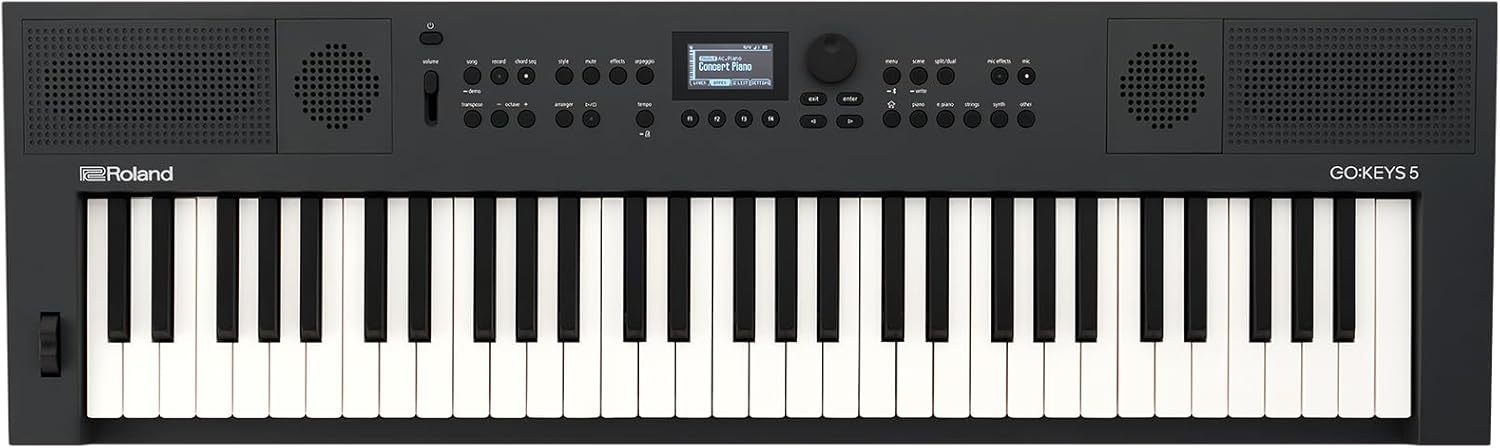
Figure 1: Top-down view of the Roland GO:KEYS 5 Music Creation Keyboard.
2. Setup Instructions
2.1 Unboxing and Initial Inspection
- Carefully remove all components from the packaging.
- Verify that all included items are present: GO:KEYS 5 unit, AC Adaptor, Power Cord.
- Inspect the keyboard for any signs of damage.

Figure 2: Included items with the Roland GO:KEYS 5.
2.2 Powering On
- Connect the AC adaptor to the DC IN jack on the rear panel of the GO:KEYS 5.
- Plug the AC adaptor into a standard electrical outlet.
- Press the Power button located on the top panel to turn on the unit.
- Alternatively, the unit can be powered by batteries (not included) for portable use. Refer to the full user manual for battery installation instructions.
2.3 Connecting Peripherals
- Headphones: Connect headphones to the 3.5mm jack on the rear panel for private practice.
- Microphone: Connect a microphone to the Mic Input jack for vocal performance and effects.
- USB Devices: Use the USB-A and USB-C ports for connecting to computers or mobile devices for audio/MIDI functionality.

Figure 3: Rear panel connections for power and peripherals.
3. Features & Operation
3.1 Keyboard and Sound Engine
- The GO:KEYS 5 features a 61-note keyboard with expressive touch sensitivity, allowing for dynamic musical performance.
- Powered by Roland's ZEN-Core engine, it offers over 1000 high-quality sounds, including pianos, organs, guitars, strings, and synthesizers.

Figure 4: Detailed view of the keyboard and controls.
3.2 Auto-Accompaniment and Chord Sequencer
- Explore over 200 onboard music styles with auto-accompaniment features.
- The chord sequencer includes user editing features and over 300 ready-to-play presets, enabling easy song creation.
3.3 Microphone Input and Vocal Effects
- Connect a microphone to the dedicated input and utilize onboard vocal effects to enhance your singing.

Figure 5: Using the microphone input with the GO:KEYS 5.
3.4 Connectivity and Recording
- Bluetooth Audio/MIDI: Stream music wirelessly from your mobile device or connect to music apps for MIDI control.
- USB Audio/MIDI Interface: Connect to computers and mobile devices for advanced music software integration and recording.
- Onboard Recording: Record your performances directly on the keyboard.
3.5 Built-in Speakers
- The GO:KEYS 5 includes built-in stereo speakers with a passive radiator, providing powerful and clear sound for practice and performance.
4. Maintenance
- Cleaning: Use a soft, dry cloth to wipe the surface of the keyboard. Avoid abrasive cleaners or solvents.
- Storage: Store the keyboard in a cool, dry place away from direct sunlight and extreme temperatures. If storing for extended periods, remove batteries if applicable.
- Handling: Always handle the keyboard with care to prevent damage to keys or internal components.
5. Troubleshooting
- No Power: Ensure the AC adaptor is securely connected to both the keyboard and a working power outlet. If using batteries, check battery levels and proper insertion.
- No Sound: Check the master volume level. Ensure headphones are properly connected or external speakers are powered on and connected correctly to the output jacks.
- Bluetooth Connectivity Issues: Ensure Bluetooth is enabled on both the GO:KEYS 5 and your mobile device. Try unpairing and re-pairing the devices.
- USB MIDI/Audio Not Recognized: Verify USB cable connections. Ensure necessary drivers (if any) are installed on your computer or mobile device.
6. Specifications
| Feature | Description |
|---|---|
| Brand | Roland |
| Model Name | GO:KEYS 5 |
| Number of Keys | 61 |
| Key Type | Expressive Touch Sensitivity |
| Sound Engine | ZEN-Core |
| Tones | Over 1000 |
| Auto-Accompaniment Styles | Over 200 |
| Chord Sequencer Presets | Over 300 |
| Speakers | Built-In Stereo Speakers with Passive Radiator |
| Connectivity | Bluetooth Audio/MIDI, USB-A x 2, USB-C, 1/4" L/R Output, 3.5mm Headphone Jack, Mic Input |
| Power Source | Battery Powered or Corded Electric |
| Dimensions (W x D x H) | 37.4" x 11.26" x 3.43" (950mm x 286mm x 87mm) |
| Item Weight | 12.18 pounds (4.9 kg) |
| Special Features | Digital Display, Digital Effects, Microphone Input, Preset Tones & Rhythms |
7. Warranty & Support
The Roland GO:KEYS 5 Music Creation Keyboard is covered by a manufacturer's warranty. Please refer to the warranty card included in your packaging for specific terms and conditions.
For technical support, product registration, or additional resources, please visit the official Roland website or contact their customer service department.