
1. Introduction
Thank you for choosing the HETP Magnetic Portable Charger Power Bank. This compact and powerful device is designed to provide convenient and efficient charging for your compatible iPhone models and other USB-C devices. Featuring a strong magnetic attachment for wireless charging and a clear LCD display, it ensures you stay powered on the go. Please read this manual carefully to ensure proper use and maintenance of your power bank.

Figure 1.1: HETP Magnetic Portable Charger Power Bank
2. Product Features
- Magnetic Charging: Specifically designed for iPhone 16/16 Plus/16 Pro/16 Pro Max/15/15 Plus/15 Pro/15 Pro Max/14/13/12 series and MagSafe compatible cases.
- High Capacity: Built-in 10800mAh battery capacity, capable of fully charging an iPhone 15 Pro up to 1.9 times.
- Ultra-Strong Magnetic Attachment: Ensures secure and stable 7.5W magnetic wireless charging, preventing disconnection issues.
- 20W PD USB-C Output: Allows for fast wired charging of other devices simultaneously with magnetic charging.
- Compact and Portable: Measures approximately 3.99 x 2.59 x 0.78 inches and weighs 0.39 lb, ideal for travel and daily use.
- LCD Display: Provides a clear digital readout of the remaining battery percentage.
- Multi-Protect Safety System: Incorporates over-voltage, over-charge, over-current, and short-circuit protection for safe charging.

Figure 2.1: Compatibility with iPhone 12-16 Series and MagSafe Cases

Figure 2.2: Charging Through Magnetic Cases
3. What's in the Box
Upon opening your package, please verify that all the following items are included:
- 1 x HETP Magnetic Wireless Power Bank
- 1 x USB-C Charging Cable
- 1 x User Manual (this document)
- 1 x Dust-proof Portable Storage Bag
4. Setup
4.1 Initial Charging of the Power Bank
- Connect the provided USB-C charging cable to the USB-C port on the power bank.
- Plug the other end of the USB-C cable into a compatible USB-C wall adapter (not included).
- The LCD display on the power bank will show the charging percentage. Charge the power bank until it reaches 100% for optimal performance.
4.2 Attaching to Your iPhone
Ensure your iPhone is a 12 series or newer, or is equipped with a MagSafe compatible case.
- Align the back of the power bank with the MagSafe area on your iPhone.
- The power bank will magnetically snap into place, and wireless charging will begin automatically.

Figure 4.1: Magnetic Attachment
5. Operating Instructions
5.1 Wireless Charging (MagSafe)
Once the power bank is magnetically attached to your compatible iPhone, wireless charging will commence. The LCD display will show the power bank's remaining charge, and your iPhone will indicate that it is charging.
5.2 Wired Charging (USB-C)
To charge devices via cable:
- Connect one end of a USB-C cable to the power bank's USB-C port.
- Connect the other end to your device's charging port.
- The power bank will automatically detect the device and begin charging.
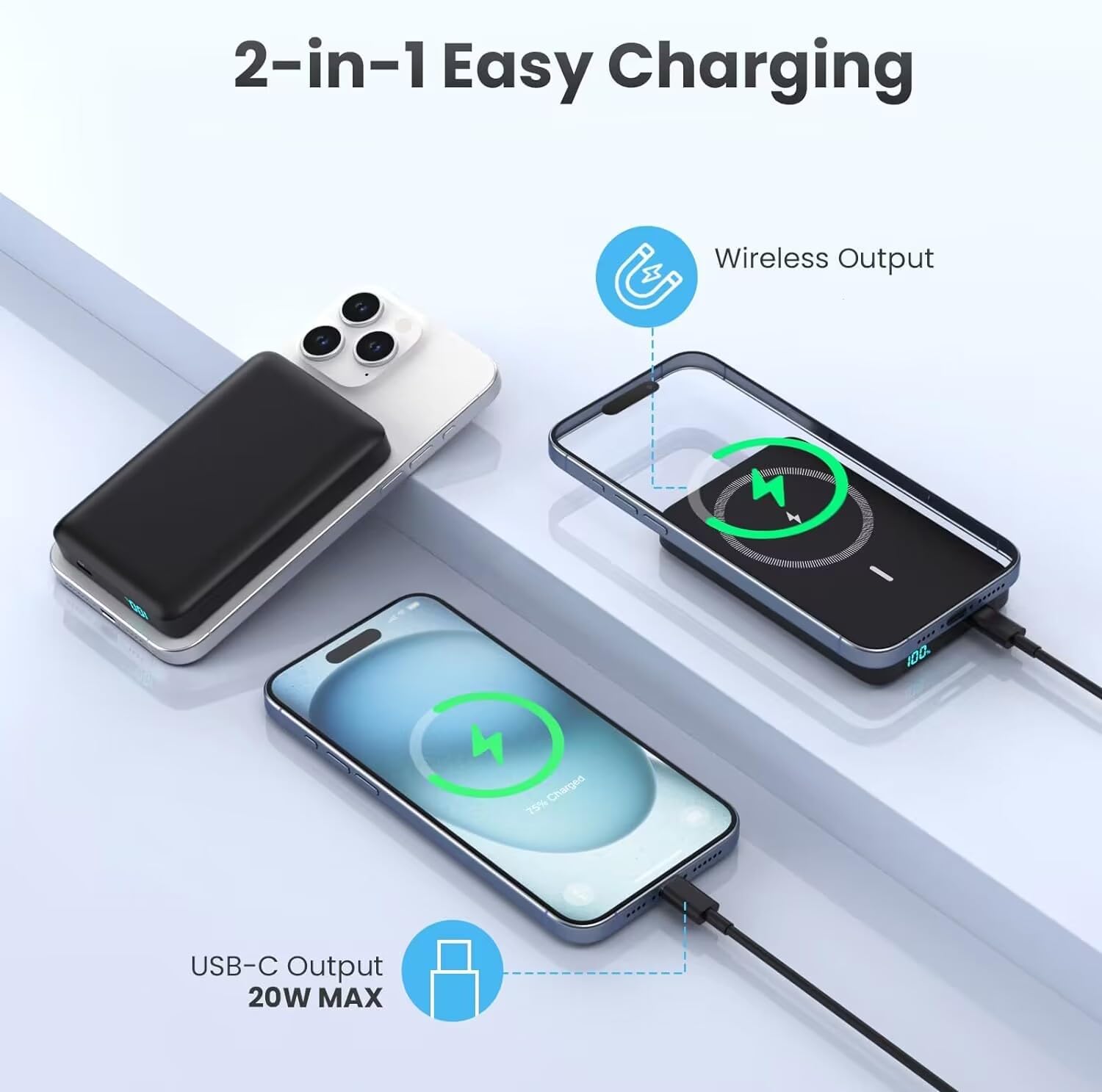
Figure 5.1: 2-in-1 Charging Capability
5.3 Pass-Through Charging
The HETP power bank supports pass-through charging, allowing you to charge your phone wirelessly while simultaneously recharging the power bank itself via the USB-C input. This provides uninterrupted power for both devices.

Figure 5.2: Pass-Through Charging in Action
5.4 LCD Display
The integrated LCD display shows the precise percentage of battery remaining in the power bank. This allows you to easily monitor its charge level and know when it needs to be recharged.
6. Maintenance
- Cleaning: Use a soft, dry cloth to clean the surface of the power bank. Avoid using harsh chemicals or abrasive materials.
- Storage: Store the power bank in a cool, dry place away from direct sunlight and extreme temperatures.
- Battery Care: To prolong battery life, avoid fully discharging the power bank frequently. Recharge it when the battery level is low. If storing for extended periods, charge it to about 50-70% every 3 months.
- Avoid Drops: While durable, dropping the power bank can damage internal components. Handle with care.

Figure 6.1: Internal Battery Design for Longevity
7. Troubleshooting
| Problem | Possible Cause | Solution |
|---|---|---|
| Power bank not charging | Cable or adapter issue; power bank fully discharged; faulty port. | Try a different USB-C cable and wall adapter. Ensure the power bank is not completely depleted before attempting to charge. |
| Wireless charging not working | Misalignment; non-MagSafe case; phone not compatible; foreign object. | Ensure proper alignment of the power bank with your iPhone's MagSafe area. Use a MagSafe compatible case or no case. Remove any foreign objects between the power bank and phone. Confirm your iPhone model is 12 series or newer. |
| Wired charging not working | Cable issue; device not compatible; power bank low on charge. | Try a different USB-C cable. Ensure your device is compatible with USB-C charging. Check the power bank's LCD display for sufficient charge. |
| Power bank gets warm during use | Normal operation; excessive load; poor ventilation. | It is normal for the power bank to get slightly warm during charging or discharging. If it becomes excessively hot, disconnect it immediately and allow it to cool down. Ensure adequate ventilation and avoid covering the power bank during use. |
| LCD display not showing charge | Power bank off; low battery. | Connect the power bank to a charger to activate the display. If the battery is completely drained, it may take a few minutes for the display to light up. |
8. Specifications
- Model Number: HX100M7
- Battery Capacity: 10800 Milliamp Hours (mAh)
- Battery Type: Lithium Polymer
- Wireless Charging Output: 7.5W (Magnetic)
- Wired Charging Output: 20W PD (USB Type C)
- Connector Type: USB Type C
- Product Dimensions: Approximately 4 x 1 x 0.5 inches
- Item Weight: Approximately 6.2 ounces
- Manufacturer: Dongguan Yuanhaoxun Technology Co., Ltd
- Date First Available: February 26, 2024
9. Warranty and Support
Your HETP Magnetic Portable Charger Power Bank comes with a worry-free 24-month warranty from the date of purchase. This warranty covers manufacturing defects and ensures reliable performance of your device.
For any technical assistance, product inquiries, or warranty claims, please contact our customer service team. We provide lifetime technical support and friendly customer services to ensure your satisfaction.
Please refer to the contact information provided on the product packaging or the official HETP website for the most up-to-date support channels.


