1. Product Overview
The Zcargel 9 Inch Android Car Stereo Player is an advanced in-dash navigation system designed to enhance your driving experience. Featuring an Android 12 operating system, a 9-inch capacitive touch screen, and a powerful 4-core processor, this unit offers seamless integration with your vehicle's systems. It supports both wireless and wired Carplay, built-in GPS navigation, Bluetooth connectivity, and a reverse camera input.
Key Features:
- HD 1080P Display: Full capacitive touch screen with a user-friendly interface.
- Built-in Wi-Fi: For online maps and internet connectivity.
- Wireless & Wired Carplay: Integrates iOS/Android devices for navigation, calls, messages, and music.
- Built-in GPS Navigation: Supports offline maps (requires internet for initial data download) and Google Maps with Wi-Fi.
- Steering Wheel Control: Allows convenient control of functions directly from your steering wheel.
- Bluetooth A2DP/Hands-free/Phone Book: For hands-free calling, music streaming, and automatic phone book loading.
- Rear Camera Support: Compatible with AHD high-definition 720P camera image input (CVBS and AHD switchable).
- Operating System: Android 12.0 with 2GB RAM + 32GB ROM.
- DSP Features: High-fidelity sound reproduction.
2. Included Components
Carefully unpack the box and ensure all the following components are present:

Image: The Zcargel 9 Inch Android Car Stereo Player with its main unit, a separate trim panel, a reverse camera, and various cables including power cables, USB cables, camera input cable, Canbus box, GPS antenna, instruction manual, and RCA input/output cables.
- Vehicle Navigation Unit (Main Head Unit)
- AHD Camera
- Power Cables (x2)
- 2USB Cable
- Camera Input Cable
- Canbus Box
- GPS Antenna
- RCA Input/Output Cables
- Instruction Manual (this document)
3. Setup and Installation
3.1 Compatibility
This car stereo is compatible with the following Toyota Prius models:
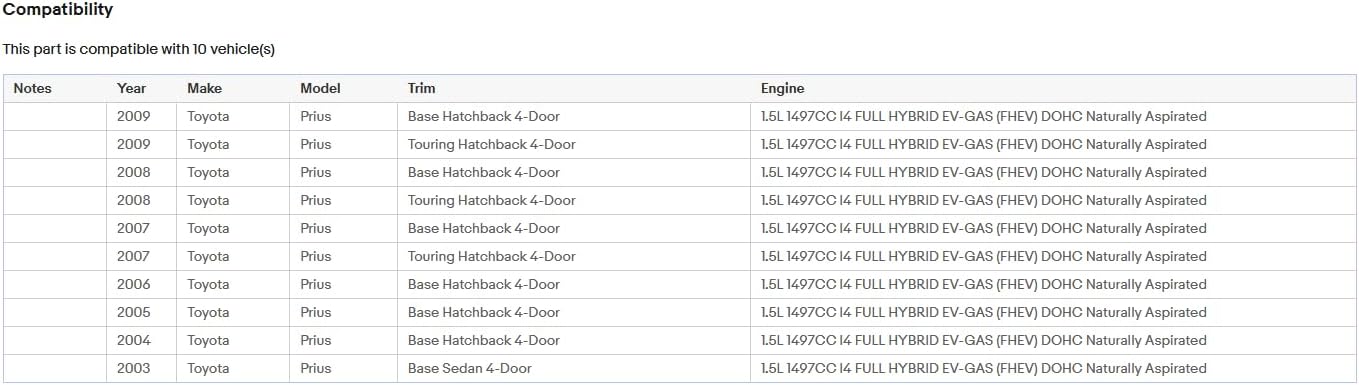
Image: A table detailing compatibility with Toyota Prius models from 2003 to 2009, including various trims like Base Hatchback 4-Door, Touring Hatchback 4-Door, and Base Sedan 4-Door, all with a 1.5L I4 FHEV engine.
3.2 Wiring Connections
Refer to the diagram below for proper wiring connections. Ensure all cables are securely connected to their respective ports on the back of the head unit and to your vehicle's wiring harness.

Image: The rear panel of the Zcargel car stereo, displaying multiple ports and connected cables including power, USB, RCA, GPS antenna, and camera input. The image highlights the complexity of the wiring harness.
- Power Cable: Connect the main power harness to the vehicle's power supply.
- GPS Antenna: Connect the GPS antenna and mount it in a location with a clear view of the sky for optimal signal reception.
- USB Cables: Connect the two USB cables for external device connectivity.
- RCA Input/Output: Connect any external audio/video devices using the RCA cables.
- Camera Input: Connect the provided AHD camera to the camera input port.
- Canbus Box: If your vehicle requires CAN bus integration for steering wheel controls or other features, connect the Canbus box as per your vehicle's specific wiring diagram.
- External Microphone: If using an external microphone, connect it to the designated port.
3.3 Initial Power On
After all connections are made, turn on your vehicle's ignition. The stereo should power on automatically. Follow any on-screen prompts for initial setup, such as language selection and time zone.
4. Operating Instructions
4.1 Touch Screen Interface
The unit features a responsive capacitive touch screen. Navigate through menus and applications by tapping, swiping, and pinching gestures similar to a smartphone.
4.2 Wi-Fi Connectivity
To connect to Wi-Fi:
- Go to Settings on the main menu.
- Select Network & Internet.
- Turn on Wi-Fi and select your desired network.
- Enter the password if prompted.
Once connected, you can access online maps, download apps from the Play Store, and browse the internet.
4.3 GPS Navigation
The unit comes with built-in offline maps. For initial data download or to use Google Maps, ensure you have an active Wi-Fi connection. You can purchase additional offline maps directly from the Play Store.
4.4 Carplay (Wireless & Wired)
Carplay allows seamless integration with your iOS or Android device.
- Wireless Carplay: Connect your device via Bluetooth. Once paired, you can use voice commands for navigation, calls, messages, and music.
- Wired Carplay: Connect your device using a USB cable.
4.5 Bluetooth Functions
To pair your phone via Bluetooth:
- Go to Settings and select Bluetooth.
- Enable Bluetooth on both the stereo and your phone.
- Search for available devices on your phone and select the stereo's name.
- Confirm the pairing code if prompted.
Once paired, you can make hands-free calls, stream music (A2DP), and access your phone book.
4.6 Rear Camera Display
When the vehicle is shifted into reverse, the display will automatically switch to the rear camera view. To configure camera settings (e.g., switching between CVBS and AHD), navigate to the camera settings menu.
4.7 Steering Wheel Control
If your vehicle supports steering wheel controls and the Canbus box is correctly installed, you can map the steering wheel buttons to control various functions of the stereo. Refer to the stereo's settings for steering wheel control configuration.
4.8 Split Screen Function
The Android 12 operating system supports split-screen functionality, allowing you to run two applications simultaneously (e.g., navigation and music player). To activate, long-press the recent apps button or follow the specific instructions within the Android interface.
5. Maintenance
- Cleaning: Use a soft, dry cloth to clean the screen and unit. Avoid abrasive cleaners or solvents.
- Software Updates: Periodically check for software updates through the system settings to ensure optimal performance and access to new features. A Wi-Fi connection is required for updates.
- Temperature: Operate the unit within the specified working temperature range of -20℃ to 75℃.
6. Troubleshooting
- No Power: Check all power cable connections. Ensure the vehicle's ignition is on. Verify fuses.
- No Sound: Check speaker connections. Verify volume levels on the stereo and any connected devices.
- GPS Signal Issues: Ensure the GPS antenna is properly connected and mounted in a location with a clear view of the sky.
- Bluetooth Pairing Problems: Ensure Bluetooth is enabled on both devices. Try unpairing and re-pairing. Clear Bluetooth cache if necessary.
- Touch Screen Unresponsive: Try restarting the unit. If the issue persists, a factory reset might be necessary (note: this will erase all user data).
- System Freezes: Perform a soft reset by pressing the reset button (if available) or by turning off the vehicle's ignition and restarting.
If you encounter persistent issues, please refer to the support section for contact information.
7. Specifications
| Feature | Specification |
|---|---|
| System | Android 12 |
| Chipset | 8227L-DEMO |
| Screen Size | 9 inch |
| Memory | 2GB (RAM) + 32GB (ROM) |
| Screen Resolution | 1024x600 |
| Radio Chip | MT6625 |
| Power Output | 4*45W |
| Work Temperature | -20℃ to 75℃ |
| Steering Wheel Control | Support |
| Power Amplifier Chip | TDA7388 |
| Radio Band | FM/RDS |
| Video Output | Support |
| Reversing Input | AHD/CVBS |
| External Microphone | Support |
| Split Screen | Support |
| Maps | Built-in offline maps (internet required for data download) |
| WIFI | Support |
| USB | Double USB interface |
| Audio Format | APE/FLAC/WAV/MP3/WMA etc |
| Video Format | MKV/RMVB/AVI/MP4/MDV etc |
| Picture Format | PNG/JPEG/JPG/GIF/WBMP/BNP etc |
| Product Dimensions | 14.17 x 10.63 x 4.72 inches |
| Operating System | Android |
| Resolution | 1024 x 600 |
| Connectivity Technology | Bluetooth, USB, Wi-Fi |
| Special Feature | Bluetooth, Touchscreen |
| Vehicle Service Type | Car |
| Human Interface Input | Microphone, Touchscreen |
| Supported Languages | Chinese/English/French/Italian/Korean/Japanese/Arabic/Spanish/Portuguese/Russian/Turkish/Vietnamese/Hebrew/Polish/German |
8. Warranty and Support
Zcargel is committed to providing high-quality products. If you have any questions or concerns regarding your Zcargel 9 Inch Android Car Stereo Player, please do not hesitate to contact us. We aim to respond to all inquiries within 24 hours.
If you are not satisfied with the product, please inform us via e-mail, and we will assist you in resolving the issue to your satisfaction.
For further support and to explore other products, please visit the official Zcargel store: Zcargel Store on Amazon