
VINABTY HD-3X00S2
VINABTY Replacement Remote Control User Manual
Model: HD-3X00S2
1. Product Overview
The VINABTY Replacement Remote Control is designed as a direct replacement for various Humax Tivumax and DIGIMAX series devices, including models like DIGIMAX-T2, DIGIMAX-NANO, HD-3801S2, HD-3601S2, HD-3800S2, HD-3600S2, and HD-3X00S2. This infrared remote control requires no programming or complex setup for its primary functions, offering a straightforward solution for lost or damaged original remotes.
Its ergonomic design ensures a comfortable grip, and sensitive buttons provide a responsive user experience. The remote operates on 2 AAA batteries (not included).

Figure 1.1: Front view of the VINABTY Replacement Remote Control, showing all buttons and their layout.
2. Setup
2.1 Battery Installation
The remote control requires two AAA batteries (not included). Follow these steps to install them:
- Locate the battery compartment on the back of the remote control.
- Slide the battery compartment cover downwards to open it.
- Insert two AAA batteries, ensuring the positive (+) and negative (-) terminals align correctly with the markings inside the compartment.
- Slide the battery compartment cover back into place until it clicks securely.

Figure 2.1: Back view of the remote control showing the open battery compartment and battery polarity markings.
2.2 Initial Use (No Programming Required for Primary Functions)
For controlling compatible Humax Tivumax and DIGIMAX devices, this remote control is designed to work immediately without any programming. Simply insert the batteries and point the remote towards your device.
2.3 Programming TV Control Buttons (Optional)
This remote control features a "TV CONTROL" section, allowing you to program certain buttons (e.g., Power, Volume Up/Down) to control your television. This feature enables you to use a single remote for both your set-top box and basic TV functions. Follow these steps to program a TV button:
- On the VINABTY remote, in the TV CONTROL section, press and hold the SET button for approximately 3 seconds. The red LED indicator on the remote will increase in intensity.
- While still in the TV CONTROL section, press the specific button you wish to program (e.g., VOL+). The red LED will now flash.
- Position the VINABTY remote control directly in front of your original TV remote control, with their infrared emitters facing each other, at a distance of about 3 cm (1.2 inches).
- On your original TV remote control, press and hold the corresponding button (e.g., VOL+) until the red LED on the VINABTY remote control remains steady. This indicates successful learning.
- Press the SET button on the VINABTY remote control to save the programmed function.
- Repeat these steps for each TV control button you wish to program.
Note: Ensure a clear line of sight between the two remotes during programming. Some TV remotes may require a longer press of the button during the learning process.
3. Operating Instructions
This section outlines the general functions of the VINABTY Replacement Remote Control. Button labels may vary slightly depending on your specific device model, but the core functionality remains consistent.
- Power (Red Button): Turns the connected device (e.g., set-top box) on or off.
- TV/IN (Blue Button): Switches the input source on your TV (if programmed).
- V-/V+/SET: Volume down, Volume up, and SET button for TV control programming.
- SUB: Subtitles.
- TTX: Teletext.
- Playback Controls (Rewind, Play/Pause, Fast Forward, Stop, Record): Standard media playback functions.
- TV/R: TV/Radio mode switch.
- SAT: Satellite mode.
- AUDIO: Audio track selection.
- F1, F2, F3, F4 (Colored Buttons): Function keys, typically assigned specific actions by the device.
- MUTE: Mutes or unmutes the audio.
- CH+/CH-: Changes channels up or down.
- RECALL: Recalls the previously viewed channel.
- Navigation Pad (Arrows and OK): Navigates menus and confirms selections.
- MENU: Opens the main menu.
- EXIT: Exits the current menu or screen.
- VOL+/VOL-: Adjusts the volume up or down.
- PVR: Accesses Personal Video Recorder functions.
- FAV: Accesses favorite channels list.
- PAGE+/PAGE-: Navigates through pages in menus or guides.
- Number Buttons (0-9): Direct channel entry.
- INFO: Displays program information.
- EPG: Electronic Program Guide.
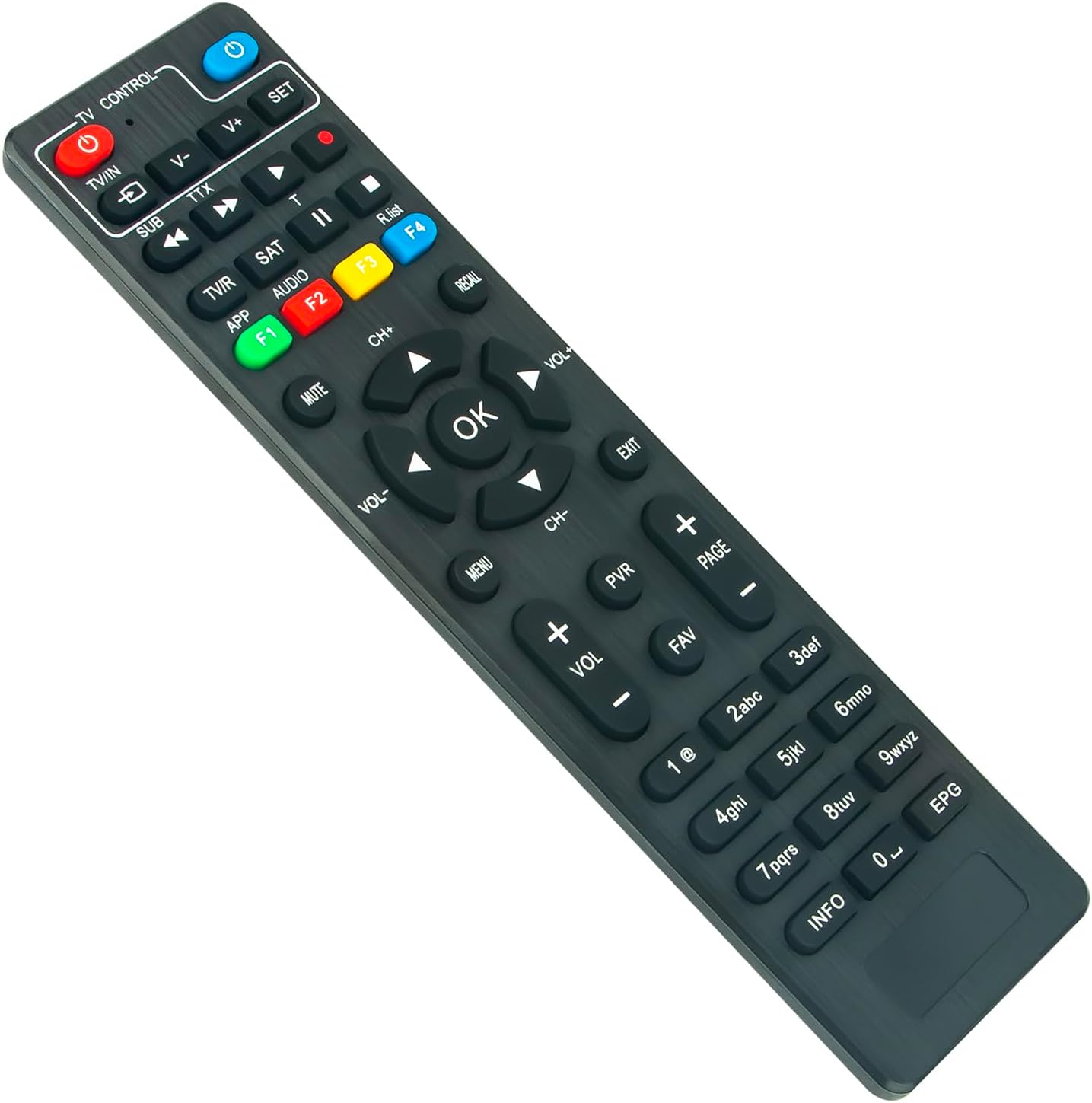
Figure 3.1: Angled view of the remote control, illustrating its comfortable and ergonomic design.
4. Maintenance
4.1 Battery Replacement
If the remote control's response becomes sluggish or it stops working, the batteries may need replacement. Refer to Section 2.1 for battery installation instructions. Always replace both batteries simultaneously with new AAA batteries.
4.2 Cleaning
To clean the remote control, use a soft, dry cloth. For stubborn dirt, slightly dampen the cloth with water or a mild, non-abrasive cleaner. Avoid using harsh chemicals, solvents, or abrasive materials, as these can damage the remote's surface or internal components.
4.3 Storage
Store the remote control in a cool, dry place away from direct sunlight, extreme temperatures, and high humidity. If the remote will not be used for an extended period, it is advisable to remove the batteries to prevent leakage and potential damage.
5. Troubleshooting
| Problem | Possible Cause | Solution |
|---|---|---|
| Remote control is not responding. |
|
|
| TV control buttons are not working. |
|
|
| Buttons feel sticky or unresponsive. |
|
|
6. Specifications
- Brand: VINABTY
- Model: HD-3X00S2
- Color: Black
- Connectivity Technology: Infrared
- Special Features: No programming required (for primary functions), Ergonomic design
- Compatible Devices: DIGIMAX-T2, DIGIMAX-NANO, HD-3801S2, HD-3601S2, HD-3X00S2, HD-3800S2, HD-3600S2
- Power Source: 2 x AAA Batteries (not included)
7. Warranty and Support
VINABTY offers a 12-month return policy for this product. If you encounter any issues or have questions regarding the VINABTY Replacement Remote Control, please contact your retailer or the VINABTY customer support for assistance.
For further support, please refer to the contact information provided with your purchase or visit the official VINABTY website.
Related Documents - HD-3X00S2
 |
Manuel d'instructions pour appareil photo numérique Samsung Digimax A6 Guide complet pour l'appareil photo numérique Samsung Digimax A6, couvrant l'installation, les modes de prise de vue, les réglages, la gestion des fichiers, les accessoires et le logiciel associé. |
 |
HUMAX HD-FOX T2 User's Manual: Setup, Operation, and Features This user manual provides comprehensive guidance for the HUMAX HD-FOX T2 HD Digital Receiver, covering installation, basic operations, channel management, media playback, preferences, system settings, and troubleshooting. Learn how to set up and maximize your viewing experience with this digital receiver. |
 |
ZK DIGIMAX DG04-GB3 Installation Guide Installation guide for the ZK DIGIMAX DG04-GB3 access control device, detailing dimensions, wall mounting steps, and FCC compliance information. |
 |
Samsung Digimax U-CA 5 User's Manual - Guide to Digital Photography Explore the features and functions of the Samsung Digimax U-CA 5 digital camera with this comprehensive user's manual. Learn about capturing photos, recording videos, and using software. |
 |
Samsung Digimax A55W User Manual Comprehensive user manual for the Samsung Digimax A55W digital camera, covering setup, operation, features, software, and troubleshooting. |
 |
Manuale Utente Fotocamere Digitali Samsung S750/S730/S630 Manuale utente completo per le fotocamere digitali Samsung S750, S730 e S630. Include istruzioni dettagliate su acquisizione immagini, download, uso del software Digimax Master, impostazioni, risoluzione problemi e specifiche tecniche. |
Ask a question about this manual
Ask about setup, troubleshooting, compatibility, parts, safety, or missing instructions. Manuals+ will review the question and use this page’s manual context to help answer it.