
Introduction
Welcome to the NARRAK Fat Tire Folding Electric Bike experience. This manual provides essential information for the safe assembly, operation, and maintenance of your new electric bicycle. Please read this manual thoroughly before your first ride to ensure optimal performance and safety.
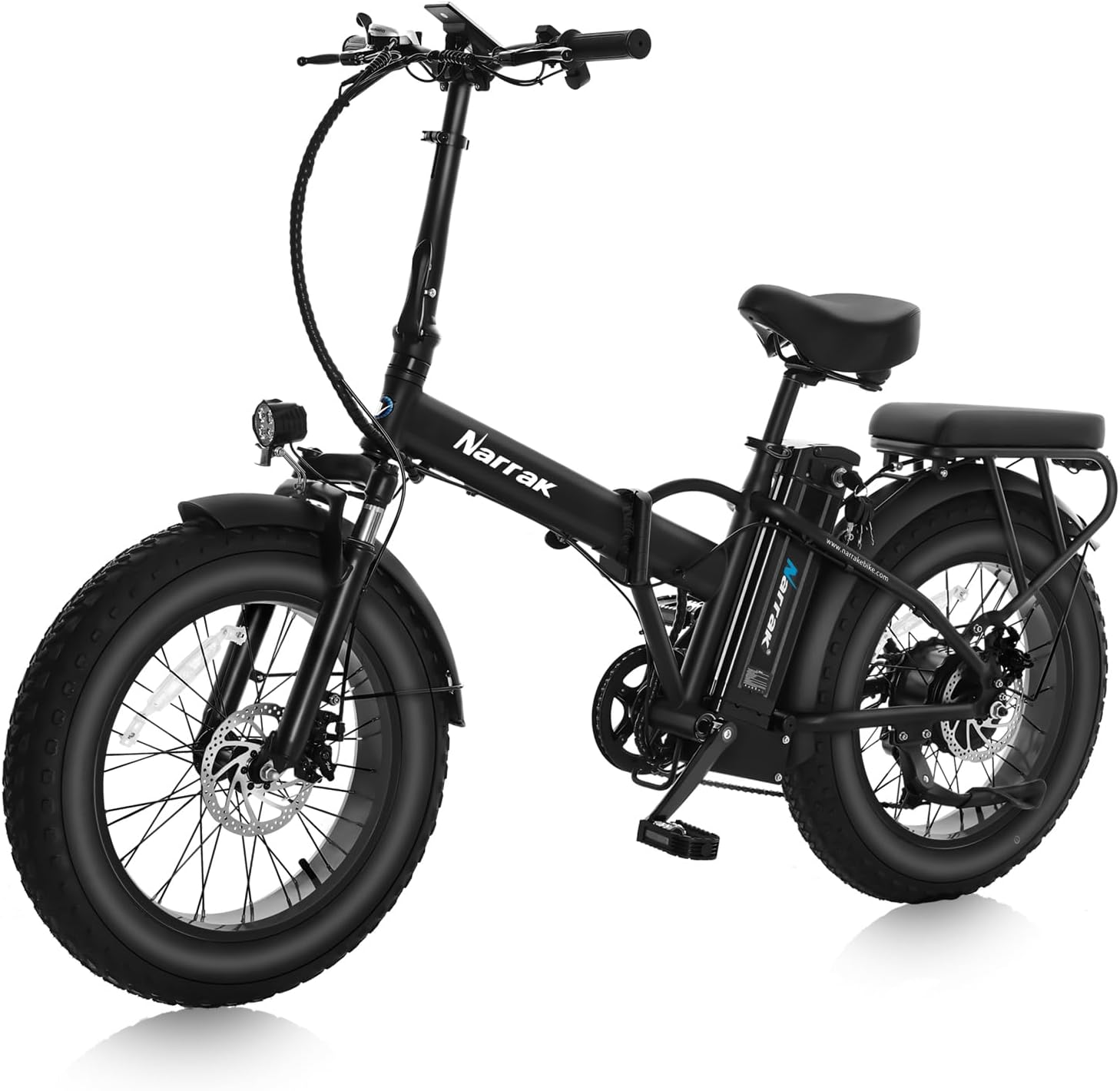
Image: The NARRAK Fat Tire Folding Electric Bike, showcasing its design and features.
Setup and Assembly
Your NARRAK electric bike arrives mostly pre-assembled. Follow these steps to complete the setup.
1. Unboxing and Unfolding
Carefully remove the bike from its packaging. The bike is in a folded state. Unfold the main frame and secure the locking mechanism. Ensure all protective packaging is removed.
Video: Watch this video for a detailed guide on unboxing and unfolding your NARRAK Electric Bike.
2. Handlebar Stem Installation
Insert the handlebar stem into the front tube. Secure the stem by locking the quick-release mechanism. Adjust the handlebar to your preferred riding position, ensuring it is perpendicular to the front wheel, and fully tighten all screws.
3. Rear Rack and Seat Installation
The rear rack may require minor adjustment. Loosen the bolts, position the rack parallel to the ground, and then tighten the bolts securely. Install the rear seat onto the rack, ensuring it is firmly attached with the provided screws.
4. Pedal Unfolding
Unfold the pedals by pushing down on the metal piece near the pedal hinge and rotating them into position. Ensure they are securely locked for riding.
5. Battery Installation and Activation
Insert the battery into its compartment on the frame. Use the provided key to lock the battery in place and turn it to the 'On' position to activate the bike's electrical system. Press the battery button to check the charge level.
Operating Instructions
1. Display Activation and Settings
Hold the 'M' switch on the handlebar for 3 seconds to activate the M5 LCD display. The display shows speed, pedal assist level (PAS), odometer, and battery energy bar. Hold the 'M' switch again for 3 seconds to power off the display.

Image: Close-up of the M5 Large LCD Display, showing speed, PAS level, and battery.
2. Riding Modes
Your NARRAK e-bike offers four riding modes:
- Pedal-Assist Mode (PAS 1-5 Levels): Press the 'UP' switch to increase the pedal assist speed one level at a time (up to level 5). The motor provides assistance as you pedal.
- Throttle Mode: Engage the throttle on the right handlebar for propulsion without pedaling. Maximum speed is 20 mph.
- Walk Mode: Hold the 'DOWN' switch to activate walk mode, which provides low-speed assistance for pushing the bike.
- Regular Bicycle Mode: Ride the bike like a traditional bicycle without any electrical assistance.
3. Headlight and Taillight Operation
Hold the 'UP' switch for 3 seconds to activate the integrated LED headlight. The taillight automatically illuminates when the headlight is on and brightens when brakes are applied.
4. Gear Shifting
Utilize the SHIMANO 7-speed drivetrain for smooth and reliable gear changes. Use the trigger shifter on the handlebar to select appropriate gears for varying terrain and speed.
Maintenance
1. Battery Charging
To charge the battery, plug the charger into the battery's charging port, then connect the charger to a power source. The charger indicator will show red while charging and turn green when fully charged. Do not overcharge the battery (do not leave plugged in for more than 12 hours). The battery can be charged while installed on the bike or removed.
2. Fuse Replacement
The battery features a 30A power fuse (green) located at the top cover and a 10A charging fuse (red) inside the top cover. Refer to the user manual for instructions on how to open the top cover and inspect/replace the fuses if needed.
3. Tire Pressure
Maintain proper tire pressure for optimal performance and safety. The fat tires are typically rated for lower pressures. Check the tire sidewall for recommended PSI. For the 20x4.0 inch tires, a common range is 20-30 PSI, but always refer to the tire manufacturer's recommendation.
4. Brake Adjustment
Regularly inspect and adjust the dual 160mm disc brakes for effective stopping power. If the brakes feel loose or are not engaging properly, consult a bike mechanic or refer to detailed instructions in the full user manual for adjustment procedures.
Folding the Bike
To fold your NARRAK electric bike for storage or transport, follow these steps:
- Lower the seat post to its lowest position and secure the quick release.
- Unlock the handlebar stem locking mechanism and fold the handlebars down.
- Unlock the main frame hinge mechanism and fold the bike in half.
- Fold the pedals inward.
Video: This video demonstrates the quick and easy process of folding and unfolding the NARRAK Electric Bike.
Specifications
| Feature | Detail |
|---|---|
| Bike Type | Folding Bike |
| Brand | NARRAK |
| Model Name | S127A-3 |
| Motor | 750W Brushless (Peak 1100W) |
| Battery | 48V 13Ah (624Wh) Lithium, Removable |
| Max Speed | 20 Mph |
| Gears | SHIMANO 7-Speed Drivetrain |
| Brakes | Dual 160mm Disc Brakes |
| Tires | 20 x 4.0 Inch Fat Tires |
| Frame Material | Aluminum |
| Suspension | Front Suspension |
| Max Weight Recommendation | 280.01 Pounds |
| Item Weight | 63 Pounds |
| Included Components | Charger, Tool Kit, User Manual |
Warranty and Support
NARRAK provides a 1-year manufacturer warranty for this electric bike. For any inquiries, support needs, or warranty claims, please contact the professional service team directly from Los Angeles, California.
- Phone Support: 626-267-2312 (Monday to Friday, 9:00 AM - 7:00 PM PST)
- Assembly Assistance: Check the product page for assembly videos or contact support for installation videos of specific parts.
- Return Policy: All NARRAK e-bikes are brand new. Confirm size and weight fit before ordering. For any issues upon receipt, contact the seller or NARRAK Service with pictures or video.