
ECOVACS GX-600
ECOVACS GOAT GX-600 Robot Lawn Mower Instruction Manual
Model: GX-600 | Brand: ECOVACS
1. Introduction
Welcome to the instruction manual for your ECOVACS GOAT GX-600 Robot Lawn Mower. This advanced robotic mower is designed to simplify lawn care with its innovative features, including boundary-free operation, AIVI 3D obstacle avoidance, and intelligent path planning. Please read this manual thoroughly before operating your device to ensure safe and efficient use.

Figure 1.1: The ECOVACS GOAT GX-600 Robot Lawn Mower and its accompanying mobile application interface.
2. Safety Information
Always adhere to the following safety guidelines to prevent injury or damage to the product and property.
- Read all instructions carefully before use.
- Keep hands and feet away from the rotating blades.
- Do not operate the mower in wet conditions unless specifically designed for it (GX-600 has IPX6, but caution is still advised).
- Ensure the mowing area is clear of debris, stones, and other objects that could be thrown by the blades.
- Supervise children and pets when the mower is operating.
- Turn off the mower and remove the safety key (if applicable) before performing any maintenance or cleaning.
- Use only ECOVACS approved replacement parts and accessories.
3. Package Contents
Verify that all components are present in the package:
- ECOVACS GOAT GX-600 Robot Lawn Mower
- Charging Station
- Power Adapter
- User Manual (this document)
- Replacement Blades (if included)
- Other accessories (e.g., cleaning brush, safety key)
4. Setup
4.1 Charging Station Placement
Select a suitable location for the charging station. It should be on a flat, level surface with access to a power outlet, and ideally in a shaded area to protect it from direct sunlight. Ensure there is sufficient clear space around the station for the mower to dock easily.
4.2 Initial Setup and Boundary Recognition
The ECOVACS GOAT GX-600 features a boundary-free design, eliminating the need for perimeter wires. Initial setup involves connecting the mower to the ECOVACS HOME app and allowing it to map your lawn using its advanced visual recognition system.
- Download the ECOVACS HOME app from your device's app store.
- Follow the in-app instructions to connect your GX-600 to your Wi-Fi network.
- Initiate the boundary learning process through the app. The mower will autonomously navigate your lawn to identify its edges and create a virtual map.
- Review and adjust the virtual boundaries within the app if necessary.

Figure 4.1: The GX-600 utilizes advanced visual recognition for automatic lawn boundary detection, eliminating the need for physical boundary wires or antennas.
5. Operating Your ECOVACS GOAT GX-600
5.1 Quick Start Mowing (Press & Mow)
For immediate mowing, simply place the GX-600 on your lawn and press the start button. The mower will begin its operation based on its learned boundaries.

Figure 5.1: The GX-600 can be started quickly by pressing a button or with a click from the mobile application.
5.2 App Control and Scheduling
The ECOVACS HOME app provides comprehensive control over your GX-600, allowing you to:
- Start, pause, or stop mowing sessions.
- Set mowing schedules for automated operation.
- Adjust mowing height (if applicable).
- Monitor the mower's real-time location and status.
- Utilize the video manager feature to view the mowing area.

Figure 5.2: The ECOVACS app serves as a smart garden keeper, offering all-round protection and control features.
5.3 Logical Cutting and AIVI 3D Obstacle Avoidance
The GX-600 employs logical path planning to ensure efficient and complete coverage of your lawn, resulting in a neat finish without missed or re-cut areas. Its AIVI 3D obstacle avoidance technology intelligently detects and navigates around common garden obstacles such as hedges, pets, and water pipes, ensuring safe operation and protecting your property.
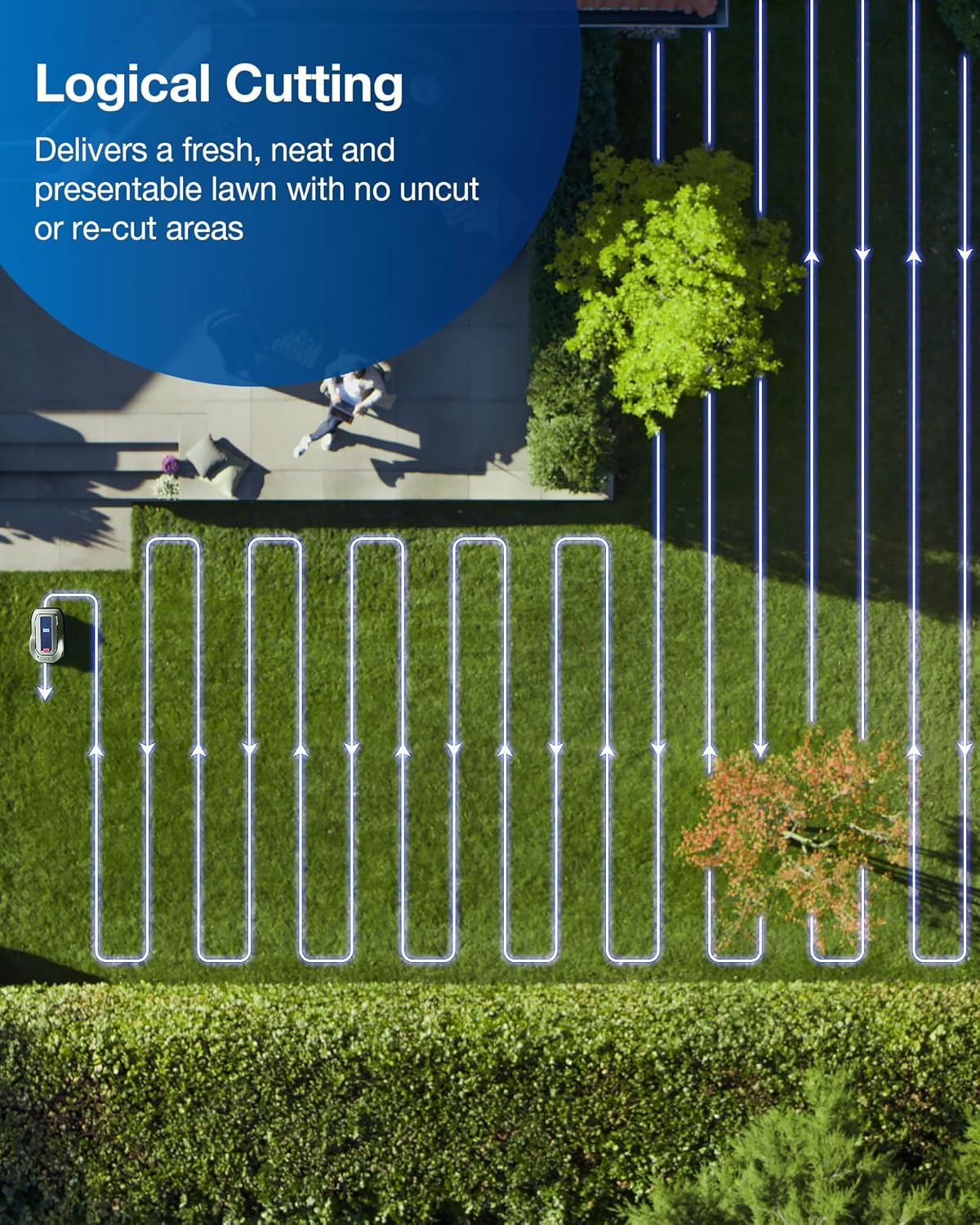
Figure 5.3: The GX-600 delivers a fresh, neat, and presentable lawn using a logical cutting pattern, avoiding uncut or re-cut areas.

Figure 5.4: AIVI 3D Intelligent Obstacle Avoidance allows the GX-600 to strategically avoid objects like water pipes, pets, or garden features.
5.4 Slope Climbing and Floating Blade Disc
The GX-600 is capable of climbing slopes up to 40% (approximately 22 degrees), making it suitable for various garden terrains. The floating blade disc adapts to uneven surfaces, ensuring a consistent and even cut across your lawn.

Figure 5.5: The GX-600 conquers slopes up to 40% with ease, and its floating blade ensures stable and even cutting on uneven terrain.
5.5 Weather Resistance
With an IPX6 waterproof rating, the GX-600 is designed for worry-free mowing in various weather conditions and can be easily cleaned by water flushing. It also features a rain sensor that can detect precipitation and prompt the mower to return to its charging station.

Figure 5.6: The GX-600's IPX6 waterproof rating allows for worry-free mowing in all weathers and easy cleaning.
6. Maintenance
Regular maintenance ensures optimal performance and extends the lifespan of your ECOVACS GOAT GX-600.
6.1 Cleaning
- Exterior: Wipe the exterior with a damp cloth. Due to its IPX6 rating, you can gently flush the underside with water to remove grass clippings.
- Blade Disc: Regularly inspect and clean the blade disc area to prevent grass buildup.
- Sensors: Keep all sensors clean and free from dirt or debris to ensure proper navigation and obstacle avoidance.
6.2 Blade Replacement
The blades should be replaced periodically, depending on usage and lawn conditions. Refer to the app or specific instructions for blade replacement frequency and procedure. Always use genuine ECOVACS replacement blades.
6.3 Battery Care
To maximize battery life, ensure the mower is stored in a cool, dry place when not in use for extended periods. Fully charge the battery before long-term storage.
7. Troubleshooting
This section addresses common issues you might encounter with your ECOVACS GOAT GX-600. For more detailed troubleshooting, consult the ECOVACS HOME app or the official ECOVACS support website.
| Problem | Possible Cause | Solution |
|---|---|---|
| Mower does not start or respond. | Low battery; Power switch off; App connection issue. | Charge the mower; Ensure power switch is on; Check app connection and Wi-Fi. |
| Mower gets stuck frequently. | Obstacles in mowing path; Uneven terrain; Dirty sensors. | Clear the mowing area; Adjust virtual boundaries; Clean sensors. |
| Poor mowing performance. | Dull or damaged blades; Grass buildup on blade disc; Incorrect mowing height. | Replace blades; Clean blade disc; Adjust mowing height in the app. |
| Mower does not return to charging station. | Charging station obstructed; Weak Wi-Fi signal; Mower too far from station. | Ensure clear path to station; Check Wi-Fi signal strength; Manually guide mower closer. |
8. Specifications
Key technical specifications for the ECOVACS GOAT GX-600 Robot Lawn Mower:
- Model: GX-600 (also known as Goat G1)
- Manufacturer: ECOVACS
- Product Dimensions: 91 x 51 x 44 cm
- Weight: 20 kg
- Power Source: Wireless (Battery-powered)
- Battery Type: Lithium Ion (1 included)
- Material: Metal
- Waterproof Rating: IPX6
- Slope Climbing Capability: Up to 40% (approx. 22 degrees)
- Key Features: Boundary-free operation, AIVI 3D Obstacle Avoidance, Logical Cutting, Floating Blade Disc, Rain Sensor, App Control.
9. Warranty and Support
For warranty information, please refer to the warranty card included with your product or visit the official ECOVACS website. For technical support, product inquiries, or service requests, please contact ECOVACS customer service through their official channels.
Official ECOVACS Website: www.ecovacs.com
Related Documents - GX-600
 |
ECOVACS GOAT GX-600 Installation Manual This document provides installation instructions and safety guidelines for the ECOVACS GOAT GX-600 robotic lawn mower. It covers important warnings, safe usage practices, and maintenance procedures. |
 |
ECOVACS GOAT GX-600 Instruction Manual This instruction manual provides detailed guidance on the operation, maintenance, and safety precautions for the ECOVACS GOAT GX-600 lawn mowing robot. Learn how to use, clean, and maintain your GOAT GX-600 for optimal performance and longevity. |
 |
ECOVACS GOAT A1600/A3000 LiDAR PRO Robotic Lawn Mower Instruction Manual Comprehensive instruction manual for the ECOVACS GOAT A1600 LiDAR PRO and A3000 LiDAR PRO robotic lawn mowers. Learn about setup, safe operation, maintenance, mapping, and troubleshooting for efficient lawn care. |
 |
ECOVACS GOAT A1600 RTK/A3000 RTK Instruction Manual Comprehensive instruction manual for the ECOVACS GOAT A1600 RTK and A3000 RTK robotic lawn mowers, covering installation, setup, operation, maintenance, safety guidelines, and technical specifications. |
 |
ECOVACS GOAT O500 Panorama Robot Lawn Mower User Manual Comprehensive user manual for the ECOVACS GOAT O500 Panorama robot lawn mower, covering setup, operation, maintenance, troubleshooting, and technical specifications. Learn how to install, map, and operate your smart lawn mower safely and efficiently. |
 |
ECOVACS GOAT G1 Uzstādīšanas un Lietošanas Rokasgrāmata Detalizēta rokasgrāmata ECOVACS GOAT G1 robotizētajam zāles pļāvējam, kas aptver uzstādīšanu, savienošanu ar lietotni, navigācijas raidītāju iestatīšanu, kartēšanu un ikdienas lietošanu. |
Ask a question about this manual
Ask about setup, troubleshooting, compatibility, parts, safety, or missing instructions. Manuals+ will review the question and use this page’s manual context to help answer it.