Introduction
This manual provides essential information for the setup, operation, and maintenance of your Avolusion PRO-T8 Series 8TB USB 3.0 External Gaming Hard Drive. This device is designed to expand the storage capacity of your PlayStation 5 (PS5) game console, allowing you to store more games and media.
The Avolusion PRO-T8 Series features a silent, fan-less design and a USB 3.0 interface for fast data transfer. It is pre-formatted for immediate use with your PS5 console.
Package Contents
Please verify that all items listed below are included in your package:
- Avolusion PRO-T8 8TB External Gaming Hard Drive (Black)
- USB Type-C Cable
- Power Adapter
- User Manual
- 2 Year Warranty Card
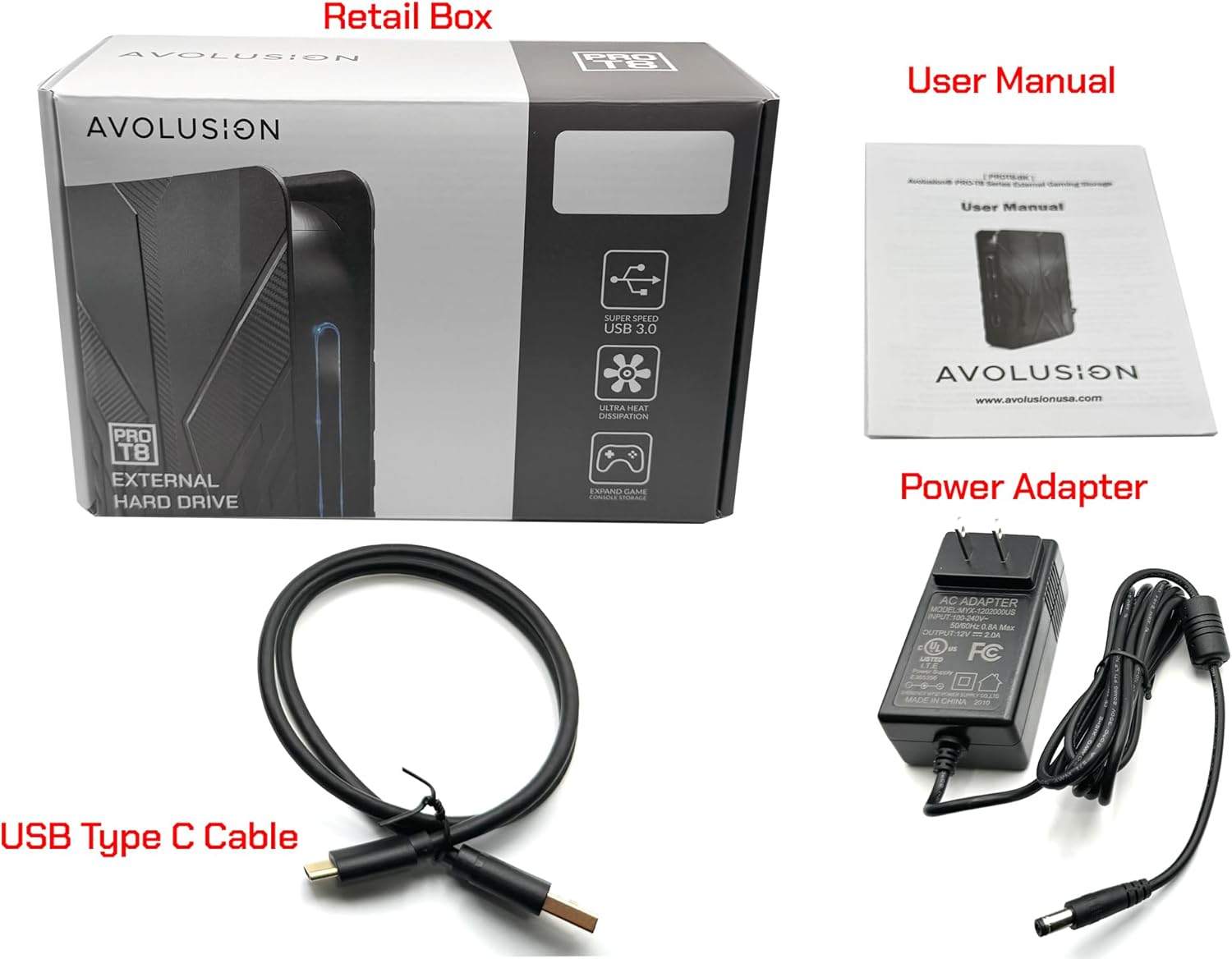
Image: Contents of the Avolusion PRO-T8 Series package. This includes the external hard drive, a USB Type-C cable, a power adapter, the user manual, and a warranty card.
Product Overview

Image: Angled view of the Avolusion PRO-T8 Series external hard drive, highlighting its textured black casing and the blue LED status indicator.

Image: Detailed front and rear views of the hard drive, indicating the location of the air vent, power on/off switch, DC 12V power input, and USB Type-C port.
The Avolusion PRO-T8 Series external hard drive is designed for seamless integration with your PS5 console. It features a robust casing and essential ports for connectivity and power.
Setup Instructions
- Connect the Power Adapter: Plug the power adapter into the DC 12V power input port on the rear of the Avolusion PRO-T8 hard drive. Then, plug the other end of the power adapter into a wall outlet.
- Connect to PS5 Console: Connect one end of the provided USB Type-C cable to the USB Type-C port on the rear of the hard drive. Connect the other end of the USB Type-C cable to an available USB port on your PS5 console.
- Power On: Flip the Power On/Off switch on the rear of the hard drive to the 'On' position. The blue LED indicator on the front of the drive should illuminate.
- PS5 Recognition: Your PS5 console should automatically detect the external hard drive. Follow any on-screen prompts from your PS5 to format the drive if necessary. The drive is pre-formatted for PS5, so this step might be automatic or require minimal confirmation.
Note: Ensure your PS5 system software is up to date for optimal compatibility.
Operating Instructions
Storing and Playing PS4 Games
You can play PS4 games directly from the Avolusion PRO-T8 external hard drive. This allows you to save valuable space on your PS5 console's internal SSD for PS5-specific titles.
- To move PS4 games to the external drive: Go to Settings > Storage > Console Storage > Games and Apps. Select the PS4 games you wish to move and choose the option to move them to USB Extended Storage.
- To play PS4 games: Simply select the game from your Game Library. The PS5 will launch it directly from the external drive.
Storing and Playing PS5 Games
PS5 games must be played from the PS5 console's internal SSD. The Avolusion PRO-T8 external hard drive can be used to store PS5 games when they are not actively being played, freeing up internal SSD space.
- Moving PS5 Games to External Storage: To move PS5 games to the external drive for storage, navigate to Settings > Storage > Console Storage > Games and Apps. Select the PS5 games you wish to move and choose the option to move them to USB Extended Storage. This process is significantly faster than re-downloading games.
- Playing PS5 Games from External Storage: To play a PS5 game stored on the external drive, you must first copy it back to the PS5 console's internal SSD. Go to Settings > Storage > USB Extended Storage > Games and Apps. Select the PS5 game and choose the option to copy it to Console Storage.
- Direct Downloads: PS5 games cannot be downloaded directly to the USB external hard drive. They must first be downloaded to the PS5's internal SSD and then moved to the external drive for storage.

Image: Flowchart explaining the difference in game storage and play for PS4 and PS5 titles using the external hard drive. PS4 games can be played directly, while PS5 games require transfer to the internal SSD for play.
Maintenance
Proper maintenance ensures the longevity and optimal performance of your external hard drive.
- Cleaning: Use a soft, dry cloth to clean the exterior of the drive. Avoid liquid cleaners or abrasive materials.
- Placement: Place the drive on a stable, flat surface. Ensure adequate ventilation around the device to prevent overheating. Do not block the air vents.
- Handling: Avoid dropping or subjecting the drive to physical shocks, as this can damage the internal components.
- Disconnection: Always safely eject the drive from your PS5 console before physically disconnecting it or powering it off. This prevents data corruption.
- Storage: When not in use for extended periods, store the drive in a cool, dry place away from direct sunlight and extreme temperatures.
Troubleshooting
If you encounter issues with your Avolusion PRO-T8 external hard drive, refer to the following common solutions:
- Drive Not Detected by PS5:
- Ensure the power adapter is securely connected to both the drive and a working power outlet.
- Verify the USB Type-C cable is firmly connected to both the drive and the PS5 console.
- Confirm the drive's power switch is in the 'On' position and the blue LED is illuminated.
- Try connecting the drive to a different USB port on your PS5.
- Restart your PS5 console.
- Slow Data Transfer Speeds:
- Ensure you are using the provided USB Type-C cable, which supports USB 3.0 speeds.
- Confirm the PS5's USB port supports USB 3.0 (typically the rear ports).
- Avoid running multiple demanding applications or transfers simultaneously on the PS5.
- Games Not Launching:
- For PS5 games, ensure they have been copied back to the PS5's internal SSD before attempting to launch.
- For PS4 games, verify the game data is intact on the external drive.
Specifications
| Feature | Specification |
|---|---|
| Model | PROT8BK-8TB-PS5 |
| Capacity | 8TB (8-Terabyte) |
| Interface | USB 3.0 |
| USB Data Speed | Up to 5.0 Gbit/s |
| Hard Drive Type | Mechanical Hard Disk (7200 RPM) |
| Compatibility | PlayStation 5 (PS5) |
| File System | Pre-Formatted for PS5 |
| Color | Black |
| Dimensions (L x W x H) | 8" x 5" x 1.6" (20.32 cm x 12.7 cm x 4.06 cm) |
| Weight | Approximately 2 pounds (0.91 kg) |
| Power Input | 100V ~ 240V (50-60Hz 0.8A) |
| Power Output | 12V 2.0A |

Image: Dimensions of the Avolusion PRO-T8 Series external hard drive, showing its length, width, and height.
Warranty Information
The Avolusion PRO-T8 Series External Gaming Hard Drive comes with a 2-Year Warranty. Please refer to the included Warranty Card in your package for detailed terms and conditions, including coverage, limitations, and how to make a claim.
Keep your proof of purchase for warranty validation.
Support
For further assistance, technical support, or inquiries not covered in this manual, please contact Avolusion customer support. Refer to the contact information provided on the warranty card or visit the official Avolusion website.
Website: www.avolusionusa.com