1. Introduction
Thank you for purchasing the RISEBASS Portable Wireless Bluetooth Speaker, model RB-1547. This compact and powerful speaker is designed to deliver clear audio with vibrant party lights, suitable for both indoor and outdoor use. Please read this manual carefully to ensure proper operation and to maximize your listening experience.

Image: Two RISEBASS RB-1547 speakers displaying their multi-color LED lights.
2. Package Contents
- RISEBASS Portable Wireless Bluetooth Speaker (RB-1547)
- USB Charging Cable
- User Manual

Image: Speaker with included USB charging cable and product dimensions.
3. Product Overview
Familiarize yourself with the speaker's controls and features:

Image: Overview of speaker features including Bluetooth, 400 Watts, rechargeable battery, TWS, USB/TF input, and FM Radio.
Control Panel (Top View)
- MODE/TWS Button: Press to switch between modes (Bluetooth, FM Radio, USB/TF Card). Long press for TWS pairing.
- M/V- Button: Short press for previous track (in music modes) or previous station (in FM mode). Long press to decrease volume.
- M/SCAN Button: Short press to play/pause (in music modes) or auto-scan FM stations (in FM mode).
- M/V+ Button: Short press for next track (in music modes) or next station (in FM mode). Long press to increase volume.
Ports
- USB Port: For USB flash drive playback.
- TF Card Slot: For TF (MicroSD) card playback.
- Charging Port: Connect the included USB cable for charging.
4. Setup
Initial Charging
- Before first use, fully charge the speaker.
- Connect the small end of the included USB charging cable to the speaker's charging port.
- Connect the standard USB end to a USB power adapter (not included) or a computer's USB port.
- The charging indicator light will illuminate. Once fully charged, the light may change color or turn off.
- A full charge provides up to 20 hours of continuous music playback.
5. Operating Instructions
Power On/Off
- To power on, press and hold the MODE/TWS button for a few seconds until the speaker activates.
- To power off, press and hold the MODE/TWS button again until the speaker shuts down.
Bluetooth Pairing
- Ensure the speaker is powered on and in Bluetooth mode (indicated by a voice prompt or LED). If not, press the MODE/TWS button to switch to Bluetooth mode.
- On your mobile device (smartphone, tablet, laptop), enable Bluetooth and search for available devices.
- Select "RISEBASS" from the list of devices.
- Once paired, the speaker will indicate a successful connection.
- You can now play audio from your device through the speaker.

Image: Speaker connecting via Bluetooth to mobile devices.
True Wireless Stereo (TWS) Function
The TWS function allows you to pair two RISEBASS RB-1547 speakers together for a stereo sound experience.
- Ensure both speakers are powered on and in Bluetooth mode, but not yet paired to any device.
- On one of the speakers (this will be the primary speaker), press and hold the MODE/TWS button for approximately 3 seconds.
- The speakers will attempt to connect to each other. A successful connection will be indicated by an audible prompt.
- Once paired, connect your mobile device to the primary speaker via Bluetooth as described above. Both speakers will now play audio in stereo.

Image: Demonstrating the TWS pairing process by pressing the MODE/TWS button.
FM Radio Mode
- Press the MODE/TWS button repeatedly until you enter FM Radio mode.
- Press the M/SCAN button once to automatically scan and save available FM stations.
- Use the M/V- and M/V+ buttons to navigate between saved stations.
USB/TF Card Playback
- Insert a USB flash drive or TF (MicroSD) card with MP3 audio files into the respective port.
- The speaker will automatically switch to USB or TF card mode and begin playing music. If not, press the MODE/TWS button to select the correct mode.
- Use the M/V- and M/V+ buttons for track navigation and the M/SCAN button for play/pause.
Party Lights
The speaker features integrated LED party lights that enhance the listening experience.
- The lights typically activate automatically when the speaker is powered on.
- Specific controls for light modes or turning them off are not explicitly detailed, but they are designed to add a dynamic visual element to your music.
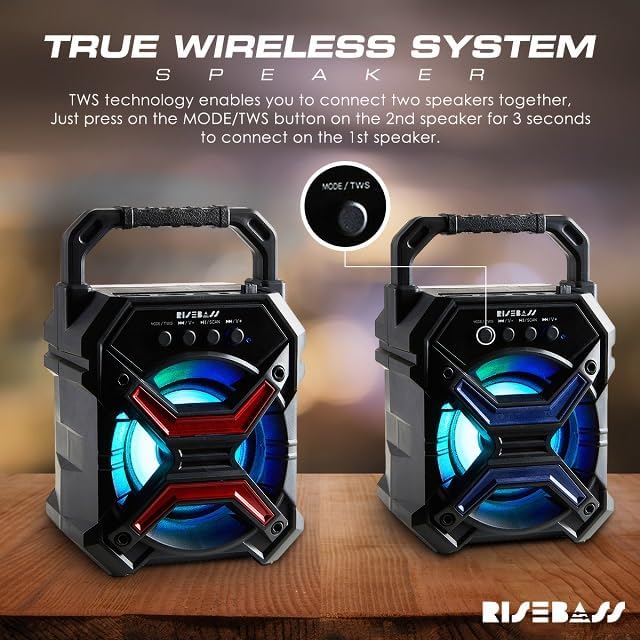
Image: Speaker with colorful glowing lights at a party setting.
6. Maintenance
- Keep the speaker dry. Do not expose it to water or excessive moisture, as it is not waterproof.
- Clean the speaker with a soft, dry cloth. Do not use abrasive cleaners or solvents.
- Store the speaker in a cool, dry place when not in use.
- Avoid extreme temperatures.
7. Troubleshooting
| Problem | Possible Cause | Solution |
|---|---|---|
| Speaker does not power on | Low battery; Power button not pressed correctly | Charge the speaker fully; Press and hold the MODE/TWS button for a few seconds |
| No sound | Volume too low; Device not paired; Incorrect mode selected | Increase volume on speaker and device; Re-pair Bluetooth device; Press MODE/TWS to select correct input mode |
| Bluetooth pairing fails | Speaker not in pairing mode; Device Bluetooth off; Too far from speaker | Ensure speaker is in Bluetooth mode; Turn on Bluetooth on your device; Move device closer to speaker (within 10 meters) |
| TWS pairing fails | Speakers already paired to a device; TWS button not held long enough | Ensure both speakers are unpaired from any device; Press and hold MODE/TWS button on one speaker for 3 seconds |
8. Specifications
| Model Name | RB-1547 |
| Brand | RISEBASS |
| Speaker Type | Portable Outdoor/Indoor |
| Connectivity Technology | Bluetooth |
| Wireless Communication Technology | Bluetooth |
| Speaker Maximum Output Power | 400 Watts |
| Power Source | Battery Powered |
| Product Dimensions | 3"D x 4"W x 7"H |
| Speaker Size | 7 Inches |
| Special Features | LED Light, Lightweight |
| Compatible Devices | Laptop, MP3 Player, Smartphone, Tablet |
| Is Waterproof | No |
| UPC | 614609801991 |
9. Warranty Information
RISEBASS products are manufactured to high-quality standards. For specific warranty details, including duration and coverage, please refer to the warranty card included with your purchase or contact customer support. Keep your purchase receipt as proof of purchase for any warranty claims.
10. Customer Support
If you have any questions, concerns, or require assistance with your RISEBASS Portable Wireless Bluetooth Speaker, please contact our customer support team. For the most up-to-date contact information, please visit the official RISEBASS website or refer to your product packaging.
Manufacturer: A AND S COLLECTION


