1. Safety Information
Please read this manual carefully before assembly and use. Retain this manual for future reference.
- Weight Capacity: Do not exceed the maximum weight capacity of 40 kg (88 lbs) for the TV.
- TV Size: This stand is designed for TVs between 32 and 70 inches. Ensure your TV's VESA pattern is compatible.
- Stability: Ensure the stand is placed on a flat, stable, and level surface. Avoid placing it on uneven ground or near edges where it could be easily tipped.
- Children and Pets: Keep children and pets away from the stand during assembly. Do not allow children to climb on or play with the stand or attached TV.
- Power Outlet: The integrated power outlet has a rating of 120V/12A. Do not overload the power strip. Ensure all connected devices are within the specified limits.
- Cable Management: Properly route all cables to prevent tripping hazards and ensure they are not pinched or damaged.
- Assembly: Follow all assembly instructions precisely. If any parts are missing or damaged, do not proceed with assembly. Contact customer support for assistance.
- Maintenance: Regularly check all screws and connections to ensure they remain tight and secure.
2. Package Contents
Verify that all components are present and undamaged before beginning assembly. Refer to the parts list provided in your packaging for specific component identification.

Image 2.1: Overview of the FITUEYES Tall TV Floor Stand with Power Outlet.
- Base Plate (Wood)
- Support Column (Metal)
- TV Mounting Bracket Assembly
- Integrated Power Outlet with 3 AC outlets (120V/12A)
- Cable Management Clips
- Hardware Kit (various screws, washers, spacers, and tools)
- Instruction Manual
3. Setup and Assembly
Assembly typically requires two people. Follow the steps below carefully.
3.1. Prepare the Base
- Unpack all components and lay them out on a soft, clean surface to prevent scratches.
- Attach the support column to the wooden base plate using the provided screws and tools. Ensure the column is securely fastened and aligned correctly.

Image 3.1: The thick wooden base provides stability for the TV stand.
3.2. Attach TV Brackets to Television
- Identify the correct VESA mounting holes on the back of your television. Refer to your TV's manual for VESA pattern specifications.
- Select the appropriate screws, washers, and spacers from the hardware kit that fit your TV's mounting holes.
- Attach the vertical TV mounting brackets to the back of your television. Ensure they are securely tightened but do not overtighten. The brackets should be level.

Image 3.2: VESA compatibility ranges from 200x200mm to 600x400mm, accommodating various TV sizes.
3.3. Mount Television to Stand
- With assistance, carefully lift the television and hook the attached TV brackets onto the mounting plate of the stand.
- Ensure the TV is centered and level.
- Secure the TV to the mounting plate using the safety screws or locking mechanisms provided. This prevents accidental dislodgement.

Image 3.3: Detail of the safety lock to secure the TV to the stand, preventing accidental movement.
3.4. Connect Power Outlet and Manage Cables
- The stand features an integrated power outlet on the rear of the support column. Plug the stand's power cord into a wall outlet.
- Connect your TV and other devices to the 3 AC outlets on the stand.
- Use the provided cable management clips to route all cables neatly along the support column, reducing clutter and potential hazards.

Image 3.4: Rear view illustrating the integrated power outlet with three AC ports and the cable management system.

Image 3.5: Close-up of the cable management clips integrated into the stand's column for organized wiring.
4. Operating Instructions
4.1. Height Adjustment
The TV stand allows for height adjustment to optimize your viewing experience. To adjust the height:
- Ensure the TV is securely mounted.
- Loosen the height adjustment screws or levers on the support column (refer to your specific model's mechanism).
- Carefully raise or lower the TV to the desired height. The stand offers an adjustable height range from 47.8 to 55.7 inches.
- Tighten the height adjustment screws or levers firmly to secure the TV in its new position.

Image 4.1: Illustration of the adjustable height feature, allowing the TV to be positioned at various levels.
4.2. Swivel Function
The stand features a swivel function, allowing you to rotate your TV for optimal viewing angles.
- Gently grasp the sides of your television.
- Rotate the TV left or right to achieve the desired viewing angle. The stand allows for a ±30° swivel.
- Avoid forcing the swivel beyond its intended range.

Image 4.2: The TV stand's swivel capability allows for a ±30° rotation, enhancing viewing flexibility.

Image 4.3: A top-down perspective demonstrating the ±30° swivel range of the TV mounting plate.
5. Maintenance
- Cleaning: Wipe the stand with a soft, dry cloth. For stubborn marks, a slightly damp cloth can be used, followed by immediate drying. Avoid harsh chemicals or abrasive cleaners.
- Hardware Check: Periodically inspect all screws and bolts to ensure they are tight. Loose connections can compromise stability.
- Cable Inspection: Check cables for any signs of wear, fraying, or damage. Replace damaged cables immediately.
- Power Outlet: Ensure the power outlet is free from dust and debris. Do not insert foreign objects into the outlets.
6. Troubleshooting
6.1. Stand Feels Unstable
- Ensure all assembly screws are tightened securely.
- Verify the stand is on a flat, level surface.
- Confirm your TV's weight does not exceed the stand's maximum capacity (40 kg / 88 lbs).
6.2. TV Does Not Fit Mounting Brackets
- Check your TV's VESA pattern against the stand's compatibility (200x200mm to 600x400mm).
- Ensure you are using the correct screws and spacers for your TV model.
6.3. Power Outlet Not Working
- Verify the stand's main power cord is securely plugged into a functional wall outlet.
- Check if the wall outlet itself is receiving power (test with another device).
- Ensure the total power draw of connected devices does not exceed 120V/12A.
7. Specifications
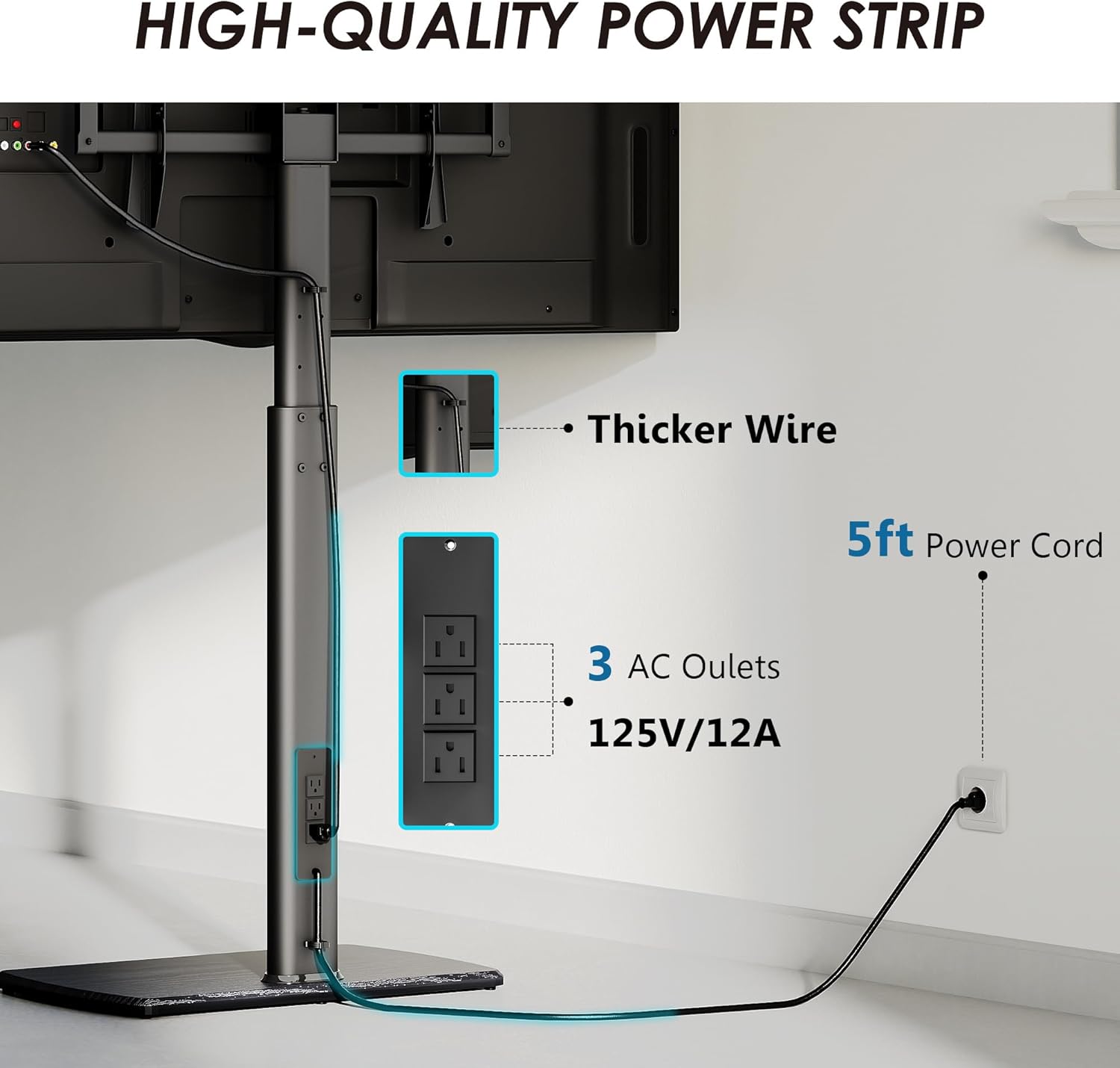
Image 7.1: Detailed dimensions of the TV stand, including height, width, depth, and VESA range.
| Feature | Specification |
|---|---|
| Brand | FITUEYES |
| Model | B0CW8LFC7G |
| Mounting Type | Floor Mount |
| Movement Type | Swivel |
| Material | Metal, Wood |
| Color | Black |
| Compatible TV Sizes | 32 to 70 inches |
| VESA Compatibility | 200x200mm to 600x400mm |
| Height Adjustment Range | 47.8 to 55.7 inches (1216mm to 1416mm) |
| Swivel Angle | ±30° |
| Maximum TV Weight | 40 kg (88 lbs) |
| Integrated Power Outlet | 3 AC Outlets, 120V/12A |
| Item Weight | Approximately 20 pounds |
| Package Dimensions | 31.5 x 16.5 x 4 inches |
8. Warranty and Support
For warranty information and customer support, please refer to the documentation included with your purchase or visit the official FITUEYES website. If you encounter any issues or have questions regarding the assembly or operation of your TV stand, please contact FITUEYES customer service for assistance.