
Gerrit T type A
Gerrit Adjustable T-Shaped Desktop Poster Display Stand User Manual
Model: T type A
1. Introduction
This manual provides detailed instructions for the assembly, operation, and maintenance of your Gerrit Adjustable T-Shaped Desktop Poster Display Stand. Please read this manual thoroughly before use to ensure proper setup and safe operation. This stand is designed for displaying advertisements, posters, or promotional information in various settings such as shopping malls, stores, and offices.
Package Contents:
- 1 x Poster Stand (consisting of base, telescopic pole, crossbar, and clips)
2. Safety Information
- Ensure all components are securely fastened before use.
- Do not overload the stand with excessively heavy posters or materials.
- Place the stand on a stable, flat surface to prevent tipping.
- Keep out of reach of children to prevent accidental injury.
3. Setup and Assembly
The Gerrit T-shaped poster stand is designed for quick and easy assembly. Follow these steps:
3.1 Unpacking
Carefully remove all components from the packaging. Verify that all parts are present: base, telescopic pole, crossbar, and two clips.
3.2 Base and Pole Assembly
- Place the base on a flat surface.
- Insert the bottom end of the telescopic pole into the designated slot on the base. Ensure it is firmly seated.

Figure 1: Fully assembled Gerrit T-shaped desktop poster display stand. This image shows the base, telescopic pole, crossbar, and two clips in their assembled configuration.
3.3 Attaching the Crossbar
- Attach the crossbar to the top of the telescopic pole. The crossbar should fit snugly into the T-shaped connector.

Figure 2: Close-up view of the crossbar with two transparent clips attached. The clips are designed to securely hold display materials.

Figure 3: Detailed view of the connection between the crossbar and the telescopic pole, showing the T-shaped joint.
3.4 Attaching Clips
- Slide the two provided clips onto the crossbar. These clips are movable and can be adjusted left or right to accommodate different poster widths.

Figure 4: Close-up of the base where the telescopic pole connects, showing the stable U-shaped design.
4. Operating Instructions
4.1 Adjusting Height
The stand features a retractable design, allowing for height adjustment. To adjust the height:
- Gently pull or push the telescopic pole to extend or retract it to your desired height.
- Ensure the pole is stable at the chosen height before attaching any display materials. The height can be adjusted from approximately 29cm (11.4in) to 94cm (37in).
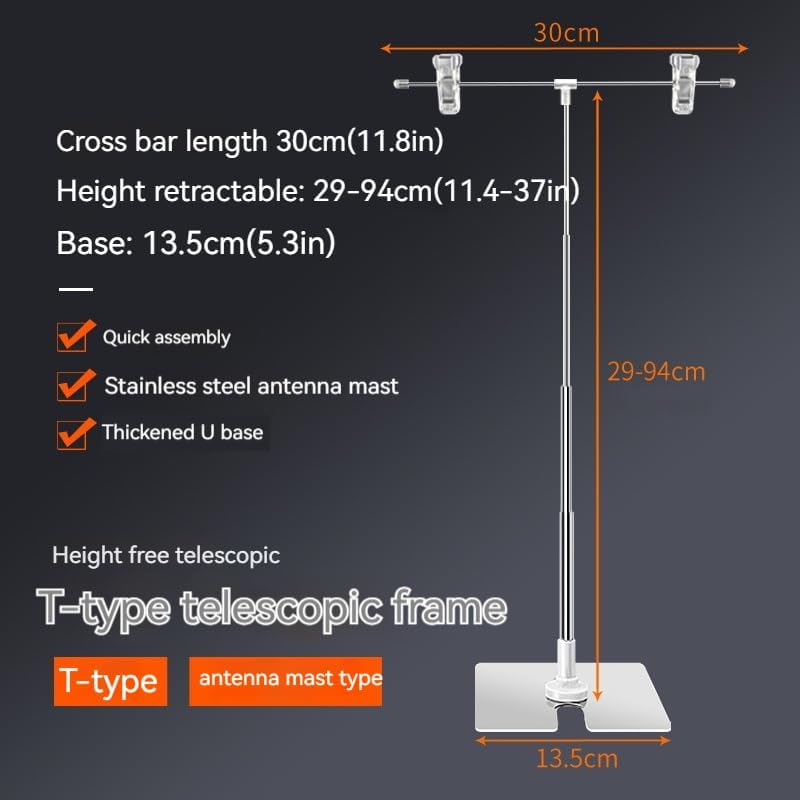
Figure 5: Diagram illustrating the adjustable height range (29-94cm) and crossbar length (30cm) of the T-type telescopic frame. It also highlights quick assembly, stainless steel mast, and thickened U-base.
4.2 Attaching Display Materials
To display posters, advertisements, or banners:
- Open the clips on the crossbar.
- Insert the top edge of your display material (e.g., KT board, poster, banner) into the clips.
- Close the clips securely to hold the material in place.
- Adjust the position of the clips along the crossbar to center or align your display as needed.

Figure 6: Illustration showing the stand holding both a "KT board" and a "Sea Newspaper" (likely a poster or flyer), demonstrating its versatility.

Figure 7: The Gerrit display stand in a retail environment, showcasing a promotional poster for a food event.
5. Maintenance
- Cleaning: Wipe the stainless steel components with a soft, damp cloth. Avoid abrasive cleaners that may scratch the surface.
- Storage: When not in use, the stand can be disassembled for compact storage. Retract the pole fully and detach the crossbar and clips. Store in a dry place.
- Inspection: Periodically check all connections and components for any signs of wear or damage. Replace any damaged parts immediately.
6. Troubleshooting
| Problem | Possible Cause | Solution |
|---|---|---|
| Stand is unstable or wobbles. | Not placed on a flat surface; components not fully assembled. | Ensure the stand is on a level surface. Check that the pole is securely inserted into the base. |
| Poster slips from clips. | Clips not closed properly; poster material too thick/thin for clips. | Ensure clips are fully closed. Use appropriate material thickness for the clips. |
| Telescopic pole does not stay at desired height. | Internal locking mechanism issue or dirt. | Clean the pole sections. If the issue persists, contact customer support. |
7. Specifications
| Feature | Detail |
|---|---|
| Model | T type A |
| Brand | Gerrit |
| Material | Stainless Steel (pole), Metal (base), Plastic (clips, connectors) |
| Color | Silver |
| Adjustable Height | Approx. 29cm (11.4in) to 94cm (37in) |
| Crossbar Length | Approx. 30cm (11.8in) |
| Base Dimensions | Approx. 13.5cm (5.3in) x 13.5cm (5.3in) (U-shaped) |
8. Warranty and Support
For any questions or issues regarding your Gerrit Adjustable T-Shaped Desktop Poster Display Stand, please contact the seller or manufacturer directly. Please refer to your purchase documentation for specific warranty terms and conditions.
Manufacturer: Gerrit
ASIN: B0CW6N82BK
Ask a question about this manual
Ask about setup, troubleshooting, compatibility, parts, safety, or missing instructions. Manuals+ will review the question and use this page’s manual context to help answer it.