Introduction
This manual provides instructions for the safe and proper use, setup, and maintenance of your MoKo 18-inch Queen Air Mattress with Built-in Pump. Please read this manual thoroughly before operating the product and retain it for future reference.

Image: The MoKo Queen Air Mattress, showing its overall design, built-in pump, and included carry bag.
Important Safety Information
- Always follow all safety instructions and warnings provided in the included User Guide.
- Do not use the air mattress near open flames or heat sources.
- Keep sharp objects away from the mattress surface to prevent punctures.
- Ensure the mattress is placed on a flat, clear surface free of debris.
- Do not allow children to jump on the mattress.
- Do not overinflate the mattress.
- Unplug the pump when not in use and before cleaning.
- This product is not a toy. Adult supervision is required when children are near the mattress.
- Maximum load capacity is 661 pounds. Do not exceed this limit.
Package Contents
Please check to ensure all items are present:
- 1 x MoKo Queen Air Mattress with Built-in Pump
- 1 x Carry Bag
- 4 x Repair Patches
- 1 x User Guide
Setup and Operation
Inflation
- Unroll the air mattress on a clean, flat surface.
- Locate the built-in pump on the side of the mattress.
- Plug the power cord into a standard electrical outlet.
- Turn the pump knob clockwise to the "INFLATE" position. The mattress will begin to inflate.
- Inflation typically takes approximately 3 minutes.
- Once the desired firmness is reached, turn the knob to the "OFF" position.
- Unplug the power cord and store it in the designated compartment.

Image: Close-up of the built-in pump, showing the inflate/deflate knob and the power cord storage compartment. The image indicates a 3-minute inflation time.
Deflation
- Ensure the mattress is clear of any occupants or objects.
- Plug the power cord into a standard electrical outlet.
- Turn the pump knob counter-clockwise to the "DEFLATE" position. The mattress will begin to deflate.
- Allow the pump to run until most of the air has been removed.
- For complete deflation, gently roll the mattress from the opposite end towards the pump to expel any remaining air.
- Turn the knob to the "OFF" position and unplug the power cord.

Image: A visual representation of the air mattress inflating from flat to full and deflating from full to flat, highlighting the 3-minute process.
Usage Guidelines
- The MoKo air mattress features a honeycomb structure for consistent firmness and spinal support.
- The flocked surface provides a soft, comfortable, and non-irritating sleeping experience.
- The mattress has a maximum load capacity of 661 pounds, suitable for 1 to 3 people.
- Side pockets are included for convenient storage of small items like phones or remote controls.
- The 18-inch height provides elevation from the ground.
- The non-slip bottom helps maintain stability.
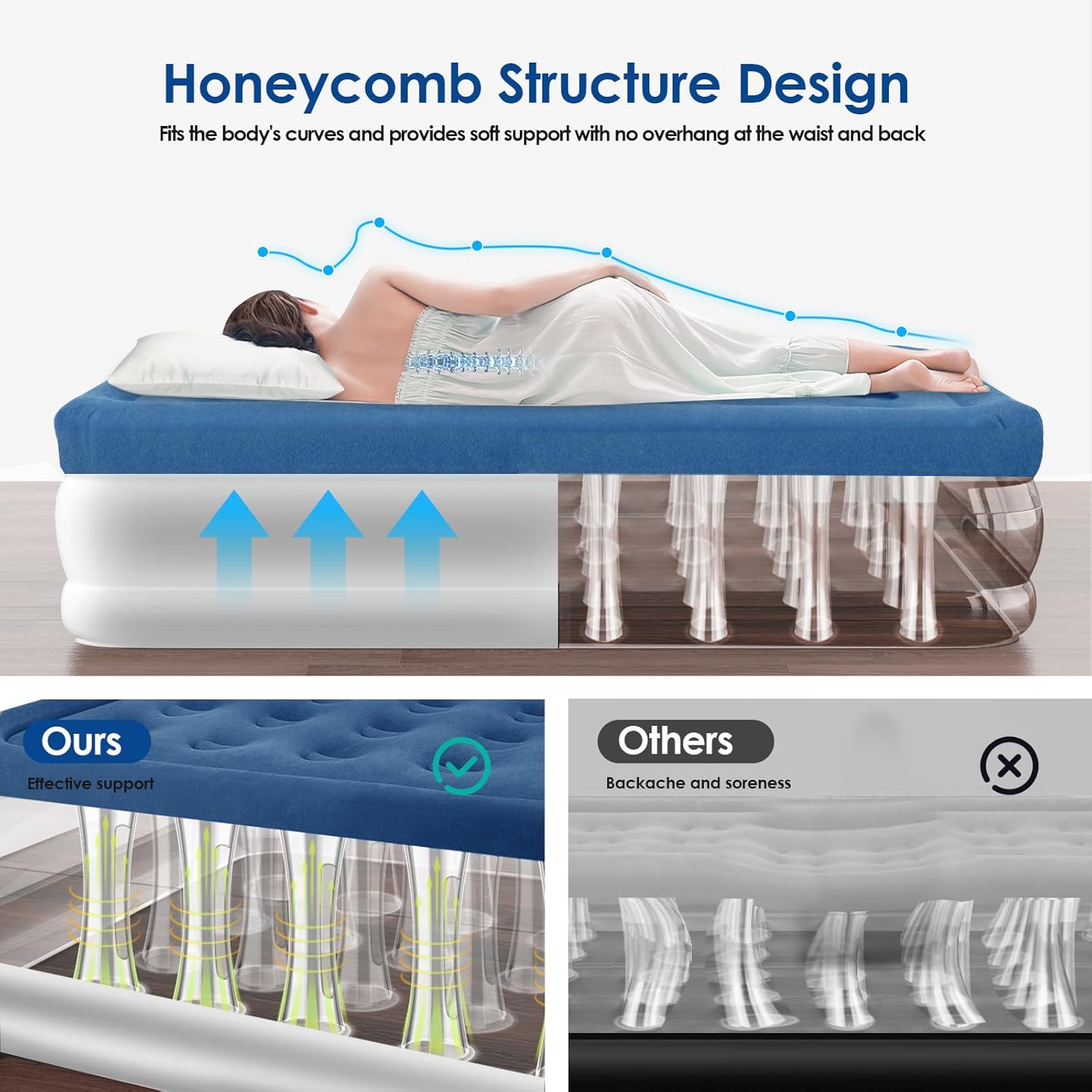
Image: A person lying on the air mattress, with an overlay illustrating the internal honeycomb structure providing support and conforming to body curves.

Image: A detailed view of the air mattress surface, highlighting the 4.3-inch improved surface height, 0.2mm surface flocking, 0.4mm PVC, and integrated side pockets for small items.
Care and Storage
Cleaning
- To clean the mattress, wipe the flocked surface and PVC material with a damp cloth.
- Do not use harsh chemicals or abrasive cleaners, as these may damage the material.
- Ensure the mattress is completely dry before storing.
Storage
- After deflating the mattress completely, fold or roll it neatly.
- Place the folded mattress into the provided carry bag for easy transport and storage.
- Store the mattress in a cool, dry place away from direct sunlight and extreme temperatures.
- Keep away from pests and sharp objects.

Image: A woman rolling up the deflated air mattress, demonstrating how it can be compactly stored in the carry bag.
Troubleshooting
| Problem | Possible Cause | Solution |
|---|---|---|
| Mattress not inflating/deflating | Power cord not plugged in; pump knob not in correct position; power outage. | Ensure power cord is securely plugged in. Turn knob to "INFLATE" or "DEFLATE". Check power supply. |
| Mattress losing air | Small puncture; valve not fully closed; initial stretching of material. | Check for punctures and use a repair patch. Ensure pump knob is fully in "OFF" position. It is normal for new air mattresses to stretch and require a small amount of air top-up during the first few uses. |
| Pump making unusual noise | Obstruction in air intake/exhaust; pump malfunction. | Check for and remove any obstructions. If the issue persists, contact customer support. |
Specifications
| Feature | Detail |
|---|---|
| Model Name | 18 Inches Queen Air Bed (MAMQ18) |
| Dimensions (Inflated) | 80"L x 60"W x 18"Th |
| Material | Heavy-duty PVC, 100% Soft Flocked Material (0.6mm thick surface, 4.3-inch flocked height) |
| Color | White/Blue |
| Built-in Pump | Yes, dual-chamber design |
| Inflation/Deflation Time | Approx. 3 minutes |
| Weight Capacity | 661 Pounds |
| Special Features | Built-In Pump, Easy to Clean, Flocked Top, Foldable, Leakproof, Waterproof, Portable, Puncture Resistant, Side Pockets |
| Item Weight | 17.2 pounds |
| UPC | 840401416167 |

Image: A visual representation of the MoKo Queen Air Mattress with its dimensions (80"L x 60"W x 18"Th) and maximum load capacity (661 lbs) clearly indicated.
Warranty and Support
For warranty information or customer support, please refer to the contact details provided in the included User Guide or visit the official MoKo website. Please have your model number (MAMQ18) and purchase details available when contacting support.


