
1. Product Overview
The HEXEH EC7830A1033 Burner Controller is a robust and reliable component designed for industrial heating applications. It is engineered to manage and monitor the combustion process in equipment such as power plants and heating furnaces, ensuring efficient and safe operation. This controller is built to replace aged or damaged components, addressing issues like equipment malfunction and unstable operation, thereby extending the service life of industrial machinery.
Each unit undergoes strict technical testing to ensure durability and consistent performance in demanding industrial environments.
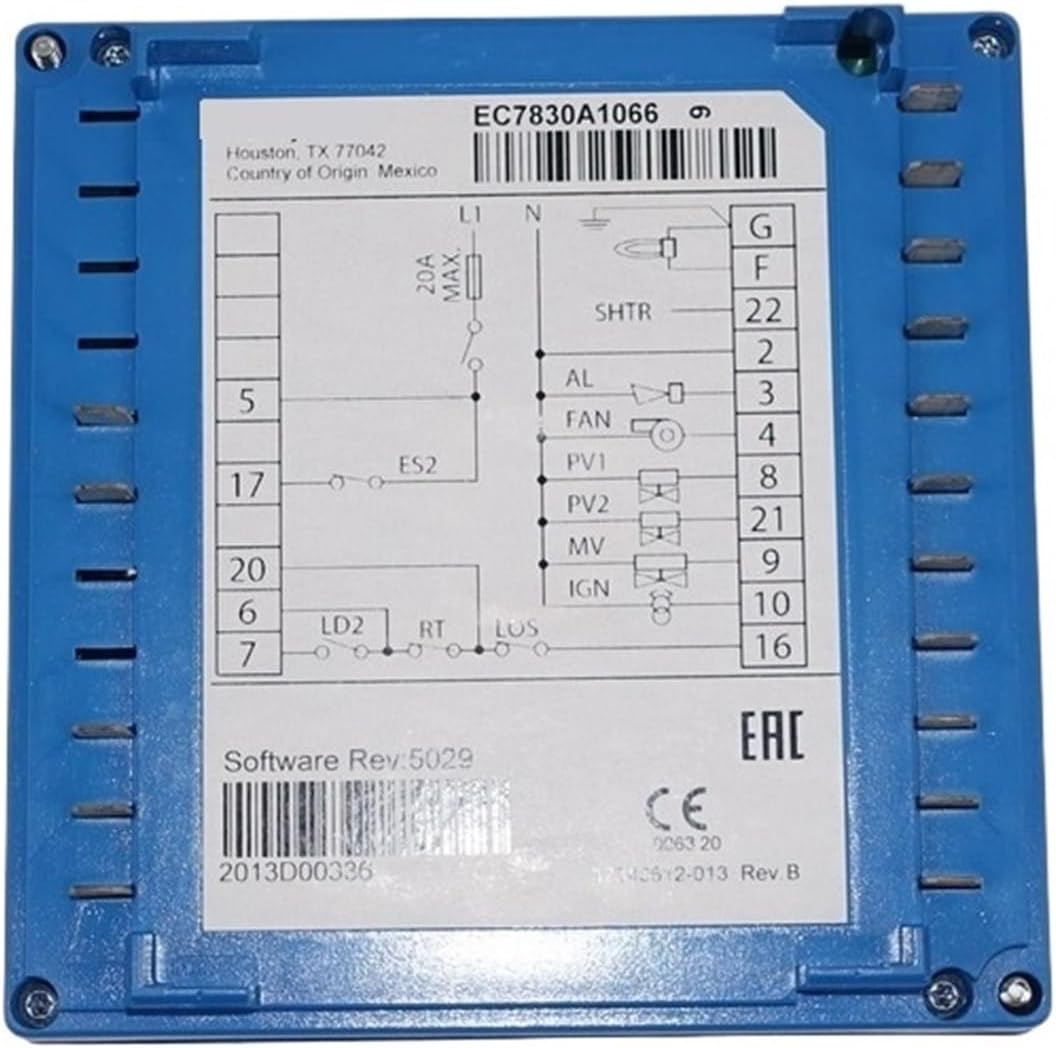
Figure 1: Front view of the HEXEH EC7830A1033 Burner Controller, showing the model number and a detailed wiring diagram for electrical connections.
2. Safety Information
Important Safety Instructions: Read all instructions carefully before installation and operation. Failure to follow these instructions could result in property damage, serious injury, or death.
- Always disconnect power to the equipment before installing, servicing, or removing the controller to prevent electrical shock.
- Installation and servicing must be performed by qualified, trained personnel familiar with industrial control systems and electrical safety procedures.
- Ensure all wiring connections comply with local and national electrical codes.
- Do not operate the controller if it appears damaged or has been exposed to moisture.
- Verify proper grounding of all equipment.
- This device is intended for use in industrial environments. Take appropriate precautions against dust, moisture, and extreme temperatures.
3. Specifications
| Feature | Detail |
|---|---|
| Model Number | EC7830A1033 |
| Manufacturer | HEXEH |
| Item Weight | 7.72 pounds (approx. 3.5 kg) |
| Package Dimensions | 1.18 x 0.79 x 0.39 inches (approx. 3 x 2 x 1 cm) |
| Assembly Required | No |
| Number of Pieces | 1 |
Note: Specifications are subject to change without notice. Refer to the product label for the most accurate information.
4. Installation
The EC7830A1033 Burner Controller is designed for straightforward replacement of existing units. Its standard size and specifications facilitate direct integration into compatible industrial systems. However, due to the nature of industrial equipment and electrical systems, installation should only be performed by certified professionals.
Installation Steps:
- Power Disconnection: Before beginning any installation, ensure that all power to the industrial equipment and the control system is completely shut off and locked out according to safety protocols.
- Old Controller Removal: Carefully disconnect all wiring from the existing burner controller, noting the position and function of each wire. Remove the old controller from its mounting.
- New Controller Mounting: Mount the HEXEH EC7830A1033 controller in the designated location. Ensure it is securely fastened and properly aligned.
- Wiring Connections: Refer to the wiring diagram provided on the controller's label (see Figure 1) and the equipment's specific schematics. Connect all wires to the appropriate terminals on the new controller. Double-check all connections for tightness and correctness.
- System Check: Before restoring power, perform a thorough visual inspection of all connections and ensure no tools or debris are left within the control panel.
- Power Restoration: Carefully restore power to the system. Observe the controller and equipment for initial startup and ensure no error indicators are present.
- Functional Test: Conduct a full functional test of the burner system according to the equipment manufacturer's guidelines to confirm proper operation of the new controller.
For detailed wiring schematics and system-specific integration, consult the complete documentation for your industrial equipment.
5. Operation
The HEXEH EC7830A1033 Burner Controller operates as an integral part of a larger industrial combustion management system. Once correctly installed and integrated, it automatically manages the ignition, flame supervision, and safety shutdown sequences of the burner.
Key Operational Aspects:
- Automatic Ignition: Initiates the burner ignition sequence upon receiving a call for heat from the system.
- Flame Supervision: Continuously monitors the flame presence during burner operation. If the flame is lost, the controller will initiate a safety shutdown.
- Safety Lockout: In the event of an unsafe condition (e.g., ignition failure, flame loss, or other system faults), the controller will enter a safety lockout state, preventing further burner operation until the fault is cleared and the controller is reset.
- Status Indicators: The controller may feature LED indicators or diagnostic outputs to communicate its operational status and fault codes. Refer to your system's specific documentation for interpretation of these indicators.
Specific operational parameters and system interaction will be defined by the overall industrial equipment in which this controller is installed. Always follow the operating procedures outlined in your equipment's primary manual.
6. Maintenance
The HEXEH EC7830A1033 Burner Controller is designed for long-term reliability and typically requires minimal direct maintenance. However, regular inspection of the overall combustion system is crucial for optimal performance and safety.
Recommended Maintenance Practices:
- Periodic Visual Inspection: Regularly inspect the controller and its wiring for any signs of physical damage, corrosion, loose connections, or overheating.
- Environmental Check: Ensure the operating environment remains within specified temperature and humidity ranges. Keep the area around the controller clean and free from dust and debris.
- System Component Checks: As part of routine system maintenance, verify the proper functioning of all associated components, including flame sensors, igniters, and fuel valves, as their performance directly impacts the controller's operation.
- Professional Servicing: It is recommended to have the entire combustion system, including the burner controller, inspected and serviced by qualified technicians at least annually, or more frequently based on operational demands and manufacturer recommendations.
Always disconnect power before performing any maintenance or inspection tasks.
7. Troubleshooting
If the industrial equipment experiences issues related to burner operation, the HEXEH EC7830A1033 controller may indicate a fault. Basic troubleshooting steps are provided below. For complex issues, always consult a qualified technician.
Common Issues and Solutions:
- Burner Fails to Ignite:
- Check power supply to the controller and burner system.
- Verify fuel supply is open and at correct pressure.
- Inspect igniter for proper function and spark.
- Ensure flame sensor is clean and correctly positioned.
- Check for any lockout codes on the controller and reset if necessary (refer to system manual).
- Burner Ignites but Shuts Down Immediately (Flame Loss):
- Clean or replace the flame sensor.
- Verify flame sensor wiring and connections.
- Check for stable flame presence and proper combustion.
- Ensure adequate combustion air supply.
- Controller in Lockout:
- Identify the specific fault code (if available) from the controller's indicators.
- Address the underlying cause of the fault (e.g., ignition failure, low air pressure, etc.).
- Reset the controller according to the system's procedure (usually a momentary power cycle or pressing a reset button).
If troubleshooting steps do not resolve the issue, contact HEXEH customer support or a certified service technician.
8. Warranty and Support
HEXEH products are manufactured to high standards and are designed for reliable performance. This product is covered by a standard manufacturer's warranty against defects in materials and workmanship under normal use and service.
For specific warranty terms, duration, and conditions, please refer to the warranty card included with your purchase or visit the official HEXEH website. Keep your proof of purchase for warranty claims.
Customer Support:
If you require technical assistance, have questions about installation, operation, or need to report a product issue, please contact HEXEH customer support.
- Website: www.hexah.com (Note: This is a placeholder URL as no official website was provided.)
- Email: support@hexah.com (Note: This is a placeholder email as no official email was provided.)
- Phone: Refer to the product packaging or official website for regional contact numbers.
When contacting support, please have your product model number (EC7830A1033) and purchase information readily available.