
1. Introduction
This manual provides essential information for the safe and efficient operation of your SUNGOLDPOWER 8KW 48V Solar Inverter Kit. This kit includes an 8000W DC 48V Pure Sine Wave Solar Inverter and two 100Ah 48Vdc LiFePO4 Batteries, totaling 10.24KWH. Please read this manual thoroughly before installation and use, and retain it for future reference.
2. Safety Information
Always observe the following safety precautions to reduce the risk of electric shock, fire, or injury:
- Installation must be performed by qualified personnel in accordance with all local electrical codes and regulations.
- Do not attempt to disassemble or repair the inverter or batteries. Refer all servicing to qualified service personnel.
- Ensure proper grounding for all components.
- Keep the equipment away from flammable materials, moisture, and direct sunlight.
- Wear appropriate personal protective equipment (PPE), including insulated gloves and eye protection, during installation and maintenance.
- Disconnect all power sources (solar, battery, utility) before performing any maintenance or wiring.
- LiFePO4 batteries contain high energy. Handle with care and avoid short circuits.
3. Product Overview
3.1 Kit Components
The SUNGOLDPOWER 8KW 48V Solar Inverter Kit includes:
- 1x 8000W Solar Hybrid Inverter (SPH series)
- 2x 100Ah 48V Lithium Batteries (SG48100P series, total 10.24 kWh)
- User Manuals for Inverter and Batteries
- Warranty Card
- WiFi BOX
- Parallel COM cable
- Communication Cable
- Cable lugs & Screws
- Positive and negative output Cables (for battery)
- Battery-Inverter Cables
- RS485 cascade communication line (for battery)
- RS232 USB (for battery)
- Hanging ear screw (for battery)
- Dry contact terminal (for battery)
3.2 Key Features
- All-in-one Solar Charge Inverter: 8000W DC 48V Pure Sine Wave Solar Inverter with Max. 180A battery charging and two inbuilt MPPT Solar controllers.
- Flexible Output: Supports Split phase (120V/240V) or Single phase (120V) output.
- Remote Monitoring: Includes a WiFi module for viewing operating status and parameters via a mobile phone APP.
- Stable AC Output and Smart Protection: Rated Output Power: 8000W, Max Peak Power: 16,000W. Features PV input over-voltage/current protection, AC input over-voltage protection, Battery over-voltage protection, and Over-load protection.
- Time-slot Charging/Discharging: Allows users to set different charging and discharging periods based on local peak and valley tariffs for optimized energy usage.
- High-Quality Batteries: SUNGOLDPOWER 51.2V 100Ah LiFePO4 Batteries manufactured with automotive-grade battery cells, providing 7000+ deep cycles and up to a 15-year lifespan.
- Communication Compatibility: Inverter and batteries support CAN/RS485/RS232 Communication for easy integration.
- Dormant Battery Activation: Mains power and photovoltaics can activate dormant lithium batteries via the inverter.
3.3 Product Visuals


4. Setup and Installation
Proper installation is crucial for the performance and safety of your solar inverter kit. Refer to the detailed Installation Manual (PDF) for comprehensive instructions. Below are general guidelines and important considerations.
4.1 System Connection Overview
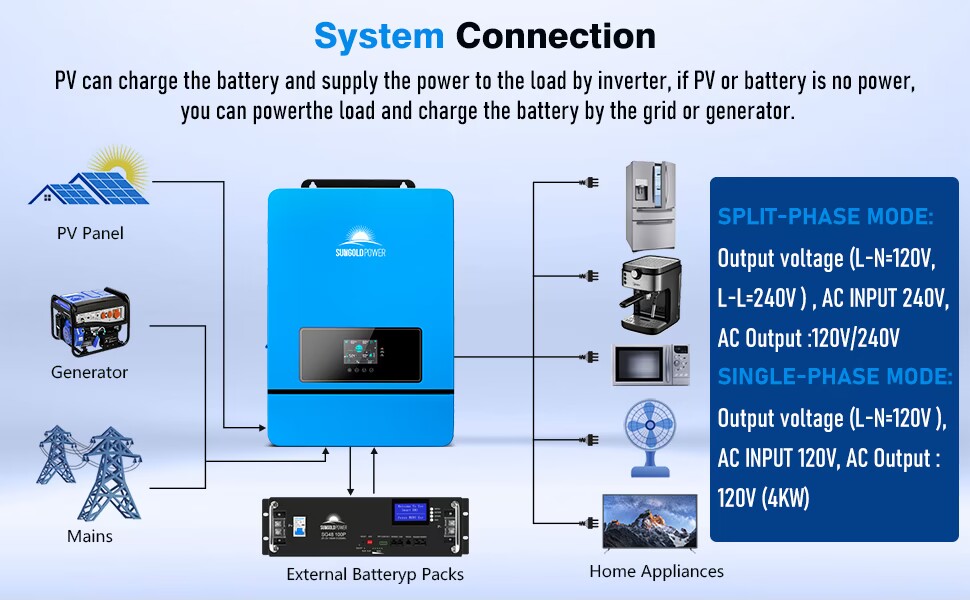
The system can be connected to PV panels, a generator, mains utility, external battery packs, and home appliances. The inverter manages power flow to charge batteries and supply loads.
4.2 Parallel Function
The SPH series inverter supports parallel connection of up to 6 units for increased power output and system redundancy. Wiring diagrams are available for single-phase, split-phase, and three-phase parallel connections.

4.3 Communication Setup
The inverter and batteries are designed for seamless communication. The following video demonstrates the connection and communication process between the SPH inverter and SG48100P battery.
Video 4.1: Connecting and communicating of SPH8-10KW inverter and SG48100P battery. This video provides a visual guide on how to establish communication between the SUNGOLDPOWER inverter and the LiFePO4 battery, which is essential for integrated system operation.
5. Operating Instructions
5.1 LCD Display and Monitoring
The inverter features a live LCD display that allows you to view real-time data and set system parameters. The display provides information on PV input, battery status, AC output, and more.

Additionally, the included WiFi module enables remote monitoring and control via a dedicated mobile application. Refer to the WiFi module's separate instructions for setup and usage.
5.2 Time-slot Charge Control
The SPH series inverter is equipped with a time-slot charging and discharging function. This feature allows you to optimize energy usage by setting specific periods for charging from PV or utility, and discharging to loads, based on electricity tariffs.

You can define up to three periods for PV array charging and battery discharging, allowing the system to prioritize inverter use during peak hours or supplement with grid power when solar is insufficient.
6. Maintenance
Regular maintenance ensures the longevity and optimal performance of your SUNGOLDPOWER Solar Inverter Kit.
- Cleaning: Keep the inverter and battery surfaces clean and free from dust. Use a dry, soft cloth. Do not use liquid cleaners.
- Ventilation: Ensure that the inverter's ventilation openings are clear and unobstructed to prevent overheating.
- Connections: Periodically check all electrical connections for tightness and signs of corrosion. Tighten as necessary.
- Battery Inspection: Inspect battery terminals for corrosion and ensure cables are securely connected. Monitor battery health via the LCD or APP.
- Firmware Updates: Check the manufacturer's website for any available firmware updates for the inverter or batteries to ensure optimal performance and compatibility.
7. Troubleshooting
This section provides basic troubleshooting steps for common issues. For more complex problems, consult the full user manual PDFs or contact customer support.
| Problem | Possible Cause | Solution |
|---|---|---|
| Inverter not turning on | No DC input from battery; Battery switch off; Loose connections. | Check battery voltage; Ensure battery switch is ON; Verify all DC connections are secure. |
| No AC output | Overload; Inverter fault; AC output breaker tripped. | Reduce load; Check inverter error codes on LCD; Reset AC output breaker. |
| Battery not charging | PV input too low; MPPT fault; Battery communication error. | Check PV panel connections and sunlight; Verify MPPT status on LCD; Ensure battery communication cable is connected. |
| WiFi monitoring not working | WiFi module not connected; Network issues; APP configuration error. | Ensure WiFi module is properly installed; Check home network connectivity; Reconfigure APP settings. |
8. Specifications
8.1 SUNGOLDPOWER 8KW Solar Inverter (SPH Series)

| Parameter | Value |
|---|---|
| Rated Output Power | 8000W |
| Max. Peak Power | 16000W |
| Output Waveform | Pure Sine Wave |
| AC Output | 120/240V (split phase/single phase) |
| Efficiency | 92% |
| Max Charging Current | 200A |
| Maximum PV Array Power | 11,000W |
| Voltage Range | 40-60Vdc |
| MPPT Voltage Range | 125-425Vdc |
| Bypass Overload Current | 63A |
| Dimensions (L x W x H) | 25.6 x 17.7 x 5.1 inches |
| Weight | 53.5 LB |
| Energy Specifications Met | UL1741 |
8.2 SUNGOLDPOWER 48V 100Ah LiFePO4 Battery (SG48100P Series)

| Parameter | Value |
|---|---|
| Nominal Voltage | 51.2V |
| Nominal Capacity | 100AH |
| Energy | 5.12KWH |
| Charge Cut-off Current | 5A |
| MAX Continuous Charge Current | 100A |
| Discharge Cut-off Voltage | 43.2V |
| Cycle Life | ≥7000 |
| Communication Protocol | RS232/RS485/CAN |
| Storage Temperature | 14 to 113°F (-10 to +45°C) |
| Dimensions (L x W x H) | 19.3 x 18.9 x 5.5 inches |
| Weight | 93 LB |
| Energy Specifications Met | UL1973 |
9. Warranty and Support
9.1 Warranty Information
The SUNGOLDPOWER 8KW 48V Solar Inverter Kit comes with a 24-month warranty from the manufacturer, SGPWATT. Please retain your proof of purchase for warranty claims. The warranty covers defects in materials and workmanship under normal use.
9.2 Customer Support
For technical assistance, troubleshooting beyond this manual, or warranty inquiries, please contact SGPWATT customer support. Refer to the contact information provided on your warranty card or the official SGPWATT website.
Additional resources, including detailed PDF manuals, are available: