
Headwolf HPad6
Headwolf HPad6 Android Tablet User Manual
Model: HPad6 (Item Model Number: H6) | Brand: Headwolf
1. Introduction
The Headwolf HPad6 is a high-performance Android tablet designed for a seamless user experience, whether for gaming, multitasking, or media consumption. Featuring a powerful Helio G99 octa-core processor and the latest Android 14 operating system, it offers enhanced privacy and efficiency. Its expansive 12-inch 2K display with Widevine L1 support provides stunning visuals, complemented by quad speakers for immersive audio. With a large 8800mAh battery, ample storage, and advanced connectivity options, the HPad6 is built to meet diverse digital needs.
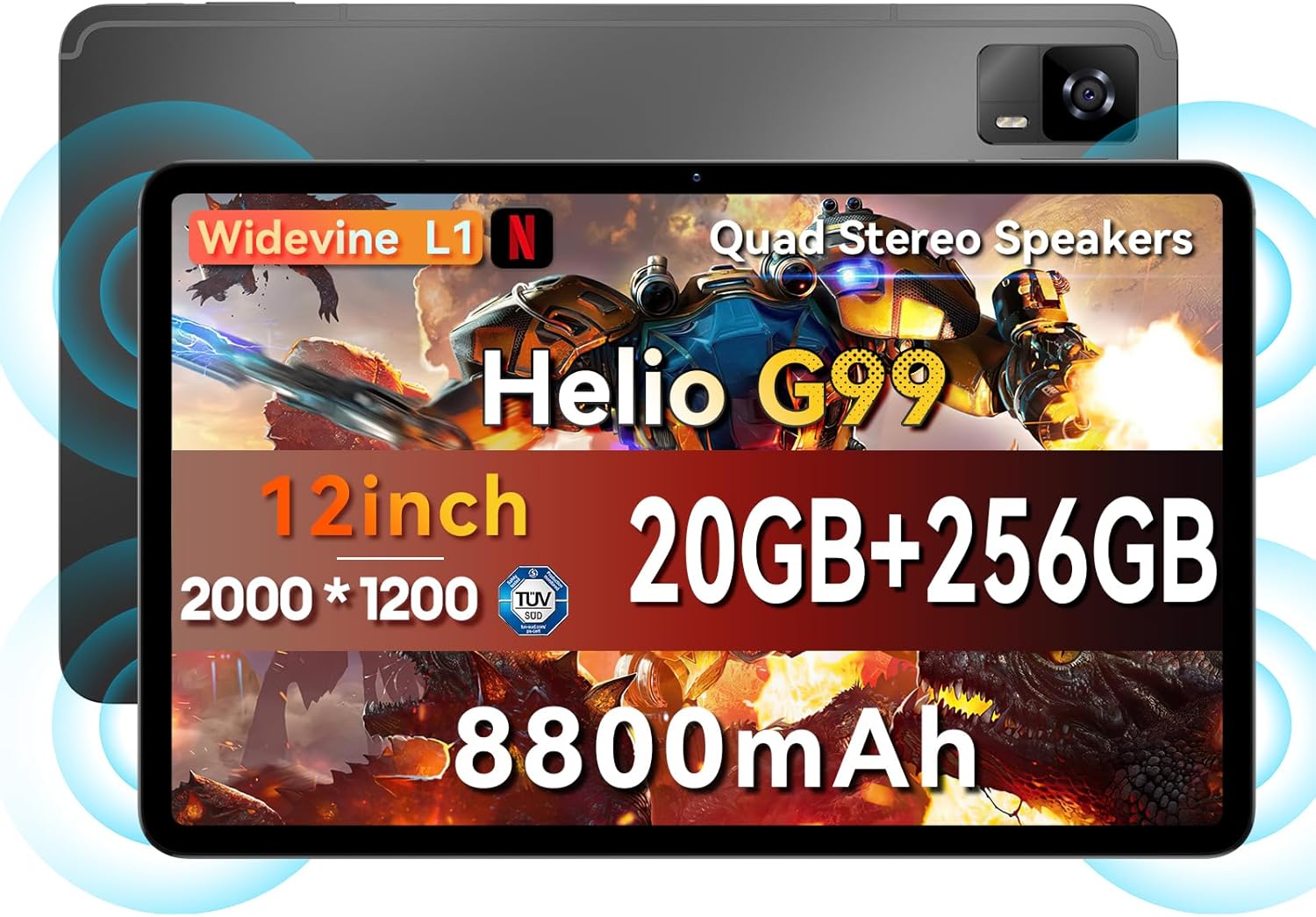
Figure 1: Overview of the Headwolf HPad6 tablet highlighting key features like Helio G99, 12-inch 2K display, 20GB RAM + 256GB ROM, 8800mAh battery, Widevine L1, and Quad Stereo Speakers.
2. What's in the Box
Upon unboxing your Headwolf HPad6 tablet, you will find the following items:
- 1x Headwolf HPad6 Tablet
- 1x PD20W Charger
- 1x Type-C Cable
- 1x Card Pin (SIM ejector tool)
- 1x User Manual
Video 1: Official Headwolf HPad6 Unboxing. This video demonstrates the contents of the product packaging and the initial setup process.
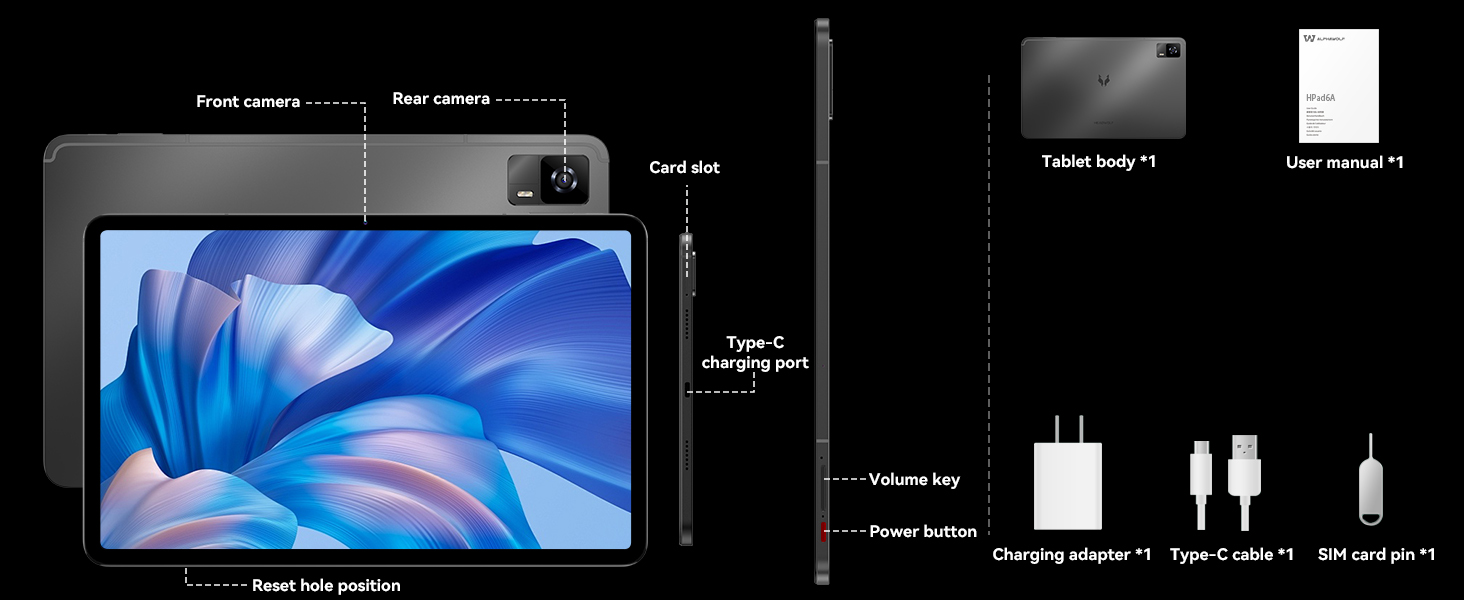
Figure 2: Diagram illustrating the tablet body, user manual, charging adapter, Type-C cable, and SIM card pin included in the box. It also highlights the front camera, rear camera, card slot, Type-C charging port, volume key, power button, and reset hole position.
3. Setup
3.1 Initial Power On
- Press and hold the Power Button located on the side of the tablet until the Headwolf logo appears.
- Follow the on-screen prompts to select your language, region, and connect to a Wi-Fi network.
- Sign in with your Google account or create a new one to access the Google Play Store and other services.
3.2 Inserting SIM/TF Card
The HPad6 supports dual 4G LTE Nano SIM cards and expandable storage up to 2TB via a TF card (not included).
- Locate the card slot on the side of the tablet.
- Insert the provided Card Pin into the small hole next to the slot to eject the tray.
- Place your Nano SIM card(s) and/or TF card into the designated slots on the tray. Ensure they are correctly oriented.
- Gently push the tray back into the tablet until it clicks into place.
Video 2: Official Headwolf HPad6 Product Overview. This video showcases various features of the tablet, including its powerful processor, display, and connectivity options, and demonstrates its use in different scenarios.
4. Operating the Tablet
4.1 Performance
The HPad6 is powered by the MTK Helio G99 octa-core processor, featuring 2 ARM Cortex-A76 cores (2.2GHz) and 6 Cortex-A55 cores. This configuration ensures smooth performance for demanding applications and multitasking. It boasts an impressive 20GB RAM (8GB physical + 12GB expansion) and 256GB ROM, providing ample speed and storage for all your needs.

Figure 3: Visual representation of the Helio G99 processor and the 20GB RAM + 256GB storage configuration, highlighting its expandability up to 2TB.
4.2 Display
Experience an elevated visual feast with the expansive 12-inch 2K (2000x1200) display. With Widevine L1 certification, you can enjoy high-definition streaming from platforms like Netflix and YouTube. The display offers rich colors and a 1500:1 contrast ratio for a stunning viewing experience.

Figure 4: Comparison of a 10-inch and 12-inch tablet display, emphasizing the 2K resolution, Widevine L1, 1500:1 contrast ratio, 350 Nits brightness, and 16:10 aspect ratio of the HPad6.
4.3 Audio
The HPad6 features quad stereo speakers with Smart Amplifier technology, delivering immersive sound for all your media. Whether you're watching movies, listening to music, or playing games, the audio quality enhances your experience.

Figure 5: Illustration of the quad box stereo speakers and their features: Loud Volume, Stereo sound, and Smart Power Amplifier.
4.4 Battery and Charging
Equipped with a massive 8800mAh lithium cobalt oxide battery, the HPad6 provides extended usage times. It supports 20W fast charging via the Type-C port, ensuring quick replenishment of power. Enjoy up to 14 hours of video playback, 18 hours of processing work, 36 hours of music playback, 16 hours of reading, and 480 hours of standby time.

Figure 6: Visualizing the 8800mAh battery capacity and 20W fast charging, along with estimated usage hours for various activities.
4.5 Connectivity
The tablet supports Bluetooth 5.2 and 2.4/5GHz Wi-Fi for seamless high-speed wireless connectivity. It also features dual 4G LTE Nano SIM card support, allowing for separate personal and work contacts. For navigation, it supports GPS, BDS, GALILEO, and GLONASS, ensuring accurate positioning wherever you are.
4.6 Camera
Capture moments with the HPad6's impressive camera setup. It features an 8MP front-facing camera for clear video calls and a 16MP rear camera with autofocus for remarkable clarity in photos and videos.

Figure 7: Depiction of the 8MP front camera, 16MP rear camera, and face recognition feature for enhanced security and convenience.
4.7 Multitasking and Productivity
The HPad6 supports multi-tasking and collaboration, allowing you to display multiple app screens simultaneously. With its 12-inch borderless screen, you can watch a video on one side while taking notes on the other, significantly boosting productivity. The Android 14 system also enhances user operability with features like freezing cached apps, customizing lock screen functions, and enabling font enlargement up to 200%.

Figure 8: A user demonstrating multitasking on the Headwolf HPad6, with a keyboard connected, showing a document and images side-by-side.
5. Maintenance
5.1 Cleaning the Tablet
- Use a soft, lint-free cloth to clean the screen and body of the tablet.
- For stubborn smudges, slightly dampen the cloth with water or a screen cleaner designed for electronics.
- Avoid using harsh chemicals, abrasive materials, or aerosol sprays directly on the tablet.
5.2 Software Updates
Regularly check for and install software updates to ensure optimal performance, security, and access to new features. Navigate to Settings > System > System update to check for available updates.
5.3 Storage Management
To maintain smooth operation, periodically manage your tablet's storage. Delete unnecessary files, uninstall unused apps, and transfer large media files to external storage (TF card or cloud storage).
6. Troubleshooting
If you encounter issues with your Headwolf HPad6 tablet, try the following common troubleshooting steps:
- Tablet not turning on: Ensure the battery is charged. Connect the tablet to the PD20W charger and wait a few minutes before attempting to power it on again.
- Apps crashing or freezing: Close the problematic app and reopen it. If the issue persists, clear the app's cache (Settings > Apps > [App Name] > Storage & cache > Clear cache) or reinstall the app.
- Slow performance: Close background apps, clear cache, or restart the tablet. Consider freeing up storage space.
- Wi-Fi connectivity issues: Restart your Wi-Fi router and the tablet. Forget the network and reconnect.
- Factory Reset: As a last resort, if software issues persist, you may perform a factory reset. This will erase all data on the tablet, so ensure you back up important information first. Navigate to Settings > System > Reset options > Erase all data (factory reset).
7. Specifications
| Feature | Specification |
|---|---|
| Brand | Headwolf |
| Model Name | HPad6 |
| Item Model Number | H6 |
| Operating System | Android 14 |
| Screen Size | 12 Inches |
| Screen Resolution | 2000x1200 Pixels (2K) |
| Processor | MediaTek Helio G99 Octa Core (2.2 GHz) |
| Graphics Coprocessor | Mali-G57 MC2 |
| RAM | 20GB (8GB + 12GB Expansion) |
| Internal Storage (ROM) | 256GB |
| Expandable Storage | Up to 2TB via TF card (not included) |
| Battery Capacity | 8800mAh |
| Fast Charging | 20W Type-C |
| Rear Camera | 16MP |
| Front Camera | 8MP |
| Wireless Type | 802.11a/b/g/n/ac (2.4/5GHz WiFi) |
| Bluetooth | 5.2 |
| Cellular Connectivity | Dual 4G LTE Nano SIM |
| Navigation | GPS, BDS, GALILEO, GLONASS |
| Item Weight | 2.14 pounds (approx. 547g) |
| Product Dimensions | 12 x 3 x 6 inches |
| Color | Gray |
8. Warranty & Support
Headwolf provides a one-year repair and replacement warranty for the HPad6 tablet. Dedicated customer service and technical support are available 24 hours a day.
If you encounter any problems with your Android 14 tablet, you can contact Headwolf support through Amazon's "Your Order - Get Help" feature. They are committed to providing a perfect solution to any issues you may face.
Ask a question about this manual
Ask about setup, troubleshooting, compatibility, parts, safety, or missing instructions. Manuals+ will review the question and use this page’s manual context to help answer it.