
1. Product Overview
The NEEWER TL120C is a versatile RGB LED tube light designed for professional photography and video production. It features an extended length of 127cm, delivering a powerful 42W output with soft and uniform light quality. Utilizing RGBWW mixing technology, it offers rich color expression with ultra-high color rendering (CRI97+ / TLCI98+) and a wide color temperature range of 2500K to 10000K. The light supports precise and faithful color reproduction with 90% coverage of the Rec.2020 color gamut.
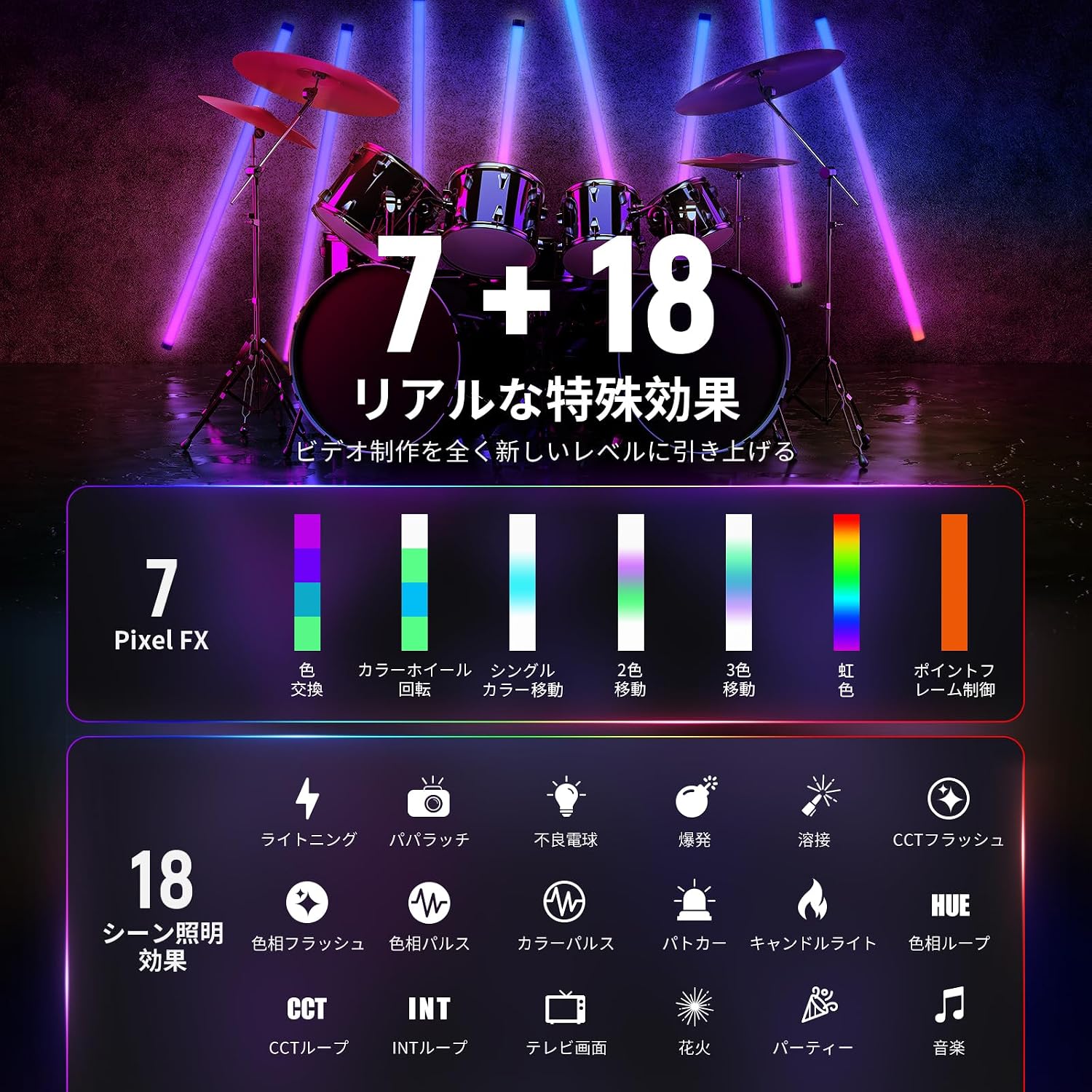
Key features include 32-bit independently controlled pixels, allowing individual adjustment of brightness, color temperature, and light effects for each pixel area. It offers 7 types of pixel effects and 18 types of scene effects, including a music sync mode, to create immersive lighting. Additionally, it comes with 40 classic gel presets (RESCO: 20 types, LEE: 20 types) for professional lighting effects.
The TL120C ensures smooth and precise brightness control through 4 types of PWM dimming methods (exponential, logarithmic, S-type, linear) and X/Y axis dimming patterns. HSI mode enables 36,000 colors, while RGBCW mode supports color ratio adjustment in 0-255 steps. A touch bar allows quick color selection and can be locked to prevent accidental changes.
Control options are extensive, including direct operation via physical buttons, wireless control via the 2.4G system, and the dedicated NEEWER app. Its unique "Infinity Network Meshing" technology allows simultaneous control of up to hundreds of lights for dynamic, animation-like effects. Precise control via a DMX512 console is also supported.
The light is powered by a built-in 6000mAh battery, providing 120 minutes of continuous illumination at maximum brightness. Its slim and elegant design, with a frameless body and 180° curved diffusion panel, blends seamlessly into various shooting environments. Multiple mounting options are available, including a 1/4-inch screw hole for light stands and included clamps and steel wire for stable setup.

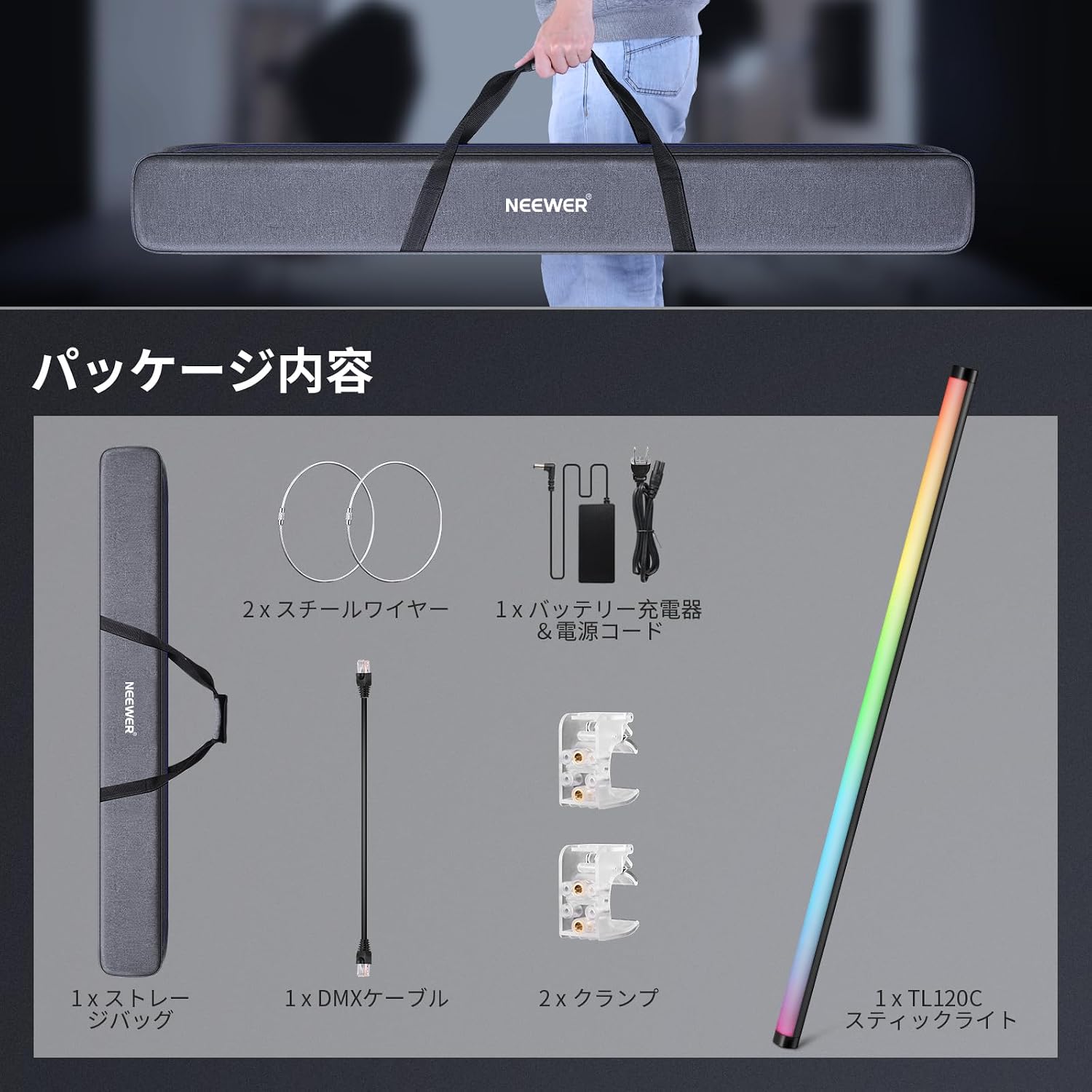
2. Package Contents
Before proceeding with setup, please verify that all items listed below are included in your package:
- 1 x NEEWER TL120C RGB LED Tube Light
- 1 x Power Adapter & Power Cord
- 2 x Clamps
- 2 x Steel Wires
- 1 x DMX Cable
- 1 x Carrying Bag
3. Setup Instructions
3.1 Charging the Battery
The TL120C features a built-in 6000mAh lithium battery. Before first use, or when the battery is low, connect the included power adapter to the light's DC input port and plug it into a power outlet. A full charge takes approximately 120 minutes.

3.2 Mounting the Light
The TL120C offers several mounting options to suit various shooting scenarios:
- Light Stand Mounting: Use the 1/4-inch screw hole located at the bottom of the light to attach it to a compatible light stand. Ensure the stand is stable and can support the weight of the light.
- Clamp Mounting: The included clamps can be used to secure the light to various surfaces or structures. Attach the clamp to the light and then to your desired mounting point.
- Steel Wire Suspension: For overhead or suspended setups, utilize the provided steel wires. Attach the wires securely to the light and to a robust overhead support.

4. Operating Instructions
4.1 Power On/Off
Locate the power button on the control panel of the light. Press and hold the button for a few seconds to power the light on or off.
4.2 Control Modes
The TL120C offers multiple control methods:
- Onboard Control: Use the physical buttons and touch bar on the light's control panel to adjust settings directly. The touch bar can be locked to prevent accidental changes.
- 2.4G Wireless Control: Utilize a compatible 2.4G wireless remote control (sold separately) to adjust light settings from a distance.
- NEEWER App Control: Download the dedicated NEEWER app on your iOS or Android device. Connect to the light via Bluetooth for comprehensive control over all functions, including color, brightness, effects, and pixel control. The app supports "Infinity Network Meshing" for controlling multiple lights simultaneously.
- DMX512 Control: For professional setups, connect the light to a DMX512 console using the included DMX cable for precise and integrated lighting control.


4.3 Adjusting Color and Brightness
The TL120C offers various modes for color and brightness adjustment:
- CCT Mode: Adjust color temperature from 2500K (warm) to 10000K (cool) and green/magenta (GM) correction by ±50.
- HSI Mode: Access 36,000 colors by adjusting Hue (0-360°), Saturation (0-100), and Intensity (brightness).
- RGBCW Mode: Fine-tune color ratios in 0-255 steps for Red, Green, Blue, Cool White, and Warm White channels.
- Dimming: Adjust brightness from 0% to 100% in 1% increments. Choose from exponential, logarithmic, S-type, or linear dimming curves for smooth transitions.
4.4 Special Effects
The light includes a range of built-in effects to enhance your creative output:
- Pixel Effects (7 types): Individually control the brightness, color temperature, and effects of 32 independent pixel areas to create dynamic lighting patterns.
- Scene Effects (18 types): Choose from various pre-programmed scene effects, including lightning, paparazzi, faulty bulb, explosion, welding, CCT flash, color flash, color pulse, police car, candlelight, TV screen, fireworks, party, and music sync mode.
- Gel Mode (40 presets): Access 40 classic gel presets (20 RESCO, 20 LEE) for quick and accurate color simulation.
5. Maintenance
To ensure the longevity and optimal performance of your NEEWER TL120C RGB LED Tube Light, follow these maintenance guidelines:
- Cleaning: Gently wipe the light's surface with a soft, dry cloth. Do not use abrasive cleaners, solvents, or harsh chemicals, as these can damage the finish or internal components.
- Storage: When not in use, store the light in its carrying bag in a cool, dry place, away from direct sunlight and extreme temperatures.
- Battery Care: For optimal battery life, avoid fully discharging the battery frequently. If storing for extended periods, charge the battery to approximately 50-70% every few months.
- Avoid Impact: Protect the light from drops or impacts, which can damage the internal electronics or the diffusion panel.
- Ventilation: Ensure the light has adequate ventilation during operation to prevent overheating.
6. Troubleshooting
If you encounter issues with your TL120C, refer to the following common troubleshooting steps:
- Light does not turn on:
- Check if the battery is charged. Connect the light to the power adapter and allow it to charge.
- Ensure the power button is pressed and held correctly.
- Light is not responding to controls:
- If using onboard controls, ensure the touch bar is not locked.
- If using the app, ensure Bluetooth is enabled on your device and the light is properly connected. Try restarting the app and the light.
- If using 2.4G or DMX, verify the connection and settings of your remote or console.
- Inconsistent light output or flickering:
- Ensure the light is not operating in an environment with extreme temperatures.
- Check for any loose connections if using external power.
- If the issue persists, contact customer support.
- App connection issues:
- Ensure the NEEWER app is updated to the latest version.
- Restart your smartphone and the light.
- Try re-pairing the light within the app.
7. Specifications
| Feature | Specification |
|---|---|
| Brand | NEEWER |
| Model Number | TL120C |
| Power Output | 42W (Max) |
| Max Illuminance | 2000Lux/0.5m (5600K) |
| Color Temperature Range | 2500K-10000K |
| Color Rendering Index (CRI) | CRI97+ |
| Television Lighting Consistency Index (TLCI) | TLCI98+ |
| GM Correction | ±50 |
| Hue Adjustment | 0-360° |
| Saturation Adjustment | 0-100 |
| Brightness Adjustment | 0-100% (1% increments) |
| Dimming Curve Types | Exponential, Logarithmic, S-type, Linear |
| Pixel Effect Modes | 7 types |
| Scene Effects | 18 types |
| Gel Presets | 40 types (20 RESCO, 20 LEE) |
| Built-in Battery | 14.4V/6000mAh/86.4Wh Lithium Battery |
| Battery Life | 120 minutes (at 100% brightness) |
| Charging Time | Approx. 120 minutes |
| Control Modes | Onboard Panel, APP, 2.4G Wireless, DMX512 |
| DC Input | 20V/5A |
| Product Dimensions (L x W x H) | 127 x 4.5 x 127 cm (Φ1.77"×50") |
| Net Weight | 3.23 kg |
| Operating Temperature | -10°C to 40°C |
8. Warranty Information
The NEEWER TL120C RGB LED Tube Light comes with a 1-year manufacturer's warranty from the date of purchase. This warranty covers defects in materials and workmanship under normal use. It does not cover damage caused by misuse, accident, unauthorized modification, or improper storage. Please retain your proof of purchase for warranty claims.
9. Customer Support
For any questions, technical assistance, or warranty inquiries regarding your NEEWER TL120C RGB LED Tube Light, please contact NEEWER customer support. You can typically find contact information on the NEEWER official website or through the retailer where you purchased the product. Please have your product model number (TL120C) and proof of purchase ready when contacting support.