
1. Introduction
The Keychron V3 Max is a QMK/VIA enabled custom mechanical keyboard designed for versatility and comfort. It features a classic Tenkeyless (TKL) layout and offers multiple connectivity options: 2.4 GHz wireless, Bluetooth 5.1, and wired USB-C. The keyboard includes an upgraded MCU, gasket design, and sound-absorbing foam for an enhanced typing experience. Its hot-swappable sockets allow for easy switch customization without soldering. The V3 Max is compatible with macOS, Windows, and Linux systems, featuring a system toggle and additional keycaps for both Mac and Windows layouts. It comes with durable OSA profile double-shot PBT keycaps and south-facing RGB backlighting.
2. Setup
2.1 Unboxing and Initial Inspection
Upon opening the package, verify all components are present:
- Keychron V3 Max keyboard
- USB Type-C to Type-A cable
- Type-A to Type-C adapter
- Extension adapter for the 2.4 GHz receiver
- Type-A 2.4 GHz receiver
- Keycap & Switch puller
- Screwdriver & Hex key

Image: Fully assembled Keychron V3 Max keyboard with its accessories, including cables, adapters, and tools.
2.2 Charging the Keyboard
Connect the keyboard to a USB power source using the provided USB-C cable. The charging indicator will show the charging status. A full charge is recommended before initial wireless use.
2.3 System Mode Selection
Locate the system toggle switch on the side or back of the keyboard. Select the appropriate operating system mode (Mac/Windows) for optimal key mapping and functionality.

Image: Keychron V3 Max keyboard with visual indicators for macOS and Windows compatibility.
2.4 Connectivity Options
The V3 Max supports three connection modes:
- Wired Connection: Connect the USB-C cable directly to your computer.
- 2.4 GHz Wireless Connection: Insert the 2.4 GHz receiver into an available USB port on your computer. Ensure the keyboard's mode switch is set to 2.4 GHz. The receiver is typically stored in a dedicated slot within the keyboard's chassis.
- Bluetooth 5.1 Connection: Switch the keyboard to Bluetooth mode. On your device, search for 'Keychron V3 Max' in Bluetooth settings and pair. The keyboard supports connecting to up to three devices via Bluetooth.
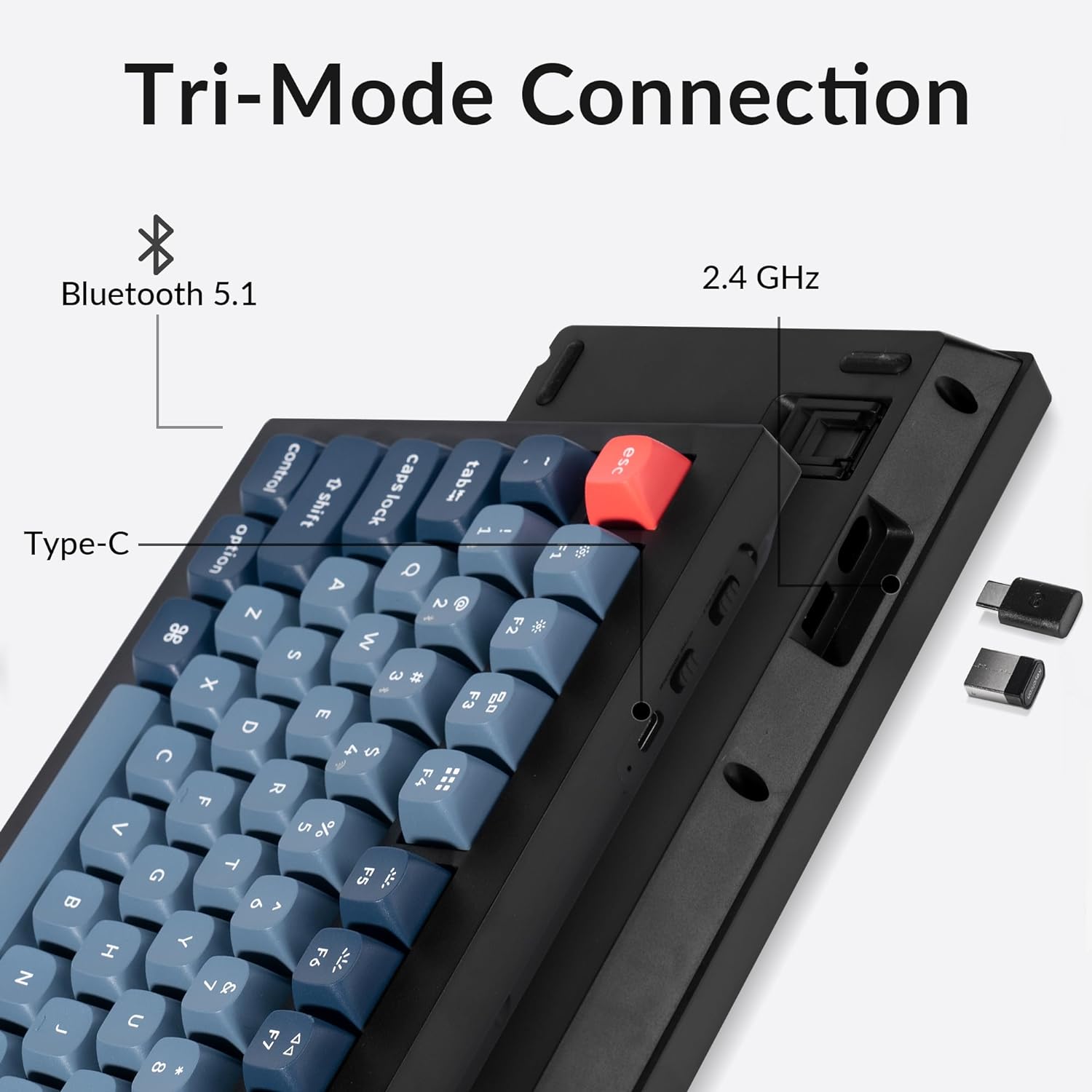
Image: Side view of the Keychron V3 Max keyboard highlighting the USB-C port, 2.4 GHz dongle storage, and Bluetooth indicator.
3. Operating Instructions
3.1 QMK/VIA Customization
The Keychron V3 Max is fully compatible with QMK/VIA software, allowing for comprehensive key remapping, macro creation, and lighting customization. Download the VIA software from the official Keychron website. Connect the keyboard via USB-C to access the customization interface. This software provides a graphical user interface for easy configuration of key functions and layers.

Image: Screenshot of the VIA software displaying the Keychron V3 Max layout for key remapping.
3.2 RGB Backlighting Control
The keyboard features south-facing RGB LEDs, designed to better illuminate the keyboard backlight from the typist’s angle. Use the designated function keys (e.g., Fn + Q, W, E, R, T, Y for different lighting effects, or Fn + arrow keys for brightness/speed) to adjust lighting modes, colors, and brightness. Refer to the keyboard's quick start guide for specific key combinations.

Image: Close-up of the Keychron V3 Max keyboard showing the vibrant south-facing RGB lighting.
3.3 Volume Knob Functionality
The rotary knob located on the top right of the keyboard typically controls system volume. Rotate clockwise to increase volume, counter-clockwise to decrease volume. Press the knob to mute or unmute audio.
4. Maintenance
4.1 Cleaning
Regularly clean the keyboard to prevent dust and debris buildup. Disconnect the keyboard from your computer before cleaning. Use a soft brush or compressed air to remove dust from between keycaps. For keycap cleaning, gently remove them using the provided keycap puller and wipe with a damp cloth. Ensure keycaps are completely dry before reattaching.
4.2 Switch and Keycap Replacement
The V3 Max features hot-swappable switch sockets, allowing for easy replacement of switches without soldering. Use the provided switch puller to carefully remove switches. Align new 3-pin or 5-pin MX style mechanical switches with the sockets and press firmly until seated. Use the keycap puller to remove and replace keycaps as desired. The keyboard comes with durable OSA profile double-shot PBT keycaps.
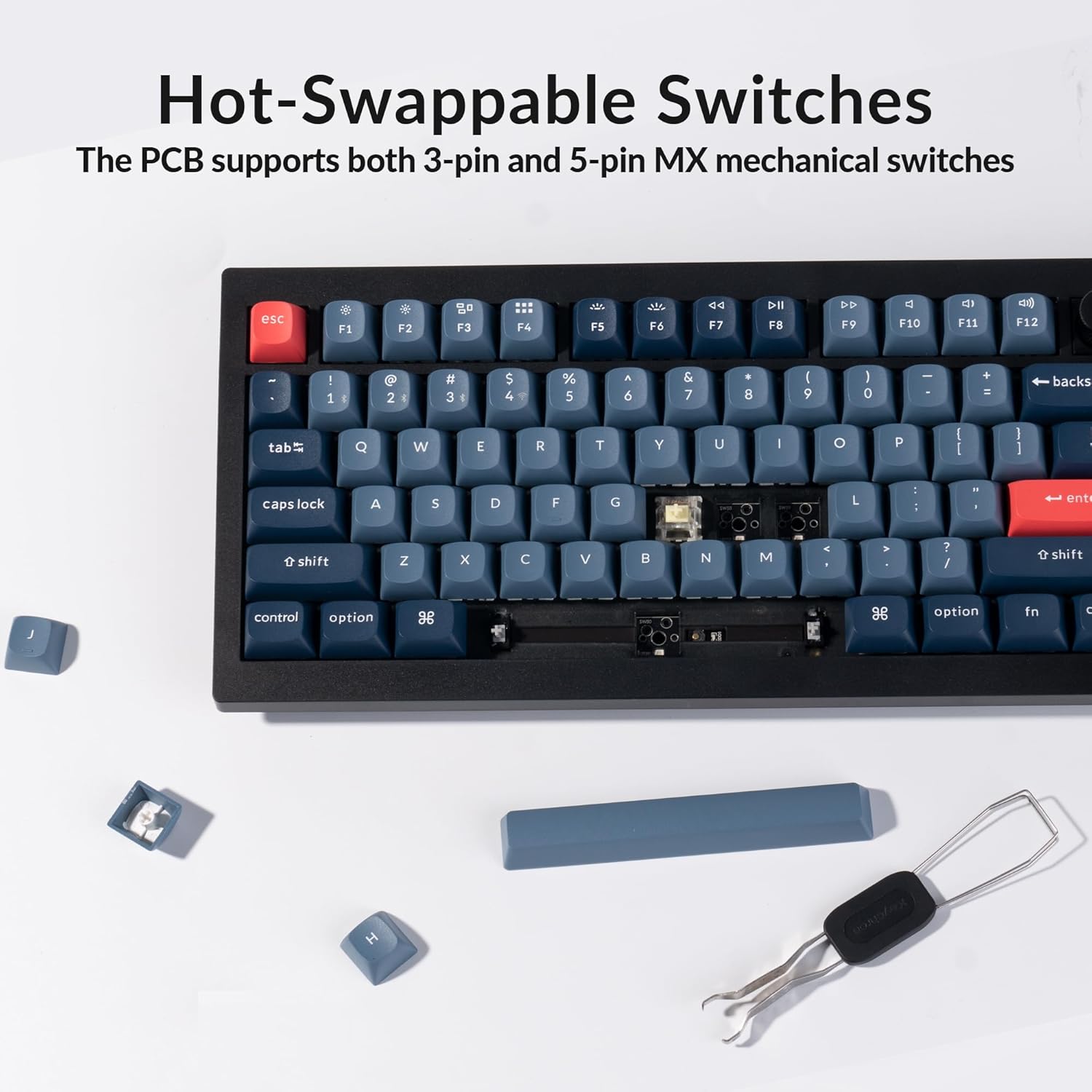
Image: Keychron V3 Max keyboard with a switch partially removed, illustrating the hot-swappable design.
5. Troubleshooting
5.1 Keyboard Not Responding
- Check Connection: Ensure the USB cable is securely plugged in, or the 2.4 GHz receiver is properly inserted, or Bluetooth is paired correctly.
- Verify Battery Level: Charge the keyboard if using wireless modes.
- Check System Switch: Confirm the keyboard is set to the correct operating system mode (Mac/Windows).
5.2 Keys Double Registering or Not Registering
- This can sometimes occur due to switch issues. Since the switches are hot-swappable, try removing and re-seating the affected switch using the provided switch puller. If the problem persists, consider replacing the switch.
5.3 RGB Lighting Not Working
- Ensure the keyboard is powered on. Check the lighting control key combinations (Fn + keys) to activate or adjust the RGB effects.
5.4 Wireless Connectivity Issues
- For 2.4 GHz, ensure the receiver is close to the keyboard and there are no major obstructions.
- For Bluetooth, try unpairing and re-pairing the device from your computer's Bluetooth settings. Avoid interference from other wireless devices.
6. Specifications
| Item Model Number | V3 Max |
| Brand | Keychron |
| Compatible Devices | Laptop, PC |
| Connectivity Technology | 2.4 GHz, Bluetooth, USB-C |
| Keyboard Description | Mechanical keyboard with classic tenkeyless (TKL) layout, hot-swappable Gateron Banana switches, 2.4 GHz wireless, Bluetooth 5.1, and USB-C wired connection. Compatible with macOS, Windows, Linux systems. Features 87 keys, double-shot non-shine through PBT keycaps with OSA profile, south-facing RGB backlight. QMK/VIA enabled for customization. Made of ABS plastic with gasket design and sound-absorbing foam. |
| Recommended Uses For Product | Office |
| Special Feature | Backlit, Hot-Swappable, QMK/VIA Programmable |
| Color | Banana Switch |
| Keyboard Backlighting Color Support | RGB |
| Style | Classic |
| Material | ABS Plastic |
7. What's in the Box
The Keychron V3 Max package includes the following items:
- 1x Keychron V3 Max Keyboard
- 1x USB Type-C to Type-A Cable
- 1x Type-A to Type-C Adapter
- 1x Extension Adapter for 2.4 GHz Receiver
- 1x Type-A 2.4 GHz Receiver
- 1x Keycap & Switch Puller
- 1x Screwdriver & Hex Key
8. Warranty and Support
The Keychron V3 Max TKL Wireless Mechanical Keyboard comes with a manufacturer's warranty. For detailed warranty information, technical support, or service inquiries, please refer to the official Keychron website or contact their customer support directly. Keep your proof of purchase for warranty claims.


