
1. Introduction
The EcoNet Controls Bulldog Smart Water Valve Controller is designed to provide automated water shut-off capabilities for your home. This device integrates with Z-Wave Plus systems, allowing for remote control and enhanced leak prevention when paired with compatible sensors. Its design facilitates a straightforward DIY installation without the need for complex plumbing modifications.
2. Safety Information
Please read all instructions carefully before installation and operation. Ensure the power adapter is disconnected before performing any maintenance or adjustments. Do not attempt to disassemble or repair the device yourself. This device is intended for indoor use in dry environments. Avoid exposure to water or extreme temperatures, except for the valve itself. Always consult a qualified professional if you are unsure about any part of the installation or operation.
3. Package Contents
- Water Shutoff Controller
- AC Adapter
- Mounting Kit
- User Guide
4. Product Overview
The EcoNet Bulldog Smart Water Valve Controller is a robust device designed to automate the opening and closing of 1/4-turn ball valves. It features a high-torque motor for reliable operation and Z-Wave Plus certification for secure wireless communication.

Figure 4.1: EcoNet Bulldog Smart Water Valve Controller mounted on a pipe.
The controller is powered by an included AC adapter, ensuring continuous operation. It is designed for easy integration into existing Z-Wave smart home ecosystems.

Figure 4.2: The Bulldog controller connected to its power adapter.
Key features include:
- Z-Wave Plus Certified: Reliable, secure wireless communication with up to 30m (100 ft) range (line of sight).
- Smart Home Ready: Integrates with Z-Wave-based systems including SmartThings, Wink, Hubitat, Nexia, Honeywell, and more.
- Leak Prevention Automation: Pair with compatible Z-Wave leak sensors (sold separately) to automatically shut off your water when a leak is detected.
- Powerful Operation: High-torque motor toggles open/close in approximately 18 seconds.

Figure 4.3: The Bulldog controller's compatibility with popular Z-Wave hubs.
5. Setup
5.1 Valve Compatibility
The Bulldog controller supports most 1/4-turn ball valves from 3/4" to 1.5" in size. It works with 3/4", 1", 1.25", and 1.5" ball valves. Refer to the compatibility chart below to ensure your valve type is supported.
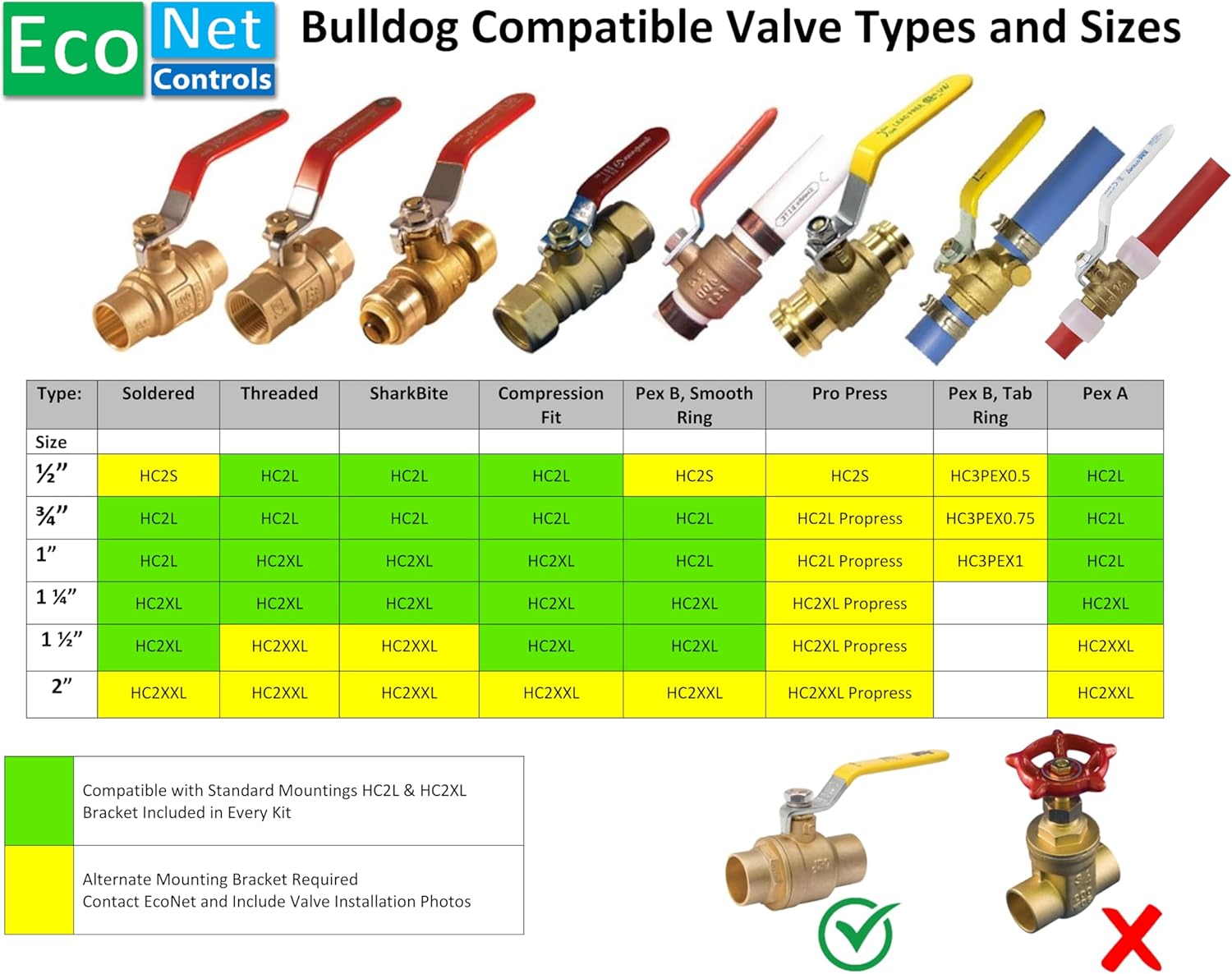
Figure 5.1: EcoNet Bulldog Valve Compatibility Chart.
5.2 Installation Steps
- Prepare the Valve: Ensure the 1/4-turn ball valve is in the fully open or fully closed position. The area around the valve should be clean and dry.
- Position the Controller: The Bulldog Valve Robot mounts directly to the valve body, not the pipe. This prevents undue stress on plumbing joints.
- Secure the Mounting Kit: Use a #2 Phillips screwdriver to attach the mounting kit securely to your existing valve. No plumbing or pipe cutting is required.
- Attach the Controller: Place the Bulldog controller onto the mounted kit, ensuring it is firmly in place.
- Connect Power: Plug the universal AC adapter into the controller and then into a standard electrical outlet.
- Pair with Z-Wave Hub: Follow the instructions provided with your Z-Wave compatible hub (e.g., SmartThings, Hubitat, Vera) to add the EcoNet Bulldog controller to your smart home network. A Z-Wave hub is required and sold separately.

Figure 5.2: Proper mounting directly to the valve body.
5.3 Dimensions
For installation planning, refer to the detailed dimensions of the unit:

Figure 5.3: Product dimensions for installation reference.
6. Operating
6.1 Manual Operation
The controller has a manual override button. Pressing this button will toggle the valve between its open and closed positions. This is useful for testing or in situations where smart home control is unavailable.
6.2 Smart Home Control
Once paired with your Z-Wave hub, you can control the valve remotely through your hub's application or interface. This allows you to open or close your main water supply from anywhere with an internet connection.
6.3 Automated Leak Prevention
For advanced leak prevention, integrate the Bulldog controller with Z-Wave leak sensors (sold separately). When a leak is detected by a paired sensor, your Z-Wave hub can be configured to automatically send a command to the Bulldog controller to shut off the water supply, minimizing potential water damage.
7. Maintenance
The EcoNet Bulldog Smart Water Valve Controller requires minimal maintenance. Periodically inspect the device and its mounting for any signs of wear or damage. Ensure the power adapter connection is secure. Keep the unit clean and free from dust and debris. Do not use harsh chemicals or abrasive cleaners.
8. Troubleshooting
- Device not responding: Check the power connection and ensure the AC adapter is properly plugged in. Verify that the Z-Wave hub is online and communicating with the controller. Try re-pairing the device with your Z-Wave hub.
- Valve not fully opening/closing: Ensure the controller is securely mounted to the valve body and not the pipe. Check for any obstructions around the valve handle. The valve itself should be a 1/4-turn ball valve within the specified size range.
- No water shut-off on leak detection: Confirm that your Z-Wave leak sensors are properly paired and functioning. Verify the automation rules within your Z-Wave hub are correctly configured to trigger the valve shut-off upon leak detection.
- Unusual noises during operation: This may indicate an issue with the valve itself or the mounting. Ensure the valve operates smoothly manually. If the issue persists, contact EcoNet Controls support.
9. Specifications
| Specification | Detail |
|---|---|
| Brand | EcoNet Controls |
| Model Number | EVC200-C |
| Material | Plastic |
| Valve Type Compatibility | 1/4-turn Ball Valve |
| Valve Size Compatibility | 3/4", 1", 1.25", 1.5" |
| Wireless Protocol | Z-Wave Plus |
| Wireless Range | Up to 30m (100 ft) line of sight |
| Power Input | 12 Volts AC Adapter |
| Operation Time | Approx. 18 seconds (open/close) |
| Item Weight | 2.92 pounds |
| Package Dimensions | 9.65 x 7.95 x 3.23 inches |
| UPC | 628451752370 |
10. Warranty and Support
For warranty information and technical support, please refer to the documentation included with your product or visit the official EcoNet Controls website. You can also contact EcoNet Controls directly for assistance with product inquiries, troubleshooting, or replacement parts.
EcoNet Controls Store: https://www.amazon.com/stores/EcoNetControls/page/A63811D9-574B-4EC6-879B-AC8B9C069456


