
Segway Ninebot S
Segway Ninebot S Electric Self-balancing Scooter User Manual
Model: Ninebot S
Introduction
This user manual provides essential information for the safe operation and maintenance of your Segway Ninebot S Electric Self-balancing Scooter. Please read this manual thoroughly before your first ride to ensure optimal performance and safety.
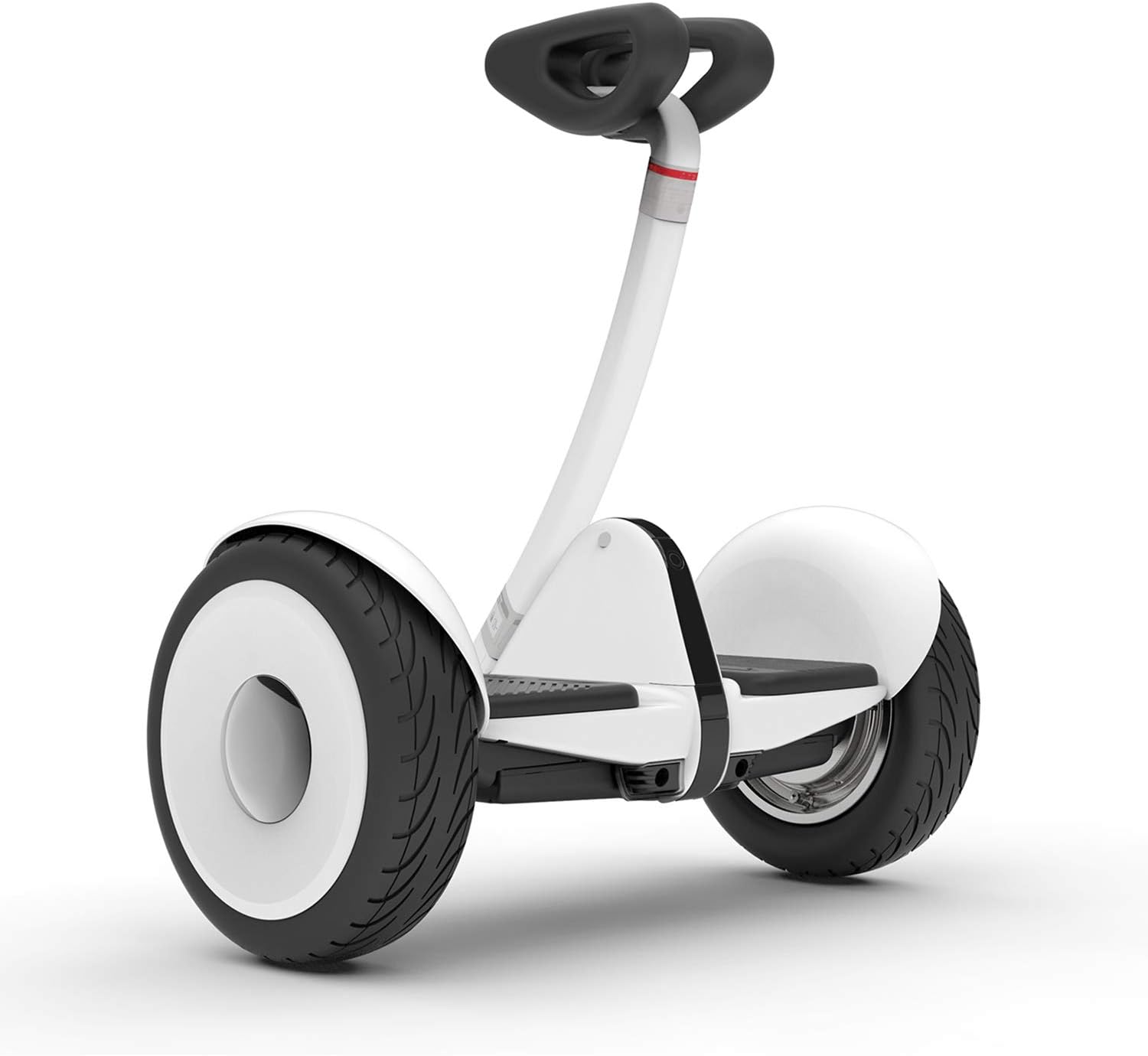
Image: The Segway Ninebot S Electric Self-balancing Scooter, showcasing its compact and sleek design in white.
Product Overview
The Segway Ninebot S is a compact and powerful self-balancing scooter designed for personal transportation. It features dual 400W motors, a top speed of 10 mph, and a range of up to 13.7 miles on a single charge. Its road-adaptive design with 10.5-inch pneumatic tires ensures a smooth ride, and the knee control bar allows for precise steering.
Key Features:
- UL 2272 Certified: Ensures safety and reliability.
- Smart Battery Management System: Optimizes battery performance and longevity.
- IP54 Waterproof Protection: Provides resistance against splashes and dust.
- Dual 400W Motors: Delivers robust power for various terrains.
- 10.5" Pneumatic Tires: Offers a comfortable and stable riding experience.
- Knee Control Bar: Enables intuitive and precise steering.
- Intelligent App Management: Connects to the Segway app for anti-theft features, speed limit settings, vehicle diagnosis, and firmware updates.

Image: Visual representation of key specifications including 13.7 miles range, 10.5-inch air-filled tires, 10 mph top speed, and 15% hill grade capability.
Setup
1. Unboxing and Assembly
Carefully remove all components from the packaging. Verify that all items listed in the packing list are present and undamaged.
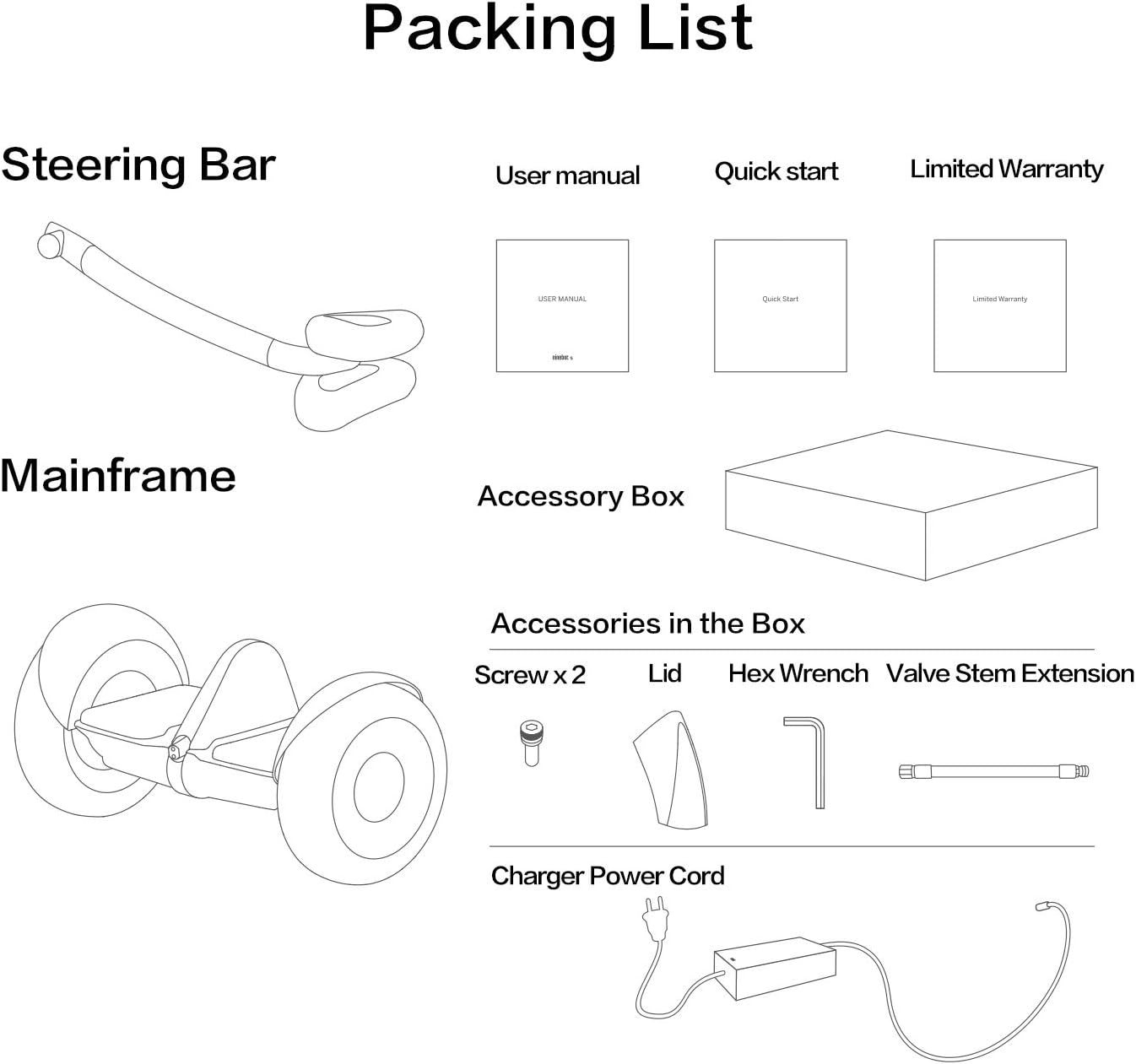
Image: Diagram illustrating the packing list, including the steering bar, mainframe, user manual, quick start guide, limited warranty, accessory box with screws, hex wrench, valve stem extension, and charger power cord.
Attach the steering bar to the mainframe. Ensure all connections are secure before proceeding.
2. Initial Charge
Before first use, fully charge the Ninebot S. Connect the charger to the charging port on the device and then to a power outlet. The indicator light on the charger will change when charging is complete.
3. App Installation and Activation
Download the Segway-Ninebot app from your mobile device's app store. Follow the in-app instructions to pair your Ninebot S via Bluetooth. The app will guide you through the activation process, which includes a mandatory safety tutorial and initial settings configuration.

Image: A smartphone screen showing the Segway-Ninebot app, demonstrating how to manage the scooter's settings and features.
Operating Instructions
1. Learning to Ride
The Ninebot S is designed to be easy to learn. Begin in a safe, open area. Step onto the foot mats one foot at a time, maintaining balance. Use the knee control bar to steer by gently leaning your knees in the desired direction. Lean your body slightly forward to accelerate and backward to decelerate or brake.

Image: A young rider being assisted by adults while learning to operate the Ninebot S, highlighting its user-friendly design.
2. Speed and Range
The Ninebot S can reach a top speed of 10 mph and offers a range of up to 13.7 miles. Actual speed and range may vary based on rider weight, terrain, temperature, and riding style. The device is capable of handling slopes up to 15 degrees.
3. Ambient Light Safety
The Ninebot S features customizable LED taillights that enhance visibility in low-light conditions. These lights function as driving lamps, tail lights, turning lights, and braking lamps, automatically adjusting based on your movements.

Image: Illustration of the Ninebot S's ambient light safety features, showing driving, tail, turning, and braking light modes.
Maintenance
1. Battery Care
To maximize battery life, always store the Ninebot S in a cool, dry place and charge it regularly, even if not in use for extended periods. Avoid completely draining the battery. The Smart Battery Management System helps protect the battery from overcharging and over-discharging.
2. Cleaning and Storage
Clean the Ninebot S with a damp cloth. Do not use high-pressure water jets or harsh chemicals. Store the scooter indoors in a dry environment. Its compact design allows for easy storage in a car trunk or small spaces.

Image: The Ninebot S stored in a car trunk, highlighting its portability and ease of storage.
3. Tire Maintenance
The 10.5-inch pneumatic tires require occasional pressure checks to ensure optimal performance and ride comfort. Refer to the user manual for recommended tire pressure. While the product comes with pneumatic tires, some variants or accessories might feature solid tires. If you have solid tires, be aware that they may offer a firmer ride and less traction on wet surfaces compared to pneumatic tires.
Troubleshooting
Common Issues and Solutions:
- Device Not Turning On: Ensure the battery is charged. Check the power button.
- Connection Problems with App: Verify Bluetooth is enabled on your device and the Ninebot S. Restart both the app and the scooter.
- "Tilt Back" at Speed Limit: This is a safety feature designed to prevent exceeding the maximum speed. It is normal behavior. Reduce forward lean to alleviate.
- Inaccurate Speedometer/Battery Indicator: For the most accurate readings, rely on the Segway-Ninebot app, which provides detailed information including speed (in MPH or KM/H), battery temperature, distance ridden, and remaining range. The built-in digital display may have limitations.
- Unusual Noises or Vibrations: Stop riding immediately and inspect the device for any loose parts or damage. If the issue persists, contact customer support.
For detailed diagnostics and further assistance, utilize the vehicle diagnosis feature within the Segway-Ninebot app.
Specifications
| Feature | Detail |
|---|---|
| Brand Name | Segway |
| Model Name | Ninebot S |
| Item Weight | 12.8 Kilograms (Approx. 28 lbs) |
| Max Load | 220 lbs |
| Max Speed | 10 mph |
| Max Range | 13.7 miles |
| Max Slope | 15° |
| Tire Type | 10.5" Pneumatic Tires |
| Dimensions (LxWxH) | 21.57 x 10.24 x 23.43 inches |
| Material | Metal, Plastic, and Rubber |
| Safety Certification | UL 2272 Certified |
| Waterproof Rating | IP54 |
| Suggested Age | 16-50 years |
| Suggested Height | 3.11-6.6 feet |

Image: Dimensional diagram of the Ninebot S, including its length, width, height, and net weight.
Warranty and Support
Warranty Information:
The Segway Ninebot S comes with a 1-year limited warranty. Please retain your proof of purchase for warranty claims. For specific terms and conditions, refer to the warranty document included in your packaging or contact Segway customer support.
Additional Resources:
- For a comprehensive user manual in PDF format, please refer to the official document: User Manual (PDF)
- For further assistance or technical support, visit the official Segway website or contact their customer service.
Important Safety Information
Always wear a helmet and appropriate safety gear when riding. Do not ride under the influence of alcohol or drugs. Adhere to local laws and regulations regarding the use of self-balancing scooters. Avoid riding in heavy traffic, on slippery surfaces, or in adverse weather conditions.
Official Product Videos
No official seller videos are available for embedding at this time.
Related documentsNinebot S


Ask a question about this manual
Ask about setup, troubleshooting, compatibility, parts, safety, or missing instructions. Manuals+ will review the question and use this page’s manual context to help answer it.