Mikado MD-381BT 5+1 Bluetooth Speaker System
User Instruction Manual
1. Introduction
Thank you for purchasing the Mikado MD-381BT 5+1 Bluetooth Speaker System. This manual provides essential information for the safe and efficient operation of your new audio system. Please read this manual thoroughly before use and retain it for future reference.
2. Safety Information
- Ensure the power supply voltage matches the specifications (230V/50Hz) before connecting.
- Do not expose the unit to rain, moisture, or extreme temperatures.
- Avoid placing the speaker system near heat sources or in direct sunlight.
- Do not block ventilation openings. Ensure adequate space around the unit for proper airflow.
- Do not open the speaker casing. Refer all servicing to qualified personnel.
- Keep out of reach of children.
- Disconnect the power cord during lightning storms or when unused for long periods.
- Handle the remote control batteries (2 AAA) with care. Do not mix old and new batteries.
3. Package Contents
Upon unpacking, please verify that all the following items are included:
- 1 x Mikado MD-381BT Subwoofer Unit
- 5 x Satellite Speakers
- 1 x Remote Control (with 2 AAA batteries)
- 1 x Audio Cable
- 1 x Audio Converter
- 1 x User Manual (this document)
4. Product Overview
Familiarize yourself with the components of your Mikado MD-381BT system.
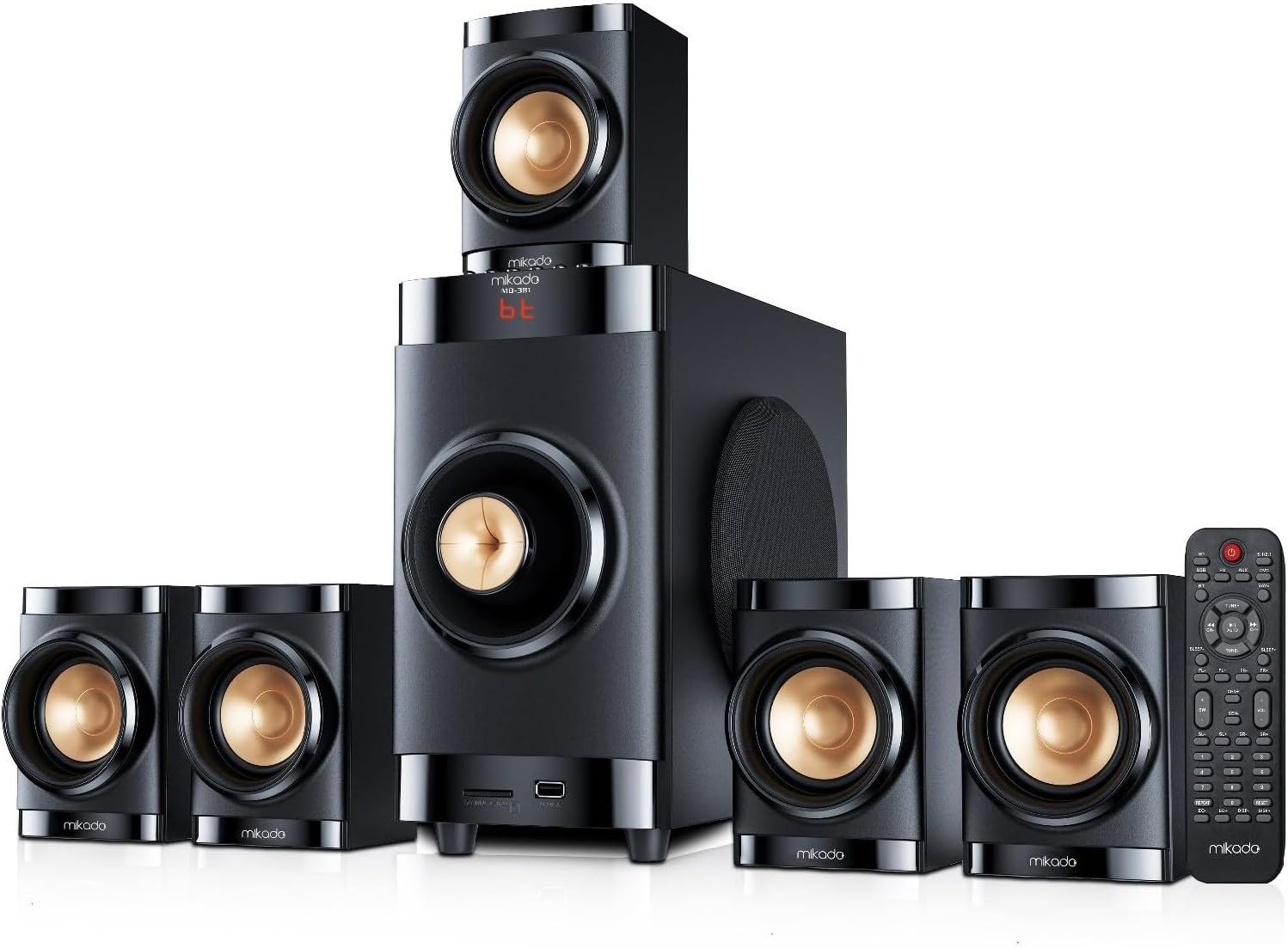
Figure 4.1: Complete Mikado MD-381BT 5+1 Speaker System. This image displays the central subwoofer unit, five compact satellite speakers, and the included remote control, showcasing the full setup.
4.1 Subwoofer Unit
The main unit houses the primary amplifier, control panel, and subwoofer speaker. It features inputs for satellite speakers, USB, SD card, and FM antenna.

Figure 4.2: Subwoofer Unit Detail. This image provides a closer look at the subwoofer, highlighting its front display, USB and SD card input slots, and the side-mounted bass port for enhanced low-frequency sound.
4.2 Satellite Speakers
The five satellite speakers provide the surround sound experience. They connect to the main subwoofer unit.

Figure 4.3: Satellite Speaker Detail. A detailed view of one of the satellite speakers, emphasizing its compact design and the distinctive gold-colored speaker driver.
4.3 Remote Control
The included remote control allows for convenient operation of all system functions from a distance.

Figure 4.4: Remote Control Layout. This image shows the full layout of the remote control, detailing buttons for power, input selection (SD, USB, FM, AUX, BT, DVD), volume control, track navigation, and individual channel adjustments (FL, FR, CEN, SW, SL, SR).
5. Setup
5.1 Placement
- Place the subwoofer on a stable, flat surface, preferably on the floor for optimal bass performance.
- Position the satellite speakers around your listening area for the best surround sound effect. The front left (FL) and front right (FR) speakers should be placed on either side of your TV/monitor. The center (CEN) speaker should be placed directly above or below your TV/monitor. The surround left (SL) and surround right (SR) speakers should be placed to the sides or slightly behind your listening position.
5.2 Connections
- Connect each of the five satellite speakers to their corresponding output ports on the rear of the subwoofer unit. Ensure correct polarity (+ to + and - to -).
- Connect the audio cable from your audio source (e.g., TV, DVD player, computer) to the AUX input on the subwoofer. Use the provided audio converter if necessary.
- Insert the 2 AAA batteries into the remote control, observing the correct polarity.
- Plug the power cord of the subwoofer into a standard 230V/50Hz electrical outlet.
6. Operating Instructions
6.1 Power On/Off
Press the POWER button on the remote control or the main unit to turn the system on or off.
6.2 Input Source Selection
Press the corresponding input buttons on the remote control (SD, USB, FM, AUX, BT, DVD) to switch between audio sources. The selected input will be displayed on the subwoofer's front panel.
6.3 Volume Control
Use the VOL+ and VOL- buttons on the remote control to adjust the master volume. Individual channel volumes (FL, FR, CEN, SW, SL, SR) can be adjusted using their respective +/- buttons on the remote.
6.4 Bluetooth Mode (BT)
- Select BT mode using the remote control. The display will show "BT".
- Enable Bluetooth on your device (smartphone, tablet, computer).
- Search for "MD-381BT" in your device's Bluetooth settings and pair with it.
- Once connected, you can play audio from your device through the speaker system.
6.5 USB/SD Card Playback
- Insert a USB flash drive or SD card into the corresponding slot on the front panel of the subwoofer.
- The system will automatically switch to USB or SD mode and begin playing supported audio files.
- Use the PREV, PLAY/PAUSE, and NEXT buttons on the remote control to manage playback.
- The REPEAT button allows you to repeat the current track or all tracks.
6.6 FM Radio Mode
- Select FM mode using the remote control.
- Press the AUTO button to automatically scan and save available FM stations.
- Use the TUNE+ and TUNE- buttons to manually tune to stations or navigate through saved stations.
- You can also directly input station frequencies using the number pad on the remote.
6.7 Equalizer (EQ) Settings
Press the EQ+ and EQ- buttons on the remote control to cycle through preset equalizer modes (e.g., Pop, Rock, Jazz, Classic, Normal).
6.8 Display Brightness
Use the DISP+ and DISP- buttons to adjust the brightness of the front panel display.
7. Maintenance
- Cleaning: Use a soft, dry cloth to clean the surfaces of the speakers and subwoofer. Do not use liquid cleaners or abrasive chemicals.
- Ventilation: Ensure that the ventilation openings on the subwoofer are not blocked by dust or debris. Periodically clean them with a soft brush or vacuum cleaner.
- Storage: If storing the system for an extended period, disconnect it from power and store it in a cool, dry place, away from direct sunlight and extreme temperatures.
- Battery Replacement: Replace the remote control batteries (2 AAA) when the remote's range decreases or it stops responding. Ensure correct polarity.
8. Troubleshooting
| Problem | Possible Cause | Solution |
|---|---|---|
| No power | Power cord not connected; Power outlet faulty; System is off. | Check power cord connection; Try a different outlet; Press the POWER button. |
| No sound | Incorrect input source selected; Volume too low; Speaker cables loose; Mute function active. | Select correct input; Increase volume; Check all speaker connections; Press MUTE on remote. |
| Bluetooth pairing failure | Device too far; Bluetooth not enabled on device; Speaker not in BT mode. | Move device closer; Enable Bluetooth; Select BT mode on speaker. |
| Remote control not working | Batteries drained or incorrectly inserted; Obstruction between remote and unit. | Replace batteries, check polarity; Remove obstructions; Point remote directly at unit. |
| Poor FM reception | Weak signal; Antenna not properly extended. | Adjust antenna position; Try auto-scan again. |
9. Specifications
The following are the technical specifications for the Mikado MD-381BT 5+1 Bluetooth Speaker System:
| Brand | Mikado |
| Model | MD-381BT |
| Sound System | 5.1 Channel |
| Color | Black |
| Input Voltage | 230V/50Hz |
| Unit Size (Subwoofer) | 4" |
| Unit Size (Satellite) | 2.75" |
| Power Output (RMS) | 40W (Subwoofer: 15W + Satellites: 5W*5) |
| Frequency Response | 40Hz-20KHz |
| S/N Ratio | ≥75dB |
| Separation | ≥50dB |
| Subwoofer Dimensions (WxHxD) | 140x258x313mm (Product Dimensions: 45 x 43 x 45 cm) |
| Satellite Dimensions (WxHxD) | 90x130x95mm |
| Connectivity Technology | Bluetooth, USB, SD, FM, AUX |
| Special Features | Bass Boost, Multimedia Control |
| Controller Type | Remote Control |
| Batteries (Remote) | 2 AAA batteries (included) |
| Compatible Devices | Desktop, Laptop, TV, Desktop Computer |

Figure 9.1: Subwoofer Dimensions. This image illustrates the physical dimensions of the subwoofer unit, showing its height (45cm), width (43cm), and depth (45cm).
10. Warranty and Support
The product description mentions "User Manual / Warranty Period". While specific warranty terms are not detailed, Mikado products typically come with a manufacturer's warranty covering defects in materials and workmanship for a specified period from the date of purchase.
For warranty claims, technical support, or service inquiries, please contact your local Mikado authorized dealer or customer service center. Keep your purchase receipt as proof of purchase.
For further assistance, you may refer to the official Mikado website or contact their customer support channels.


