
XTRONS B0CW342YFM
XTRONS 10.1 Inch Double Din Rotatable Android 13 Car Stereo Radio User Manual
Model: B0CW342YFM
Brand: XTRONS
Product Overview
The XTRONS 10.1 Inch Double Din Rotatable Android 13 Car Stereo Radio is an advanced in-car entertainment and navigation system designed to enhance your driving experience. Featuring an Octa-Core processor, ample memory, and a high-definition QLED touch screen, it offers seamless performance and versatile connectivity options. This manual provides essential information for setup, operation, and maintenance of your new car stereo.

Figure 1: XTRONS 10.1 Inch Double Din Rotatable Android 13 Car Stereo Radio.
What's in the Box
Verify that all components are present before proceeding with installation.
- 1 × ISO Wiring Harness
- 1 × WiFi Antenna
- 1 × 4G Antenna
- 1 × GPS Antenna
- 2 × USB Cable
- 1 × SIM Card Slot Cable
- 2 × Fitting Kits & 8 x Screws
- 1 × Microphone
- 1 × Camera Cable
- 1 × User Manual

Figure 2: All included accessories and components.
Specifications
| Feature | Detail |
|---|---|
| Operating System | Android 13 |
| Processor | Octa-Core CPU |
| Memory (RAM) | 4GB |
| Storage (ROM) | 64GB |
| Display Size | 10.1 Inches |
| Display Type | QLED Touch Screen |
| Resolution | 1280x720 |
| Connectivity | 4G LTE, Dual Band Wi-Fi (2.4GHz/5GHz), Bluetooth 5.0 |
| Special Features | Rotatable Screen, Wireless Car Play, Wireless & Wired Android Auto, Built-in DSP, Steering Wheel Control, Split Screen, Picture in Picture, USB Tethering |
| Radio | ST TDA7708 Radio with RDS |
| Audio Output Mode | Stereo |
| Mounting Type | Dashboard Mount (Double Din) |
| Item Weight | 7.17 pounds |
| Product Dimensions | 10.1 x 10.1 x 7 inches |

Figure 3: Visual summary of key features and hardware specifications.
Setup and Installation
Compatibility
This unit is designed for a standard Double DIN slot with dimensions of 100mm (Height) x 178mm (Width) x 130mm (Depth). Ensure your vehicle's dashboard opening matches these specifications. For some car models, a custom fit fascia and ISO cable with CANbus box may be required. Please consult with XTRONS support for detailed information regarding your specific vehicle.

Figure 4: Double DIN slot compatibility details.
Wiring Diagram
Refer to the following diagram for proper wiring connections. It is recommended that installation be performed by a qualified professional.

Figure 5: Detailed wiring diagram for the car stereo connections.
- 1. Radio Antenna Port
- 2. WiFi Antenna
- 3. 4G Antenna
- 4. GPS Antenna
- 5. USB Port 1
- 6. USB Port 2
- 7. USB Port 3
- 8. WIFI ANT, WiFi Antenna
- 9. CAM IN, Camera Input
- 10. BACK, Reverse Camera Power Cable
- 11. BT-ANT, Bluetooth Antenna
- 12. BRAKE, Brake In Cable
- 13. AMP CONT, Amplifier Control Cable
- 14. SUB WOOFER, Subwoofer Output
- 15. MIC, External Microphone Port
- 16. F-CAM-IN, Front DVR Video Input
- 17. AV-IN, Video Input
- 18. AUX IN L, Audio Input Left
- 19. AUX IN R, Audio Input Right
- 20. FL OUT, Front Left Audio Output
- 21. FR OUT, Front Right Audio Output
- 22. SIM Card Slot
- 23. ILLUMI, Illumination Cable
- 24. KEY-2, Steering Wheel Control Key2
- 25. KEY-1, Steering Wheel Control Key1
- 26. BACK, Reverse Control Cable
- 27. ANT, Automatic antenna control
- 28. ISO Wiring Harness
Operating Instructions
Key Features Overview
Watch this video for a comprehensive overview of the XTRONS 10.1 Inch Double Din Rotatable Android 13 Car Stereo's key features and functionalities.
Video 1: XTRONS 10.1 Inch Double Din Rotatable Android 13 Car Stereo Features Overview.
Rotatable QLED Touch Screen
The 10.1-inch QLED screen features a 1280x720 high-definition resolution, providing clear and vibrant visuals. Its rotatable design with a gravity sensor allows for optimal viewing angles, whether in portrait or landscape mode, adapting to your content and preference. The screen offers full adjustability for ergonomic comfort.

Figure 6: The rotatable QLED screen provides flexible viewing options.
4G LTE Connectivity & Dual Band Wi-Fi
The unit includes a global 4G LTE modem. Simply insert a Micro-SIM network card (not included) to access ultra-fast data speeds. It supports 99% of carriers worldwide. Additionally, the dual-band Wi-Fi supports both 2.4GHz and 5GHz bands, offering faster and more flexible internet connectivity. You can also share your mobile network via USB tethering by connecting your smartphone to the unit.

Figure 7: Connectivity options including 4G LTE, Dual Band Wi-Fi, and USB Tethering.
Wireless Car Play & Android Auto
Enjoy seamless smartphone integration with built-in wireless Car Play and full-featured Android Auto. Connect your iPhone or Android device wirelessly or via USB to access supported apps, navigation, music, and make calls directly from the car stereo screen. Utilize smart voice commands like "Hey Siri" or "Hey Google" for hands-free operation, ensuring a safer driving experience.
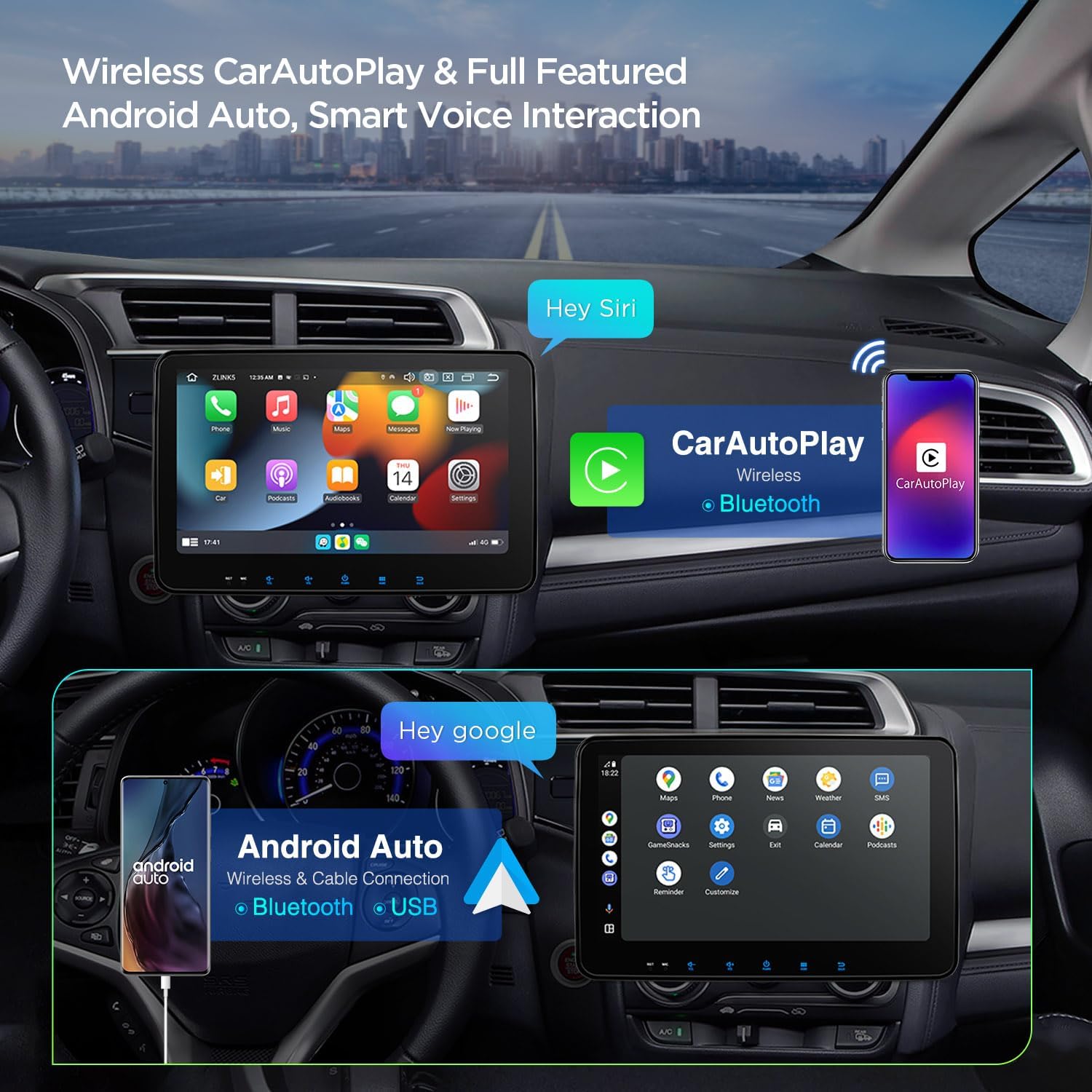
Figure 8: Wireless Car Play and Android Auto functionality.
Built-in DSP and Bluetooth 5.0
The integrated Digital Sound Processor (DSP) allows you to fine-tune your audio experience with advanced equalization and sound field adjustments. Bluetooth 5.0 ensures a stable and fast connection for hands-free calling and high-quality audio streaming from your mobile devices.

Figure 9: User Interface, Bluetooth 5.0, DSP, and Radio features.
Split Screen and Picture in Picture (PIP)
The split-screen function allows you to run two applications simultaneously, such as navigation and a music player. Picture in Picture (PIP) mode enables continuous video playback while you interact with other functions on the main screen, ensuring uninterrupted entertainment.
Steering Wheel Control
The unit supports steering wheel controls, allowing you to adjust volume, change tracks, and manage calls without taking your hands off the wheel. This feature enhances safety and convenience during driving.
GPS Navigation
The built-in GPS module supports various Android navigation software, including Sygic, IGO, Waze, and Google Maps, providing reliable and accurate route guidance.
Optional Accessories Support
The car stereo supports various optional accessories to expand its functionality, including OBD2 for vehicle diagnostics, TPMS for tire pressure monitoring, front/reversing cameras, and external DVRs. These accessories are sold separately.
Maintenance
- Screen Cleaning: Use a soft, lint-free cloth to gently wipe the QLED screen. For stubborn smudges, slightly dampen the cloth with water or a screen-safe cleaner. Avoid abrasive materials or harsh chemicals.
- Software Updates: Periodically check for software updates from the XTRONS official website or through the unit's system settings to ensure optimal performance and access to new features.
- Cable Connections: Ensure all wiring harness and accessory connections remain secure to prevent intermittent issues.
- Environmental Conditions: Avoid exposing the unit to extreme temperatures, direct sunlight for prolonged periods, or excessive moisture.
Troubleshooting
- Unit Not Powering On:
- Check all power connections and fuses.
- Ensure the vehicle's ignition is on.
- No Sound:
- Verify speaker connections.
- Check volume levels and mute settings.
- Ensure the correct audio source is selected.
- Touch Screen Unresponsive:
- Perform a soft reset (refer to the unit's specific reset button location, often a small pinhole).
- Ensure the screen is clean and free of debris.
- GPS Signal Issues:
- Ensure the GPS antenna is properly installed and has a clear view of the sky.
- Verify GPS settings within the unit.
- Bluetooth Connectivity Problems:
- Ensure Bluetooth is enabled on both the stereo and your mobile device.
- Delete previous pairings and re-pair the devices.
- Move closer to the unit to ensure signal strength.
- Slow Performance:
- Close unnecessary background applications.
- Clear cache and temporary files from the system settings.
- Consider a factory reset if issues persist (note: this will erase all user data).
If problems persist after attempting these steps, please contact XTRONS technical support for further assistance.
Warranty and Support
XTRONS provides a 1-year warranty for this double DIN radio. For technical support, warranty claims, or any inquiries, please contact XTRONS directly via Amazon email. They are committed to providing professional technical support and ensuring customer satisfaction.
For the latest information and support resources, visit the official XTRONS store on Amazon: XTRONS Amazon Store.
Ask a question about this manual
Ask about setup, troubleshooting, compatibility, parts, safety, or missing instructions. Manuals+ will review the question and use this page’s manual context to help answer it.