1. Setup
1.1 Installing Batteries
This remote control requires two AAA batteries (not included). Follow these steps to install them:
- Locate the battery compartment on the back of the remote control.
- Slide the battery cover downwards or press the latch and lift to open.
- Insert two AAA batteries, ensuring the positive (+) and negative (-) terminals align correctly with the markings inside the compartment.
- Replace the battery cover by sliding it back into place until it clicks securely.
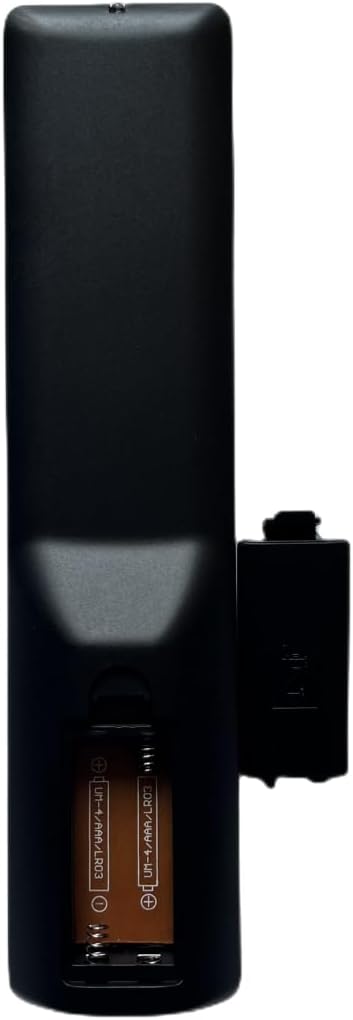
Image: Back view of the remote control with the battery cover removed, illustrating the correct orientation for AAA battery insertion.
1.2 Initial Use
This remote control is a direct replacement and typically does not require any programming or pairing. Once batteries are installed, it should function immediately with compatible Aiwa 4K Smart UHD TV models. Ensure there are no obstructions between the remote control and the TV's infrared (IR) receiver.
2. Operating Instructions
To operate your TV, point the remote control directly towards the signal receiving window of your Aiwa TV. The buttons are designed for intuitive control of various TV functions.

Image: Front view of the Dtirszxy remote control, displaying the layout of all control buttons.
2.1 Button Functions Overview
- Power (U): Turns the TV on or off.
- Number Buttons (0-9): Directly select TV channels.
- INFO: Displays information about the current program or input.
- AUDIO (I/II): Selects audio language or mode.
- Colored Buttons (Red, Green, Yellow, Blue): Access specific functions within menus or interactive services (e.g., Teletext, Smart TV features).
- MENU: Opens the main TV menu.
- Navigation Buttons (Up, Down, Left, Right): Navigate through menus and options.
- OK: Confirms selections in menus.
- BACK (←): Returns to the previous screen or menu.
- EPG (Electronic Program Guide): Displays the TV program guide.
- LIST: Shows a list of channels or media.
- SOURCE: Selects the input source (HDMI, AV, etc.).
- Volume (+/-): Adjusts the volume level.
- Channel (P↑/P↓): Changes TV channels.
- Mute (🔇): Mutes or unmutes the TV sound.
- Netflix: Direct access button for the Netflix streaming service.
- YouTube: Direct access button for the YouTube streaming service.
- Media Playback Controls (Play, Pause, Stop, Rewind, Fast Forward, Previous, Next): Control media playback.
3. Maintenance
3.1 Cleaning the Remote Control
To maintain the remote control's functionality and appearance:
- Wipe the surface with a soft, dry cloth.
- For stubborn dirt, slightly dampen the cloth with water or a mild, non-abrasive cleaner. Do not spray cleaner directly onto the remote.
- Avoid using harsh chemicals, solvents, or abrasive cleaning pads, as these can damage the remote's finish or internal components.
3.2 Battery Replacement and Disposal
Replace batteries when the remote control becomes unresponsive or its range decreases significantly. Always replace both batteries at the same time with new ones of the same type (AAA). Dispose of used batteries according to local regulations. Do not dispose of batteries in household waste or fire.
4. Troubleshooting
4.1 Common Issues and Solutions
- Remote not responding:
- Ensure the batteries are correctly inserted and not depleted. Replace them if necessary.
- Check for any obstructions between the remote and the TV's IR receiver.
- Make sure you are pointing the remote directly at the TV.
- Verify the TV is powered on.
- Some buttons not working:
- This could indicate a specific button malfunction or dirt under the button. Try cleaning around the button.
- If only certain functions are affected, ensure your TV model supports those specific features (e.g., some older TVs may not fully utilize all smart TV buttons).
- Short operating range:
- Batteries may be low. Replace them.
- Ensure no strong light sources (like direct sunlight or bright fluorescent lights) are interfering with the IR signal.
5. Specifications
| Brand | Dtirszxy |
| Compatible Devices | Aiwa 4K Smart UHD TVs (Models: AW65B4K, AW39B4SM, AW32B4SM, AW42B4SM, AW58B4K, AW43B4SMFL, AW55B4KFL, AW-D01, AW50B4K, AW55B4KF, AW75B4K) |
| Max Number of Supported Devices | 1 |
| Color | Black |
| Power Source | 2 x AAA Batteries (not included) |
6. Warranty and Support
6.1 Warranty Information
This Dtirszxy remote control comes with a 90-day warranty from the date of purchase. This warranty covers manufacturing defects under normal use. It does not cover damage caused by misuse, accidents, unauthorized modifications, or normal wear and tear.
6.2 Customer Support
If you encounter any issues or have questions regarding the operation or compatibility of your Dtirszxy remote control, please contact the seller or manufacturer through your purchase platform. Provide your order details and a clear description of the problem for efficient assistance.


